If the User is not receiving Alerts as expected, this article will assist their manager in checking their Alert setup and Notifications. In order to change any settings, the manager will need to sign in as this User and adjust settings via the menus displayed under the User Name.
Check User Settings for Alerting
Access Content > Alerts > Alerts by User
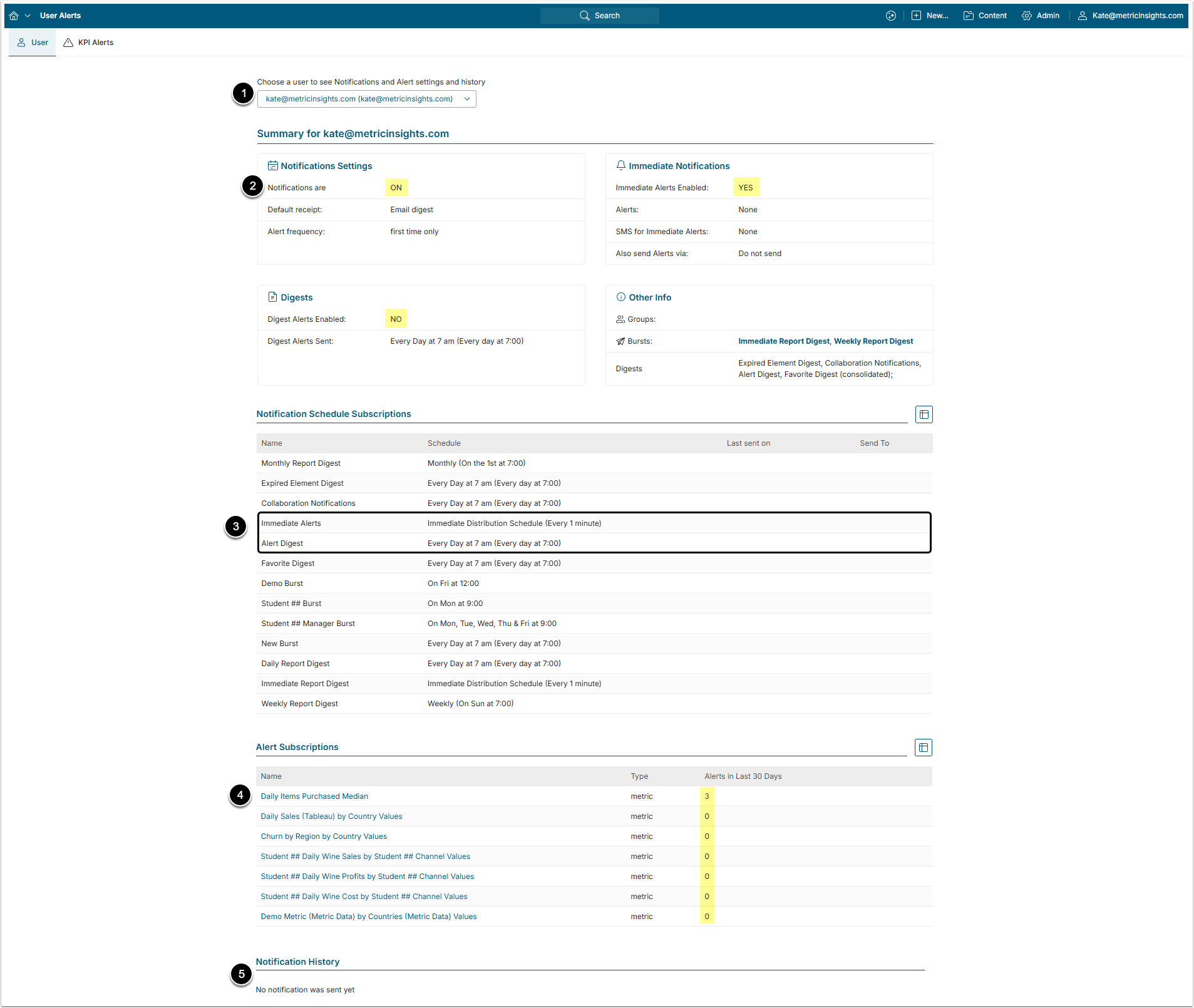
- Select a User from the dropdown list.
- Verify Notification Settings, Digests and Immediate Notifications are set to ON or YES.
- In his Notifications Schedule Subscriptions verify that either Immediate Alerts or Alert Digest is set correctly.
- For more details on changing those settings, check the Setting Up Alert Notifications article.
- Verify that Elements (they are always Metrics) are set to be Alerted on and whether or not any have been sent in the last 30 days.
- By clicking the number in the Alerts in Last 30 Days column, you will able to see more details on sent Alerts.
- Notification History will show the date and email address of Notification recipient. This section will also show other types of Notifications sent, such as Bursts.