In 7.3.1, creating new Metrics will no longer be supported. All Metric use-cases will be supported via Report Metrics.
Metric Insights allows to create one or several Aggregate Metrics from any created Metric. This article describes how to create an Aggregate Metric using "Aggregate a Metric" option as a Data Source.
This method is based on creating a new Metric. It is also possible to create an Aggregate Metric directly from the Metric Editor of already created Metric. For more details check the Create Multiple Aggregates from a Single Metric article.
1. Start Creating a New Metric
Access +New > Metric > Create New
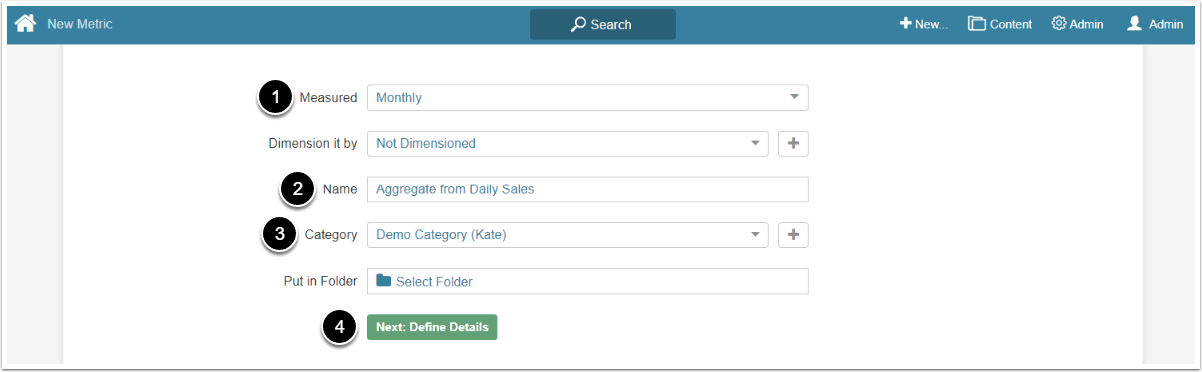
- Measured: Select the measurement interval that applies to the level of aggregation that you want in your result set
- Name: Give the Metric a descriptive name
- Category: Select the Category to place the Metric
- [Next: Define Details] to open the Editor
2. Complete Data Tab
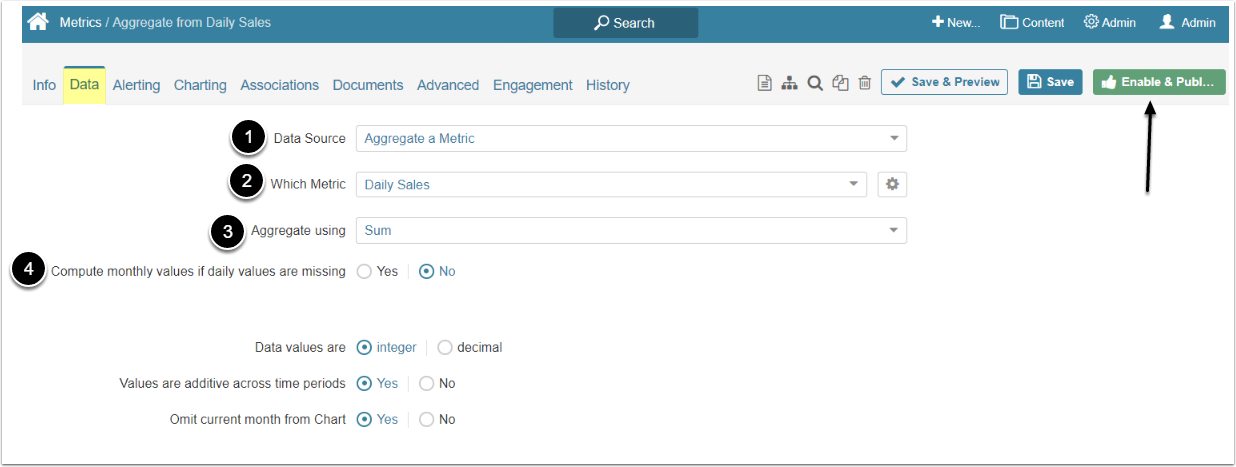
- Data Source: Select the "Aggregate a Metric" option
- Which Metric: Choose the Metric from which to create an Aggregate from the dropdown list
- Aggregate using: Select the aggregation method
- Compute monthly values if daily values are missing: Select 'Yes" if you want to use monthly values instead of daily values if they are not available
[Enable&Publish] afterwards.
Aggregate Metrics are not bound to any particular Data Collection Trigger. The Metric's data is updated automatically each time its Source Metric's data is updated or changed.