System Objects are Power BI datasets that Metric Insights can collect for usage tracking, governance, and lineage analysis. This article covers how to configure the three available System Objects: Usage, User Details & Permissions, and Log Analytics. All three require granting Tenant.Read.All permission in Azure. Complete Step 1 first, then follow the steps for the System Object being configured.
PREREQUISITES:
- Established connectivity with Microsoft Power BI.
TABLE OF CONTENTS:
1. Grant Tenant.Read.All Permission
NOTE: See Why Tenant.Read.All Permission Is Required.
NOTE: Credentials of this Azure application will be used for the Data Source connection in Metric Insights.
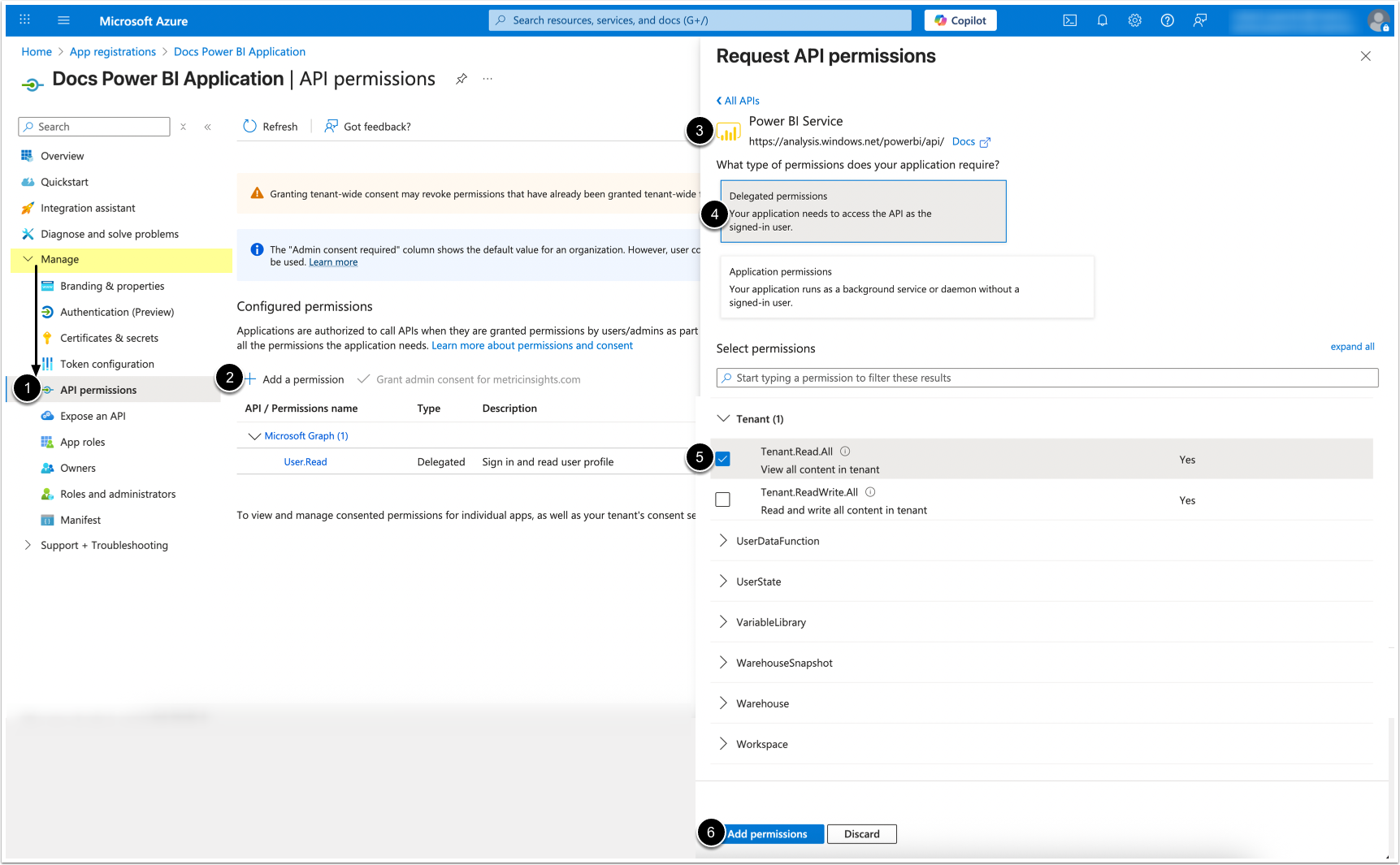
- Under Manage, click on API Permissions.
- [ + Add a permission]
- Scroll to and select Power BI Service.
- Click on Delegated permissions.
- Under "Tenant", find and check Tenant.Read.All
- [Add permissions]
2. Usage Dataset
The Usage Dataset is powered by Power BI's Get Activity Events API. These logs form the foundation of adoption and performance analysis, and in Metric Insights appear as Usage data.
2.1. Configure Permissions in Azure Portal
NOTE: See the official Microsoft documentation: https://learn.microsoft.com/en-us/rest/api/power-bi/admin/get-activity-events.
Requirements
- The user must be a Fabric administrator or authenticate using a Service Principal.
- When running under Service Principal authentication, an app must not have any admin-consent required permissions for Power BI set on it in the Azure portal.
- Tenant.Read.All application permission is required only when authenticating via a standard delegated admin access token. This permission must not be present when authentication via a Service Principal is used.
- Delegated permissions are supported.
Limitations
- Maximum 200 requests per hour.
- Activity logging isn't supported for Microsoft Cloud Deutschland.
2.2. Configure Power BI Data Source
v7.2.0+
Access Plugin Connection Profile > Info tab

- Enable Usage Dataset.
Prior to v7.2.0
Access Plugin Connection Profile > Info tab

- Locate Scope: Types to collect parameter.
- Click the edit icon, then add USAGE to the object type list and [Save].
2.3. Create a Dataset from Usage System Object

- Select the System/Usage object.
- MDX/DAX query: Enter
param usage_date_to_collect=:measurement_time. - Activate Snapshot Dataset.
- Activate Can historical instances be backfilled?
- [Validate]
3. User Details & Permissions Dataset
The User Permissions Dataset is powered by Power BI's Get Workspace Info API, and is essential for BI Optimizer's governance and cleanup.
3.1. Configure Permissions in Azure Portal
NOTE: See the official Microsoft documentation: https://learn.microsoft.com/en-us/rest/api/power-bi/admin/workspace-info-post-workspace-info.
Requirements
- The user must be a Fabric administrator or authenticate using a Service Principal.
- Tenant.Read.All application permission is required.
Limitations
- Maximum 500 requests per hour.
- Maximum 16 simultaneous requests
3.2. Configure Power BI Data Source
v7.2.0+
Access Plugin Connection Profile > Info tab

- Enable User Permissions Dataset.
Prior to v7.2.0
Access Plugin Connection Profile > Info tab

- Locate the Scope: Types to collect parameter.
- Click the edit icon, then add USER_PERMISSIONS to the object type list and [Save].
3.3. Create a Dataset from User Permissions System Object

- Select System/User Permissions object.
- [Validate]
4. Log Analytics Dataset
See Configure Log Analytics for Power BI Lineage Collection for details.