Metric Insights 7.2.0 is the first major release of 2026, bringing key improvements in security, usability, and platform extensibility. This release focuses on simplifying configuration, strengthening authentication, and improving content navigation across the platform.
Concierge introduces enhanced authentication, including OAuth2 support, Service Account tokens, and token inheritance from plugin data sources. Security is strengthened with domain-restricted access for LLM prompts and clearer configuration options.
Navigation and discovery are improved with the new Command Menu, which allows quick access to key objects and recent content. Global Search now uses Content Types for filtering and grouping, providing a more consistent search experience.
Bursts now allow for PowerPoint Report Packs and Publishing Workflows have been significantly simplified. Themes gain more customization options, focusing on Tiles. Plugins and JDBC drivers have also been upgraded for better performance. Just like always, this release includes important end-user experience enhancements that increase efficiency, clarity, and ease of use across the system.
Major Features (released January 12, 2026)
- Concierge now delivers expanded authentication options, enhanced external resource configuration and testing, and precise control over tool exposure in chat integrations.
- Power BI Data Source Editor has been streamlined with clearer fields, improved drop-downs, and a troubleshooting popup for testing connections and embedding content.
- Admins can control metadata visibility on Catalog Tiles and customize Tile Title font size and weight for consistent branding and display.
- Owner fields can now be reordered in Admin settings, with the configured order consistently applied across all UI surfaces.
- Metric Insights introduces a unified Content Type model across the platform, with predefined types, an updated Editor, and clearer menu terminology.
- The new Command Menu allows quick navigation and search using Cmd/Ctrl + K, including recent content support and keyboard shortcuts for Editors.
- PowerPoint Report Packs can now be generated and burst with table-of-contents navigation, slide titles, page numbers, branding, and improved performance.
- Publishing Workflows have been simplified with “Included Categories", conditional Required Fields, bulk Stage selection, and the ability to review published content without unpublishing.
- A new toast-style notification system provides consistent, non-blocking feedback with configurable display timing across the platform.
- New and updated API endpoints extend security automation, access management, and configuration control, alongside the new
/api/content_typeendpoint and CLI utility mi-config. - App Builder introduces pre-selected layouts, improved drag-and-drop, panel resizing, and a Concierge component for simplified app creation and layout management.
Changes in 7.2.0a (released February 6, 2026)
This micro release introduces several essential bug fixes and improvements, mainly focused on Publishing Workflows:
- Fixed issues related to Content Types (introduced in 7.2.0), where icons were not properly matching to respective External Reports and External Content objects (this impacted QlikSense, ServiceNow, Looker, Pyramid Analytics)
- New Publishing Workflow restrictions allow administrators to hide the "Open in Full Editor" and "Lineage" buttons.
- Publishing Workflows can now include rich text descriptions displayed above the Workflow Board.
- Required custom fields are enforced only when they are displayed, improving usability in workflows with conditional logic.
- Publishing Workflow Automation rules support a new Calendar Date condition, enabling scenarios such as annual recertification workflows.
- Snowflake integration has been expanded with a new Managed MCP resource type, along with updated naming and icons for existing resource types.
- Gemini integrations via Vertex AI have been updated to align with current Google APIs, including revised naming in the user interface.
- Concierge can now connect to Gemini via Vertex using Google Cloud Service Account credentials uploaded directly in the UI.
- Power BI workspace selection once again supports custom values and wildcards when configuring Data Sources (this was inadvertently removed in 7.2.0 with our complete revamp of the Power BI Data Source editor)
- Atlan integrations now include a Categories Dataset with descriptions, and the Glossaries Dataset includes a Section ID column for improved organization and reference-ability.
- Dimensioned Metrics on the Homepage now display only values with collected data for more accuracy and clarity.
- PDFs distributed in Bursts are now generated correctly for recipients.
The primary Docker images used for standard deployments are:
- web – docker.metricinsights.com/metric-insights/release_7_2/39:amd64
- dataprocessor – docker.metricinsights.com/dataprocessor/release_7_2/9:amd64
- data-analyzer – docker.metricinsights.com/data-analyzer/release_7_2/36:amd64
- mi-console – docker.metricinsights.com/console/release_7_2/6:amd64
- redis – docker.metricinsights.com/redis/release_7_2/5:amd64
- image-generator – docker.metricinsights.com/image-generator/release_7_2/6:amd64
Additional images:
- logger(needed for simple deployments) – docker.metricinsights.com/logger/release_7_2/5:amd64
- mysql(used for simple deployments with MySQL running locally) – docker.metricinsights.com/mysql/release_7_2/4:amd64
Concierge
- Concierge now dynamically retrieves domain information and access tokens for LLM prompts, eliminating the need to statically define domains. Access is restricted to explicitly allowed domains, strengthening security.
- The platform supports Service Account token authentication for Snowflake and Databricks when configuring MCP server integrations.
- Concierge supports OAuth2 authentication, including per-user OAuth flows. When a resource requires OAuth, users are prompted to authenticate and are automatically returned to Concierge after completing login.
- Concierge can now inherit tokens from Plugin Data Sources, such as Microsoft Fabric Data Agents, reducing duplicate configuration.
- External Resource configurations can now control whether a tool is available to the Slack bot or Microsoft Teams bot. Tools are disabled by default and must be explicitly enabled before they can be used in chat-based interactions.
- External Resource Editor has been updated with a clearer configuration layout, resource type management, persistent tabs, and a new Test Resource Connection feature for validating connectivity, authentication, and input.
- Concierge Setup Page now has a Developer code block on the Advanced tab, allowing for extended Concierge configuration.
Microsoft Power BI Plugin Custom Editor
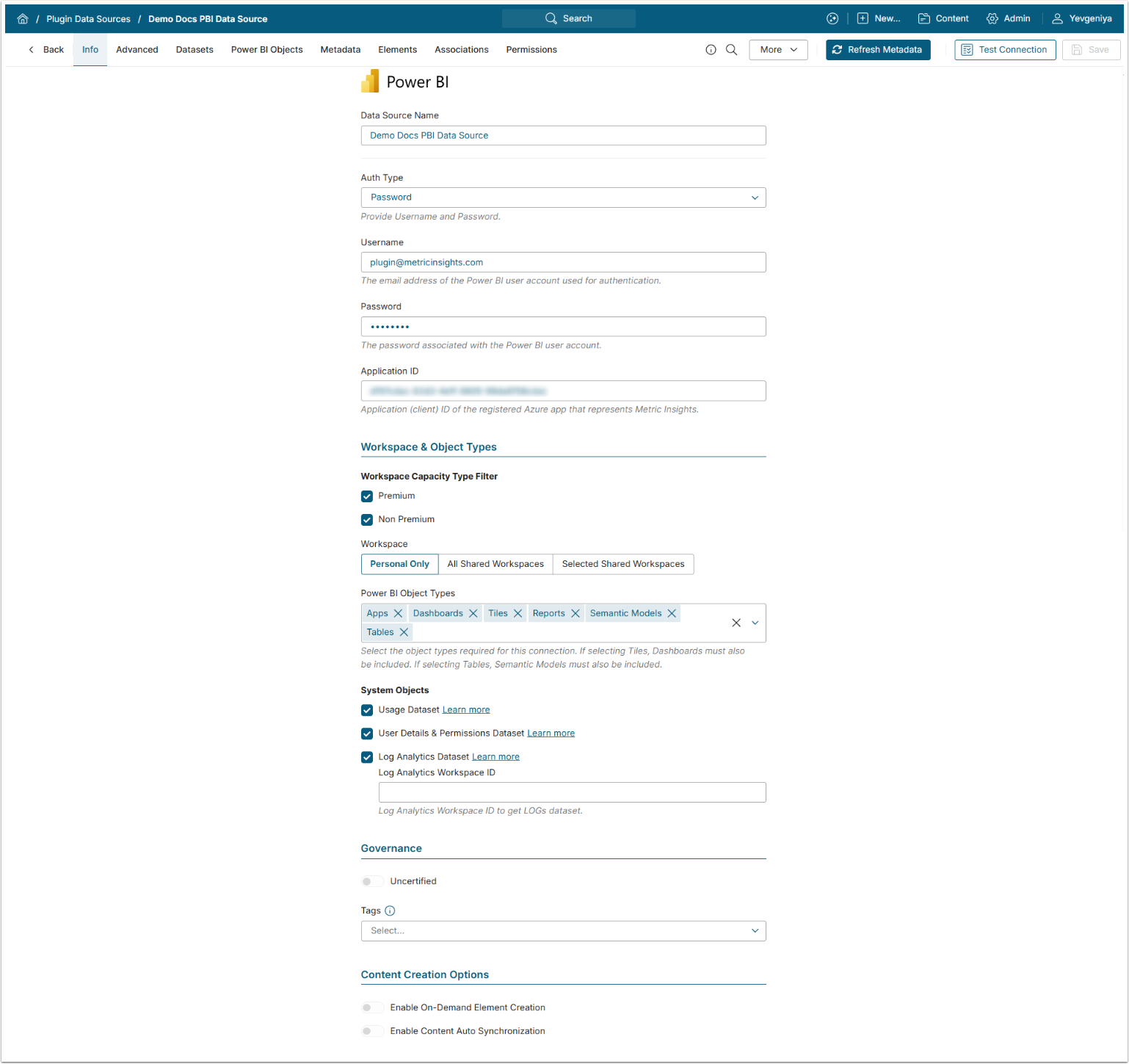
We updated the Power BI Custom Plugin Data Source Editor to align with the actual Power BI configuration needs across the Info and Advanced tabs. Field descriptions, drop-downs, parameter naming, and collapsible sections were improved, deprecated options were removed or replaced, and system object settings were streamlined to simplify configuration.
A troubleshooting popup was added to the Power BI Data Source Editor, providing dedicated tabs for testing connections, retrieving objects, and embedding. The Test Connection tab now displays clear success, warning, and error states, and several UI and messaging issues were addressed.
Themes
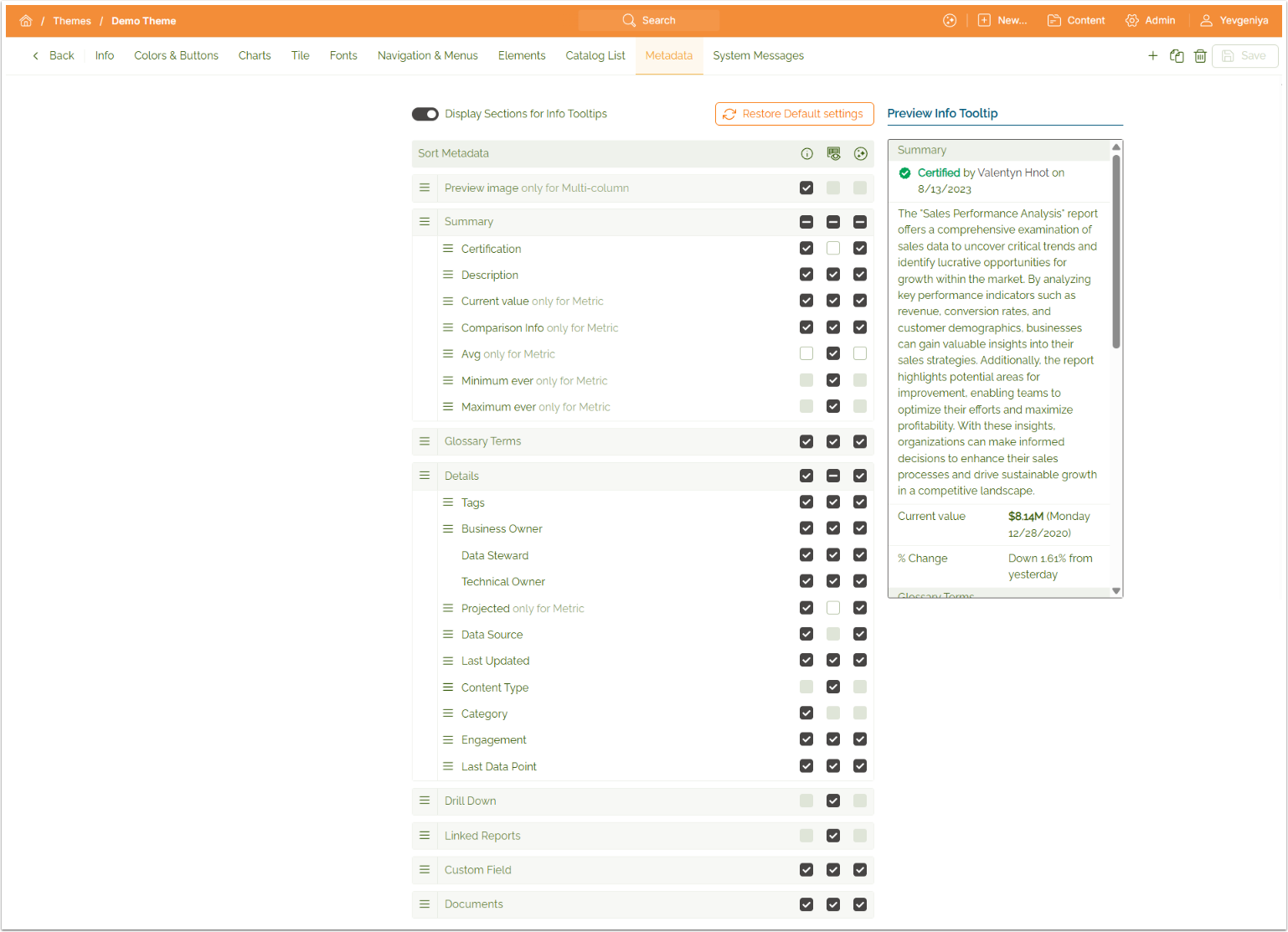
- Customizable metadata visibility was introduced for Catalog Tiles, allowing Admins to control which metadata elements such as ownership, Data Source, Tags, Glossary Terms, and engagement indicators are displayed across tile views.
- We added new Themes settings to customize Tile Title font size and font weight, allowing administrators to control typography consistently across Themes.
- Theme deletion behavior was updated to prevent removing a Theme that is currently assigned to one or more Brands. When a deletion is attempted, the system now displays a confirmation message identifying the affected Brands and blocks the action until the Theme is unassigned.
- Loader visibility was improved for dark Themes to ensure loading states are clearly visible across environments.
Owner Field Re-Ordering
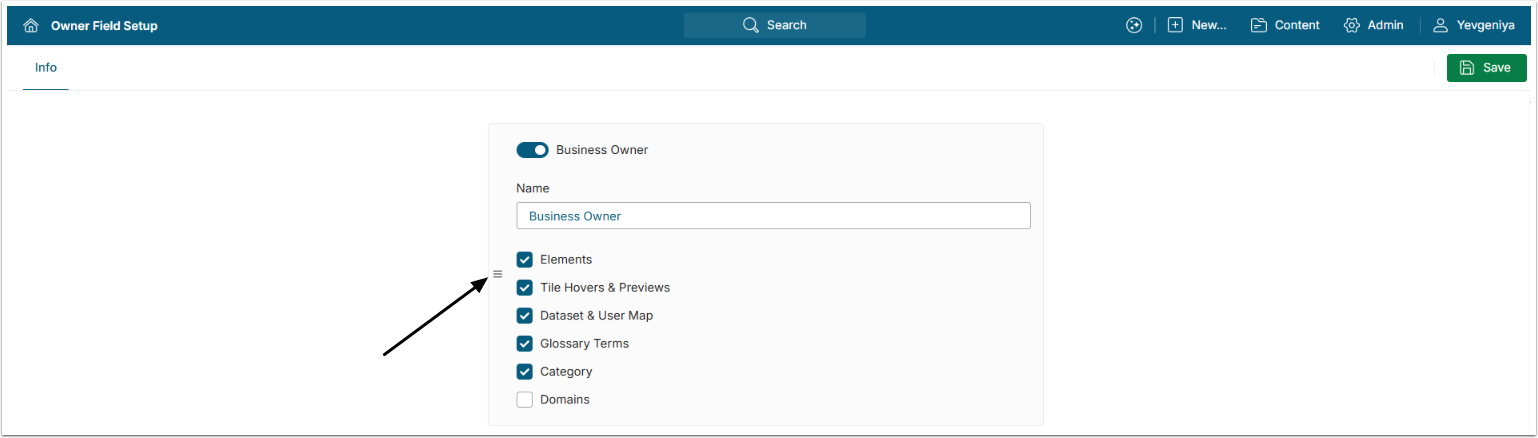
Owner field ordering has been improved to allow Admins to reorder Owner fields directly from Admin > System > Owner Field Setup. The configured order is now consistently enforced across the platform, including Element Editors, Global Search, and all other UI surfaces where Owner fields are displayed. This update resolves previous inconsistencies between setup and usage views, ensuring a predictable and unified presentation of Owner information.
Unified Content Types
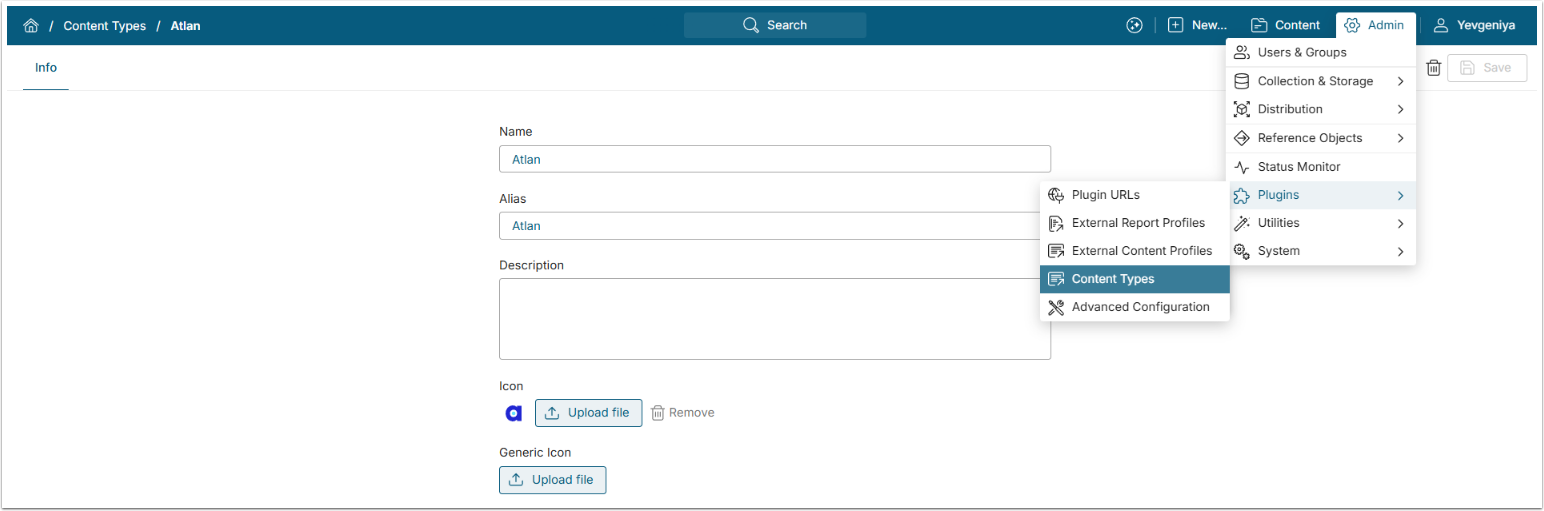
Metric Insights now fully supports a unified Content Type model across UI and APIs. Menu terminology has been updated, introducing Content Types under Plugins and renaming External Content Type and External Report Type to External Content Profile and External Report Profile, with simplified Editors. Metric Insights also ships with an initial set of predefined Content Types and assets, supported by an updated database schema and a new Content Type Editor for managing aliases, descriptions, and icons.
Command Menu
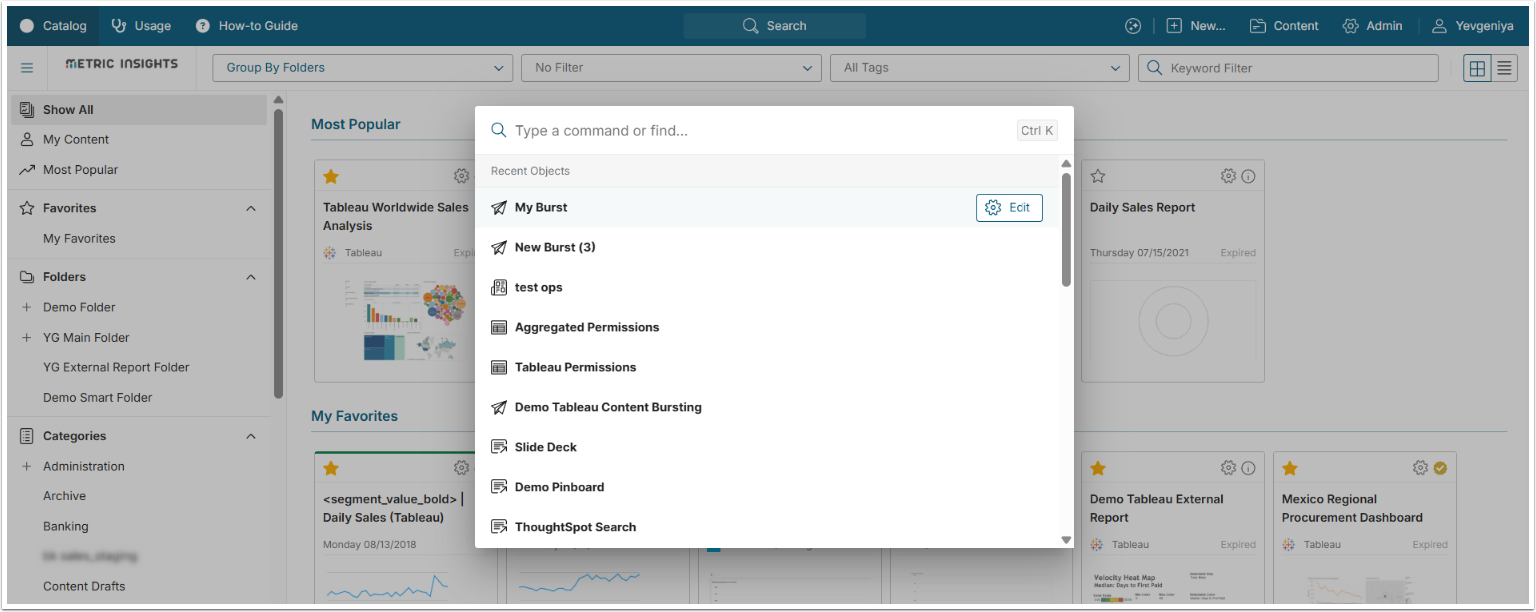
Metric Insights introduces a new Command Menu that allows users to quickly navigate and search using Cmd/Ctrl + K. Users can access lists, recent items, and key objects directly from the keyboard, significantly reducing time spent navigating menus. Recent content support is included, with broader object search and tracking to be expanded in future releases. All Editors now also support keyboard shortcuts (Cmd/Ctrl + 1, 2,...) to switch between Editor tabs, improving efficiency when working across complex configurations.
PPT Report Packs
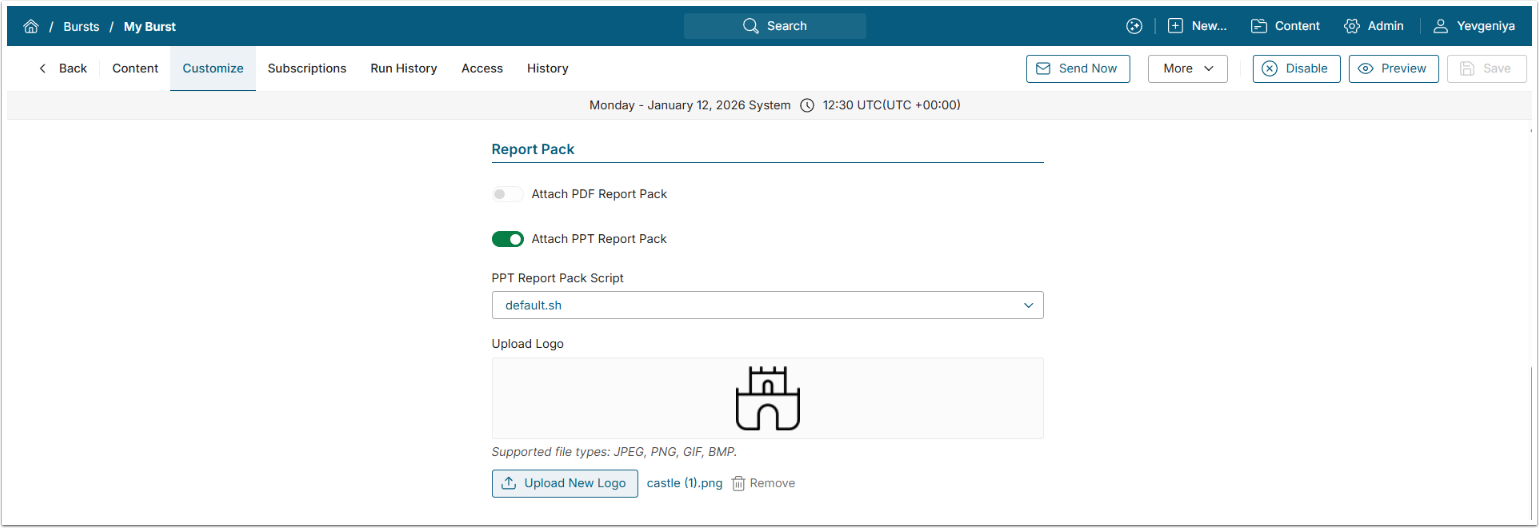
Support for PowerPoint Report Packs has been added, enabling bursting of large PPT files using the same architecture as existing PDF Report Packs. Generated PowerPoint files include optional table-of-contents navigation, slide titles, page numbers, and configurable branding elements, with support for internal links back to the table of contents. PPT bursting performance has also been improved, significantly reducing output size and increasing reliability for large files.
Publishing Workflows
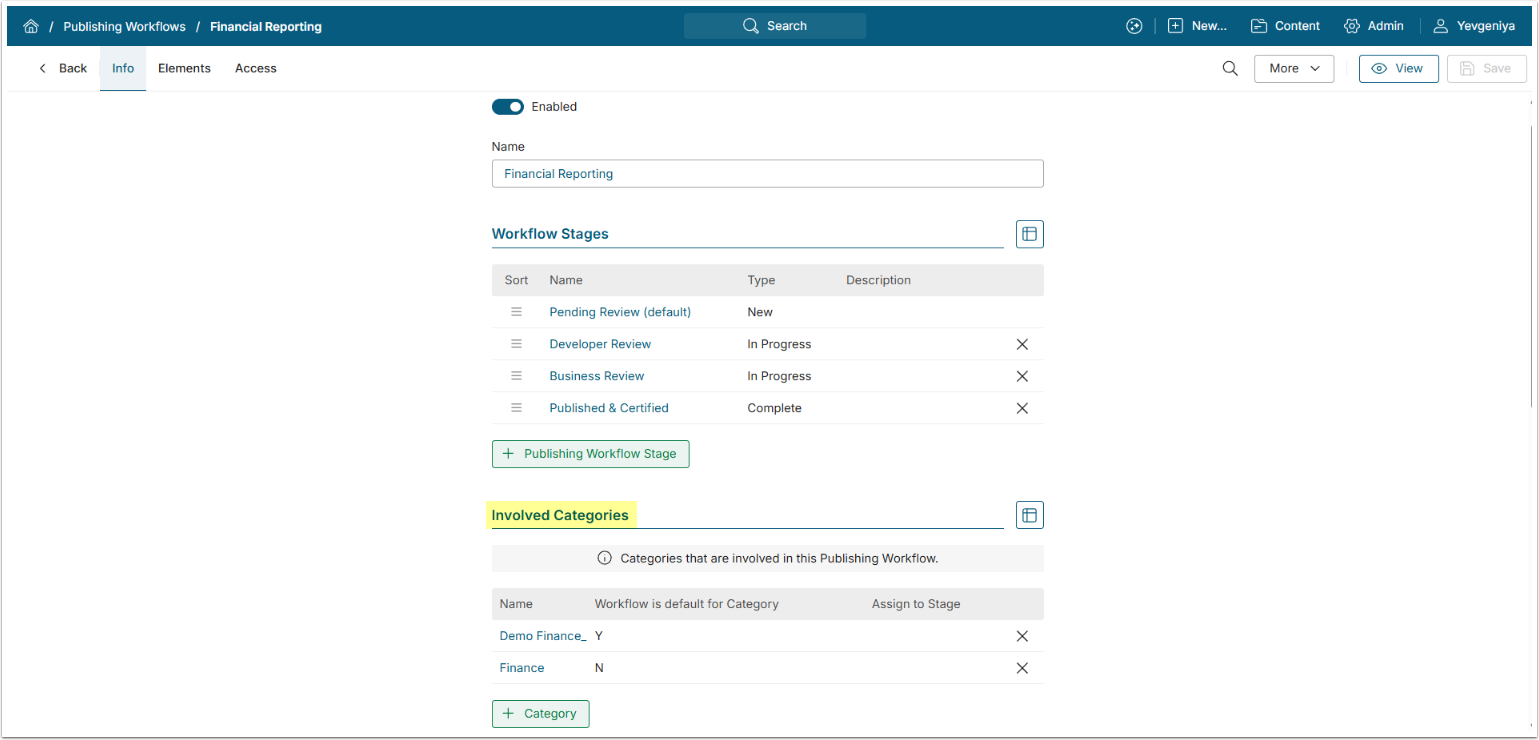
- Publishing Workflows have been simplified and improved to just Involved Categories in place of Staging and Publishing Categories. Involved Categories can be configured to automatically add new content to a specific Publishing Workflow Stage.
- Required Fields in a Publishing Workflow Stage have been improved; the system will now only require Fields that are visible to better handle conditionally displayed Custom Fields.
- Bulk Change for Elements now supports selecting both a Publishing Workflow and a specific Stage.
- Published content can be reviewed while remaining published.
API
- This release aims to extend security automation and access management APIs for various object types, with a focus on preventing direct user assignments and aligning API behavior with UI permissions. The new and updated API endpoints are:
/api/target/access, /api/group_target, /api/user_target;/api/page/access, /api/group_page, /api/group_page_view, /api/user_page, /api/user_page_view;/api/dimension/access and updated /api/group_dimension, /api/group_dimension_value, /api/user_dimension, /api/user_dimension_value;/api/dataset/access, /api/group_dataset, /api/user_dataset;/api/folder/access, /api/folder/sharing, /api/group_folder, /api/group_folder_view, /api/group_folder_api, /api/user_folder, /api/user_folder_view, /api/user_folder_api.
- A new
/api/content_typeendpoint is also available.
Plugin & JDBC Improvements
- Microsoft Power BI embedded Reports now support cross-table Global filters and an option to force mobile view for embedded content.
- Microsoft Power BI Plugin OAuth configuration was simplified by allowing a single identity profile to be reused across multiple connections.
- It is possible to get data and PDFs from Tableau Custom Views. This functionality is supported for Tableau Cloud December 2024 / Server 2024.3 and later versions.
- We improved session and cookie handling for the MicroStrategy integration to address intermittent authentication and authorization failures during object retrieval.
- Support for embedding Databricks Lakeview dashboards and SAP Analytics Cloud Insights has been added.
- The new Databricks Lakeview Dashboards Plugin image collection implementation will use an intermediate page with Service Principal credentials (Client ID and Client secret).
App Builder (Alpha 4)
- The Concierge component has been added to the App Builder component list after the Folder Menu. It links to the Concierge Setup page, and several preview and UI issues related to sizing, margins, borders, and colors were addressed.
- We have introduced pre-selected layouts during App creation, allowing users to choose from five predefined layouts with consistent default container margins applied.
- Drag-and-drop behavior has been improved so containers fill available space and drop indicators render consistently within containers and along container edges.
- The team updated right panel and page resizing behavior to enforce a consistent maximum panel width, trigger responsive page resizing when the panel is resized or collapsed, enable full-resolution previews when collapsed, and apply consistent page padding.
OpenTelemetry
OpenTelemetry support has been expanded across Metric Insights application services, delivering deeper, end-to-end visibility into application behavior. The following services can now emit distributed traces and related telemetry data using standard OpenTelemetry protocols:
- Web;
- Console;
- Data Analyzer;
- Data Processor.
OpenTelemetry data can be forwarded to a wide range of observability platforms, including Azure Monitor, AWS observability services, Grafana, and Splunk, as well as other OpenTelemetry-compatible back-ends.
OpenTelemetry is enabled through dedicated container images. To begin collecting telemetry, request OpenTelemetry-enabled images for the core services you want to instrument and configure the required OpenTelemetry environment variables for your selected back-end.
Global Search
- As a continuation of the Analytics Marketplace development, the system now allows filtering on Tags that do not exist in Metric Insights but have been brought in from external data catalogs.
- Global Search now uses Content Types to improve filtering and tab grouping for a more intuitive search experience. The filter drop-down always displays all available Content Types, and grouping by Content Type is encouraged after upgrading to 7.2.0.
- The Clear Filters control was added to the Global Search filter panel, allowing all active filters to be reset with a single action.
- Search results now display Custom Fields above the fields configured for search from Datasets.
Toast Notifications
A new toast-style system notification pattern was introduced to provide non-blocking, contextual feedback across the platform. Toast notifications use Theme-based styling, support configurable display timing, and appear in consistent screen locations without interrupting user workflows.
Status Monitor
- Status Monitor now separates Apache Errors from Application Error for easier troubleshooting.
- Additional logs for data analysis and search indexing are now included in Status Monitor log bundles.
System Variables
- Dockable hierarchy is now always enabled, removing the need for the DASHBOARD_ALLOW_DOCKABLE_HIERARCHY System Variable.
- New installations now enable Discoverable content restrictions with the RESTRICT_DISCOVERABLE_CONTENT System Variable set to “Y” by default, improving access clarity out of the box.
- Additional configuration validation has been added to prevent application startup failures caused by misconfigured CACHE_LAYER_1_SAVE_HANDLER and CACHE_LAYER_1_SAVE_PATH System Variables.
Other Improvements
- Support for inserting images into Dataset Tables has been added, allowing Reports to include visual content directly within table components.
- Glossary CSV uploads now include an option to clear existing Terms before importing new ones.
- End-user UI localization was expanded to support Spanish, German, French, and Portuguese for Regular Users. Localization is scoped specifically to the Regular User experience, with a new Content Viewers option in Vocabulary that limits translations to UI elements visible to Regular Users across all Privilege levels.
- An option has been added to allow External Reports to opt out of Dimension naming templates.
- The edit and add icons have been restored in the Element Name Template drop-down, making it easier to create and manage Dimension templates directly from the Editor, just like it was in v6.
- LDAP-authenticated usernames are now read-only, with no possibility to edit via UI, to prevent inconsistencies with external identity providers.
- “Validate fetch command variables” has been removed from My Settings.
- A new MI Viewer Shared Component has been introduced to replace iframe-based Viewers, enabling better sizing behavior, customization, and browser history handling for Custom Apps.
- When the SSO username does not match the existing MI username, Metric Insights now displays a clear warning and logs the issue instead of silently altering the username or allowing unintended fallback behavior.
- Metric Insights now supports a Strict Mode for migrations, ensuring that only explicitly selected objects are created or updated.
DevOps & Installation
- The Metric Insights installer introduces an interactive wizard for generating deployment commands by answering a set of guided questions.
- A new mi-config tool was introduced for System Variable management, allowing to display current values, set new values, and list available System Variables.
- The Metric Insights installer introduces a new parameter,
--skip-user-access-rebuild, which allows skipping the User Access Rebuild procedure during installation or upgrade. - Metrics from the Console, Data Analyzer, Concierge (AI), and Data Processor services can now be exported to Prometheus, enabling integration with a wide range of visualization and monitoring systems.
- All application services now run on Debian 13 and use Python 3.13.9.
- Metric Insights now supports MySQL 8.4.6 across all deployment types.
- Several legacy daily statistics tables were removed to eliminate unnecessary daily processing and reduce system performance overhead, including:
- daily_stats_users_active
- daily_stats_users
- daily_stats_elements_active
- daily_stats_elements
- daily_stats_distributions
- daily_stats_portal_pages_views
- daily_stats_portal_pages
- daily_stats_mobile
- daily_stats_rated_items
- daily_stats_rating
- daily_stats_search
Issues Fixed
- Metric Insights now supports using snapshot-generated “Prior” fields when defining derived fields on Dataset Views, which resolves a limitation present in earlier versions where only base fields were selectable.
- We have resolved a line-height rendering issue that caused misalignment between custom fonts and other UI elements, improving visual consistency across the application.
- An issue where % change/compare values were not displayed on Tiles after an upgrade has been addressed.
- An issue preventing data from being fetched from an array via
api/dataset_data, affecting the Custom App performance, has been fixed. - Power Users can now impersonate Regular Users without any issues. The expected administrative functionality has been restored.
- A bug where changes to the “Order By” setting in bar charts did not update immediately in the Editor has been fixed.
- We have addressed a discrepancy between column order in the Report UI and Burst outputs after Dataset SQL edits.
- The search bar background color can now be properly configured.
- We have improved performance for adding Elements to Folders by optimizing inefficient SQL queries, significantly reducing processing time, and eliminating timeout errors.
- Getting an image from SAP BusinessObjects Crystal Reports with prompts works properly.
- We have resolved a Glossary manual autoimport failure caused by long-running operations by migrating the process to a polling-based execution model.