To allow Users to seamlessly interact with Snowflake Cortex AI directly from Concierge, Metric Insights supports connecting via Model Context Protocol (MCP) Server. Establishing this connection gives Users access to Snowflake's Conversational Analytic and other AI-powered tools, so Users can ask natural language questions about data from Concierge without the need to switch platforms.
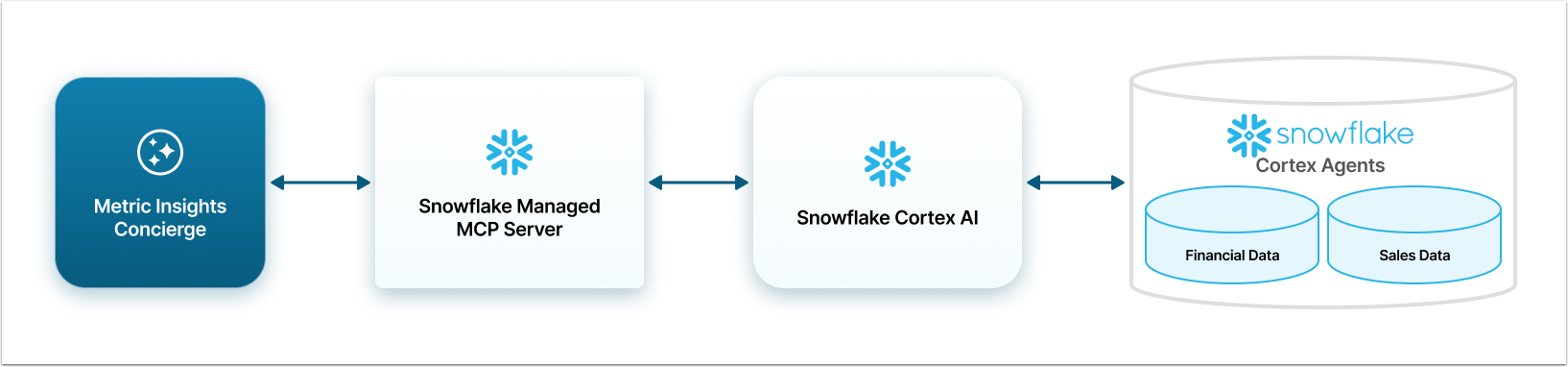
Architectural Diagram for Snowflake MCP Server Integration with Concierge
There are two options for integration with Snowflake Cortex. It can be connected to Metric Insights via the native Snowflake Managed MCP Server or Metric Insights MCP Server for Snowflake. There are some differences between them:
- Snowflake Managed MCP Server: while many Agents can be configured as tools, each agent will need a separate External Resource Configuration in Metric Insights. The benefit of using a Snowflake Managed MCP Server is that it does not require additional setup or deployment on a separate server.
- It is recommended to use Snowflake Managed MCP Server when connecting only a few Agents to Metric Insights.
- Metric Insights MCP Server for Snowflake can connect to multiple Agents without requiring separate External Resource Configurations. This allows the Concierge to process requests faster. However, this requires additional set up steps and deployment to a separate server.
- It is recommended to use Metric Insights MCP Server for Snowflake when you want to connect many Agents to Metric Insights.
Here are the diagrams of how the connection between Snowflake and Metric Insights work. In these examples, Snowflake Cortex has been configured with two Agents, Financial Data and Sales Data. These Agents correlate to their respective Domains in Metric Insights. A User can ask a financial question and Concierge will know to route that question through the correct MCP Server to the specific Domain.

Prerequisites
To perform all the steps necessary for connecting Concierge and Snowflake, you need the following:
- In Snowflake CLI:
- Snowflake account with ACCOUNTADMIN privileges.
- Snow CLI installed and configured with a working profile.
- Access to Snowsight or Snowflake CLI for executing SQL commands.
- Snowflake accounts of all users who will be making queries to Snowflake from Concierge have to have a role with the set of permissions:
- USAGE: agent, database, schema, warehouse;
- SELECT on the tables and semantic views (if applicable);
- READ on stages (if applicable);
- If you are using Managed Snowflake MCP Server, additionally give the USAGE permission for MCP server and database, schema and all the tables connected to it.
- The server space (on the same machine where the application is running or remotely on a separate server or cloud platform) to run the MCP Server.
- It is a lightweight API proxy that doesn't require significant resources and runs well with minimal specifications: 256MB RAM and 1 vCPU.
- Metric Insights Admin account.
Steps to Connect Concierge and Snowflake
Before starting, define the Authentication method. Choose how Concierge will perform authentication when connecting to Snowflake:
- Defined in configuration: The authentication Token has to be created in Snowflake account and manually inserted into the Concierge configuration code. This Auth Type should be used if the Snowflake has the security model which doesn't include OAuth or has some specific features that require flexible solution.
- Service Account Token: The Token is requested form Snowflake and inserted into the configuration code automatically. The User only provides credentials to the service account in Snowflake. This Auth Type should be used if OAuth authentication method is used in Snowflake.
- User OAuth: This method is the same as the "Service Account Token" but takes into account the permissions of the User, who makes a query to Concierge. This Auth Type should be used if different users of the Snowflake have different levels of access to data and that difference has to be implemented in their Concierge queries.
Afterward, go through this steps:
- Configure Snowflake via Snowflake CLI: Set up the required roles, users, and permissions in Snowflake to get the MCP server working with your existing Snow CLI profile.
- Collect Connection Information in Snowflake account: Gather data for MCP Server setup and credentials for authentication. Create a user Role if necessary.
- Set up the Custom MCP Server or Snowflake Managed MCP Server: Run the MCP Server.
- Configure External Resource in Metric Insights account: Set up Concierge to connect with Snowflake.