This article contains a general overview of what Element Discoverability is, the choices that have to be made before enabling it, what specialists will be involved, and the pitfalls to avoid. Designing the underlying security model is covered separately in Security Model Best Practices; what matters for Discoverability is that access requests feed into that model rather than bypassing it.
The steps to implement everything described here are in Element Discoverability & Access Workflow Playbook.
Discoverability Model
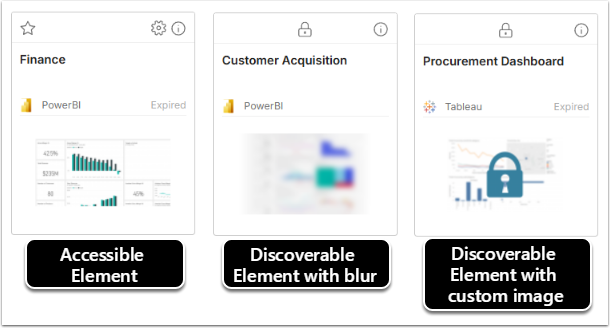
Discoverability makes selected Tiles visible to Users who do not have Permission to view the content, so that they can see the content exists and request access to it directly from the Tile. The Tile is visible; the data behind it is not. By default, the Homepage shows only Tiles for Elements a User has Permission to view or edit, and Discoverability is how that view is widened.
Without Discoverability, Users file tickets describing content they cannot name. With it, they find the Report they need and request access in place.
Decision 1: What Users See in the Catalog
Most organizations run several BI platforms – Tableau, Qlik Sense, Power BI, SQL-based reporting, etc. – and content is spread across all of them. Everything else in this article follows from how much of that landscape you decide Users see.
Curated Categories: Specific Categories are designed and shared with groups of Users. Users land on a small, purposeful set of Tiles instead of hundreds of objects, and never see what is not relevant to them. Discoverability plays a limited role, and the remaining decisions in this article barely apply.
The entire Catalog: The full inventory of BI assets is loaded, and the Catalog becomes a true index of everything the organization has. Users see the content they use daily alongside content they do not have access to, or had access to and lost. Discoverability and access requests are central to this model, and it is the model that shifts request volume away from the support desk.
If you choose the entire Catalog, continue with the decisions below.
What Users See Without Access
Discoverability is enabled per Element. If a User does not have View or Edit access to the Element, they do not know the Element exists, unless Discoverability is enabled (Make Discoverable to Users Without Access).
Each discoverable Element has a Preview Image Blur slider. Blur applies only to the default image; an uploaded custom preview image displays unblurred. Match the blur level to data sensitivity — enough to show that a chart exists and what shape it takes, not enough to read values. The User then has the option to request access to the Element.
NEW_CONTENT_IS_DISCOVERABLE determines whether newly created Elements are discoverable by default, meaning that Make Discoverable to Users Without Access is enabled for all new Elements. "Y" keeps the Catalog complete; "N" makes Discoverability a deliberate act. Pair either choice with discoverability standards.
Furthermore, for more granular control, RESTRICT_DISCOVERABLE_CONTENT set to "Y" allows discoverable content within a Category or Subcategory to be restricted to selected Groups. Use this where whole Categories are not relevant to whole populations, and Subcategories where the split is finer.
Decision 2: How Access Requests Are Handled
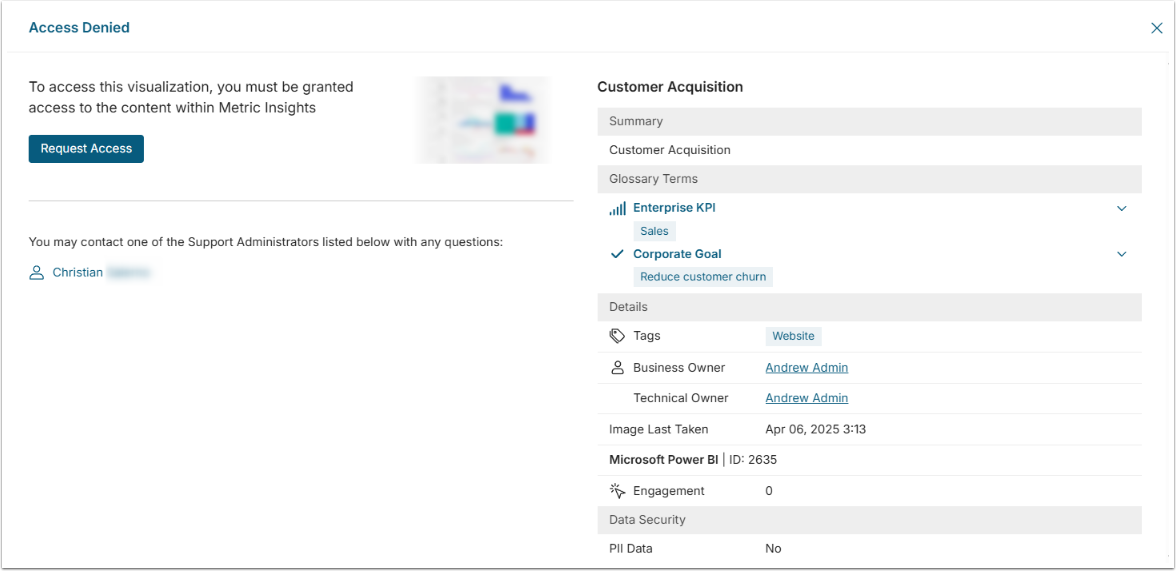
This decision applies if you have chosen to expose the entire Catalog. It determines what happens when a User clicks the request button, and whether the request arrives with enough context to act on. Discoverability itself behaves the same regardless of which BI platforms supply the content; what varies by environment is where requests are approved.
Access Request Profiles: Requests are raised as service requests in the Freshworks Service Catalog and approved there. This is a built-in capability and the recommended option where the service desk runs on Freshworks. It requires an API key, an agent with the Account Admin role, and a Service Item configured in Freshworks. NOTE: ServiceNow support is expected in v7.2.2.
Custom App: A Custom App uses JavaScript to leverage a destination platform's API — such as ServiceNow's — to pass full request context to that workflow tool. Custom Apps are separate from Access Request Profiles and are the route for platforms that Profiles do not cover natively. For more detail, see Best Practices & First Principles: Custom Apps.
Access Request API: The request is posted to an endpoint SAP's GRC tool, for example passing the Element's Access Request Group. Suits access that is governed centrally through a tool with an API.
Within Metric Insights: The request is emailed to the Access Request Email set on the Element or Category, or to Support Admins by default, and an approver processes it inside Metric Insights. Workable for small deployments, but it keeps approvals outside the organization's established request process.
External webpage: The User is sent to a form to submit the request. Custom Access Denied messages and email recipients are ignored in this flow, and the User re-enters what they already selected. An interim option only.
Alongside the pathway, establish who needs to request access to what: which Users and groups require access to which Elements and Categories, and who is responsible for reviewing those requests.
The principle behind all of these: route requests into the access request platform the organization already uses, so that Discoverability requests follow the same approval path as every other access request.
Once the pathway is settled, define what the request screen tells the User. The Access Denied message can be set per Element, falls back to the Category or Subcategory, and falls back again to the standard system message. Set it once at the Category or Subcategory level for most content and override at the Element level only where the request path differs. Note that the external webpage flow ignores custom messages altogether.
Decide what the button itself does, too. Where content is made visible without inviting requests, it can be renamed through ACCESS_REQUEST_BUTTON_TEXT.
Decision 3: How Approved Access Is Granted
The pathway chosen in Decision 2 largely determines where the grant is made. What remains to be decided is what it covers, and that has to fit the security model already in place.
Whoever makes content discoverable is also deciding what an approved request hands over: the requested Element alone, or the Category it belongs to and everything else in it. Where requests are processed in Metric Insights, the approver chooses between those two at the moment of approval, so the answer should be a standing policy rather than a case-by-case judgment and Categories should be structured on the assumption that access will be granted at that level.
Group to Category: where requests are routed to a workflow tool or a governance API, approval typically results in the User being added to an Active Directory group. Groups are granted access to Categories of content, and access follows at the next synchronization. This is the most scalable model, and it means a User who requested one Element receives everything in that Category.
User to Element: where requests are processed within Metric Insights, the approver grants access to the individual Element requested. Precise, but it does not scale and sits outside a group-based model.
Synchronized from the source platform: access is granted in the source system (on the Tableau workbook, for example) and Metric Insights picks it up through security synchronization. This fits where the BI platform, rather than Metric Insights, owns Permissions.
Required Administrator Roles
The functions below are not job titles. Titles differ by organization, and one person may hold several functions. The system role is a separate matter: it defines what Metric Insights requires in order to perform the function, not who owns the decision.
| Function | Responsibilities | Required in Metric Insights |
|---|---|---|
| Catalog strategy | Decides whether the Catalog is curated or comprehensive, and what Users see without access. Typically, the BI platform owner or analytics lead. | Admin |
| Access request configuration | Configures how requests are routed. Creates and manages Access Request Profiles and owns the integration with the workflow tool. | Admin |
| Content curation | Decides which Elements, Categories, and Subcategories are discoverable. Sets blur levels, preview images, and Access Denied messaging. | Admin; or a Power User with Edit Access to the Category or Element |
| Request approval | Reviews requests and grants Permissions, or adds Users to the groups that carry them. | Admin; or a Power User with the Manage Access Requests Privilege, who can grant access only to content they already have Edit Access to. Where requests are routed externally, approval happens in that platform. |
| Group structure and identity | Owns the groups and synchronization that access grants depend on. Involve this function before Decision 3, not after. | None — managed in Active Directory or the identity provider |
Pitfalls to Avoid
- Making uncertified content discoverable. Exposing draft or unverified objects makes the Catalog less trustworthy, not more complete.
- Assuming an approved request grants only the Element requested. Under a group-to-Category model, the User receives access to everything in that Category.
- Routing requests to an external webpage without passing context, which leaves Users re-entering what they already selected.
- Enabling Discoverability broadly without Group restriction, so that Users see large volumes of content that is not relevant to them.
Recommendations Before Implementation
Before technical implementation, you may want to:
- Establish certification standards and limit Discoverability to certified content.
- Confirm which access request platform is in scope, and whether it is supported natively or requires a Custom App.
- Decide whether an approved request grants the Element or the whole Category, and structure Categories accordingly.
- Submit a test request as a Regular User and follow it through approval to granted access before rolling out.