This article provides sample API calls to manipulate Dimensions:
-
/api/dimension: -
/api/dimension_value:
Prerequisites:
- Set up API access
- Verify that you have API access and obtain a token via get_token call
Table of contents:
1. Access Admin > System > API Toolkit
2. Configure Dimensions
2.1. Fetch Dimensions
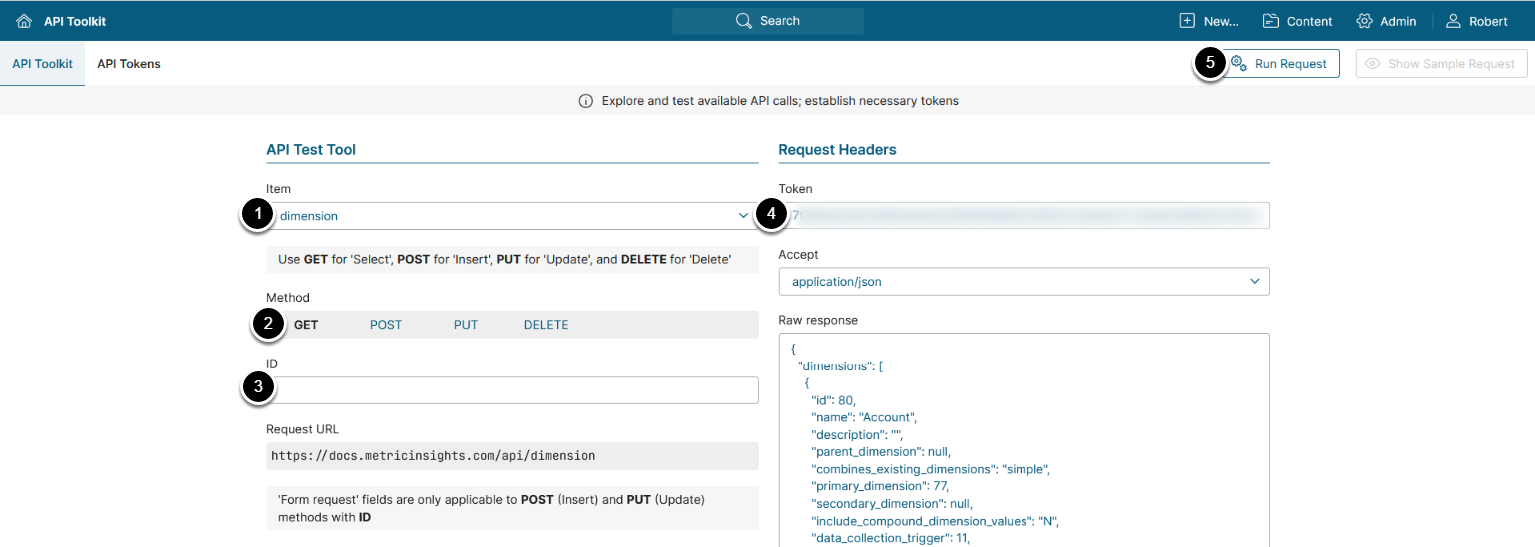
The GET request to /api/dimension returns the data of all Dimensions.
- Item: dimension
- Method: GET
- ID: Enter ID of the dimension you need to get more information about
- Enter an API Token
- [Run request]
Example Response
{
  "dimensions": [
    {
      "id": 80,
      "name": "Account",
      "description": "",
      "parent_dimension": null,
      "combines_existing_dimensions": "simple",
      "primary_dimension": 77,
      "secondary_dimension": null,
      "include_compound_dimension_values": "N",
      "data_collection_trigger": 11,
      "value_type": "varchar",
      "bind_parameter": "account",
      "drill value for total": "",
      "element_name_template": 6,
      "scope_of_access_default": "Y",
      "show_as_tile_default": "Y",
      "include_total_dimension_value": "Y",
      "include_individual_currency_prefix": "N",
      "data_source": "dataset",
      "data_fetch_command": null,
      "dataset_source": "208_0",
      "dataset_id": 208,
      "dataset_filter_id": 0,
      "show_dimension_drop_down_when_there_is_only_one_value": "N"
    },
    {
      "id": 136,
      "name": "Regions",
      "description": "",
      "parent_dimension": null,
      "combines_existing_dimensions": "simple",
      "primary_dimension": null,
      "secondary_dimension": null,
      "include_compound_dimension_values": "Y",
      "data_collection_trigger": 11,
      "value_type": "varchar",
      "bind_parameter": "regions",
      "drill value for total": "",
      "element_name_template": 6,
      "scope_of_access_default": "Y",
      "show_as_tile_default": "Y",
      "include_total_dimension_value": "N",
      "include_individual_currency_prefix": "N",
      "data_source": "manual",
      "data_fetch_command": null,
      "dataset_source": "0_0",
      "dataset_id": 0,
      "dataset_filter_id": 0,
      "show_dimension_drop_down_when_there_is_only_one_value": "N"
    }
  ]
}
Fields Description
| Column 1 |
Column 2 |
|---|---|
| Value 1 |
Value 2 |
3. Fetch Dimension Information
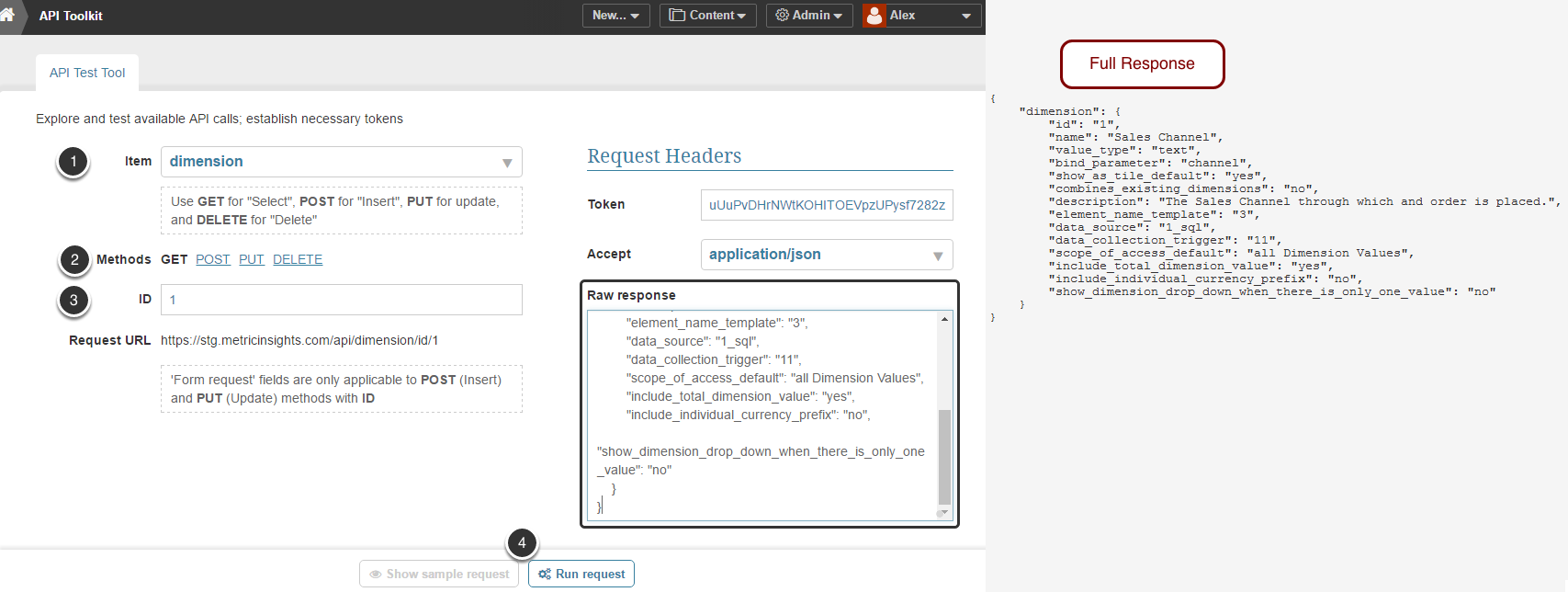
Retrieve key data about specific Dimension.
- Item: dimension
- Method: GET
- ID: Specify ID of the dimension you need to get more information about
- Run request
3.1. Create Dimension

- Item: dimension
- Method: POST
- ID: Find an existing Dimension that you wish to use as a foundation for new Alert. To see the list of all Dimensions created in the system, select GET method, keep this field empty and Run request
- Define parameters of the new dimension
- Run Request
4. Fetch Dimension Value Information
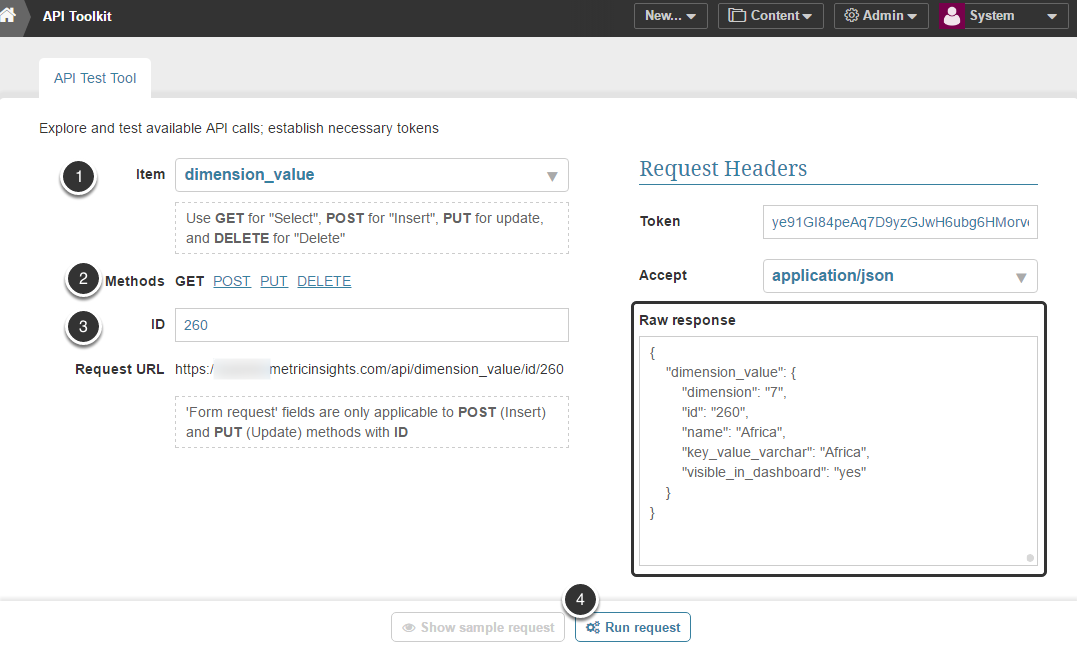
Retrieve key data about specific Dimension.
- Item: dimension_value
- Method: GET
- ID: Specify ID of the Dimension Value you need to get more information about
- Run request
4.1. Create Dimension Value
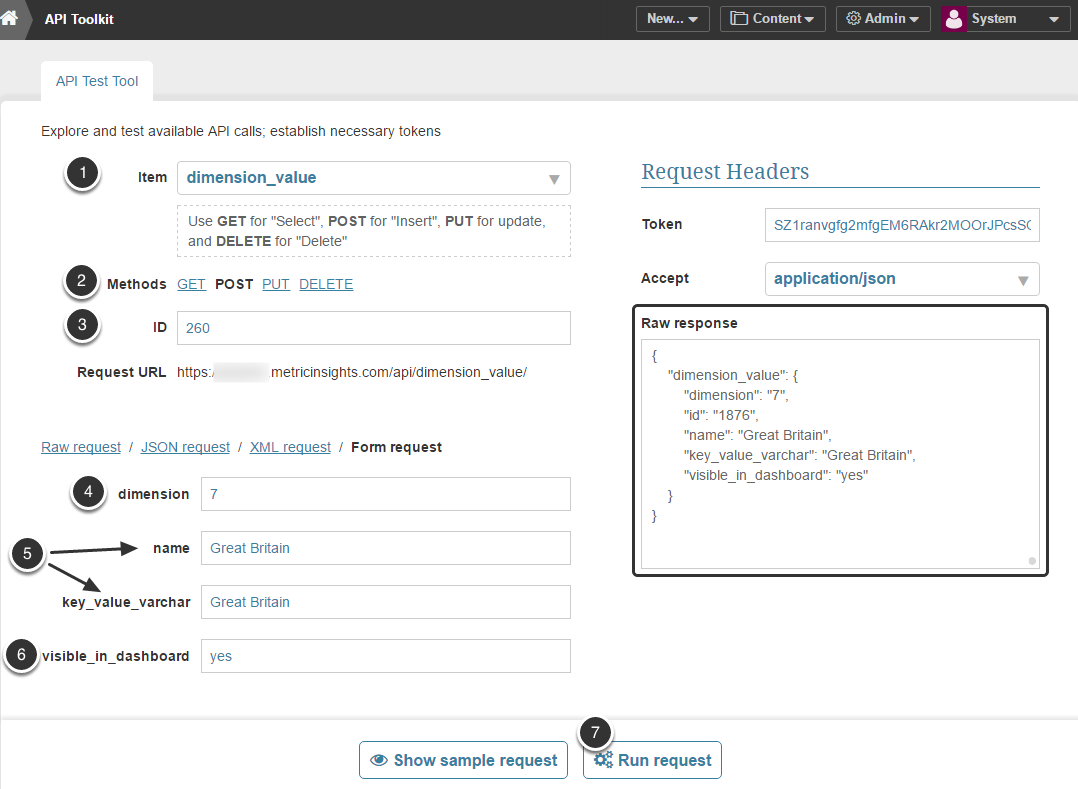
- Item: dimension_value
- Method: POST
- ID: Find an existing Dimension Value that you wish to use as a foundation for new Alert. To see the list of all Dimension Values created in the system, select GET method, keep this field empty and Run request
- dimension: Specify ID of the Dimension where you need to create a new Value
- name / key_value_varchar: Define a descriptive name of a new Dimension value
- visible_in_dashboard: yes / no
- Run Request
4.2. Create Compound Dimension Value
API:
https://yourinstance.metricinsights.com/api/dimension_valueHeader:
Accept:application/json
Token:UClCUUKxUlkdbhE1cHLz3kyjbIZYVh9eB34A5Q21Y3FPqKGSJs
POST body payload:
{
"dimension": "17",
"primary_dimension_value": "16345",
"secondary_dimension_value": "13560",
"visible_in_dashboard": "Yes"
}
Response:
{"dimension_value":{"dimension":"17","primary_dimension_value":"16345","secondary_dimension_value":"13560","visible_in_dashboard":"Yes"}}5. Get all Dimension information (for Metric / Multi-metric / Report)
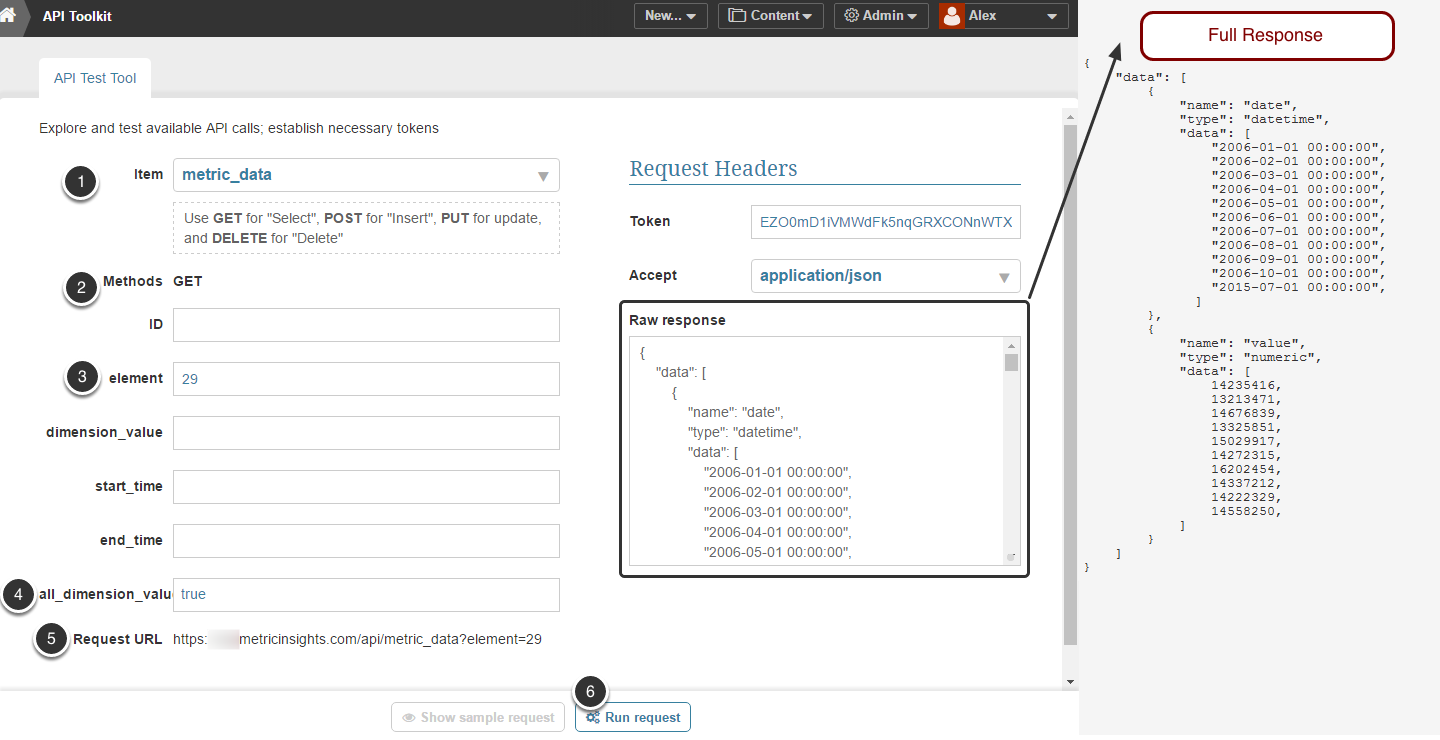
This API call can be used to get metric data along with all data related to all Dimension Value.
NOTE: Dimension Values are returned as dimension IDs.
- Item: metric_data / multimetric_data / report_data
- Method: GET
- element: (numeric value) Specify the ID of an you wish to get information about. Metric ID can be determined in the web browser URL of the Metric Viewer (Multi-Metric Viewer or Report Viewer). For example:
https://demo.metricinsights.com/chart/index/index/element/29- all_dimension_values: "true". This parameter retrieves all data related to a specific dimension value
- API:
Dimensioned Metric - https://demo.metricinsights.com/api/metric_data?element=<metric_id>&all_dimension_value=true
Dimensioned Report -  https://demo.metricinsights.com/api/report_data?element=<report_id>&all_dimension_value=true
Dimensioned Multi-metric - https://demo.metricinsights.com/api/multimetric_data?element=<multimetric_id>&all_dimension_value=true
6. Run request
6. Delete Dimension value
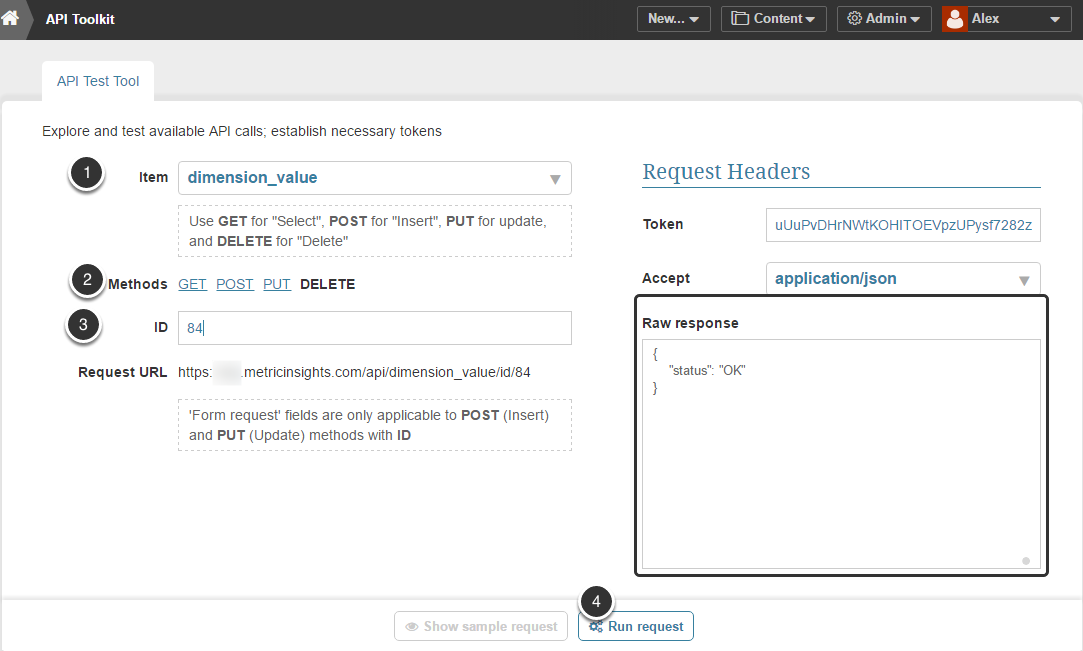
- Item: dimension_value
- Method: DELETE
- ID: Specify the Dimension Value you need to delete
- Run request