This article describes endpoints available for configuration of Folders and Folder Elements.
/api/folder: Retrieve, create, update, and delete Folders/Sub-Folders./api/folder_element: Retrieve, add, bulk add, and remove Elements from Folders.
Prerequisites:
- Set up API access, verify that you have API access, and obtain a token via the get_token call OR
- Generate Personal API Token
Table of contents:
1. Access Admin > System > API Toolkit
2. Configure Folders
2.1. Get All Folders
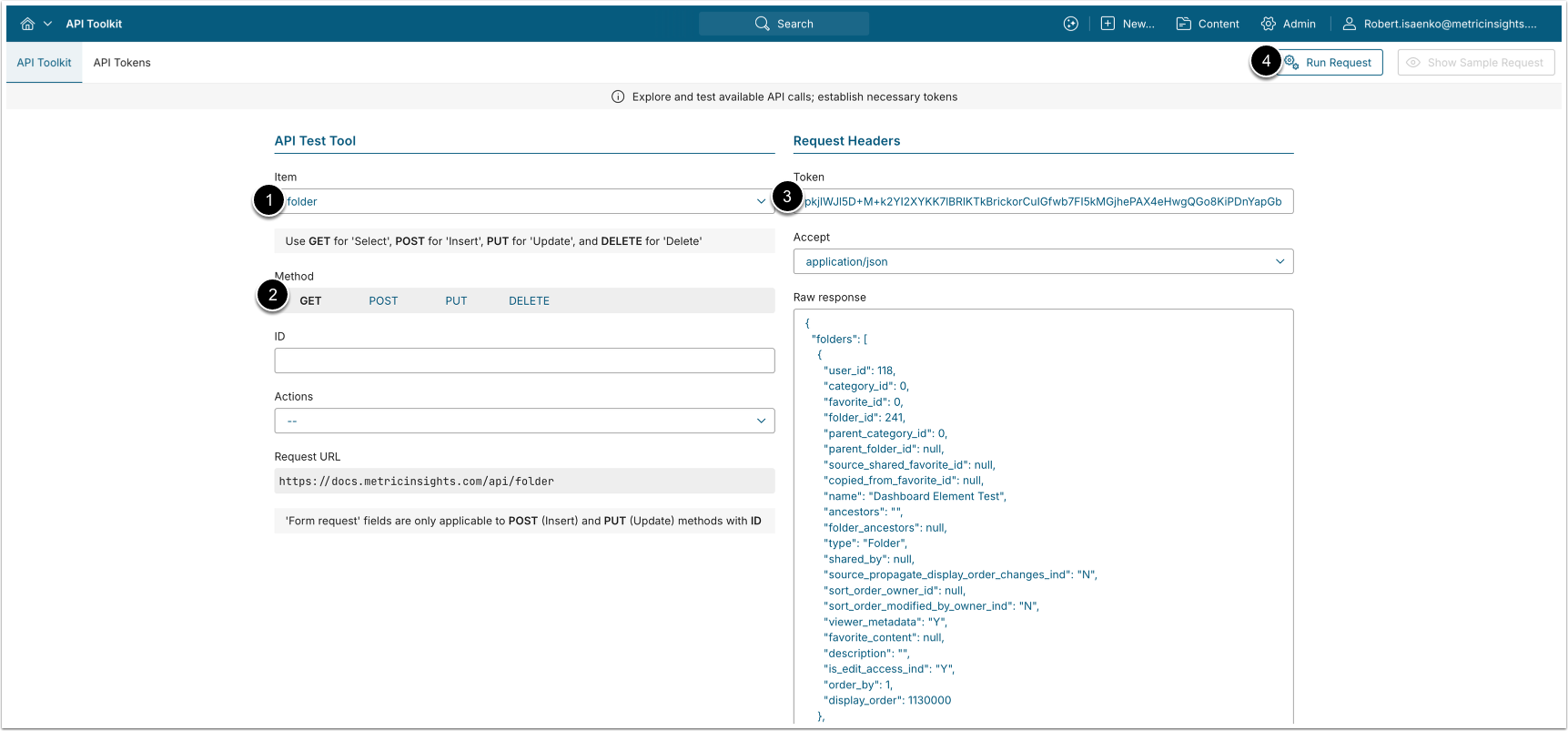
- GET request to
/api/folderretrieves all Folders.
- Item: folder
- Method: GET
- Enter an API Token
- [Run request]
Example Response
{
  "folders": [
    {
      "user_id": 118,
      "category_id": 0,
      "favorite_id": 0,
      "folder_id": 241,
      "parent_category_id": 0,
      "parent_folder_id": null,
      "source_shared_favorite_id": null,
      "copied_from_favorite_id": null,
      "name": "Dashboard Element Test",
      "ancestors": "",
      "folder_ancestors": null,
      "type": "Folder",
      "shared_by": null,
      "source_propagate_display_order_changes_ind": "N",
      "sort_order_owner_id": null,
      "sort_order_modified_by_owner_ind": "N",
      "viewer_metadata": "Y",
      "favorite_content": null,
      "description": "",
      "is_edit_access_ind": "Y",
      "order_by": 1,
      "display_order": 1130000
    }
  ]
}Fields Description
| Field Name | Value Type | Description |
folders | array | An array with all Folder data. |
user_id | integer | The ID of the User who ran the API request. |
folder_id | integer | The ID of the Folder. |
parent_folder_id | integer | The ID of the parent Folder. Returns null if the folder is a top-level Folder. |
name | string | The name of the Folder. |
folder_ancestors | string | Comma-separated list of ancestor Folder IDs, ordered from the top-level folder down to the immediate parent. Returns |
description | string | The description of the Folder. |
is_edit_access_ind | string | Whether or not the User who ran the API request has edit access to the Folder. Takes value "Y" if the User has edit access, "N" - if not. |
display_order | integer | The numeric value that determines the display order of the Folder on the homepage. Lower value = earlier in the list. |
2.2. Get a Specified Folder
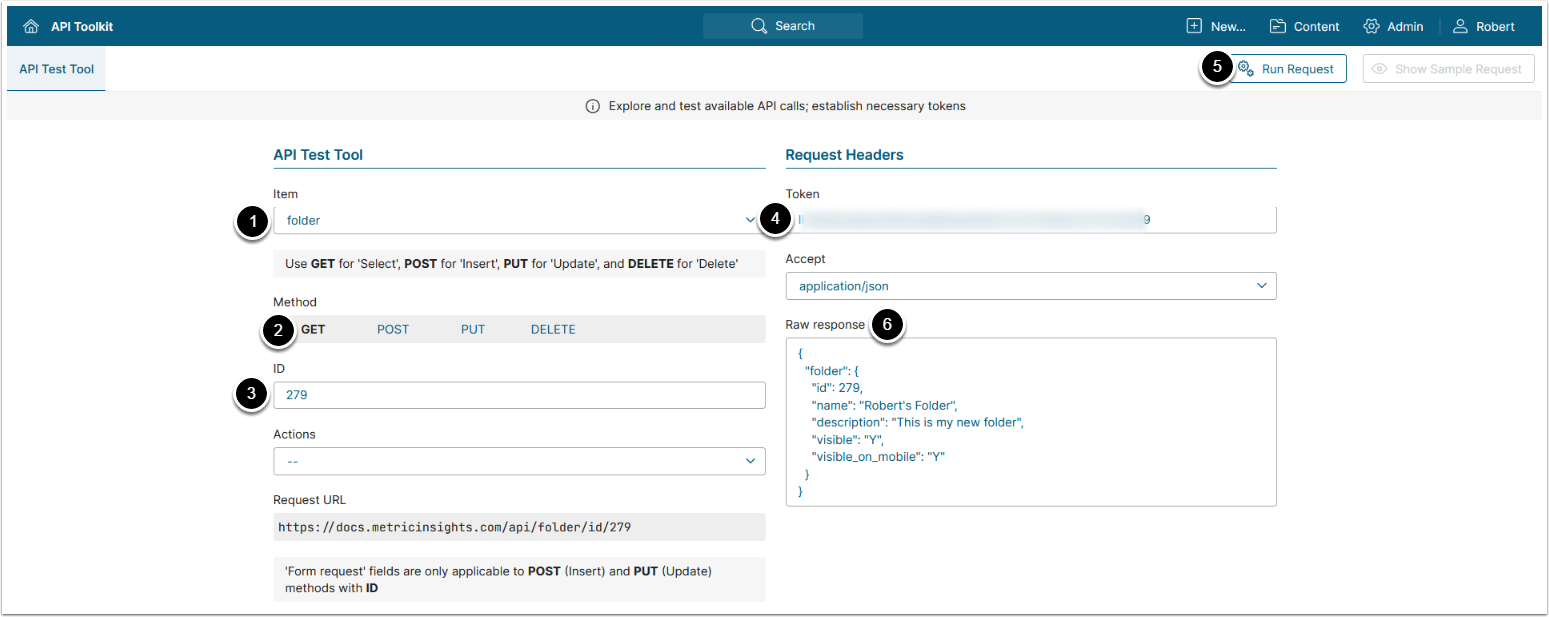
- GET request to
/api/folder/id/<ID>retrieves a specified Folder.
- Item: folder
- Methods: GET
- Enter the ID of the Folder or Sub-Folder which data needs to be retrieved.
- Enter an API Token
- [Run request]
- The returned object contains an object with Folder's data.
- See Example Response and Fields Description for details.
Example Response
{
  "folder": {
    "id": 279,
    "name": "Robert's Folder",
    "description": "This is my new folder",
    "visible": "Y",
    "visible_on_mobile": "Y",
    "include_in_export": "N"
  }
}NOTE: For Sub-Folders, only id, parent_folder_id, and name are returned.
Fields Description
| Field Name | Value Type | Description |
|---|---|---|
folder | object | Object containing Folder information. |
id | string | The ID of the Folder. |
name | string | The name of the Folder. |
description | string | The description of the Folder. |
visible | string | Whether the Folder is displayed on the homepage. («Y/N») |
visible_on_mobile | string | Whether the Folder is displayed in mobile app.(«Y/N») |
2.3. Create Folder
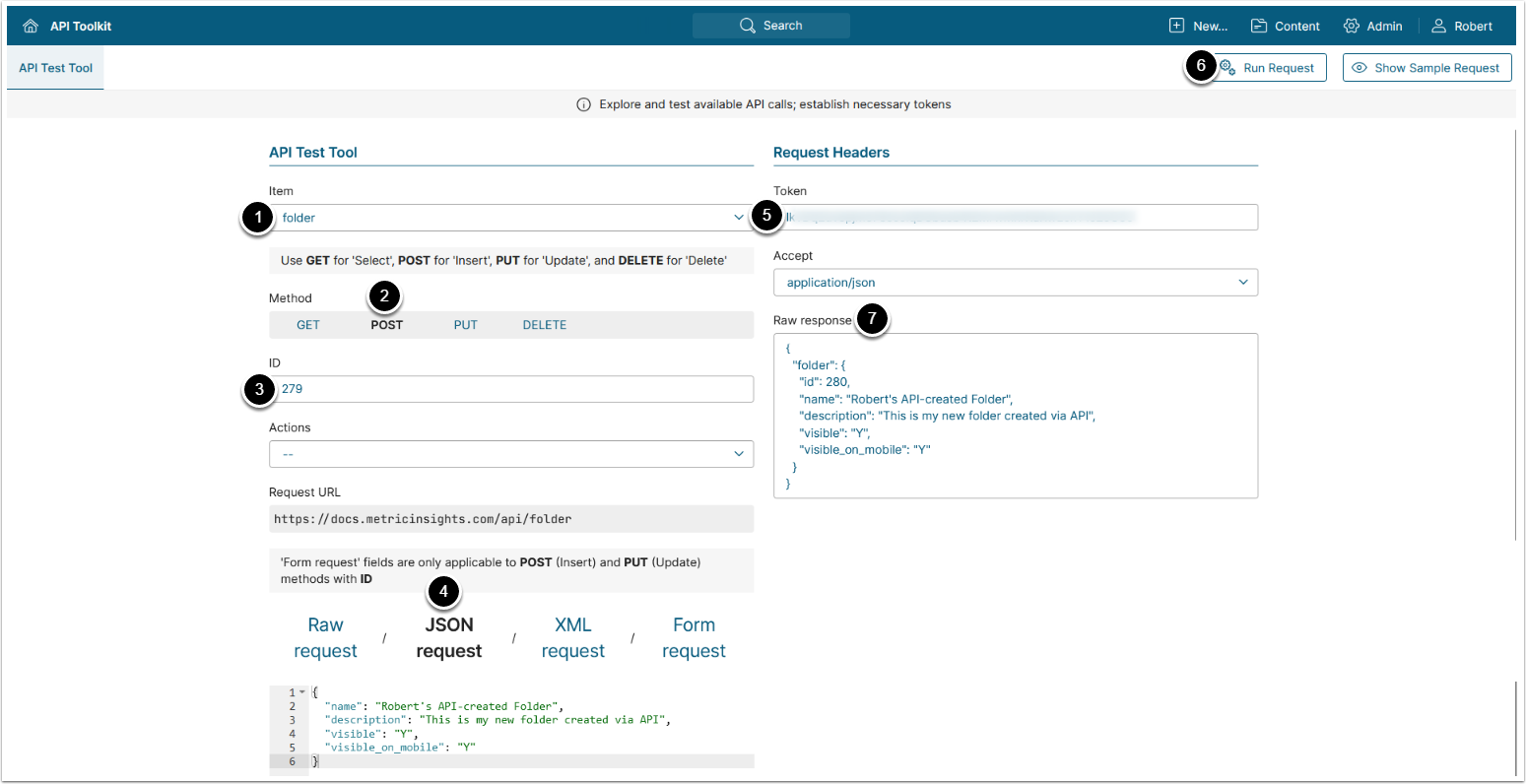
- POST request to
/api/folderwith body{"name": "<name>", "visible": "<Y/N>", "visible_on_mobile": "<Y/N>"}creates a new Folder.
- Item: folder
- Methods: POST
- Enter ID of an existing Folder
- Select JSON request and enter JSON providing the needed values for your Folder. See Fields Description for details:
{
  "name": "<Folder_Name>",
  "visible": "<Y/N>",
  "visible_on_mobile": "<Y/N>",
  "include_in_export": "<Y/N>"
}- Enter an API Token
- [Run request]
- The returned object contains an object with Folder's data.
- See Example Response and Fields Description for details
2.3.1. Create Sub-Folder
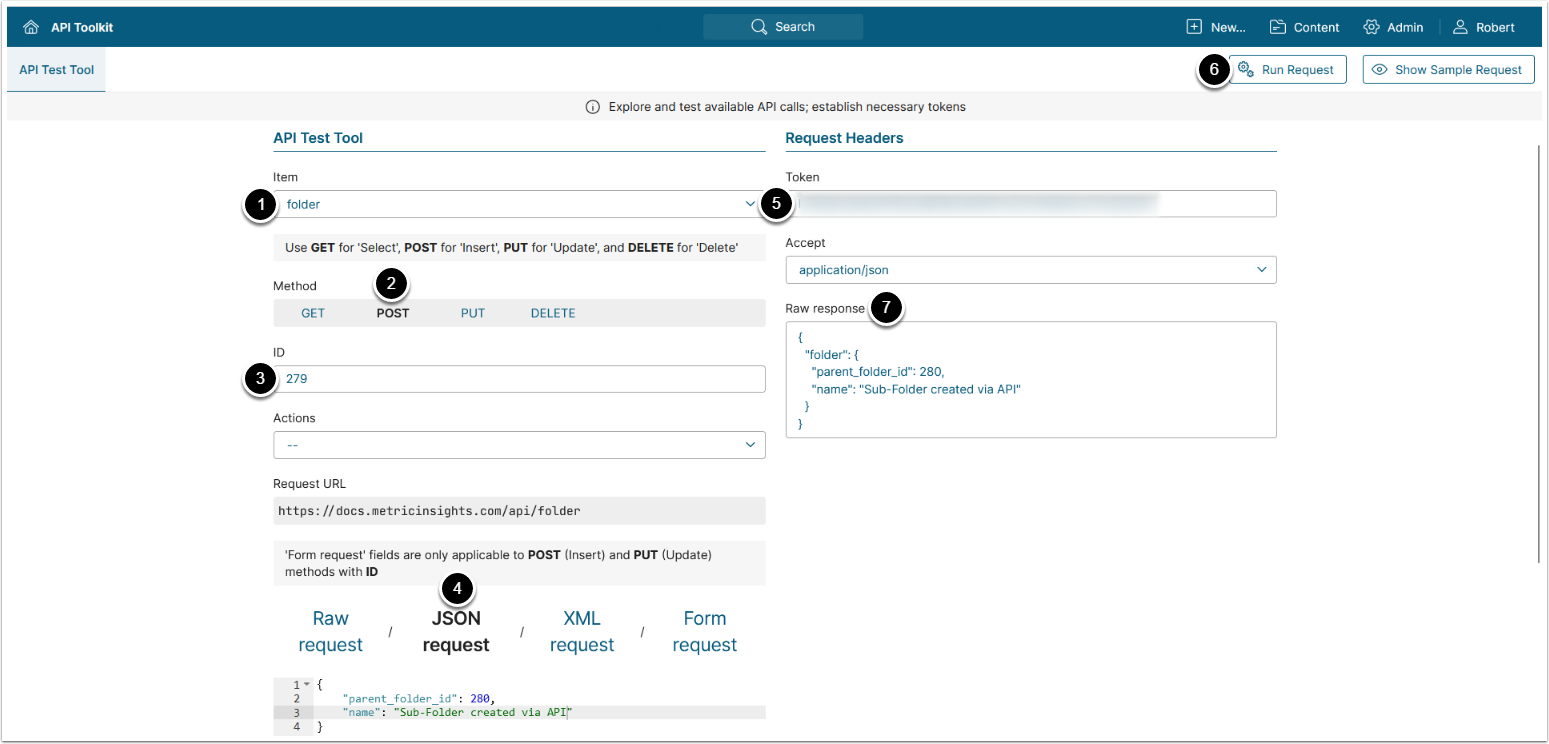
- POST request to
/api/folderwith body{"parent_folder_id": "<ID>", "name": "<name>"}creates a new Sub-Folder.
- Item: folder
- Methods: POST
- Enter ID of an existing Folder
- Select JSON request and replace request with the following JSON providing the needed values:
{
    "parent_folder_id": <Parent Folder ID>,
    "name": "<Sub-Folder name>"
}- Enter an API Token
- [Run request]
- The returned object contains an object with Sub-Folder's data.
2.4. Update Folder
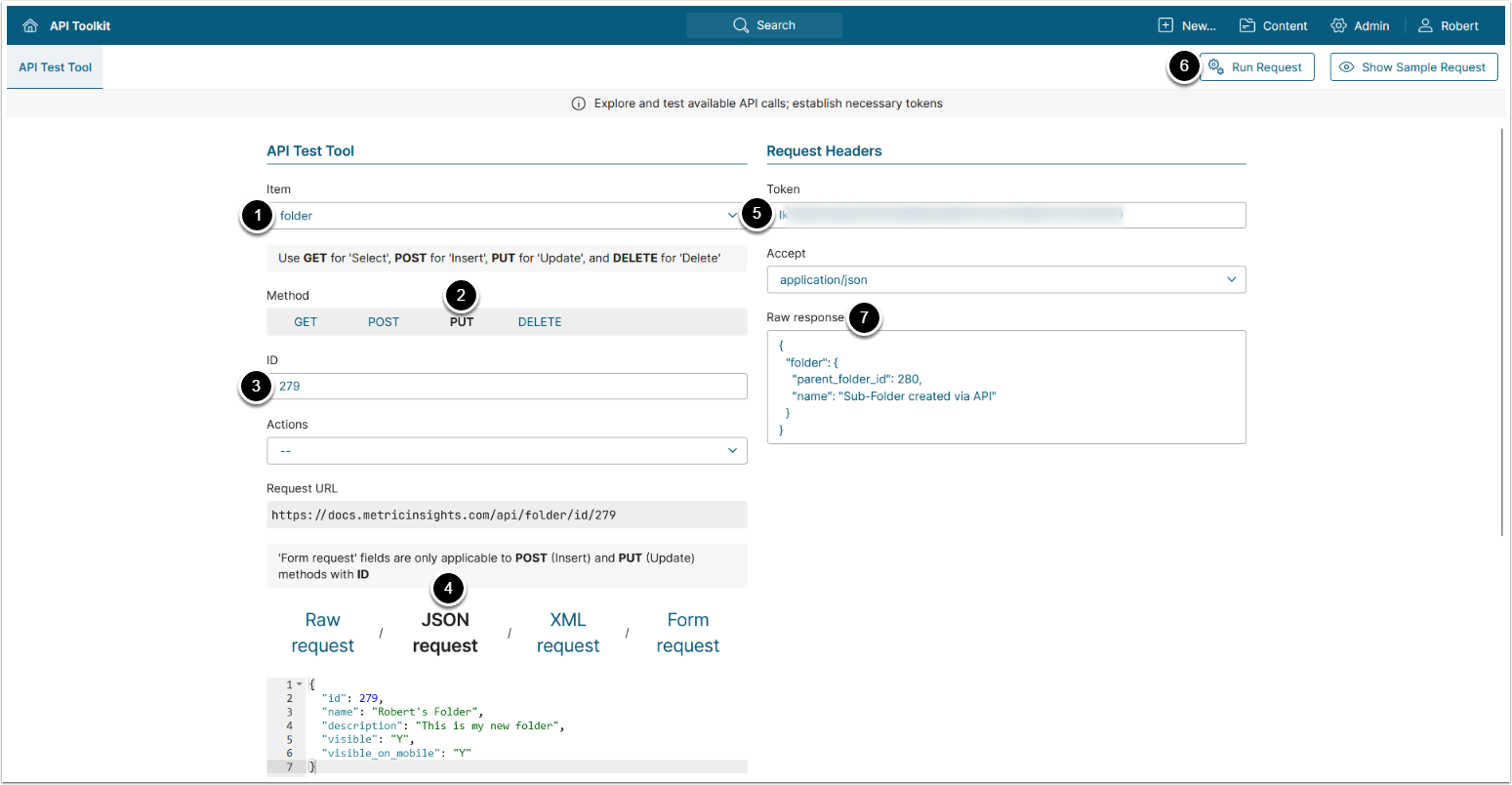
- PUT request to
/api/folderwith body{"name": "<name>", "visible": "<Y/N>", "visible_on_mobile": "<Y/N>"}updates an existing Folder.
- Item: folder
- Methods: PUT
- Enter ID of the Folder which data needs to be updated
- Select JSON request and enter JSON with the updated Folder's data:
- See Example Response for details on Folder's data
- Enter an API Token
- [Run request]
- The returned object contains an array with an object with the updated Folder's data.
- See Example Response and Fields Description for details
2.4.1. Update Sub-Folder
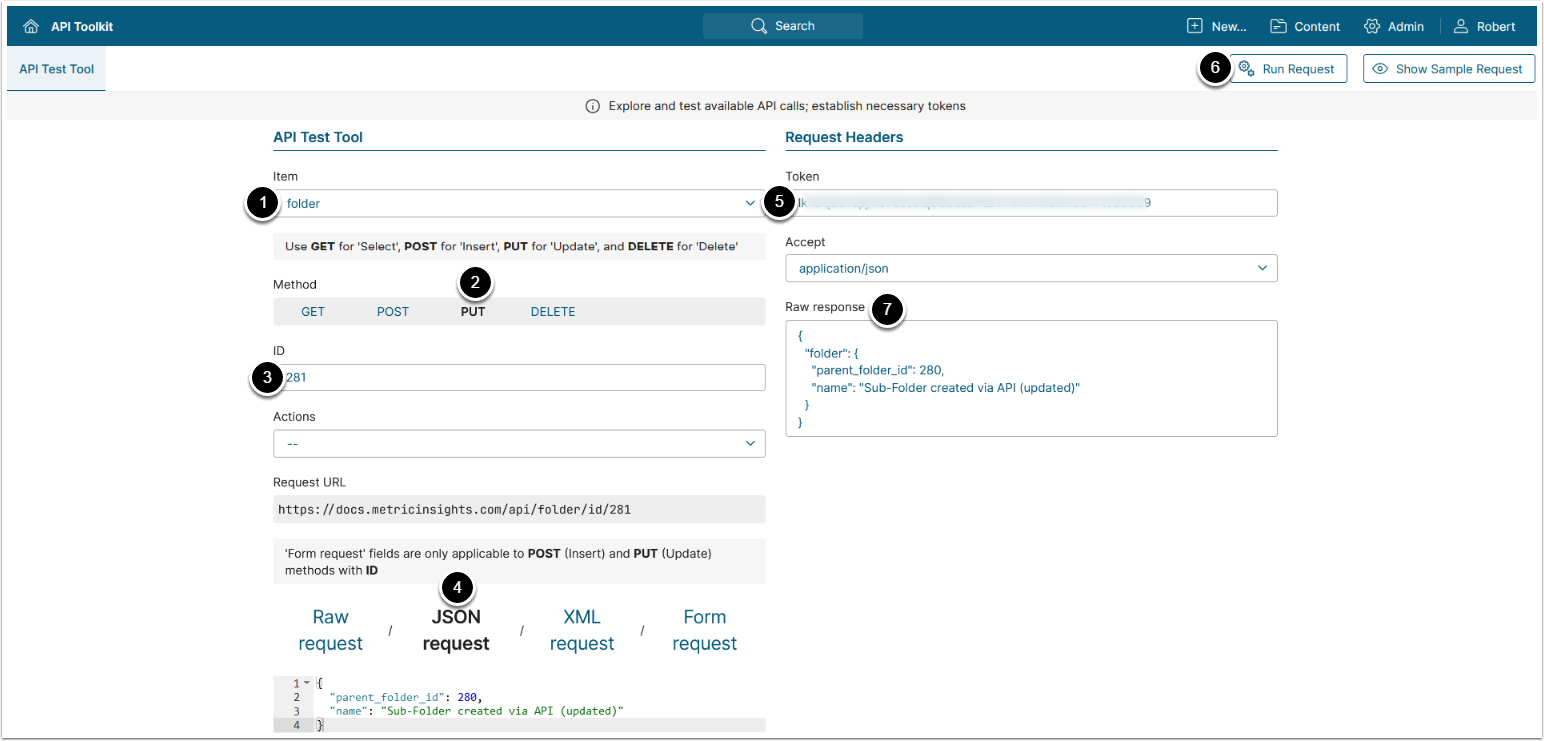
- PUT request to
/api/folderwith body{"parent_folder_id": "<ID>", "name": "<name>"}updates an existing Sub-Folder.
- Item: folder
- Methods: PUT
- Enter ID of the Sub-Folder which data needs to be updated
- Select JSON request and replace request with the following JSON providing the needed values:
{
    "parent_folder_id": <Parent Folder ID>,
    "name": "<Sub-Folder Name>"
}- Enter an API Token
- [Run request]
- The returned object contains an array with an object with the updated Folder's data.
2.4.2. Copy Or Move Folder Or Sub-Folder
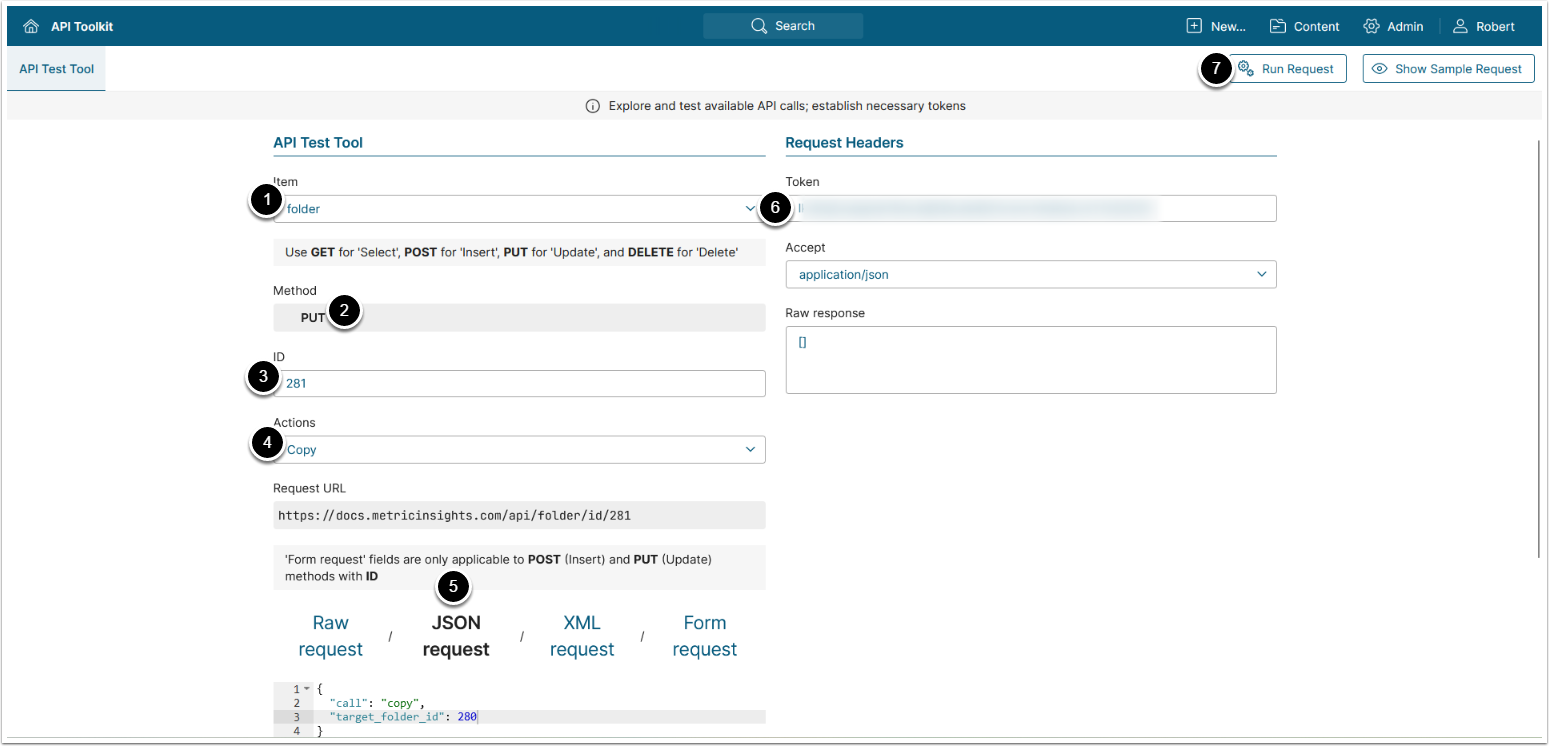
- PUT request to
/api/folderwith body{"call": "copy", "target_folder_id": "<ID>"}creates a copy of the specified Folder inside of the target Folder. - PUT request to
/api/folderwith body{"call": "move", "target_folder_id": "<ID>"}moves the specified Folder inside the target Folder.
- Item: folder
- Method: PUT
- Enter ID of the Folder or Sub-Folder which needs to be copied or moved
- Actions:
- Copy: A copy of the selected Folder is created inside of the target Folder.
- Move: Selected Folder is moved inside the target Folder.
- Select JSON request and assign
target_folder_idthe ID of the target Folder - Enter an API Token
- [Run request]
2.5. Delete Folder Or Sub-Folder
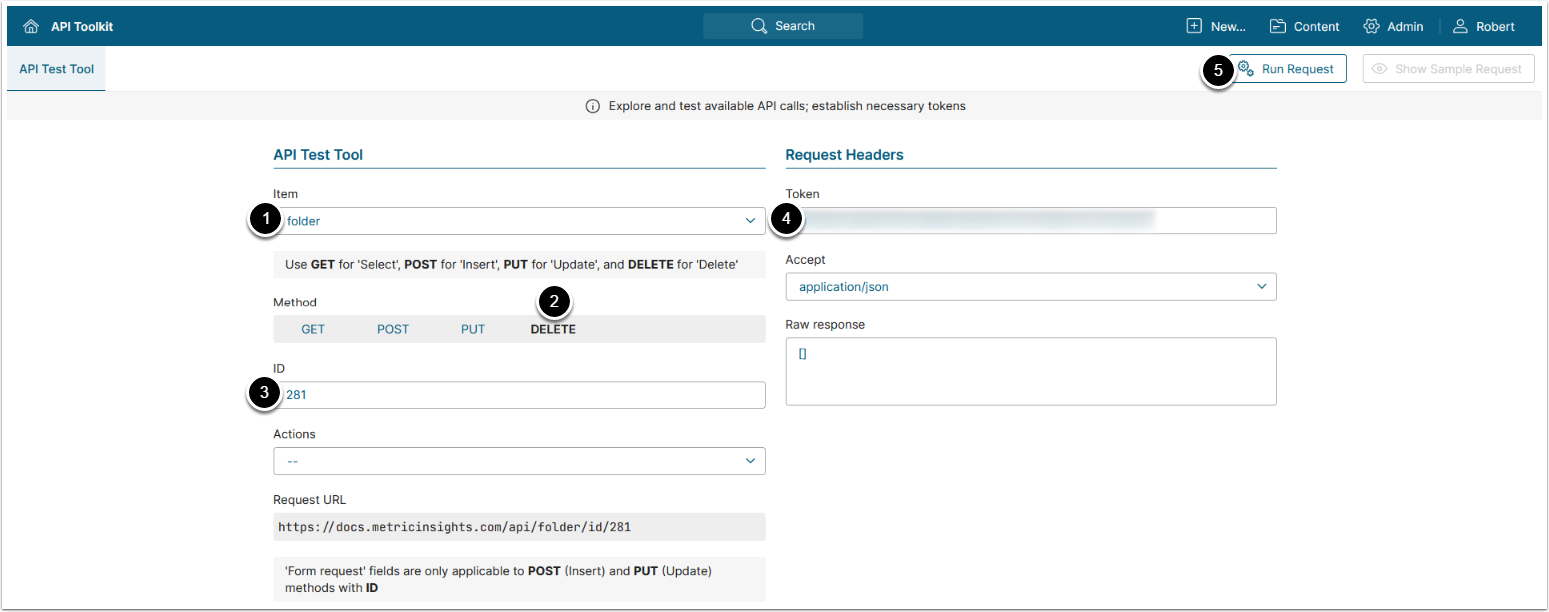
- POST request to
/api/folder/id/<ID>deletes the specified Folder or Sub-Folder.
- Item: folder
- Methods: DELETE
- Enter ID of the Folder or Sub-Folder which needs to deleted
- Enter an API Token
- [Run request]
3. Configure Folder Elements
3.1. Get Folder Elements
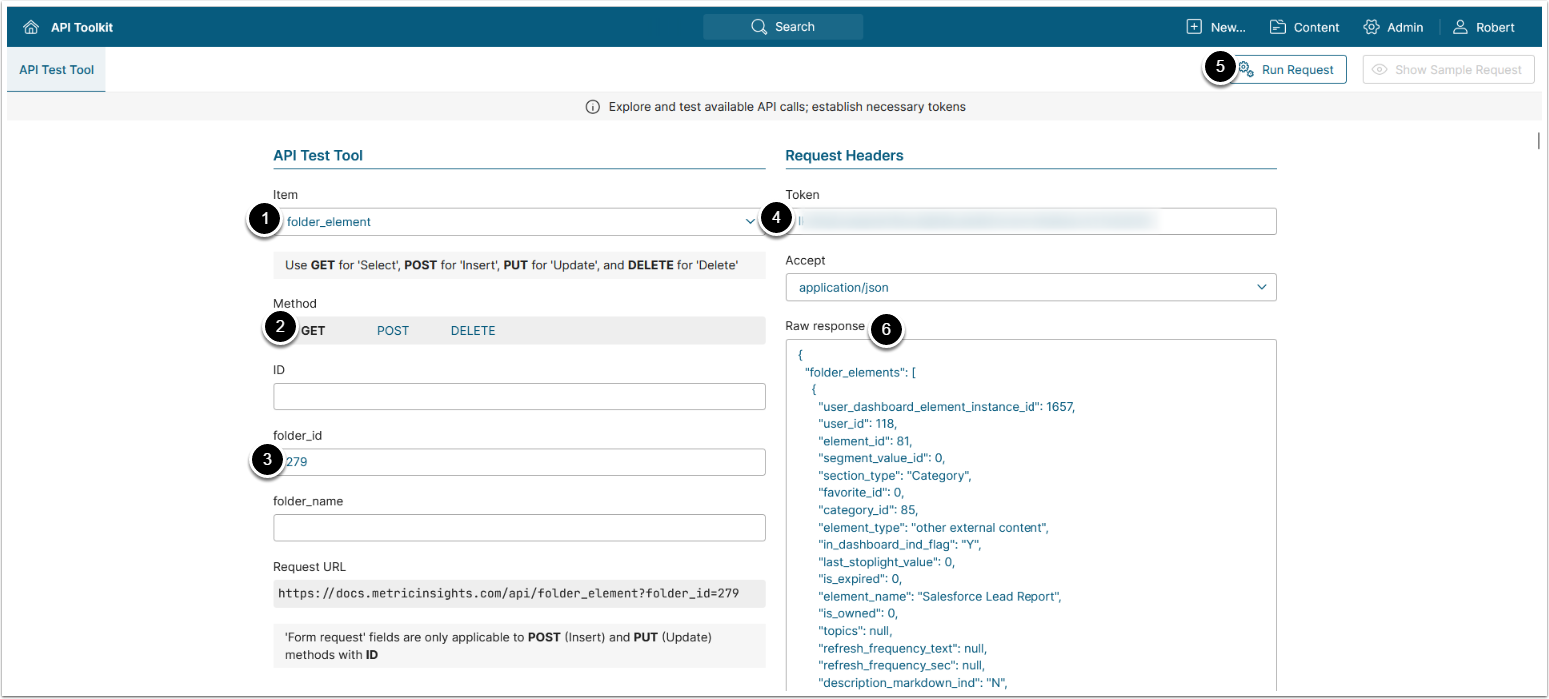
Note: Beginning v6.4.3, this API request returns only Elements that are placed in the Folder, without Elements with Discoverability.
- Item: folder_element
- Methods: GET
- Use one of the following parameters to retrieve Folder's data:
- folder_id: Enter Folder ID
- folder_name: Enter Folder Name
- Enter an API Token
- [Run request]
- The returned object contains an object with Folder elements' data.
- See Example Response and Fields Description for details.
{
  "folder_elements": [
    {
      "user_dashboard_element_instance_id": 311,
      "user_id": 192,
      "element_id": 1279,
      "segment_value_id": 0,
      "section_type": "Favorite",
      "favorite_id": 532,
      "category_id": 0,
      "element_type": "external report",
      "in_dashboard_ind_flag": "Y",
      "last_stoplight_value": 0,
      "is_expired": 1,
      "element_name": "Tableau Worldwide Sales Analysis",
      "is_owned": 0,
      "topics": "101,177",
      "refresh_frequency_text": "Daily",
      "refresh_frequency_sec": 86400,
      "description_markdown_ind": "N",
      "element_info": "Daily sales data in Tableau, updated at 3am PST",
      "metric_unit_of_measure": null,
      "last_measurement_time": null,
      "external_report_download_url_info": "",
      "certified_ind": "Y",
      "certification_level_id": 1,
      "last_certified_time": "2021-10-13 23:06:07",
      "metric_display_on_tile": "value",
      "metric_moving_average_interval": null,
      "metric_display_on_tile_prefix": null,
      "metric_home_page_compare_value_type": "last value",
      "metric_home_page_compare_line_id": null,
      "metric_home_page_compare_target_id": null,
      "report_single_unit_label": null,
      "report_multiple_units_label": null,
      "report_no_units_label": null,
      "report_on_demand_generation_ind": "Y",
      "external_report_display": "iframe",
      "external_report_url": "https://tableau-prod.metricinsights.com/t/MI-Demo/views/SalesAnalysis/SalesAnalysis",
      "publicly_visible_ind": "Y",
      "certification_level_name": "Bronze",
      "certification_level_color": "#cd7f32",
      "last_certified_by_name": "Anna Kennedy",
      "last_certified_by_email": "bk@metricinsights.com",
      "business_owner": "Grayson Stebbins",
      "business_owner_email": "grayson@metricinsights.com",
      "data_steward": null,
      "data_steward_email": null,
      "technical_owner": "Grayson Stebbins",
      "technical_owner_email": "grayson@metricinsights.com",
      "data_source_name": "Tableau - Prod_MI-Demo",
      "supports_last_refreshed_check": "none",
      "display_order": 1,
      "total_view_count": null,
      "in_favorites": "532",
      "is_in_favorites": 0,
      "is_in_folders": 0,
      "mi_name": "Daily",
      "mi_sequence": 30,
      "pct_variance_text": "from last day",
      "last_measurement_value_formatted": null,
      "last_measurement_time_formatted": null,
      "metric_last_moving_average_value_formatted": null,
      "last_updated_time": "2019-04-05 19:06:03",
      "total_forecast_amount_formatted": null,
      "last_activity_time": null,
      "last_annotation_text": null,
      "last_commentary_text": "Canada Manager: In Canada, we noticed that our Toronto store has maintained the same walk-in traffic as before, while at the same time noticing an increase in our website sales.",
      "element_dashboard_name": "Tableau Worldwide Sales Analysis",
      "element_dashboard_name_with_formatting": null,
      "is_empty_instance_ind": "N",
      "metric_tile_display_pct_variance": null,
      "report_rows": null,
      "last_display_generation_time": "2019-04-02 15:08:38",
      "last_file_updated_time": "",
      "last_modified": "unknown",
      "favorite_content": "wisdom of crowds",
      "alert_event_id": null,
      "last_alert_text": null,
      "last_alert_news_type": null,
      "is_alert_active": 0,
      "is_collaborative_alert_active": 0,
      "is_collaborative_annotation_active": 0,
      "is_annotation_active": 0,
      "is_commentary_active": 1,
      "last_notable_event_activity_time": null,
      "last_user_annotation_activity_time": null,
      "last_user_note_activity_time": null,
      "last_alert_event_activity_time": null,
      "reporting_tool_name": "Tableau",
      "remove_preview_link_ind": "N",
      "is_tech_editor": "N",
      "external_content_type_name": null,
      "enable_click_in_mobile_ind": "Y",
      "content_type": "Tableau",
      "global_total_view_count": 2,
      "has_access": "Y"
    },
  ],
  "folder_items": []
}Fields Description
This description covers only the fields that contain information useful for App (Portal Page) development, the fields that are not covered are for internal use only.
| Field Name | Value Type | Description |
|---|---|---|
folder_elements | array | An array containing folder_elements data entries. |
user_dashboard_element_instance_id | integer | A unique ID of the element record. |
user_id | integer | The ID of the user who ran the API request. |
element_id | integer | The ID of the element. |
segment_value_id | integer | The dimension value of the element. |
favorite_id | integer | The IDs of the element instances in favorites. |
category_id | integer | The ID of the element's category. |
element_type | string | The type of the element. |
in_dashboard_ind_flag | string | Whether or not the element is displayed on the dashboard. |
is_expired | string | Whether or not the element is expired. |
is_tech_editor | string | Whether or not the user who ran the API request can edit the element. Takes value "Y" if the user can edit the element, "N" - if not. |
is_owned | integer | Whether or not the element has an owner. Takes value "1" if the element has an owner, "0" - if not. |
topics | array | An array of the element's tags' IDs. |
refresh_frequency_sec | integer | The frequency of element refresh in seconds. |
enabled_ind | string | Whether the Element is enabled («Y»/«N»). |
description_markdown_ind | string | Whether or not markdown is applied to the element's description. Takes value "Y" if markdown is enabled, "N" - if not. |
external_report_download_url_info | object | Information about element download. |
certified_ind | string | Whether or not the element is certified. Takes value "Y" if the element is certified, "N" - if not. |
certification_level_id | integer | The ID of the certification level. |
last_certified_time | string | The date and time of the last certification of the element. |
external_report_display | string | If the element is an External Report, describes its display options. |
external_report_url | string | The URL of the External Report or External Content in a native BI tool. |
certification_level_name | string | The name of the certification level. |
certification_level_color | string | The hex value of the certification level color. |
last_certified_by_name | string | The name of the user who certified the element. |
last_certified_by_email | string | The email of the user who certified the element. |
business_owner | string | The name of the Element Business Owner. |
business_owner_email | string | The email of the Element Business Owner. |
data_steward | string | The name of the element's Data Steward. |
data_steward_email | string | The email of the element's Data Steward. |
technical_owner | string | The element's Technical Owner. |
technical_owner_email | string | The email of the element's Technical Owner. |
data_source_name | string | The name of the data source from which the element is populated. |
total_view_count | integer | The engagement count of the element. |
in_favorites | string | The IDs of favorites where the element is present. |
is_in_favorites | integer | Whether or not the element is in favorites. Takes value "1" if the element is in favorites, "0" - if not. |
is_in_folders | integer | Whether or not the element is in any folder. Takes value "1" if the element is in any folder, "0" - if not. |
metric_last_moving_average_value_formatted | string | The last collected value of a metric. |
last_updated_time | string | The date and time of the last element update. |
last_activity_time | string | The date and time of the last element activity. |
last_annotation_text | string | The text of the last annotation. |
last_commentary_text | string | The text of the last comment. |
element_dashboard_name | string | The name of the element. |
is_empty_instance_ind | string | Whether or not the last instance of the report is empty. |
metric_tile_display_pct_variance | string | The percentage ratio between the two latest metric values. |
favorite_content | string | The type of favorite content. |
content_type_alias | string | Human-readable alias of the content type. Supported values:
|
reporting_tool_name | string | If the element is an External Report, displays the name of the BI tool from which the element is populated. |
external_content_type_name | string | If the element is an External Content, describes its type. |
enable_click_in_mobile_ind | string | If the element is an External Report or External Content, defines whether or not the "Enable click-through" option is activated for its content type. |
content_type | string | The type of the content. |
global_total_view_count | integer | The engagement count of the element. |
has_access | string | Whether or not the user who ran the API request has access to the element. |
3.2. Add Element to Folder
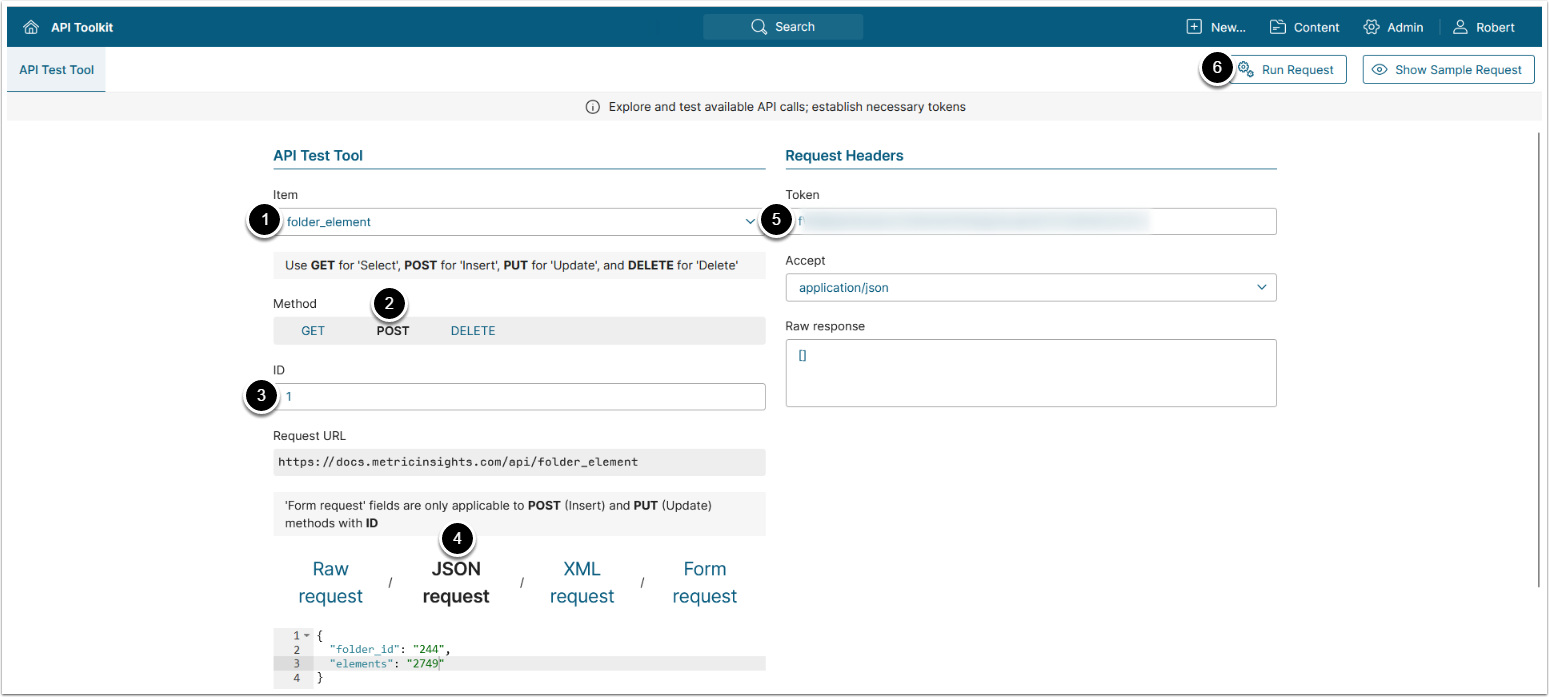
- Item: folder_element
- Methods: POST
- Enter any number
- Select JSON request and enter JSON providing the needed values for the following parameters:
- folder_id: ID of the Folder.
- elements: ID of the Element that needs to be added to the Folder.
- Enter an API Token
- [Run request]
3.3. Bulk Add Folder Elements
Bulk adding Folder elements is not available in API toolkit but can be performed via direct API request to the /api/folder_element endpoint:
$.ajax({
    url: '/api/folder_element',
    type: 'POST',
    data: {
        folder_id: '<Folder ID>',
        elements:['<Element 1 ID>', '<Element 2 ID>']
    }
});
Assigning values to the following parameters:
folder_id: A string containing ID of the Folderelements: An array of strings containing IDs of the elements that need to be added to the Folder
Example request:
$.ajax({
    url: '/api/folder_element',
    type: 'POST',
    data: {
        folder_id: "258",
        elements:['1700', '122483']
    }
});3.4. Delete Element from Folder
Deleting an element from Folder is not available in API toolkit but can be performed via direct API request to the /api/folder_element endpoint:
$.ajax({
    url: '/api/folder_element',
    type: 'DELETE',
    data: {
        folder_id: '<Folder ID>',
        elements:['<Element 1 ID>', '<Element 2 ID>']
    }
});
Assigning values to the following parameters:
folder_id: A string containing ID of the Folderelements:- A single string containing ID of the element, if only one element needs to be deleted, or
- An array of strings containing IDs of the elements that need to be deleted from the Folder
Example request:
$.ajax({
    url: '/api/folder_element',
    type: 'DELETE',
    data: {
        folder_id: "258",
        elements:['1700', '122484']
    }
});4. Code Snippets
4.1. Folders Elements
The following API call returns an array of all Folder elements from Folders available on the Homepage:
$.ajax({
    url: '/api/element?folder_items=Y',
    type: 'GET',
    dataType: 'json',
}).then(res=>{console.log(res.folderItems)})
The following API call returns an array of all Folder elements including the Folders hidden from the Homepage:
$.ajax({
  url: '/api/element?folder_items=Y&all_folders=Y',
  type: 'GET',
  dataType: 'json',
}).then(res=>{console.log(res.folderItems)})Example Response
[
   {
     "folder_item_id": "3644700",
     "folder_id": "171",
     "element_id": "1247",
     "segment_value_id": "1",
     "display_order": "1"
   },
   {
     "folder_item_id": "3644699",
     "folder_id": "171",
     "element_id": "1247",
     "segment_value_id": "2596",
     "display_order": "2"
   },
]