This article provides sample API calls for Data Sources in Metric Insights. The following Item functions are covered:
/api/data_source: Fetch the list of all Data Sources and their metadata./api/data_source_sql: List, create, test, and delete SQL Data Sources./api/data_source_plugin: List Plugin Data Sources and run plugin actions; e.g., refresh the External Report list./api/data_source_parameter: Query the parameters of a Plugin Data Source./api/data_source_external_report: List the External Reports (Data Source Objects) of a Plugin Data Source.
Prerequisites:
- Set up API access, verify that you have API access, and obtain a token via the get_token call OR
- Generate Personal API Token
Table of Contents
1. Access Admin > System > API Toolkit
2. List All Data Sources
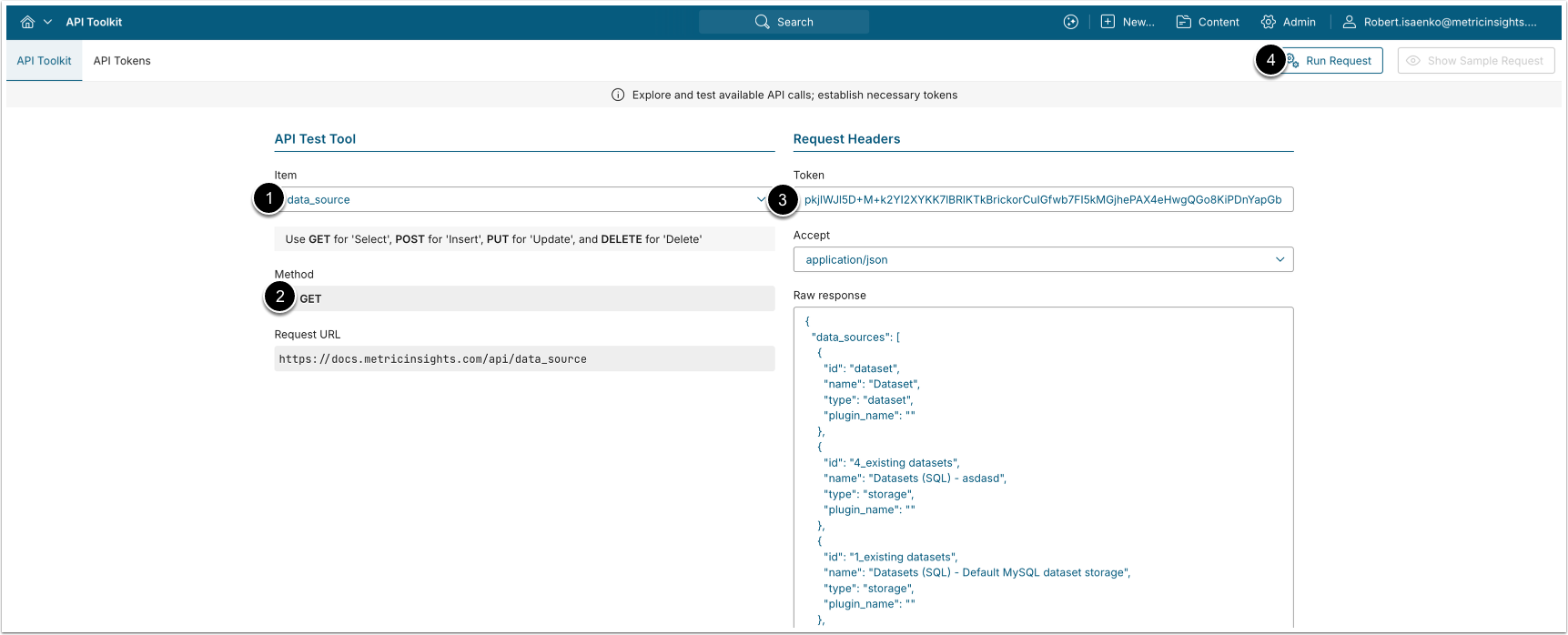
A GET request to /api/data_source returns all Data Sources (SQL and Plugin) with basic metadata.
- Item: data_source
- Method: GET
- Enter an API Token.
- [Run request]
Example Response
{
  "data_sources": [
    { "id": 12, "name": "Sales MySQL", "type": "database", "plugin_name": "" },
    { "id": 18, "name": "Tableau Server", "type": "plugin", "plugin_name": "Tableau" }
  ]
}Fields Description
| Field Name | Value Type | Description |
|---|---|---|
id | integer | The ID of the Data Source. |
name | string | The name of the Data Source. |
type | string | The Data Source type. |
plugin_name | string | The plugin name (for Plugin Data Sources; empty for SQL). |
3. Configure SQL Data Sources
3.1. List SQL Data Sources
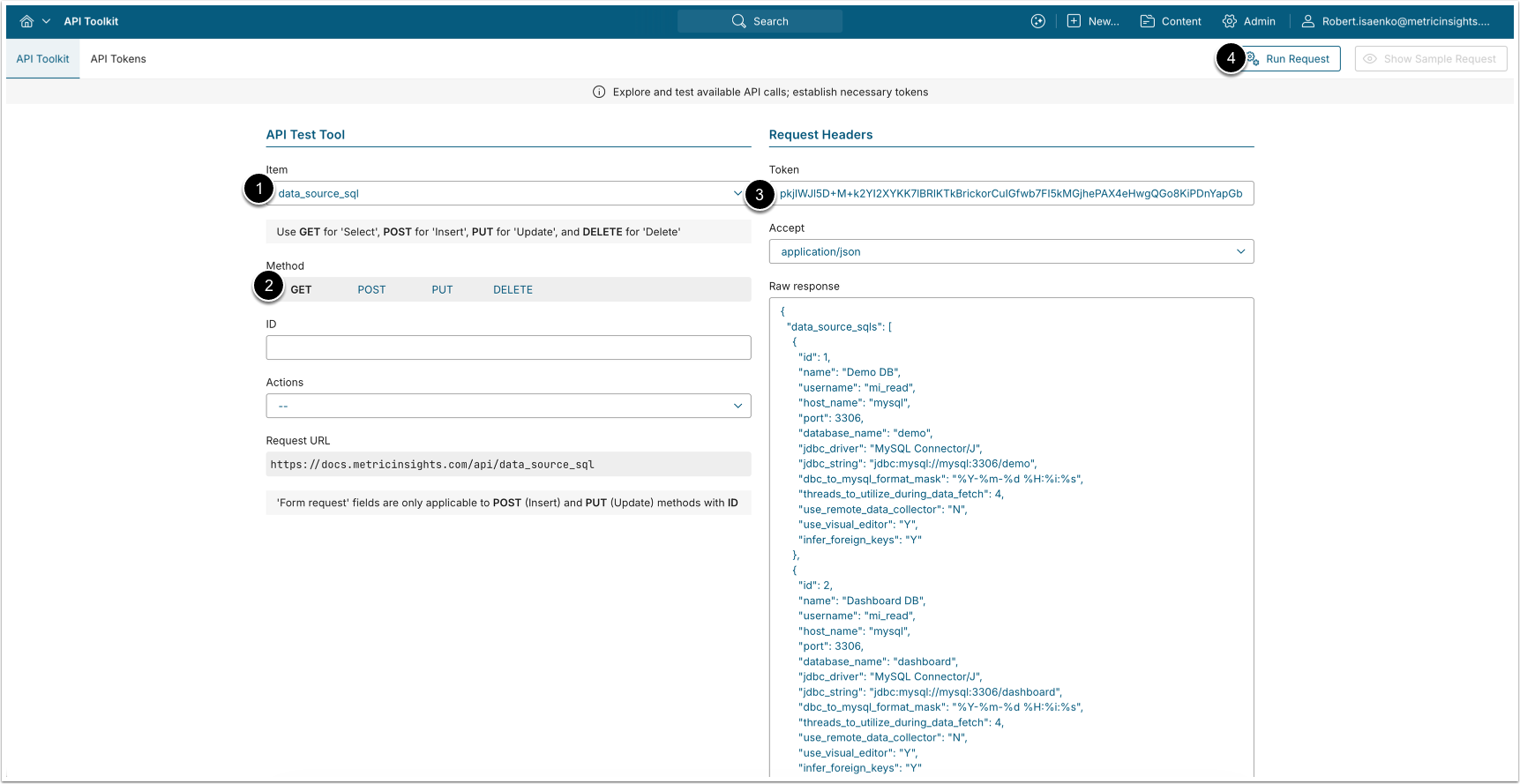
A GET request to /api/data_source_sql returns the SQL Data Sources and their connection settings.
- Item: data_source_sql
- Method: GET
- Enter an API Token.
- [Run request]
Example Response
{
  "data_source_sqls": [
    {
      "id": 5,
      "name": "Sales MySQL",
      "username": "mi_reader",
      "host_name": "db.example.com",
      "port": "3306",
      "database_name": "sales",
      "jdbc_driver": 3,
      "jdbc_string": "",
      "jdbc_to_mysql_format_mask": "",
      "threads_to_utilize_during_data_fetch": 1,
      "use_remote_data_collector": "N",
      "use_visual_editor": "Y",
      "infer_foreign_keys": "N"
    }
  ]
}Fields Description
| Field Name | Value Type | Description |
|---|---|---|
id | integer | The ID of the SQL Data Source. |
name | string | The Data Source name. |
username | string | The database username. |
host_name | string | The database host. |
port | string | The database port. |
database_name | string | The database name. |
jdbc_driver | integer | The JDBC driver ID. |
jdbc_string | string | The custom JDBC connection string (if used). |
jdbc_to_mysql_format_mask | string | The JDBC-to-MySQL date format mask. |
threads_to_utilize_during_data_fetch | integer | Concurrent threads per update trigger event. |
use_remote_data_collector | string | Whether data fetch runs on a Remote Agent. ("Y"/"N") |
use_visual_editor | string | Whether the visual editor is allowed. ("Y"/"N") |
infer_foreign_keys | string | Whether foreign keys are inferred. ("Y"/"N") |
3.2. Create (Copy) a SQL Data Source
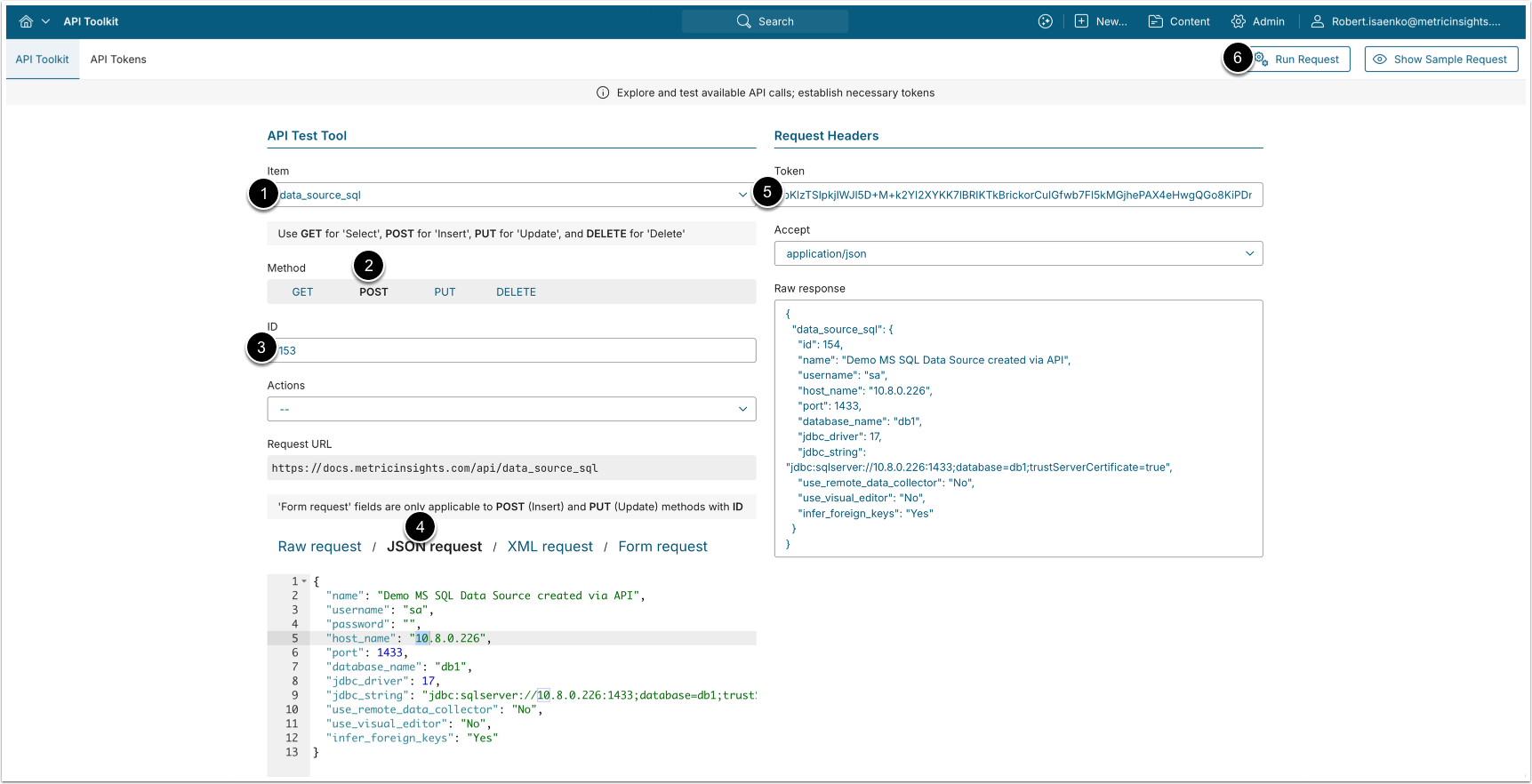
A POST request to /api/data_source_sql creates a new SQL Data Source.
- Item: data_source_sql
- Method: POST
- ID: Enter the ID of an existing SQL Data Source to use as a template. After entering it, the Request body is pre-filled with that Data Source's settings.
- Select JSON Request and modify the request body:
- To copy an existing Data Source, provide a unique name and a password, and keep the other settings.
- To point at a different database, also update the relevant connection parameters (
host_name,port,database_name,username, password).
- Enter an API Token.
- [Run request]
3.3. Test a SQL Data Source Connection
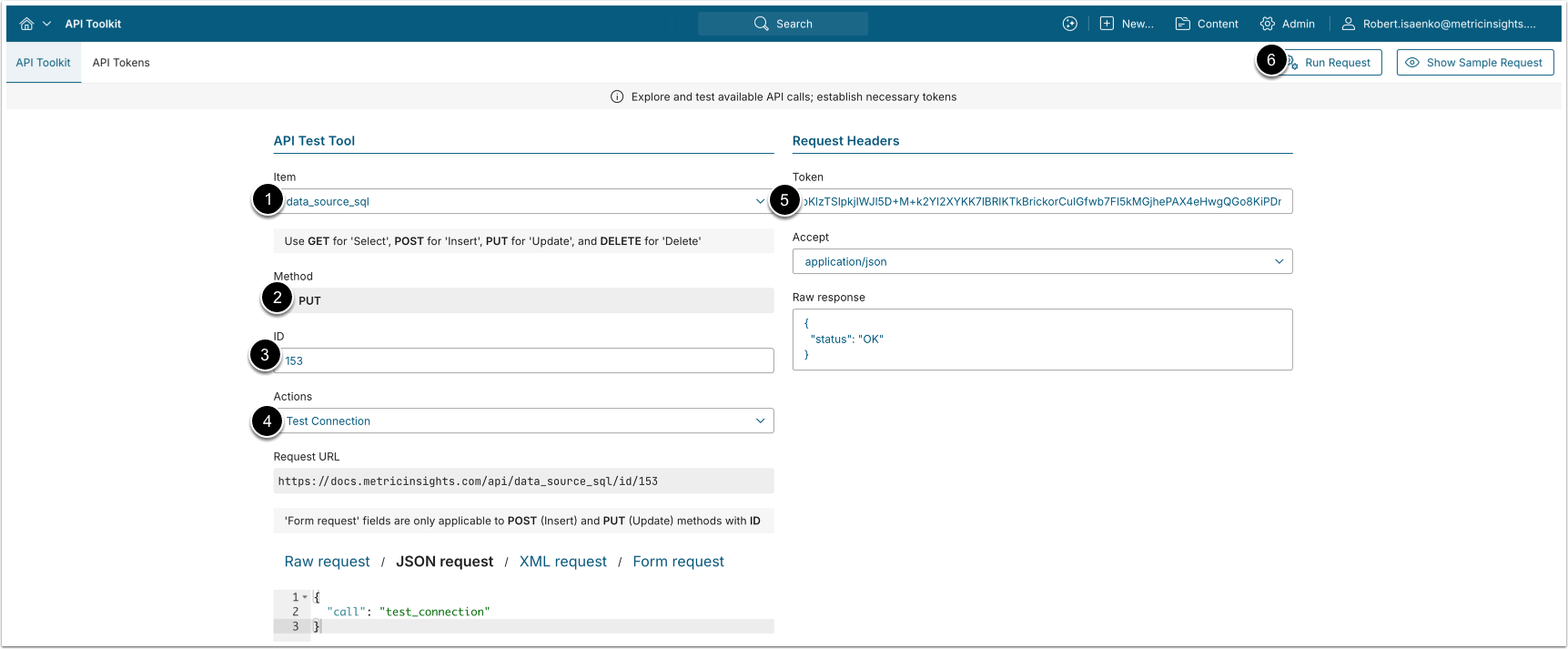
A PUT request to /api/data_source_sql/id/<id> with the body {"call": "test_connection"} validates the connection.
- Item: data_source_sql
- Method: PUT
- ID: The ID of the SQL Data Source to test.
- Actions: Test Connection.
- Enter an API Token.
- [Run request]
3.4. Delete a SQL Data Source
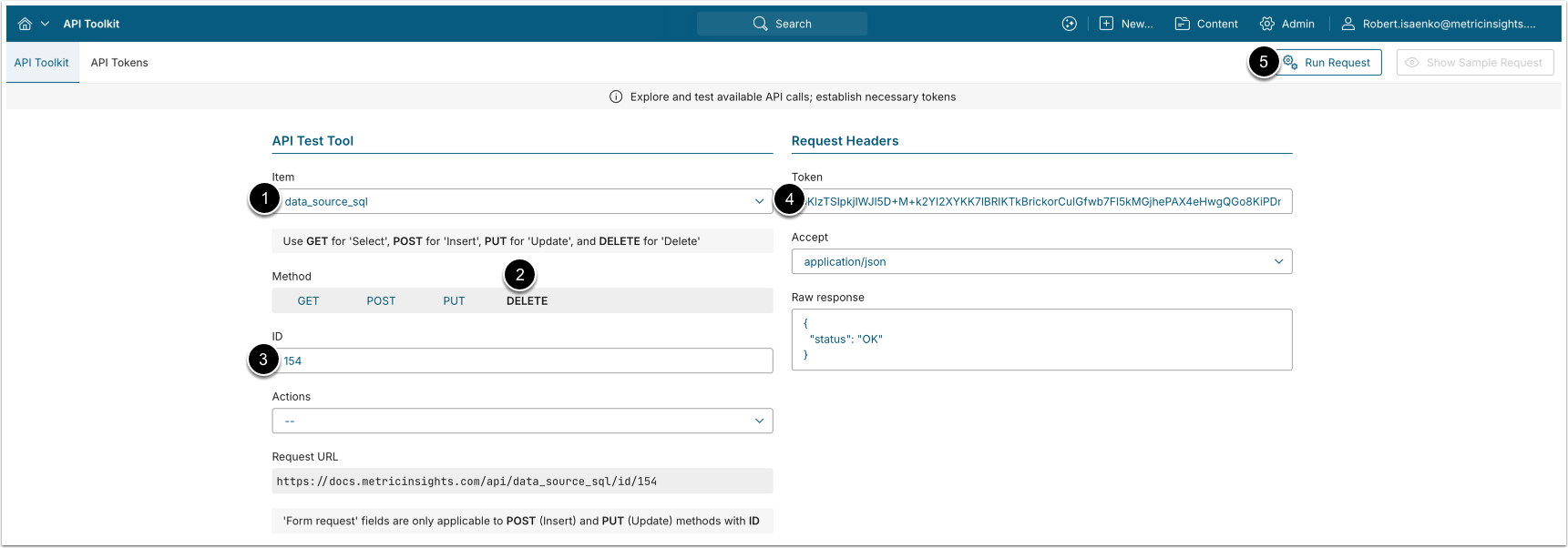
A DELETE request to /api/data_source_sql/id/<id> deletes a SQL Data Source.
- Item: data_source_sql
- Method: DELETE
- ID: The ID of the SQL Data Source to delete.
- Enter an API Token.
- [Run request]
4. Configure Plugin Data Sources
4.1. List Plugin Data Sources
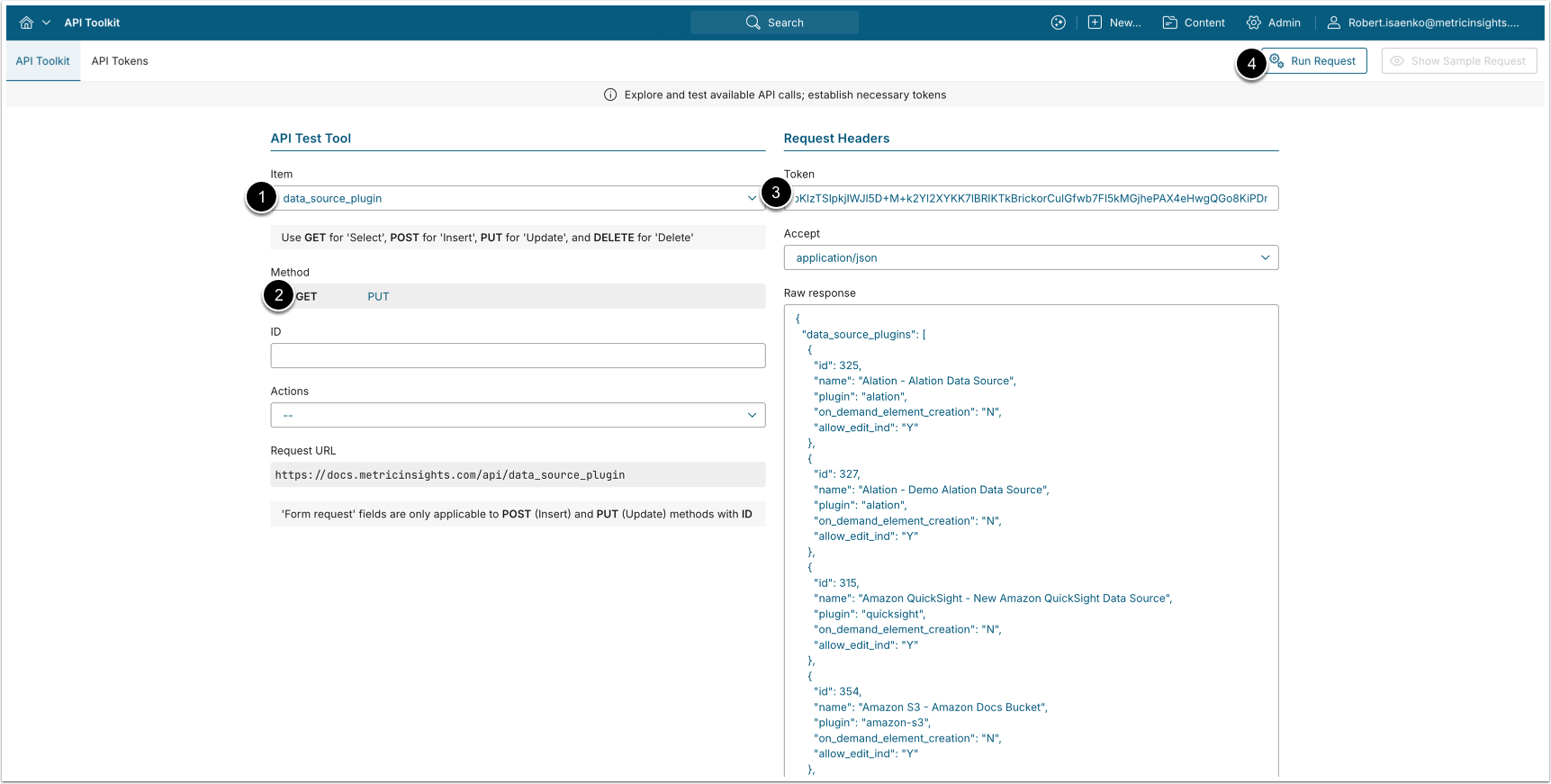
A GET request to /api/data_source_plugin returns the Plugin Data Sources.
- Item: data_source_plugin
- Method: GET
- Enter an API Token.
- [Run request]
Example Response
{
  "data_source_plugins": [
    {
      "id": 21,
      "name": "Tableau Server",
      "plugin": "tableau",
      "on_demand_element_creation": "N",
      "allow_edit_ind": "Y"
    }
  ]
}Fields Description
| Field Name | Value Type | Description |
|---|---|---|
id | integer | The ID of the Plugin Data Source (connection profile). |
name | string | The Data Source name. |
plugin | string | The plugin internal name. |
on_demand_element_creation | string | Whether on-demand element creation is enabled. ("Y"/"N") |
allow_edit_ind | string | Whether the current user can edit this Data Source.
("Y"/"N") |
4.2. Run a Plugin Data Source Action
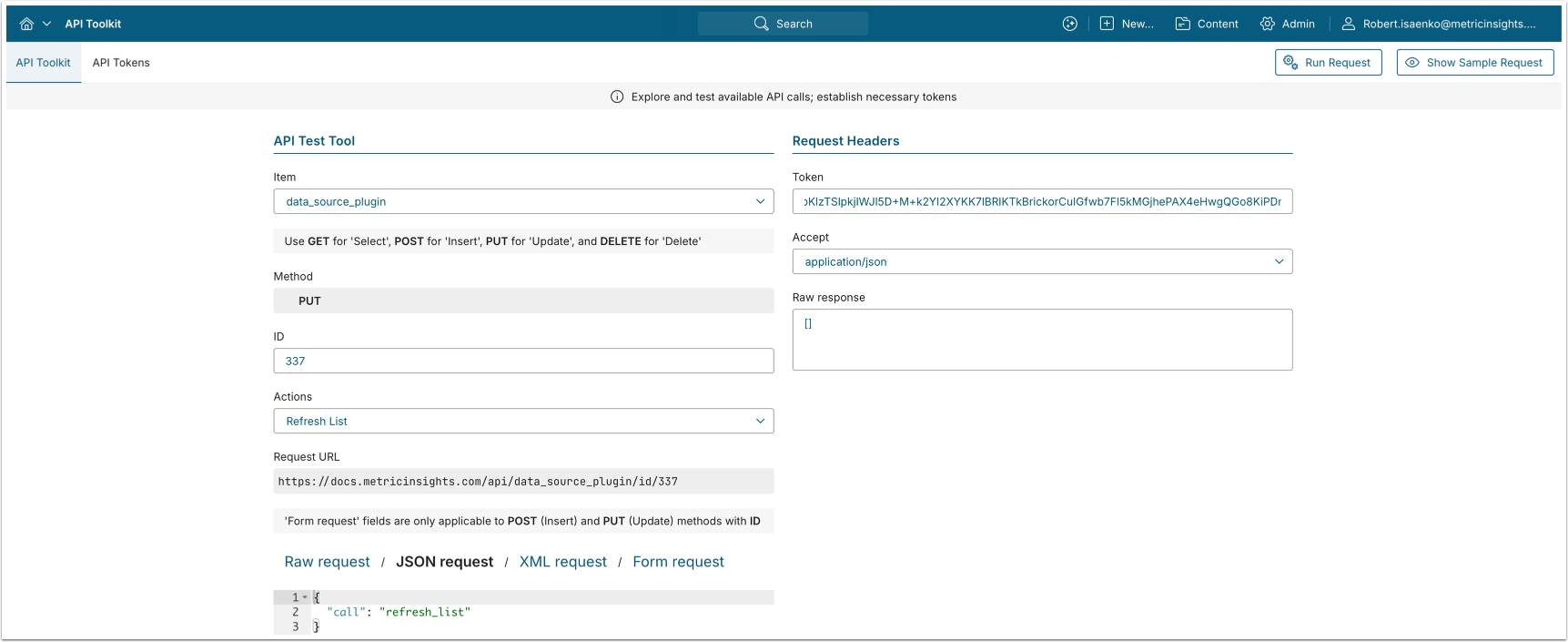
A PUT request to /api/data_source_plugin/id/<id> runs an action against a Plugin Data Source. The action is selected with the call parameter (the Actions drop-down list in the API Toolkit).
- Item: data_source_plugin
- Method: PUT
- ID: The ID of the Plugin Data Source.
- Actions / call: Choose one of the actions:
- refresh_list: Re-fetch the list of the plugin's External Reports.
- refresh_security_cache: Refresh the external-tool security caches for this Plugin Data Source. Only works for plugins that support row-level security (such as Tableau and Power BI).
- get_token: Return an access token for the Plugin Data Source. The
access_tokenfield will be empty if the plugin does not use OAuth or token-based authentication, or if valid credentials have not been configured for the profile. - update_user_role: Sync user roles and licenses with the source system. Only supported by the Tableau plugin.
- Enter an API Token.
- [Run request]
5. List Plugin Data Source Parameters
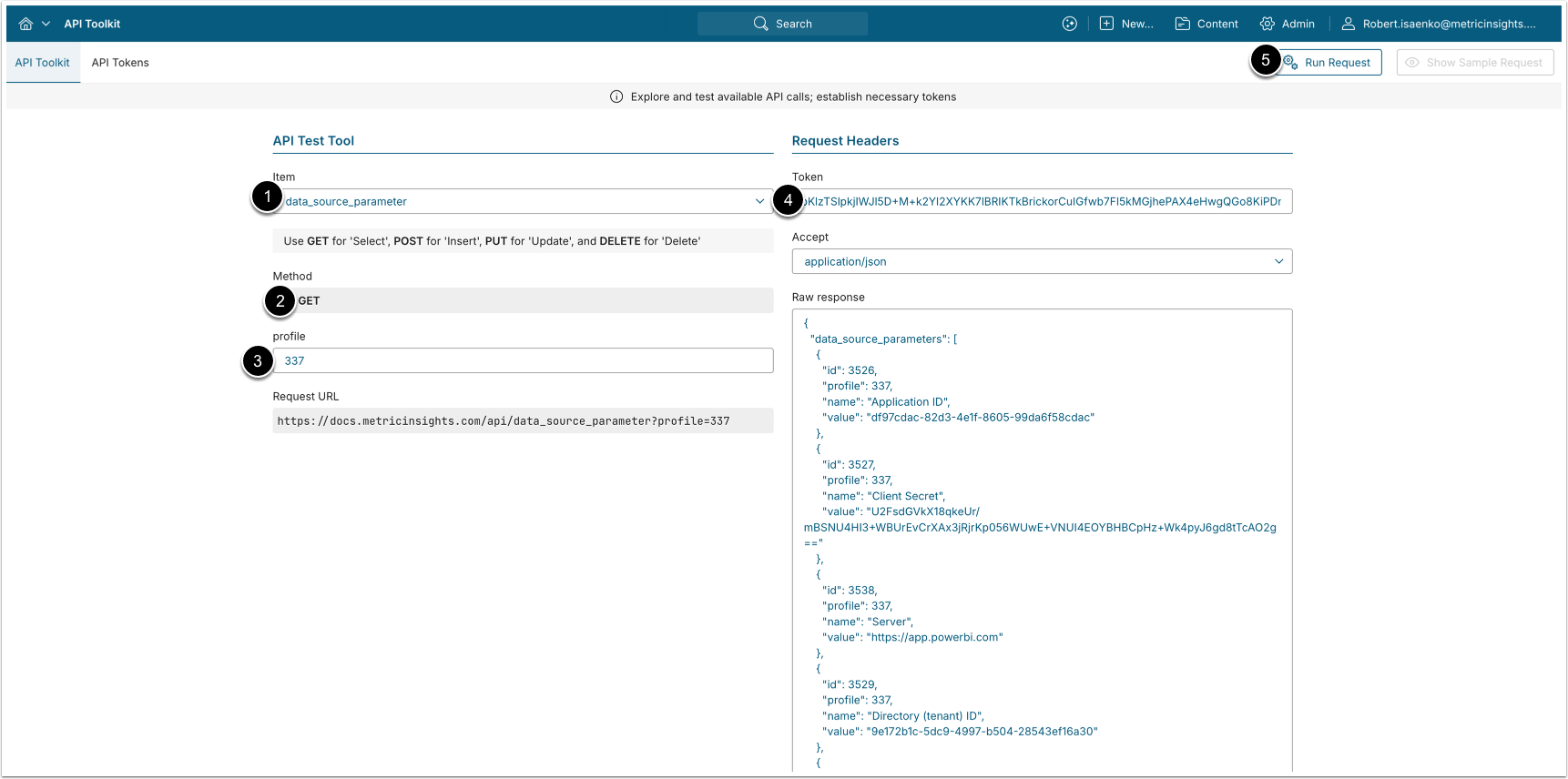
A GET request to /api/data_source_parameter returns the parameters configured for the Plugin Data Source.
- Item: data_source_parameter
- Method: GET
- profile: Optionally, enter the ID of the Plugin Data Source (connection profile) whose parameters to retrieve.
- Enter an API Token.
- [Run request]
Example Response
{
  "data_source_parameters": [
    { "id": 101, "profile": 21, "name": "site", "value": "Sales" },
    { "id": 102, "profile": 21, "name": "api_version", "value": "3.15" }
  ]
}Fields Description
| Field Name | Value Type | Description |
|---|---|---|
id | integer | The ID of the parameter. |
profile | integer | The Plugin Data Source (connection profile) ID. |
name | string | The parameter name. |
value | string | The parameter value. |
6. List External Reports for a Plugin Data Source
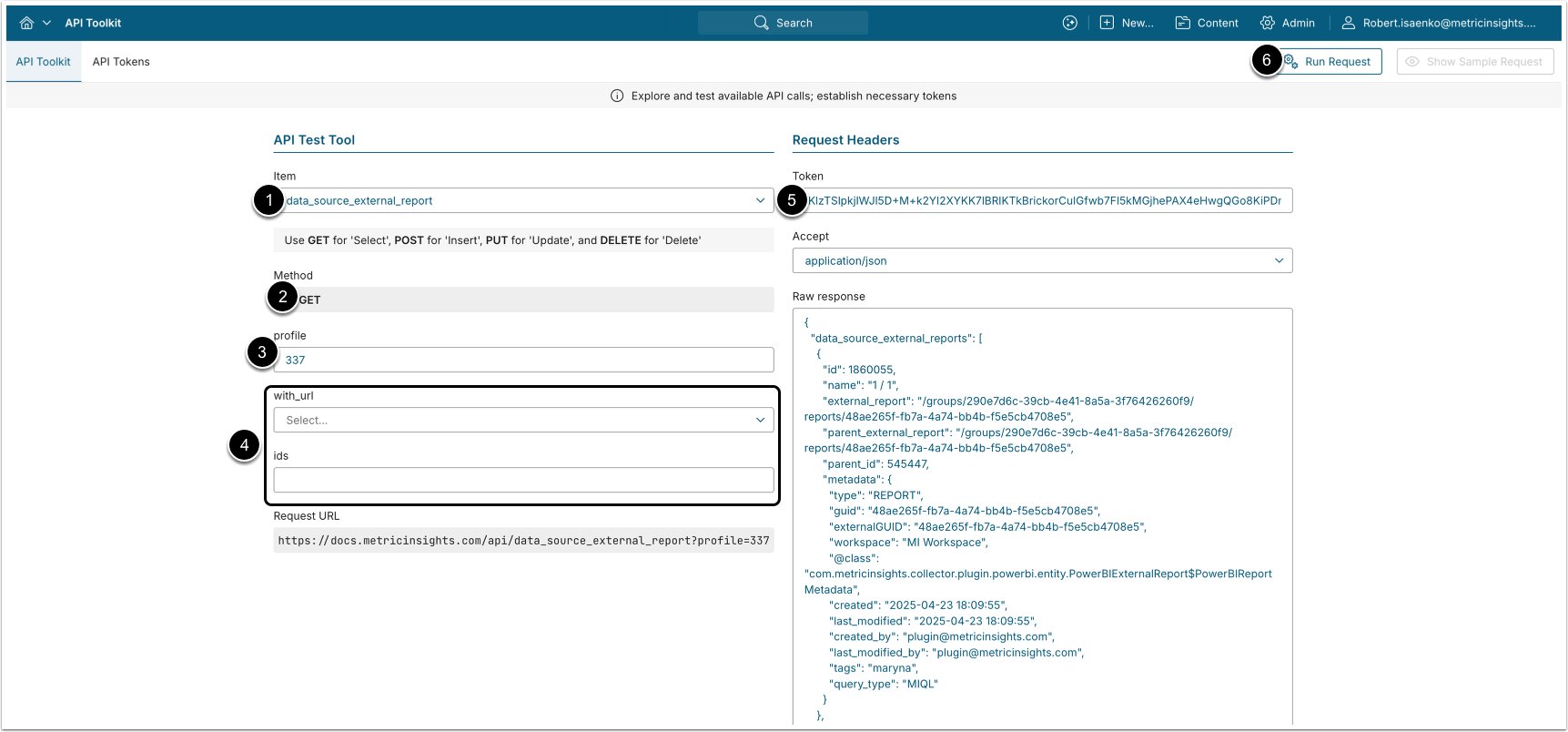
A GET request to /api/data_source_external_report returns the External Reports (Data Source Objects) available from a Plugin Data Source.
- Item: data_source_external_report
- Method: GET
- profile: The ID of the Plugin Data Source (connection profile).
- Enter optional parameters:
- with_url: Select whether to include the External Report URL ("
Y"/"N"). - ids: Restrict to specific External Report IDs.
- with_url: Select whether to include the External Report URL ("
- Enter an API Token.
- [Run request]
Example Response
{
  "data_source_external_reports": [
    {
      "id": 8842,
      "name": "Quarterly Sales",
      "external_report": "wb-1234",
      "parent_external_report": "proj-55",
      "parent_id": 880,
      "metadata": {}
    }
  ]
}Fields Description
| Field Name | Value Type | Description |
|---|---|---|
id | integer | The internal ID of the External Report. |
name | string | The External Report name. |
external_report | string | The external (source-system) ID of the report. |
parent_external_report | string | The external ID of the parent object. |
parent_id | integer | The internal ID of the parent object. |
metadata | object | Source-system metadata for the report. |