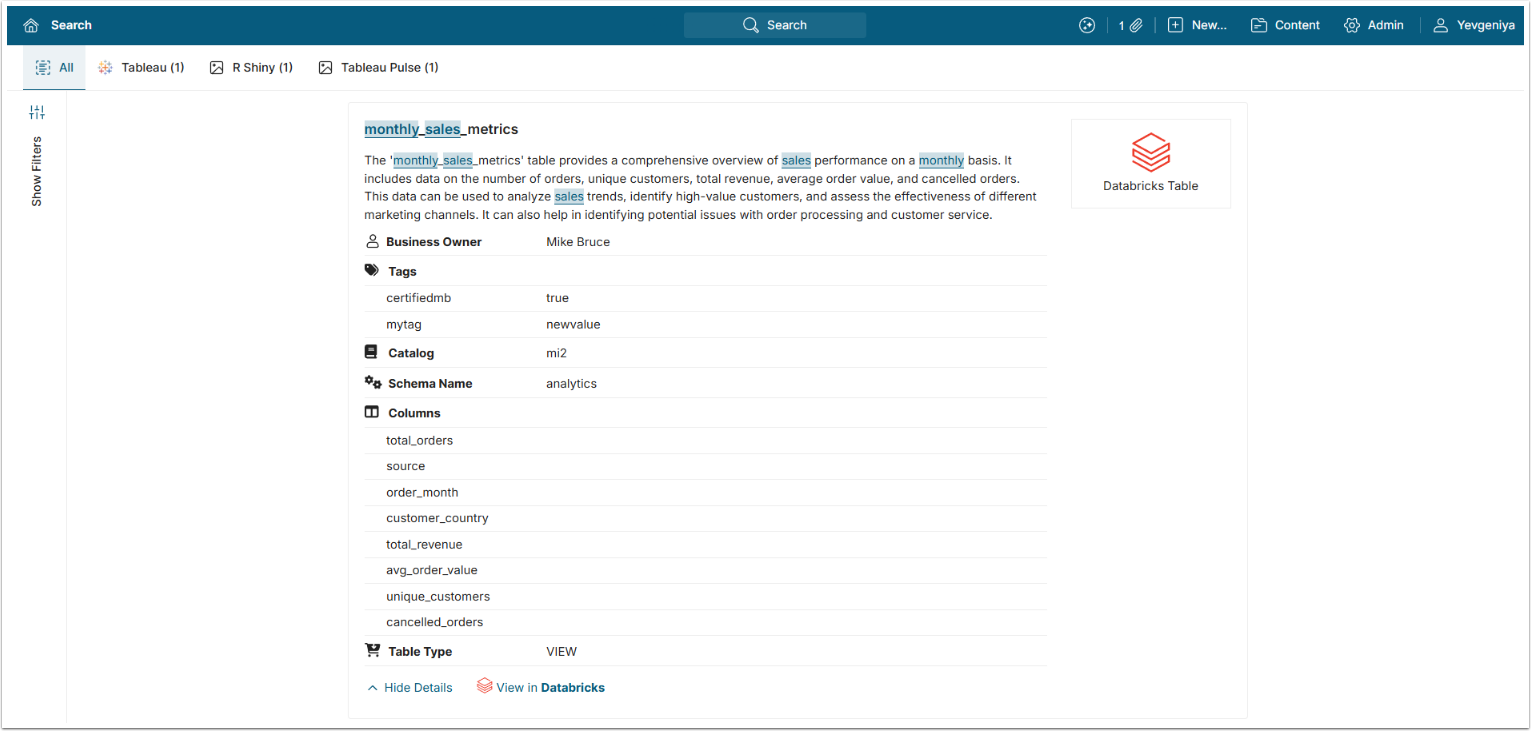
With the introduction of Analytics Marketplace in v7.1.0, discovery and search capabilities across multiple data catalog platforms has been significantly expanded.
You can search for database table assets without leaving the Metric Insights UI and without recreating them as objects in Metric Insights. Global Search will return the assets with the list of available metadata and links to proceed to either the asset in the data catalog tool, such as Atlan, Collibra, Databricks Unity Catalog, etc. or the actual object in the associated BI tool like Tableau, Power BI, etc.
The process consists of the following steps:
- Create a Dataset to retrieve All Table Assets metadata into Metric Insights.
- Create a Derived Dataset from the All Table Assets Dataset to generate JSON objects for metadata fields available in the data catalog tool and include any additional custom fields specific to your environment.
NOTE: The Column and Tags fields are already formatted in JSON. - Add the Derived Dataset to Search and map the Dataset Columns.
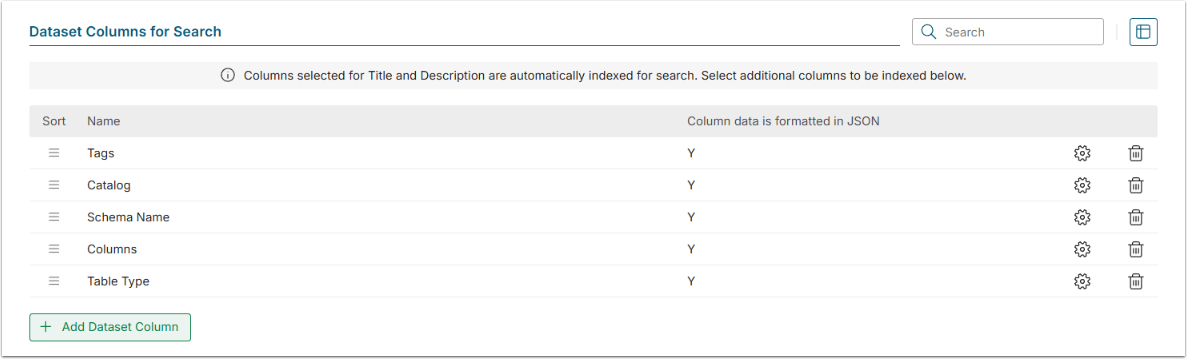
- Add Dataset Columns for Search—include the JSON fields from Step 2 so they are indexed and displayed in the search results for each object, as shown in the final screen.
PREREQUISITES:
- Established connectivity with Databricks Unity Catalog.
1. Create a Dataset from the All Table Assets Object
For more details on how to create Datasets, refer to Understanding Datasets.
For more details on how to create a Dataset form Databricks Unity Catalog, refer to Create Dataset from Databricks.
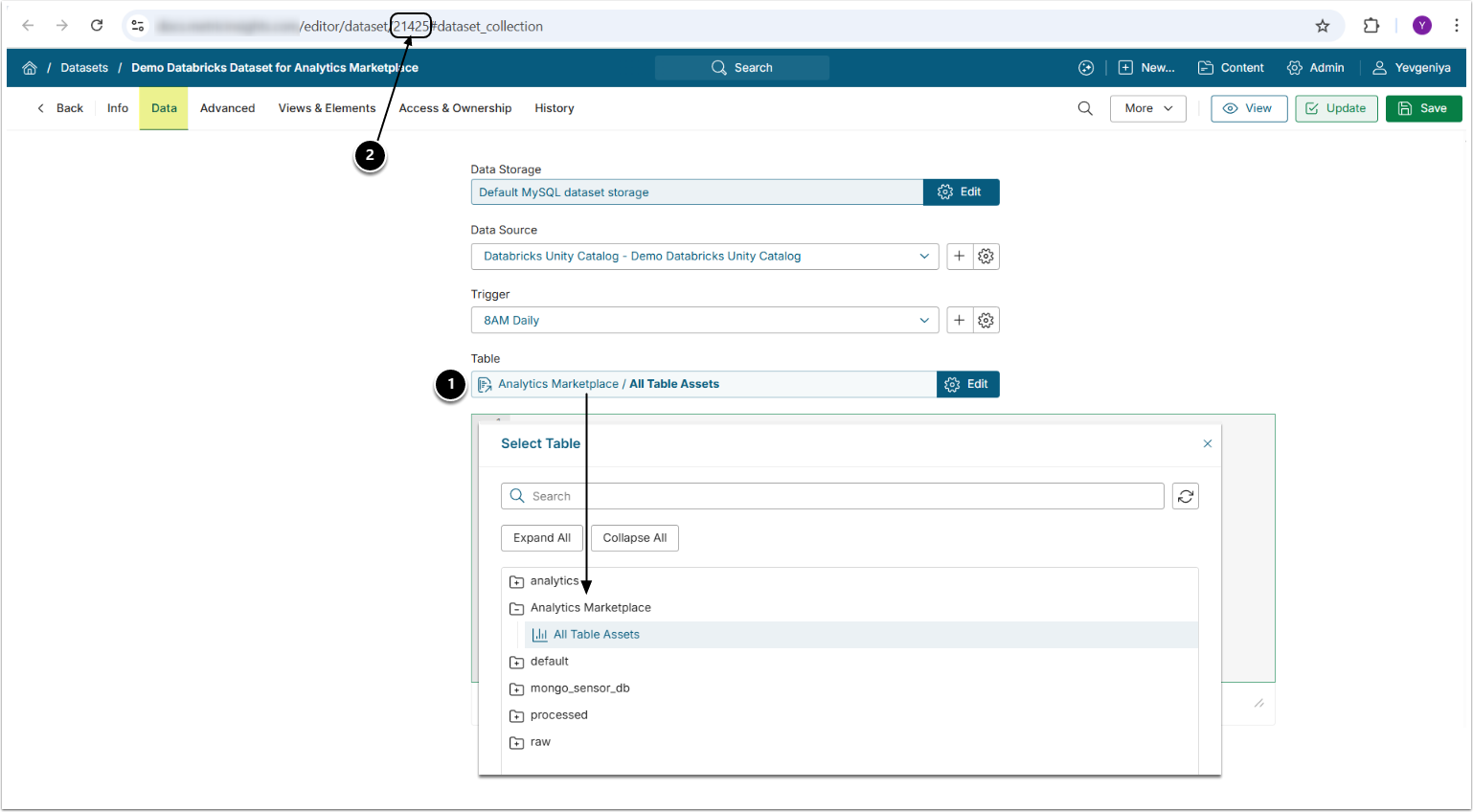
- Create a Dataset from the All Table Assets object under Analytic Marketplace.
- Note the Dataset ID to be used in Step 2.
2. Create a Derived Dataset from the All Table Assets Dataset
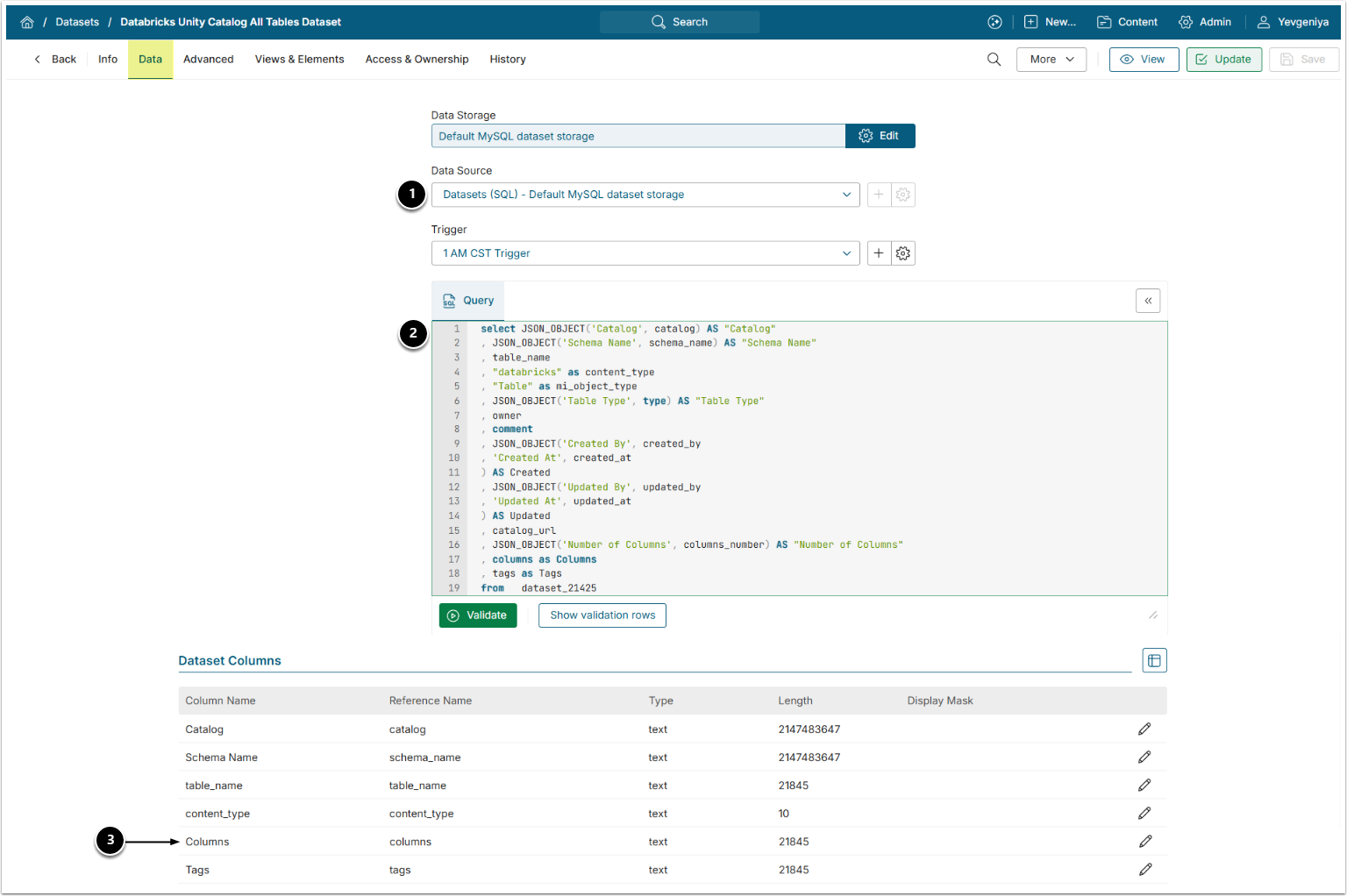
- Data Source: select the Data Source used as Data Storage when creating the Dataset from the Databricks Unity Catalog All Table Assets object in Step 1;
- Query: the query is intended to:
- Set Object Type Column to "Table" and Content Type Column to "Databricks";
- Transform standard Databricks Unity Catalog fields, such as Catalog, Schema Name, Table Type, etc., into JSON objects.
- Transform user-added fields into JSON objects.
- This step will ensure that metadata is searchable and appears in search properly formatted.
- The query must include the ID [
datasetID] of the Dataset created from the Databricks Unity Catalog All Table Assets object in "FROM dataset_datasetID".
- Make sure the Dataset Column Length for "columns" is set high enough. This may be necessary if your table contains many columns or very detailed descriptions.
select JSON_OBJECT('Catalog', catalog) AS "Catalog"
, JSON_OBJECT('Schema Name', schema_name) AS "Schema Name"
, table_name
, "databricks" as content_type
, "Table" as mi_object_type
, JSON_OBJECT('Table Type', type) AS "Table Type"
, owner
, comment
, JSON_OBJECT('Created By', created_by
, 'Created At', created_at
) AS Created
, JSON_OBJECT('Updated By', updated_by
, 'Updated At', updated_at
) AS Updated
, catalog_url
, JSON_OBJECT('Number of Columns', columns_number) AS "Number of Columns"
, columns as Columns
, tags as Tags
from   dataset_XXX
Acceptable JSON Formats:
{"Pii Data": ""}
{"Data Steward": "Clyde, Curt", "Business Owner": "Clint", "Technical Owner": "Kyle"}
[{"label":"Catalog","value":"Gifts"}]
[{"name":"Product Type","description":"High level grouping of our products."}]3. Add the Derived Dataset to Search
Access Admin > System > Search Setup
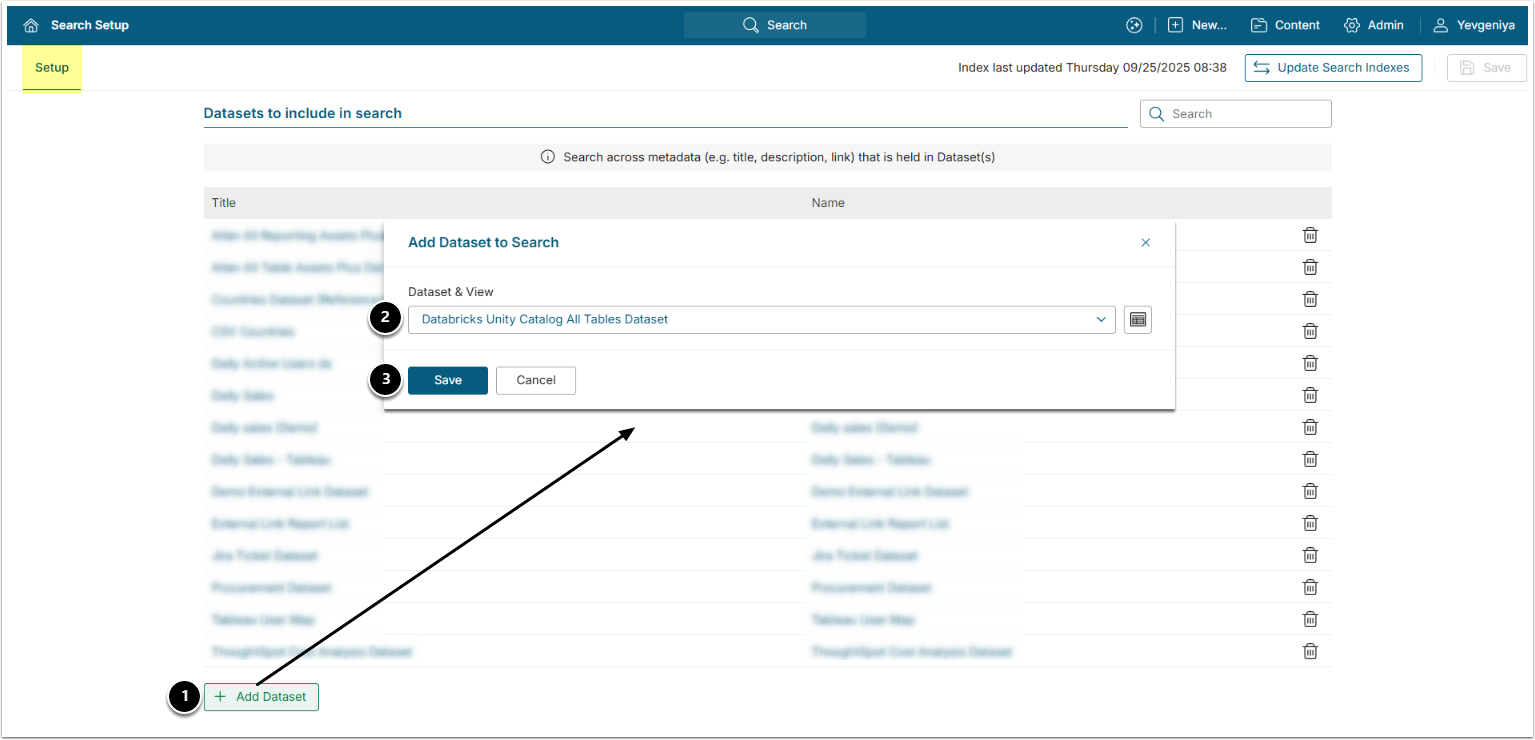
- Under Datasets to include in Search, [+Add Dataset].
- Dataset & View: choose the Dataset created in the Step Create a Derived Dataset from the All Table Assets Dataset.
- [Save]
4. Map Dataset Columns
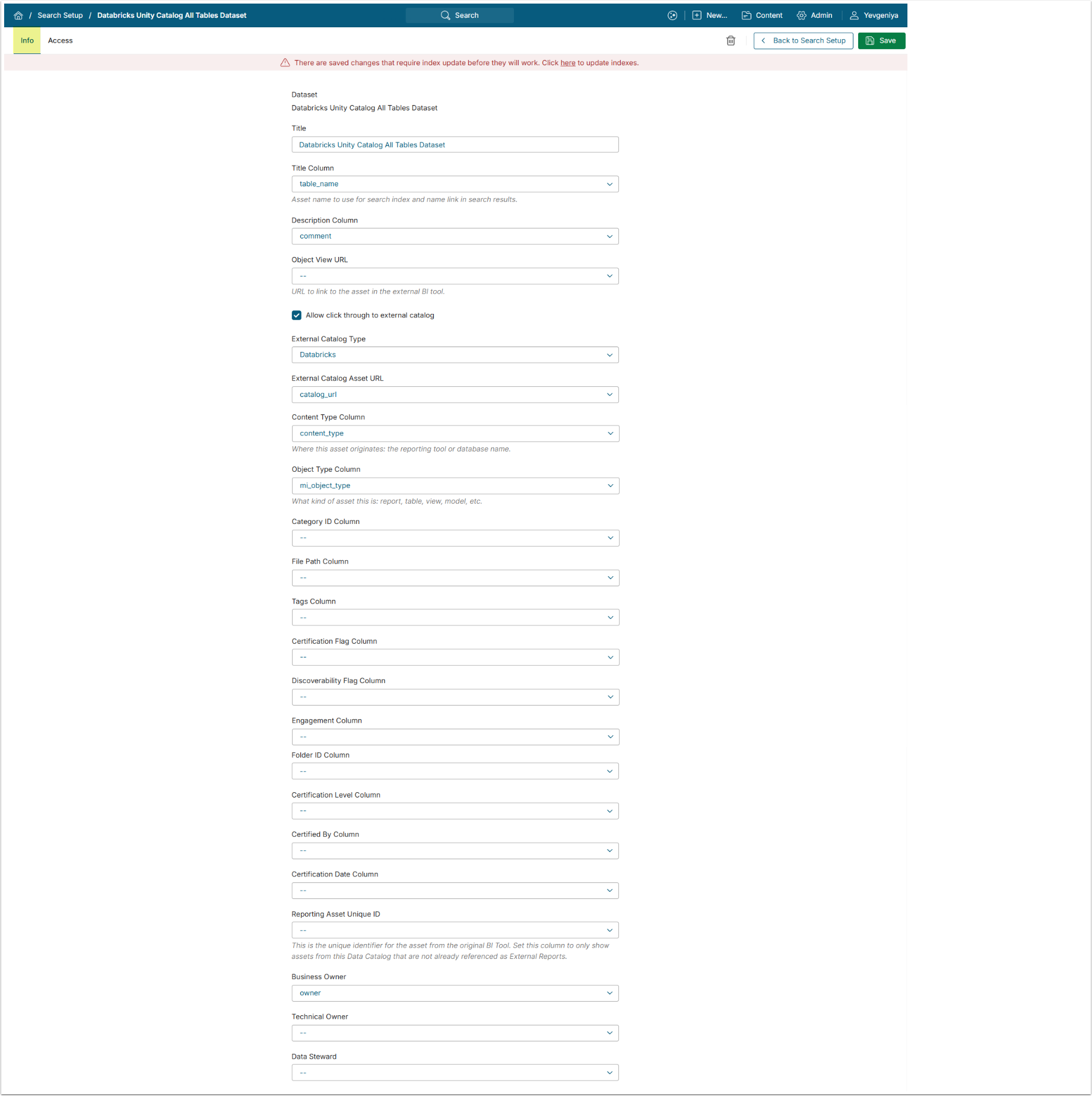
Use the following mapping example with Allow click through to external tool enabled.
| Field | Dataset Column |
|---|---|
| Title Column | table_name |
| Description Column | comment |
| External Catalog Type | Databricks Unity Catalog |
| External Catalog Asset URL | catalog_url |
| Content Type Column | content_type |
| Object Type Column | mi_object_type |
| Business Owner/Technical Owner/Data Steward* | owner |
*If retrieving email addresses from the data catalog system, they can be mapped to Metric Insights’ native owner fields. For example, the "owner" field from Databricks Unity Catalog can be mapped to the Business Owner field. Otherwise, owner fields can instead be pulled in as JSON objects.
For more details on configuring search across Datasets and Access, refer to Configure Search Across Specific Dataset (v7.1.0+).
5. Add Dataset Columns for Search
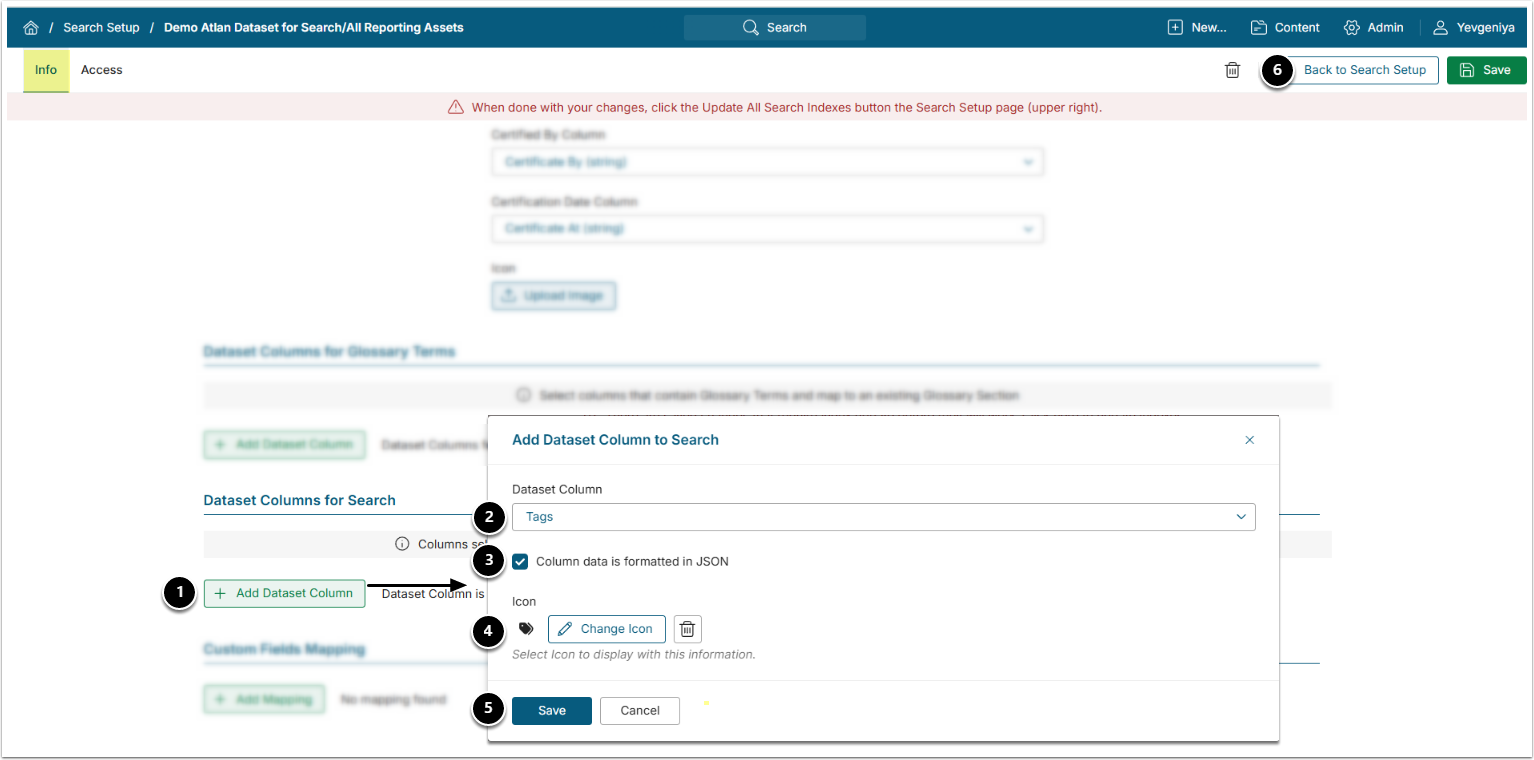
- Under Dataset Columns for Search, [+Add Dataset Columns].
- Dataset Column: choose a custom field column from the Dataset.
- Column data is formatted in JSON: enable. Must be enabled for all added columns, if multiple.
- Icon: optionally, select an icon.
- [Save] and add as many additional columns as needed.
- [Save]
- See the final result on the screen below. These fields will then appear in search results.
- [Back to Search Setup] and [Update All Search Indexes] at the upper right.
6. Verify Result