Metric Insights 7.2.1 is the second major release of 2026, focusing on reporting, metrics and alerts; Concierge and AI enhancements; catalog flexibility, and BI tool integration.
Report Metrics and Alerting brings KPI tracking and alert-driven workflows directly into our native reporting layer (no more dimension limitations!). Concierge enhancements push the MI platform further into the exciting realm of AI for BI use-cases. Multiple Catalogs gives organizations the ability to present tailored content experiences to different teams within a single MI environment.
Plugin configuration becomes more self-service with a new purpose-built Tableau Data Source Editor and clearer error codes. App Builder has seen further polishing, moving closer to a beta release in 7.3.0.
Additionally, this release includes targeted improvements across Publishing Workflows, Search, Access Requests, and system administration. Keep reading for more.
Major Features in 7.2.1 (released May 6, 2026)
- Report Metrics and Alerts are a new feature within Reports, providing report-level metrics and alerting with no dimension restrictions (historically a challenge with our legacy Metric object). Users can define alert conditions for report KPI components, and use those alert outcomes in downstream Bursts, including support for bursting by filter combinations.
- Talk to Your Data for Tableau and Power BI (Beta) makes rich, data-centric interactions possible via Concierge. The vision: once a Tableau Dashboard or Power BI Report is accessed, simply open up the Concierge panel and start asking questions about the data. This functionality is beta and should not be used for production use-cases until release 7.2.2
- AI-powered Reports & Datasets (Beta) enable AI analysis directly in Dataset Reports to generate synthesized insights, with drill-down traces showing how each conclusion was reached, and a new AI-sourced dataset type enables dynamic data population via connected tools.
- Multiple Catalogs allow organizations to define multiple distinct catalog experiences within a single MI environment, each with its own curated content constraints, default filters, Categories, Folders, and Tags — enabling different teams or user groups to browse a homepage and Catalog tailored specifically to them.
- Tableau Plugin Data Source is a purpose-built plugin data source editor that follows that same pattern we introduced with Power BI in our 7.2.0 release. It makes connecting and configuring BI tool integrations significantly more self-service, paired with clearer, actionable error codes so users know exactly what went wrong and how to fix it.
- App Builder advances MI's no-code portal page builder with a dedicated Styles tab, giving users fine-grained control over fonts, colors, spacing, and borders at the page, container, and individual component level — making it easier than ever to create polished, on-brand portal experiences without writing code.
- Concierge brings the next wave of improvements to MI's AI assistant, including richer context passing from embedded BI dashboards (active filters, current focus) for more relevant responses, and improved error messaging around LLM API configuration.
- Access Request Profiles enables Admins to configure integration-specific Access Request Profiles — including Freshworks (ServiceNow support to come in 7.3.0) — that route access requests directly into the ITSM system already in use, while end users landing on discoverable content they can't access now see a rich page with metadata and a clear path to request access.
- Publishing Workflows delivers targeted improvements to the Publishing Board including bulk stage actions, a Data Source filter for scoping work to specific BI tools, custom access denied messaging at the stage level, and read-only Element names for content synced from external BI tools.
- Remote Filesystem Plugin introduces support for remote CIFS (network share) file systems, enabling MI to connect to network-accessible storage and collect external references with IDs compatible with the existing Local Filesystem plugin for seamless migration.
The primary Docker images used for standard deployments are:
- web – docker.metricinsights.com/metric-insights/release_7_2/133:amd64
- dataprocessor – docker.metricinsights.com/dataprocessor/release_7_2/10:amd64
- data-analyzer – docker.metricinsights.com/data-analyzer/release_7_2/128:amd64
- mi-console – docker.metricinsights.com/console/release_7_2/8:amd64
- redis – docker.metricinsights.com/redis/release_7_2/7:amd64
- image-generator – docker.metricinsights.com/image-generator/release_7_2/9:amd64
Additional images:
- logger (needed for simple deployments) – docker.metricinsights.com/logger/release_7_2/6:amd64
- mysql (used for simple deployments with MySQL running locally) – docker.metricinsights.com/mysql/release_7_2/5:amd64
Report Metrics & Alerting
7.2.1 introduces Report Metrics, a new KPI Component for Dataset Reports that brings metric tracking and Alerting directly into the reporting layer. There is no limit on the number of dimensions that can be present in the data, like there is with our legacy Metric object. Power Users can add KPI Components to a Dataset Report with configurable aggregation, variance calculation, and Stoplights, and define Alert Rules based on Snapshot Date (support for alerting on any measure will come in the future). Users can subscribe to those Rules from the Report Viewer and receive Alerts when conditions are met. Burst recipients can be scoped to only receive a Report when Alert Rule criteria are satisfied. When a Report is included in a Burst based on Alert Rule triggers, Burst content is grouped by Alert Event, with each Event's filtered data presented as a separate section in the delivered email.
Talk To Your Data (Beta)
Initially supported in Tableau and Power BI, you can now open up Concierge and start a conversation directly with your dashboard/report. No MCP required.
By collecting "learnings" on the purpose of the report and the semantic model that powers it, we can write VizQL (Tableau) and DAX (Power BI) queries directly against the underlying data. Queries are made as the user, so RLS is applied. System prompts are configurable.
We are eager to partner with any interested customers early so that we can achieve General Availability in 7.2.2 and support your production use-cases. Contact our support team or let your Solutions Architect know are you interested in early review.
Multiple Catalogs
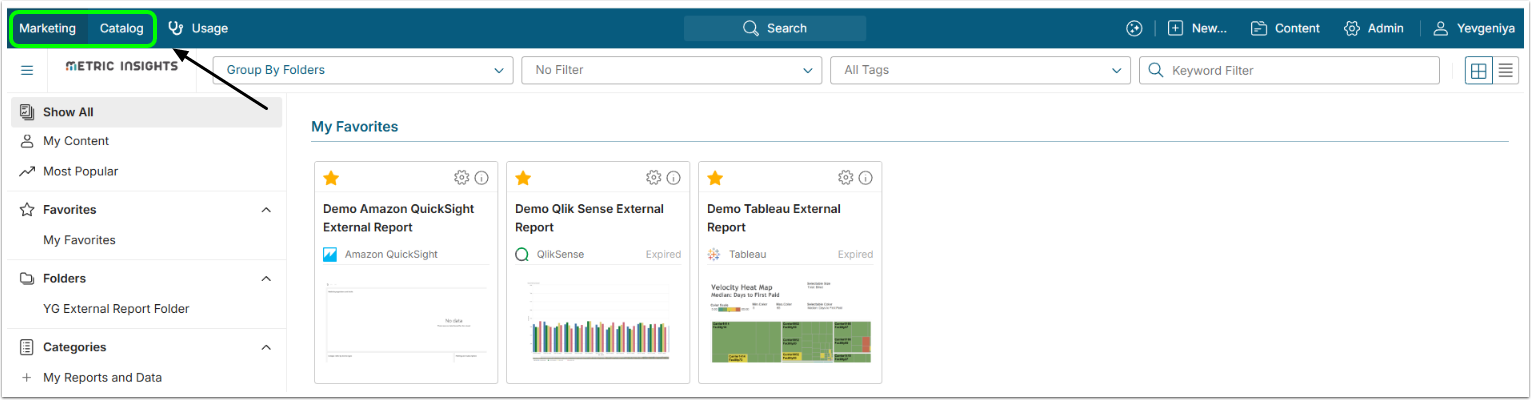
Metric Insights 7.2.1 introduces Multiple Catalogs, giving Admins the ability to define several distinct Catalog views within a single instance, each surfaced as its own named Tab in the top navigation. This makes it possible to present different audiences with a focused, curated content experience rather than requiring all Users to navigate a single unified Catalog.
Each Catalog is configured independently through a new dedicated Catalogs Editor, which serves as the single source of truth for Catalog names and Icons. The Brand Editor has been updated accordingly, with Catalog naming and Icon settings moved entirely into the Catalogs Editor. Admins can disable the default native Catalog per Brand and replace it with one or more custom Catalogs. Users can Favorite Tiles within each Catalog for a personalized experience, and the Element Viewer Breadcrumb now reflects the Catalog the user navigated from. Announcements can also be scoped to specific Catalogs, or shown across all Catalogs.
Custom Tableau Data Source Editor
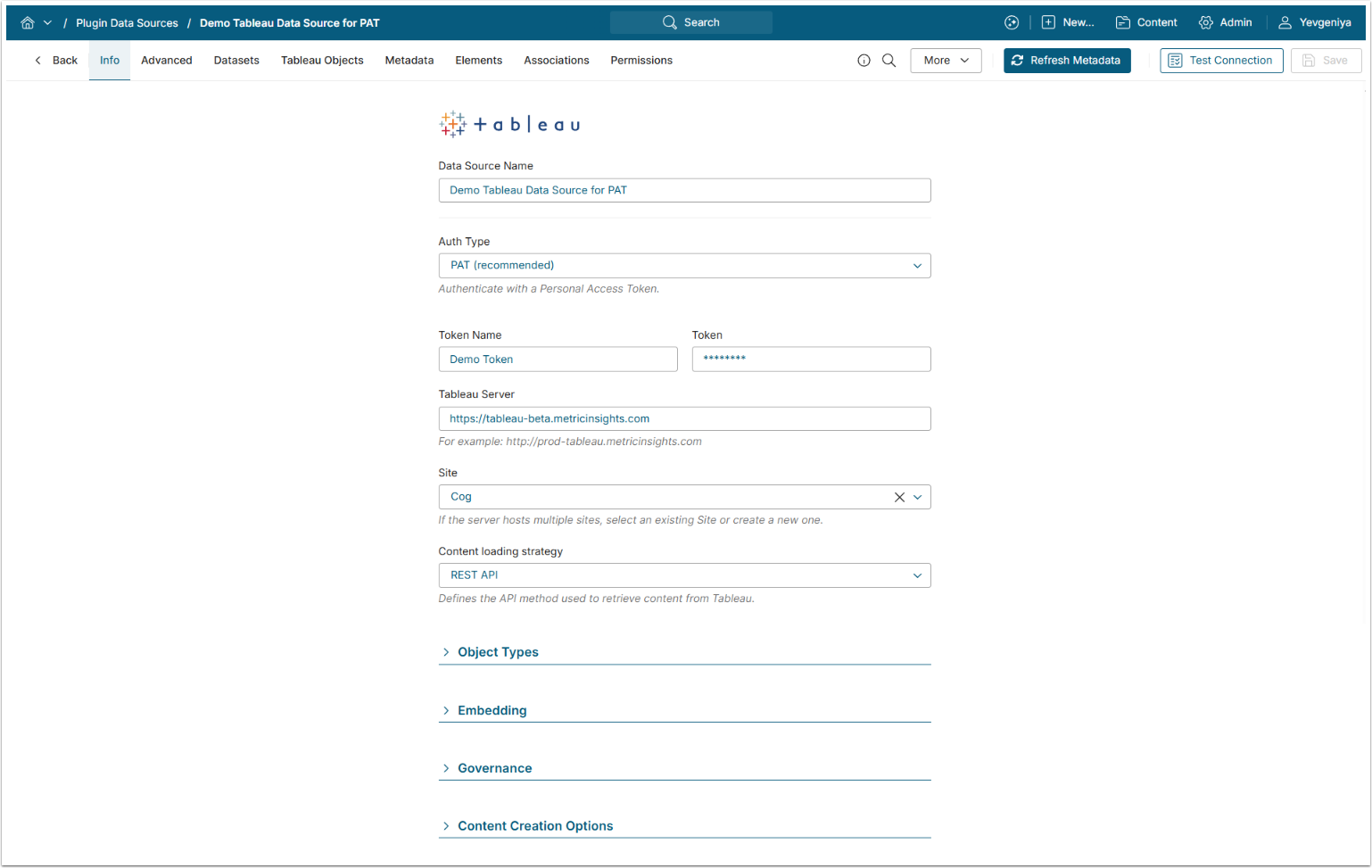
The Tableau Plugin now features a custom Data Source Editor, following the same approach introduced for Power BI in 7.2.0. The Editor provides a clearer, more structured configuration experience with dedicated fields for authentication and connection settings. Supported Auth Types have been streamlined for clarity. PAT credentials can now be stored and reused via Identity Profiles, reducing the need to re-enter tokens across multiple Data Sources. The Editor also includes a dedicated Site Selector Component, allowing Admins to filter and scope content by specific Tableau Sites.
Access Request Profiles

Admins can now configure Access Request Profiles to automatically route content access requests to external ticketing systems such as Freshworks (ServiceNow support will arrive in 7.3.0). Profiles are managed in the Content Center under the new Profiles tab and can be associated with content Categories, ensuring that when a user requests access to content they don't have permission to view, a ticket is automatically created in the appropriate external system — eliminating manual handoffs and streamlining the access approval workflow.
Concierge
7.2.1 brings several improvements to Concierge across context awareness, search quality, and multi-domain support. Concierge now receives contextual information from Tableau, Power BI (mentioned above as the Beta Talk to Your Data functionality) and Custom App dashboards, allowing it to provide more relevant responses based on what the user is currently viewing. Real-time progress indicators have been added, giving users visibility into what Concierge is doing while processing a query. Search quality has been improved through flexible term matching, which allows Concierge to find relevant results even when not all search terms produce exact matches. Snowflake Managed MCP now supports multiple Domains within a single configuration.
App Builder
- The Top Menu Component has been added, providing a configurable navigation bar with logo, navigation links, and optional submenus per item.
- The Quick Access Box Component has been added, displaying a curated set of Tiles based on the User's Favorites, Recently Viewed, or Most Popular content.
- The Styles Tab has been expanded for Page and Container Components with new Layout, Background, Border, and Typography controls, and cleaned up across all Components to show only applicable options.
- Selected Components can now be deleted using the Delete keyboard shortcut.
- Changing settings in the panel no longer triggers a full canvas refresh, resulting in a smoother editing experience.
- The Announcements Component now displays a scrollbar when its configured size is smaller than the list of active Announcements, ensuring all items remain accessible.
API
- api/search results now incorporate Glossary Term Custom Field values, contributing to search ranking and supporting Custom Field-based syntax (e.g., [custom field]value).
- api/topic returns all Tags, including those with empty created_time or created_by fields.
- api/element_info includes an edit_access flag (Y/N) indicating whether the current user has Edit access to the Element.
- api/user_setting includes the List View column count value in both requests and responses.
- api/report_component_data retrieves data for a specific KPI component within a Dataset Report, accepting report (Element ID), component (block UID), and an optional dimension_value parameter.
Plugin Improvements
New Plugins
- Metric Insights now includes a new Plugin for Google Dataplex Universal Catalog, extending Analytics Marketplace support to Google's data catalog platform.
- A new Remote Filesystem Plugin is now available, replacing the previous Local Filesystem Plugin for installations that access files over RDP.
Microsoft Power BI
- Power BI HTTP 429 (rate limit) responses are now handled gracefully, with automatic retry logic that waits for the rate limit window to reset before retrying.
- Power BI report Tags are now included in synced metadata, surfaced alongside other Element metadata in MI.
- The Power BI Plugin can now retrieve Filter names and values from reports, enabling Filter-based Element configuration within MI.
- The Power BI Object Types drop-down has been updated to match the current design standards.
Tableau
- The Original Size field in the External Report image setup are now disabled for Tableau, with a tooltip clarifying that Tableau does not support requesting images of a specific size.
- Security sync details including user-to-group and workbook-to-group mappings can now be extracted from Tableau Online without requiring a direct Postgres connection.
Collibra
- A Connection Type column has been added to the All Reporting Assets and All Data Assets Datasets, making it easier to identify the source tool of each asset.
- Column Descriptions are now included in the All Data Assets/Tables Dataset. Columns now include both name and description fields, enabling column-level search results to surface descriptive context alongside column names.
- Responsibilities are now available in the All Data Assets/Tables Dataset, consistent with their existing presence in All Reporting Assets.
- Collibra Plugin now returns Recommended Label Terms — associated acronyms and aliases for Glossary Terms — which can be leveraged via Custom Fields for richer search and data cataloging.
Databricks
Service Principal (Client Credentials) is now the default authentication type across the Databricks Unity Catalog Plugin, Databricks JDBC Driver, and Databricks Lakeview Dashboards Plugin. Personal Access Token remains available as a secondary option across all three. Username/password authentication has been removed from Databricks JDBC entirely.
- Databricks Unity Catalog: the Auth Type selector now defaults to Service Principal (Client ID + Client Secret required); PAT is available as an alternative.
- Databricks JDBC: Service Principal is the default Auth Type. The "Password" field has been renamed to "Personal Access Token" for the PAT option, and the username field has been removed. The underlying JDBC driver has also been upgraded to version 3.1.1.
- Databricks Lakeview Dashboards: Service Principal is the default Auth Type. An issue preventing Image collection for Lakeview Dashboard Elements has been resolved.
- Databricks SQL Data Source: Personal Access Token (PAT) is now available as an Auth Type, with a 4,000-character Token field and full Broker support. The "Data Source Username" field is hidden when Service Principal auth is selected, and the Token field label has been updated to "Personal Access Token" for clarity.
Other Plugin Improvements
- SharePoint Online Dataset collection for group and user permission Datasets has been significantly accelerated through multithreading. Collection times have been reduced to be comparable to or faster than previous versions.
- ServiceNow now supports OAuth2/bearer token authentication in addition to basic auth.
- The Atlan Plugin now supports OAuth2 authentication.
- The Zendesk Plugin has been updated to use API Token authentication, replacing the deprecated password-based method.
- MicroStrategy One session and cookie handling has been improved to prevent intermittent session expiry errors during connection testing and object retrieval.
- Oracle Analytics Cloud now uses a URL input type for the instance parameter, preventing unwanted extra URL parameters from appearing in the connection configuration.
- The Google Drive Plugin has been re-enabled and now includes a "Get Token" button for OAuth authorization.
- The Amazon S3 Plugin now generates pre-signed URLs for file access, streaming files directly from S3 to the browser without caching or storing them in MI. A region parameter has also been added to the Plugin configuration.
- The SAP Analytics Cloud Plugin now includes the Application-Interface-Key header in all API requests.
Reports & Filters
- Bookmarks are now available in the Dataset Report Viewer. Users can create and manage a list of Bookmarks, set a default Bookmark, and apply saved Filter states including numeric and datetime range Filters. Bookmark support extends to Previews and Bursts.
- Report Filters are now correctly applied across all download types from the Report Viewer, including exports to CSV and PDF.
- The date range Filter in Dataset Reports now correctly filters data and uses the maximum date in the Dataset as the upper bound of the range.
Search
- Search results no longer match on Glossary Term description text, reducing false positives in Element discovery and Conversational Analytics responses.
- The Conversational Analytics "Continue with" selector now correctly surfaces all Domains that responded to a query, not just the first one.
Other Improvements
- The Active Users chart has been split into two separate charts: one showing full historical engagement across all time, and one dedicated to 30/60/90-day active user counts. Previously only 90 days of history was visible.
- A new "Element Name" option has been added to the "Cannot Be Edited Outside of Workflow" section of the Publishing Workflow Editor. When enabled, the Element Name becomes read-only for users who access it through the Workflow, preventing name drift between the originating BI tool and MI for synced content.
- Test Connection messages now display the name of the connected tool for clearer feedback.
- A note has been added to the Source Object List indicating where Object collection can be scheduled, reducing confusion when the scheduling controls are on a separate Tab.
- The Bulk Change feature for Bursts, which was available in v6, has been restored in v7.
- A "View in new tab" option has been added to the Tile context menu on the Home Page, available when right-clicking any Tile.
- The MI version number and release date are now accessible to Power Users and Admins via a new "About" entry at the bottom of the left sidebar User Menu, restoring visibility that was available in v6.
- External Report and Content Profiles now support a default Content Type setting. When an Element does not have a Content Type inherited from its external reference, MI falls back to the Content Type configured on the assigned Profile, ensuring consistent icon and type display across all Elements.
- The Default Filter and Default Grouping options in My Settings are now synchronized with the available options in the Homepage drop-down, including Glossary Term sections.
System Variables
- A new STORE_SENT_EMAIL_IN_DB System Variable controls whether sent email content is stored in the database after delivery. It defaults to "Y" to preserve existing behavior; setting it to "N" skips storing email bodies, which can be useful in high-volume Burst environments.
- The SHOW_ALERT_INBOX System Variable has been removed.
DevOps & Installation
- The Metric Insights installer now supports Red Hat Enterprise Linux 10.
- MySQL has been updated to v8.4.7 (latest LTS).
- The bundled Docker Compose version has been updated to v2.40.2.
- A Lite installation package with OpenTelemetry support is now available, including OTEL-enabled images for the web, console, data-analyzer, and data-processor services.
- The image-generator service now writes logs to /opt/mi/log on the filesystem, making them available alongside other service logs for easier troubleshooting.
- The MI installer process has been renamed to mi-installer to prevent conflicts with third-party processes using the generic installer process name.
- JVM options for the Data Processor can now be configured via a System Variable. Changes are detected and applied automatically, triggering a Data Processor restart without requiring a full system update.
- ModSecurity has been updated to disable external status check calls, preventing unexpected outbound DNS traffic.
- Outbound Plugin HTTP connections now enforce TLS 1.2 or higher; TLS 1.0 and 1.1 have been disabled. Admins managing custom SSL configurations should review any environments that relied on older TLS versions.
MI Console
- A new Log Streaming view has been added to the Logs & Analytics tab, providing a terminal-style viewer with live auto-refresh (similar to tail -f), manual refresh, and auto-scroll to the latest log entry. This is particularly useful for troubleshooting MCP Server configuration and real-time issue diagnosis.
- A new Advanced tab consolidates configuration for Timezone, High Load Mode (including a description of what the mode enables), Proxy, and No Proxy settings.
- The SAML_UID_FIELD Attribute Name field in the Console SAML configuration is now editable, removing the need to manually edit saml.php inside the web container when a non-default value is required.
- The MI Console Patcher no longer begins processing an uploaded patch file before the upload is complete. Files are now staged in a temporary location and moved atomically, eliminating the "patch is broken or download in progress" error that affected large patch uploads.
Issues Fixed
- Several Microsoft Power BI bugs have been resolved: Power Users with Edit Access to a Category can now open Power BI Elements in the Editor without a Plugin not found error; the Element Viewer no longer leaves excessive blank space at the bottom on high-resolution displays when using Automatic Viewer Size; the correct Report Page Image is now returned instead of a hidden page; and creating an External Report with "Image Manually Uploaded" no longer causes a 500 error.
- Power BI and BOBJ Report Types now appear correctly in the Catalog Filter drop-down.
- Several Tableau bugs have been resolved: URL-encoded Filters are now correctly applied to embedded Reports; negative numeric values are no longer imported as absolute values from Tableau Datasets; the Setup Image is no longer unnecessarily re-collected when opening the Setup Image popup without making changes; and the timestamp in burst PDF attachments now matches the email body.
- Fixed a MySQL "Unknown column" error in the Glossary Grid query that caused a 500 error for certain Users on the Content > Glossary page, depending on sort state stored in their session cache.
- Resolved a theming issue where Dataset Report data tables rendered with white text on a white background under custom dark Themes, making data unreadable.
- Fixed an issue where Search Index updates appeared to complete successfully but the last-indexed timestamp did not update, leaving the Index stale.
- Fixed a regression where Plugin parameters failed to migrate correctly during an upgrade to 7.2.0, causing connection test failures with a "PluginParameterMetadata not found" error.
- The plugin_connection_profile_predicate column has been enlarged to support more than 117 Data Sources assigned to a single Remote Data Processor. Previously, adding beyond this limit silently truncated data with no warning shown in the UI.
- Fixed a race condition where Power Users with conditional Category Edit Access were redirected to an Access Denied page within seconds of opening an External Report Editor, even when they had valid Edit Access.
- Qlik Sense connections now work correctly after upgrading to 7.2.0a; an invalid auth token cookie was causing Test Connection and Source Object collection to fail indefinitely.
- Fixed a SCIM sync loop that caused a high rate of add/remove operations for a single User, leading to database overload and instance downtime. MI now handles contradictory sync cycles gracefully without impacting availability.
- Two high-frequency SQL queries used by the Data Analyzer for search operations have been refactored to significantly reduce CPU utilization on the database.
- Fixed an installer bug on RHEL 10 that caused permission errors when removing temporary log files during self-update.
- The Certification Level Filter in the left sidebar now correctly supports multiple simultaneously selected Certification Levels.
- Newly created or imported Categories are now correctly inserted in alphabetical order when the AUTO_SORT_PARENT_CATEGORIES_ALPHABETICALLY System Variable is enabled. Previously, new Categories appeared at the bottom of the list regardless of this setting.
- The ServiceNow Plugin now correctly retrieves the full list of Source Objects from large ServiceNow instances. A pagination issue in the API requests caused the Plugin to stop fetching objects before retrieving the complete list, resulting in reports being missing from MI.