Metric Insights can connect to Sigma’s AI tools through a Model Context Protocol (MCP) Server, creating a secure, programmatic link from the Concierge service. With this integration, Sigma Conversational Analytics and related AI services become available directly in Concierge, so users can ask natural-language questions about Sigma data assets without leaving the platform.
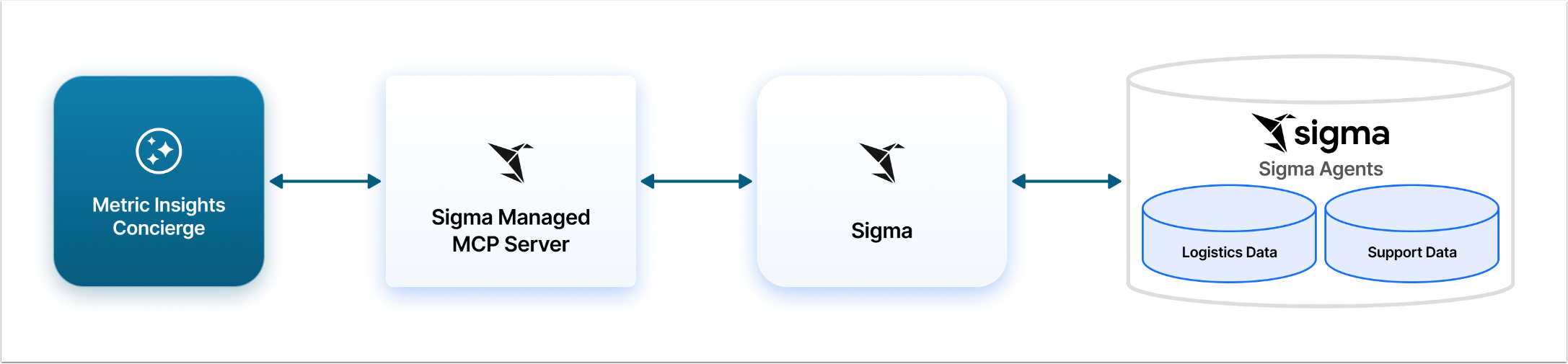
Architectural Diagram for Sigma MCP Server Integration with Concierge
This diagram shows an example, where Sigma was configured to have Logistics Data and Support Data as Agents. Your Sigma can have other Agents set up with different names. These Agents correlate to their respective Domains in Metric Insights Concierge. A User can ask a question about logistics and Concierge will know to route that question through the Sigma Managed MCP Server to the specific Domain.
Prerequisites
- A Sigma account type with the Use Sigma MCP with OAuth permission enabled.
- A Sigma account type with the permissions to perform the same operation in the Sigma UI:
- Depending on the type of data source you want to use, you need the View connections, View data models, and/or View workbooks permissions.
- To search, explore, or query a specific document, you must be granted at least Can view access to the document.
- To search, explore, or query a specific connection, you must be granted at least Can use access to the connection.
- To call agents, you must be granted at least Can view access to a workbook that contains the agent.
- To build workbooks, you must be assigned an account type with the Create, edit, and publish workbooks and Create, edit, and publish workbooks with Sigma MCP permissions enabled.
- To edit an existing workbook, you must also be granted Can edit access to the workbook.
- To take a screenshot of a workbook page or element, you must be assigned an account type with the Create, edit, and publish workbooks with Sigma MCP permission enabled and be granted at least Can view access to the workbook.
- Metric Insights Admin User account.
Steps to Connect Concierge and Sigma
- Decide on the Authentication method: Define how Concierge will perform authentication when connecting to Sigma:
- "User OAuth": The Token is requested form Databricks and inserted into the configuration code automatically. The User only provides credentials to the service account in Sigma.
- "Defined in configuration": The authentication Token has to be created in Sigma account and manually inserted into the Concierge configuration code. This Auth Type should be used if Sigma has the security model which doesn't include OAuth or there are other specifics that need a flexible solution. Be aware, that when the Token expires, it has to be re-entered into the configuration code manually.
- Configure Sigma and gather information for authentication: set the account type, find and copy the connection information.
- Configure External Resource in Metric Insights account: Set up Concierge to connect with Sigma.