This article describes the API endpoints used to view and manage the access that Users and Groups are granted to Folders. This includes "Can Add/Remove Content", "Display on homepage", and "Available in API Response" access, granted directly to a User or indirectly via Group membership:
/api/folder/access: Returns the access Groups have to a Folder, and identifies which Users have "Can Add/Remove Content" access either directly or via Group membership./api/folder/sharing: Shows which Users have "Display on homepage" and "Available in API Response" access to Folder, either directly or via Group./api/group_folder: View, grant, and revoke a Group's "Can Add/Remove Content" access to Folders./api/group_folder_view: View, grant, and revoke a Group's "Display on homepage" access to Folders./api/group_folder_api: View, grant, and revoke a Group's "Available in API Response" access to Folders./api/user_folder: View, grant, and revoke a User's "Can Add/Remove Content" access to Folders./api/user_folder_view: View, grant, and revoke a User's "Display on homepage" access to Folders./api/user_folder_api: View, grant, and revoke a User's "Available in API Response" access to Folders.
Prerequisites:
- Set up API access, verify that you have API access, and obtain a token via the get_token call OR
- Generate Personal API Token
NOTES:
- Only Admin Users and Power Users with edit access to the Folder can execute these API calls.
- See Folder API for API calls on all elements related to folders.
Table of contents:
- Access Admin > System > API Toolkit
- Retrieve Users and Groups with Access to Folder
- Retrieve Users With Homepage View And API Access to Folder
- Configure Group_Folder Associations
- Configure Group_Folder_View Associations
- Configure Group_Folder_API Associations
- Configure User_Folder Associations
- Configure User_Folder_View Associations
- Configure User_Folder_API Associations
1. Access Admin > System > API Toolkit
2. Retrieve Users and Groups with Access to Folder
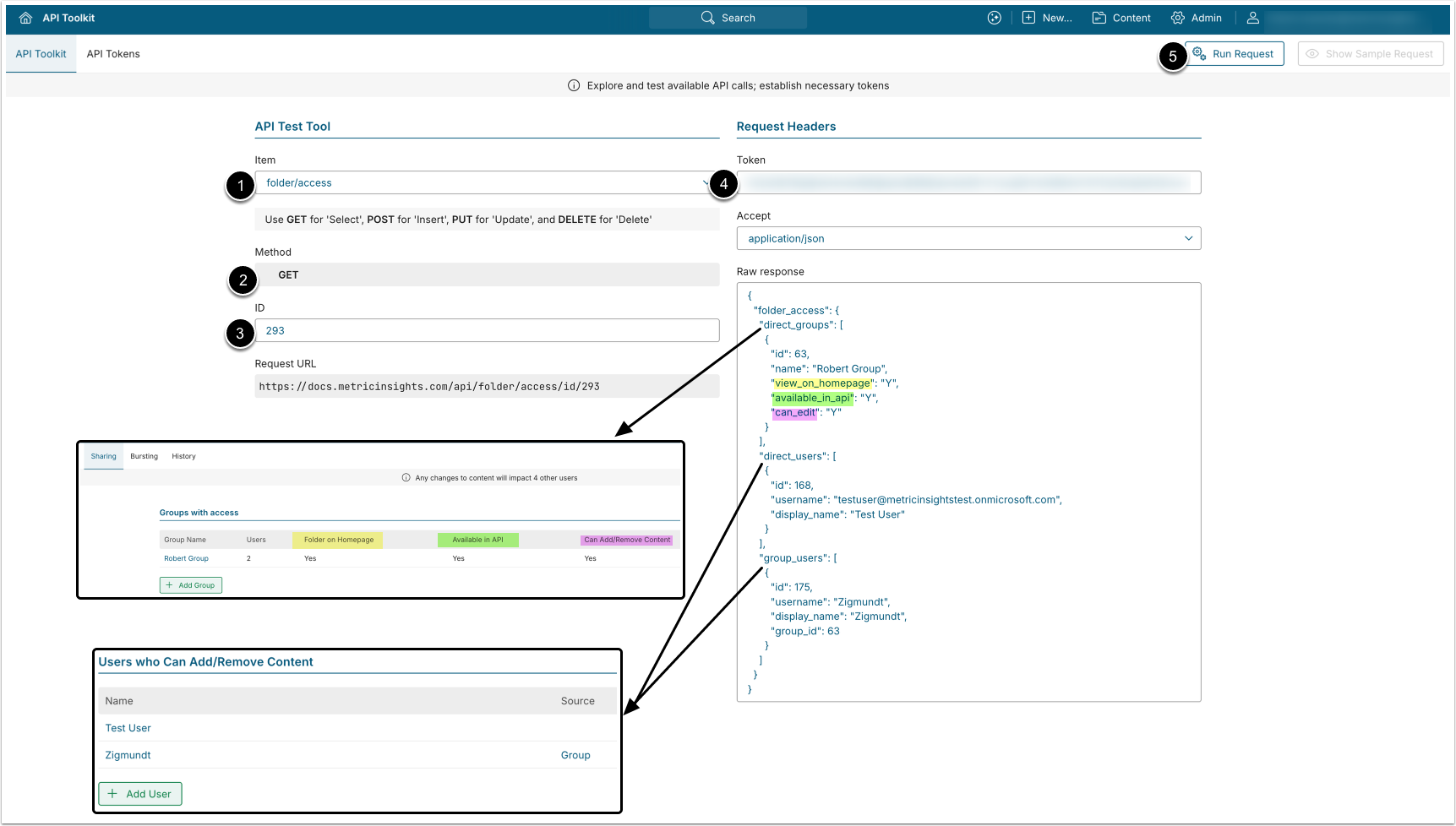
- GET request to
/api/folder/access/id/<id>returns Users and Groups with access to the specified Folder. The response shows the type of access Groups have to Folders, and identifies the Users with "Can Add/Remove Content" access to the Folder, either granted directly or via Group.
- Item: folder/access.
- Method: GET.
- ID: Enter the ID of the Folder.
- Enter an API Token.
- [Run request]
Example Response
{
  "folder_access": {
    "direct_groups": [
      {
        "id": 53,
        "name": "Documentation Group",
        "view_on_homepage": "Y",
        "available_in_api": "Y",
        "can_edit": "Y"
      }
    ],
    "direct_users": [
      {
        "id": 168,
        "username": "testuser@metricinsightstest.onmicrosoft.com",
        "display_name": "Test User"
      }
    ],
    "group_users": [
      {
        "id": 193,
        "username": "johnpowers.writer@metricinsights.com",
        "display_name": "John Powers",
        "group_id": 53
      }
    ]
  }
}Fields Description
| Parameter Name | Value Type | Description |
|---|---|---|
| direct_groups | array | Groups with access to the Folder. |
Below are the Group object parameters from the direct_groups array: | ||
| id | integer | The ID of the Group. |
| name | string | The name of the Group. |
| view_on_homepage | string | Whether or not the Folder is displayed on the user’s homepage. ("Y"/"N") |
| available_in_api | string | Whether or not the Regular/Power Users can get the Folder via API response. ("Y"/"N") |
| can_edit | string | Whether or not the Regular/Power Users have edit access to the Folder. ("Y"/"N") |
| direct_users | array | Users with direct access to the Folder. |
| group_users | array | Users with group access to the Folder. |
Below are the User object parameters from the direct_users and group_users arrays: | ||
| id | integer | User ID. |
| username | string | Username |
| display_name | string | User’s first and last name. |
| group_id | integer | The ID of the Group.
|
3. Retrieve Users With Homepage View And API Access to Folder
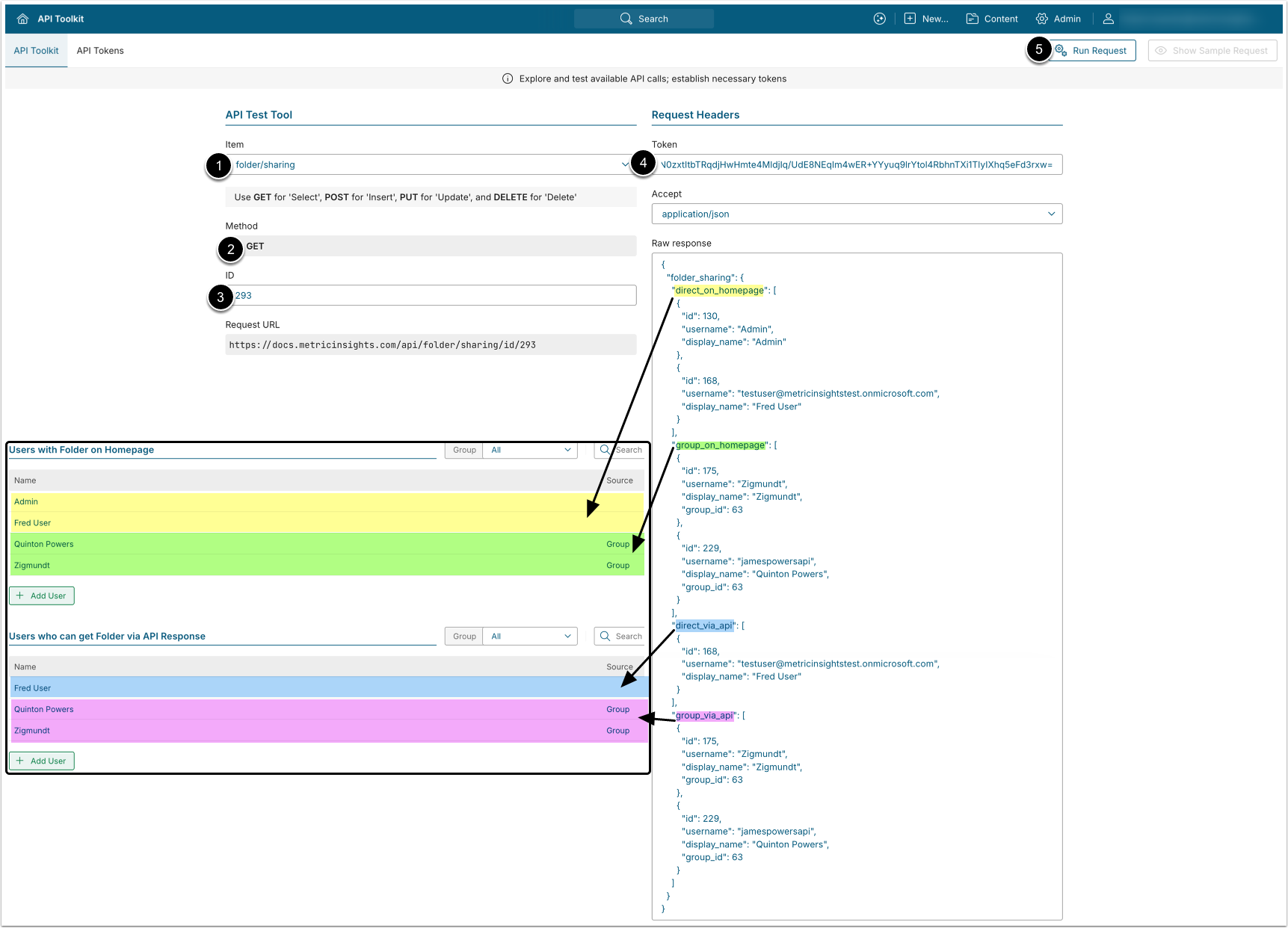
- GET request to
/api/folder/sharing/id/<id>returns Users with "Display on Homepage" and "Available in API Response" access, both granted directly and via Group.
- Item: folder/sharing.
- Method: GET.
- ID: Enter the ID of the Folder.
- Enter an API Token.
- [Run request]
Example Response
{
  "folder_sharing": {
    "direct_on_homepage": [
      {
        "id": 11,
        "username": "michael.turner",
        "display_name": "Michael Turner"
      }
    ],
    "group_on_homepage": [
      {
        "id": 22,
        "username": "sarah.collins",
        "display_name": "Sarah Collins",
        "group_id": 101
      }
    ],
    "direct_via_api": [
      {
        "id": 33,
        "username": "david.martin",
        "display_name": "David Martin"
      }
    ],
    "group_via_api": [
      {
        "id": 44,
        "username": "emily.harris",
        "display_name": "Emily Harris",
        "group_id": 202
      }
    ]
  }
}Fields Description
| Parameter Name | Value Type | Description |
|---|---|---|
| folder_sharing | object | Contains information about Folder access via homepage and API. |
| direct_on_homepage | array | Users who have directly assigned "View on homepage" access to the Folder. |
| group_on_homepage | array | Users who have "View on homepage" access to the Folder via Group. |
| direct_via_api | array | Users who have directly assigned "Available in API Response" access to the Folder. |
| group_via_api | array | Users who have "Available in API Response" access to the Folder via Group. |
Below are the User object parameters from the direct_on_homepage, group_on_homepage, direct_via_api, and group_via_api arrays: | ||
| id | integer | User ID. |
| username | string | Username used for login or identification. |
| display_name | string | User’s first and last name. |
| group_id | integer | The ID of the Group through which the user has access.
Displayed only for group-based arrays
(group_on_homepage, group_via_api). |
4. Configure Group_Folder Associations
The /api/group_folder endpoint retrieves information on which groups have "Can Add/Remove Content" access to which folders, and allows assigning and removing this access. Each data entry has a unique ID and represents a single group-to-folder mapping.
4.1. Retrieve Groups With Edit Access to Folder
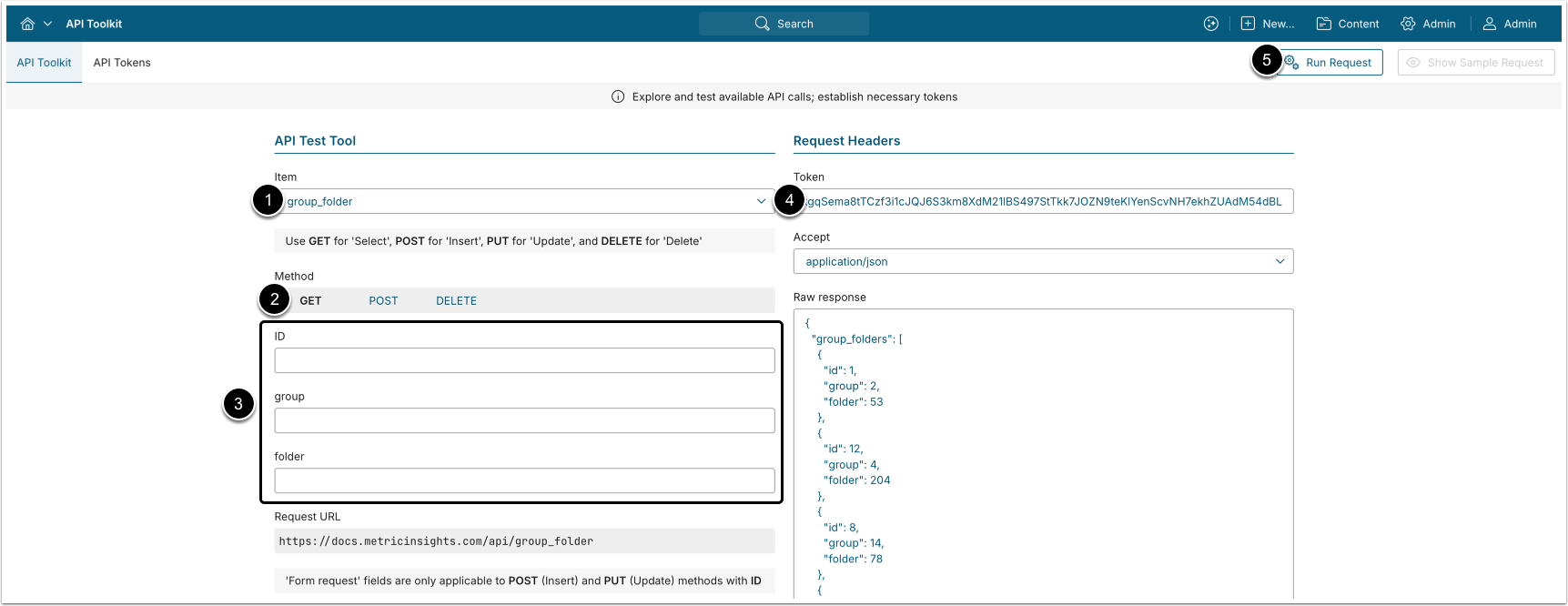
NOTE: The ID of each group_folder data entry is unique and can be used to create new entries or delete existing ones.
- GET request to
/api/group_folderreturns all folder-to-group associations where Groups members have "Can Add/Remove Content" access to Folder.
- Item: group_folder.
- Method: GET.
- Filter the results with the following parameters:
- ID: The ID of the
group_folderdata entry. - group: The ID of the Group.
- folder: The ID of the Folder.
- ID: The ID of the
- Enter an API Token
- [Run request]
Example Response
{
  "group_folders": [
    {
      "id": 1,
      "group": 2,
      "folder": 53
    },
    {
      "id": 12,
      "group": 4,
      "folder": 204
    },
    {
      "id": 8,
      "group": 14,
      "folder": 78
    }
  ]
}Fields Description
| Field Name | Value Type | Description |
|---|---|---|
| id | integer | The ID of the group_folder data entry. |
| group | integer | The ID of the Group. |
| folder | integer | The ID of the Folder. |
4.2. Grant Group Edit Access to Folder
NOTE: The "Can Add/Remove Content" access cannot be added to a Group that already has access to the Folder; e.g., "Available in API Response" or "Can Add/Remove Content". Revoke the existing access before granting "Can Add/Remove Content" access.
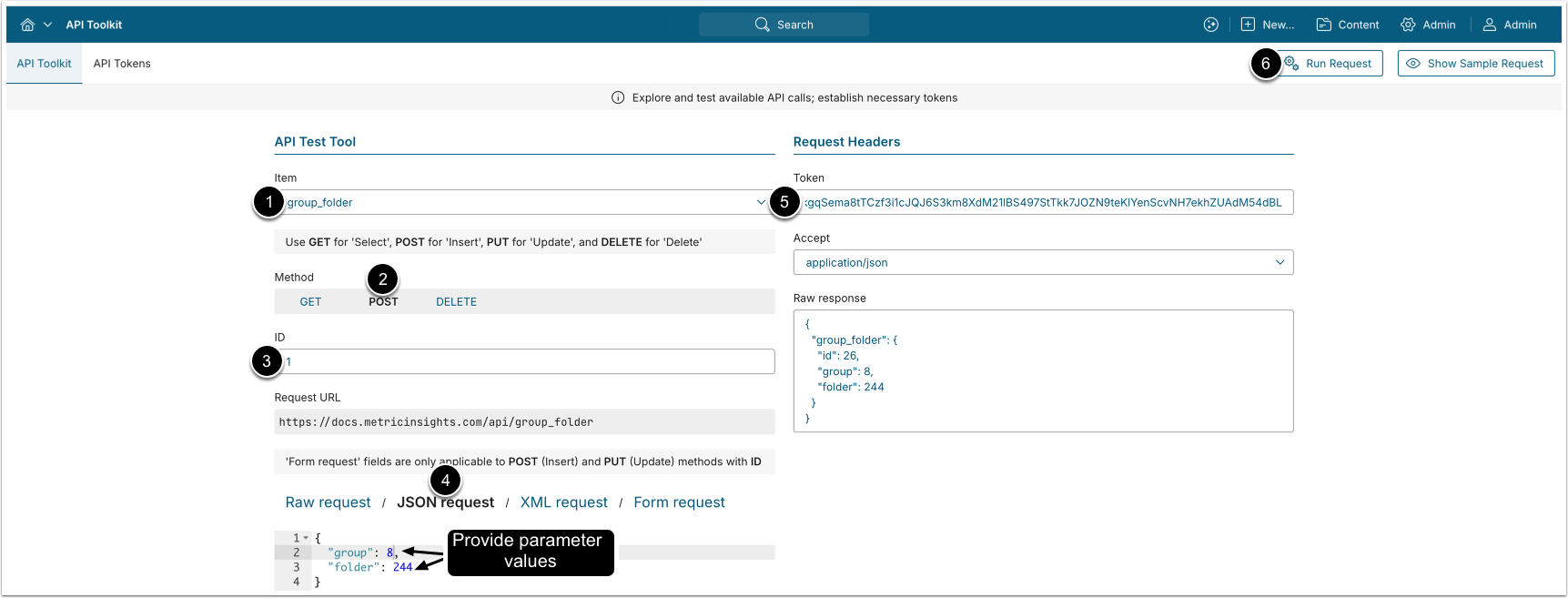
- POST request to
/api/group_foldergrants Group members "Can Add/Remove Content" access to the Folder.
- Item: group_folder.
- Method: POST.
- Enter the ID of an existing
group_folderdata entry.- See Retrieve Groups That Have Edit Access to Folder for details.
- Provide values for the request fields.
- See Fields Description for details.
- Enter an API Token.
- [Run request]
4.3. Remove Folder Edit Access from Group
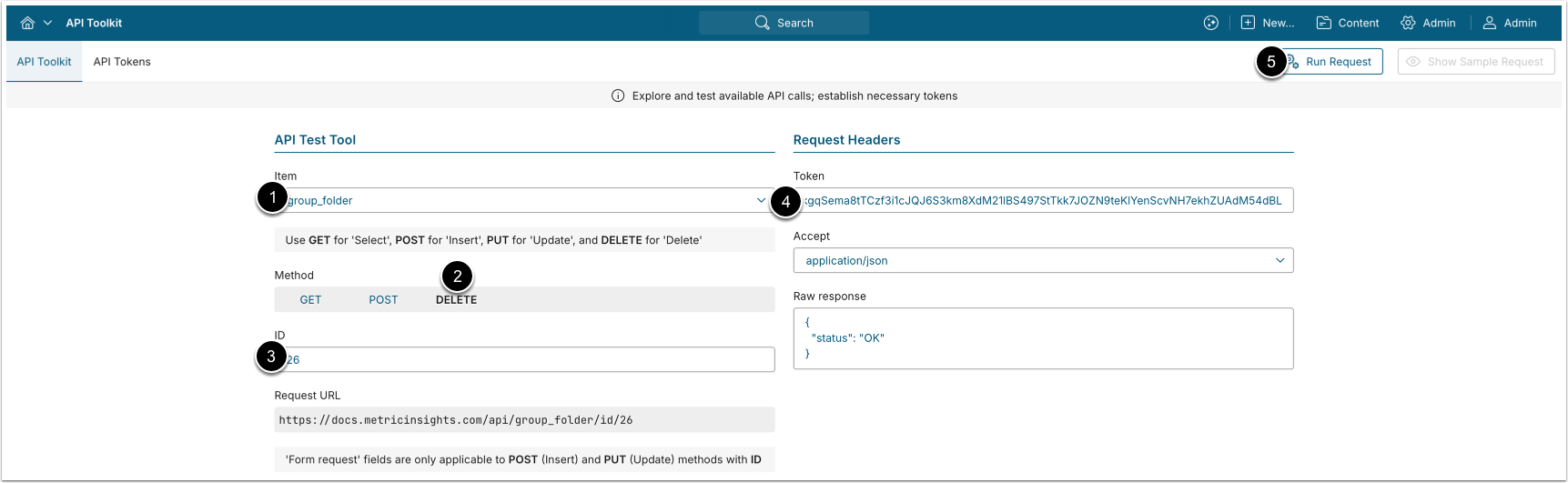
- DELETE request to
/api/group_folder/id/<id>removes "Can Add/Remove Content" access to the Folder from Group members.
- Item: group_folder.
- Method: DELETE.
- Enter the ID of the
group_folderdata entry to be deleted.- See Retrieve Groups That Have Edit Access to Folder for details.
- Enter an API Token.
- [Run request]
5. Configure Group_Folder_View Associations
The /api/group_folder_view endpoint retrieves information on which groups have "Display on Homepage" access to which folders, and allows assigning and deleting group-to-folder access. Each data entry has a unique ID and represents a single group-to-folder mapping.
5.1. Retrieve Groups With Homepage View Access to Folder
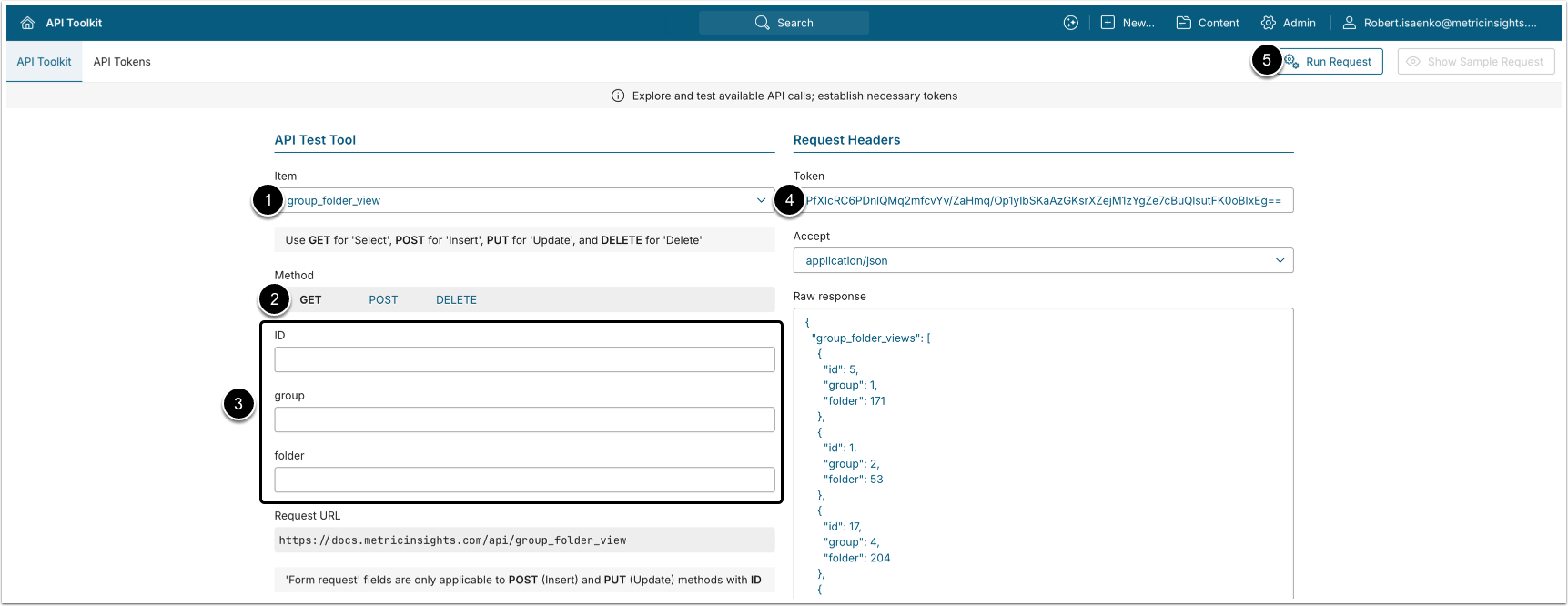
NOTE: The ID of each group_folder_view data entry is unique and can be used to create new data entries or delete existing ones.
- GET request to
/api/group_folder_viewreturns all group-to-folder associations where Group members have "Display on homepage" access to Folders.
- Item: group_folder_view.
- Method: GET.
- Filter the results with the following parameters:
- ID: The ID of the
group_folder_viewdata entry. - group: The ID of the Group.
- folder: The ID of the Folder.
- ID: The ID of the
- Enter an API Token
- [Run request]
Example Response
{
  "group_folder_views": [
    {
      "id": 1,
      "group": 2,
      "folder": 53
    },
    {
      "id": 12,
      "group": 4,
      "folder": 204
    },
    {
      "id": 8,
      "group": 14,
      "folder": 78
    }
  ]
}Fields Description
| Field Name | Value Type | Description |
|---|---|---|
| id | integer | The ID of the group_folder_view data entry. |
| group | integer | The ID of the Group, the members of which have "Display on homepage" access to the Folder. |
| folder | integer | The ID of the Folder. |
5.2. Grant Folder Homepage View Access to Group
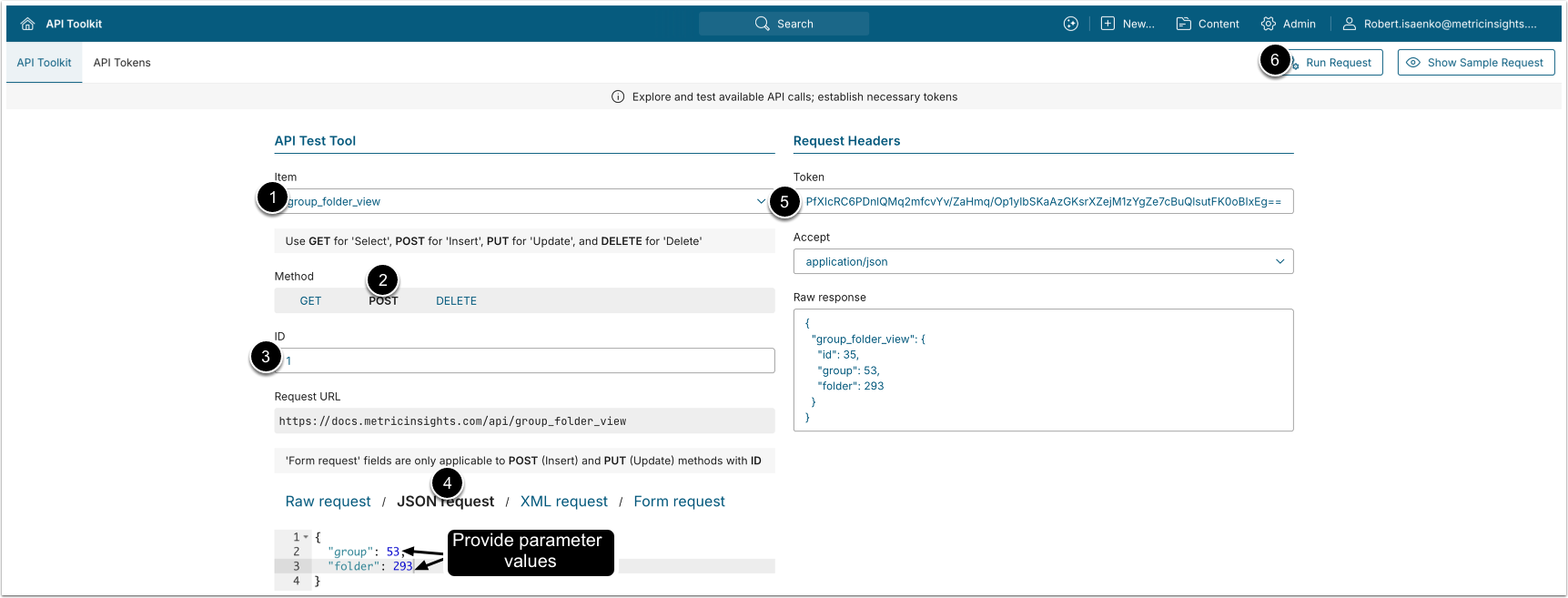
NOTE: Homepage view access cannot be added to a Group that already has some access to the Folder; e.g., "Available in API Response" or "Can Add/Remove Content". Revoke the existing access before granting Homepage view access only.
- POST request to
/api/group_folder_viewgrants "Display Folder on Homepage" access to Group members.
- Item: group_folder_view.
- Method: POST.
- Enter the ID of an existing
group_folder_viewdata entry.- See Retrieve Groups That Have Homepage View Access to Folder for details.
- Provide values for the request.
- See Fields Description for details.
- Enter an API Token.
- [Run request]
5.3. Delete Folder Homepage View Access from Group
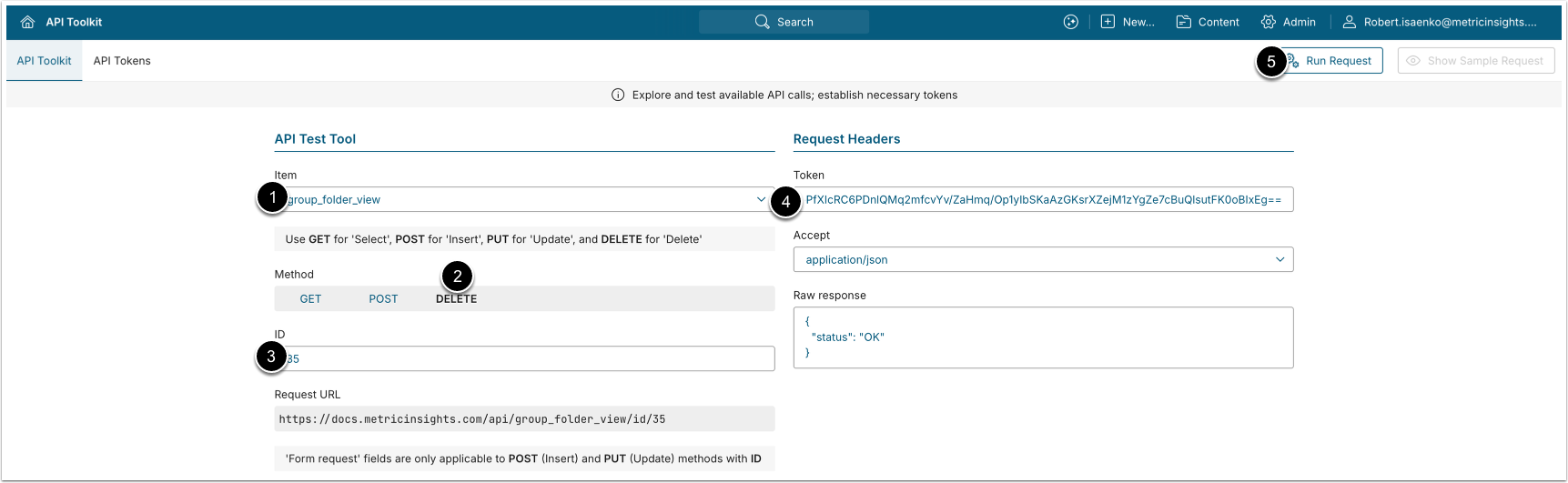
- DELETE request to
/api/group_folder_viewremoves "Display Folder on homepage" access from Group members.
- Item: group_folder_view.
- Method: DELETE.
- Enter the ID of
group_folder_viewdata entry that needs to be deleted.- See Retrieve Groups That Have Edit Access to Folder for details.
- Enter an API Token.
- [Run request]
6. Configure Group_Folder_API Associations
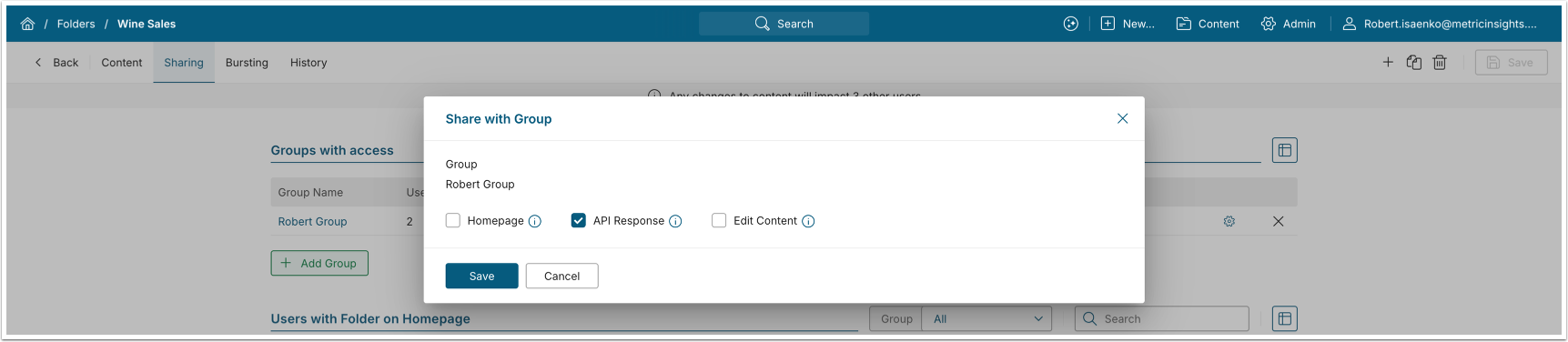
The /api/group_folder_api endpoint retrieves information on which groups have "Available in API Response" access to which folders, and allows assigning and deleting group-to-folder access. Each data entry has a unique ID and represents a single group-to-folder mapping.
6.1. Retrieve Groups That Have API Access to Folder
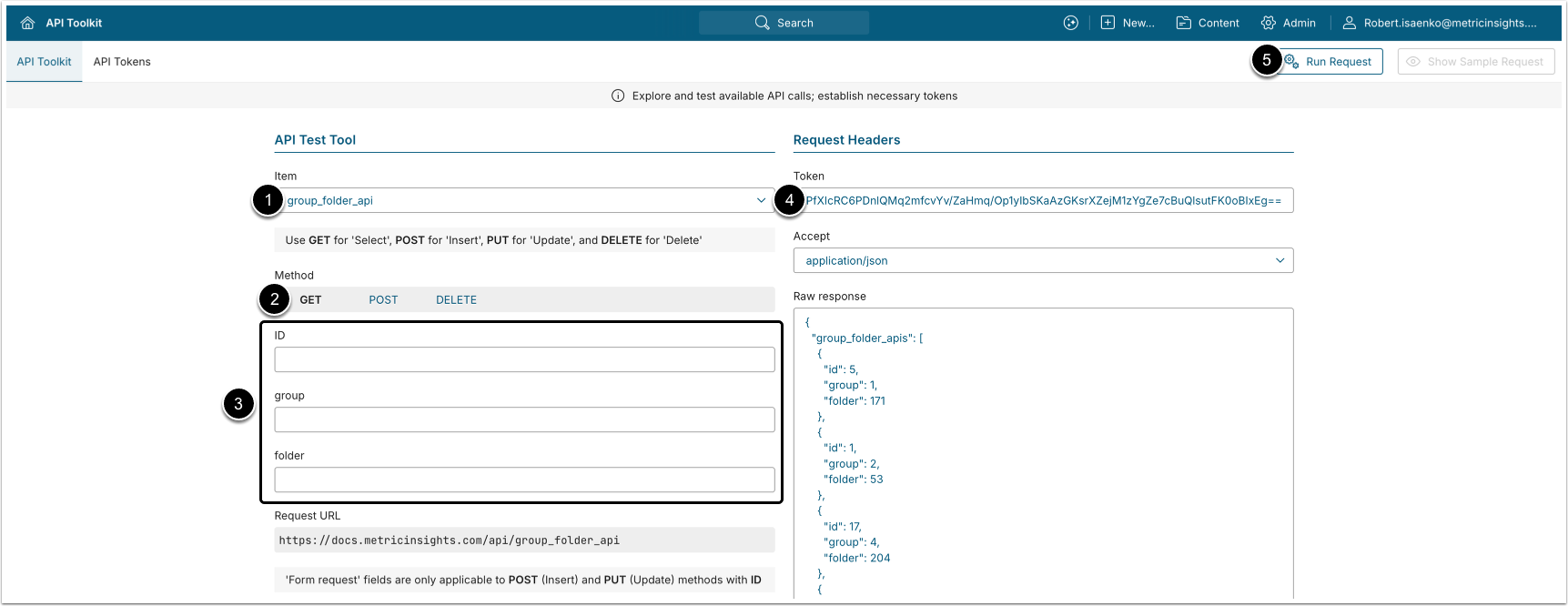
NOTE: The ID of each group_folder_api data entry is unique and can be used to create new data entries or delete existing ones.
- GET request to
/api/group_folder_apireturns all group-to-folder associations where the Group members have the "Available in API Response" access to the Folder.
- Item: group_folder_view.
- Method: GET.
- Filter the results with the following parameters:
- ID: The ID of the
group_folder_apidata entry. - group: The ID of the Group.
- folder: The ID of the Folder.
- ID: The ID of the
- Enter an API Token
- [Run request]
Example Response
{
  "group_folder_views": [
    {
      "id": 1,
      "group": 2,
      "folder": 53
    },
    {
      "id": 12,
      "group": 4,
      "folder": 204
    },
    {
      "id": 8,
      "group": 14,
      "folder": 78
    }
  ]
}Fields Description
| Field Name | Value Type | Description |
|---|---|---|
| id | integer | The ID of the group_folder_api data entry. |
| group | integer | The ID of the Group, the members of which have the "Available in API Response" access to the Folder. |
| folder | integer | The ID of the Folder. |
6.2. Grant Folder API Access to Group
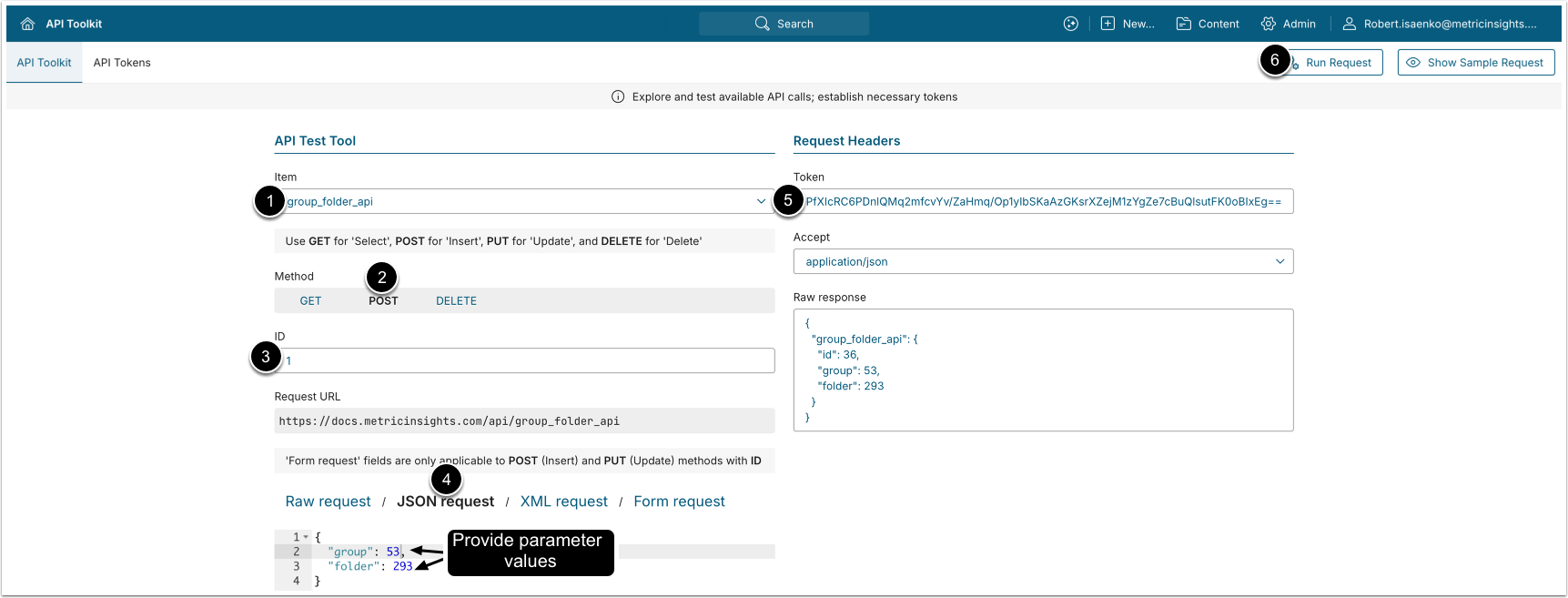
NOTE: API response access cannot be added to a Group that already has access to the Folder; e.g., "Display Folder on Homepage" or "Can Add/Remove Content". Revoke the existing access first, then grant API response access only.
- POST request to
/api/group_folder_apigrants "Available in API Response" access to group members.
- Item: group_folder_api.
- Method: POST.
- Enter the ID of an existing
group_folder_apidata entry.- See Get Group_Folder Associations for details.
- Modify the request by providing values.
- See Fields Description for details.
- Enter an API Token.
- [Run request]
6.3. Revoke Folder API Access from Group
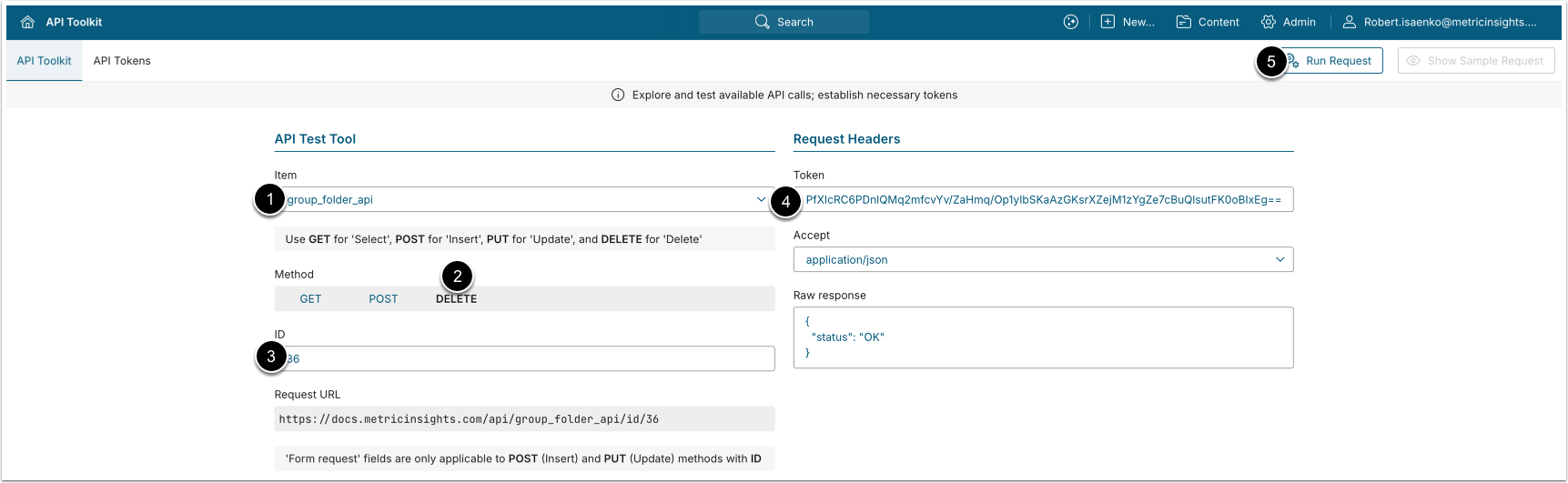
- DELETE request to
/api/group_folder_apiremoves folder API response access from group members.
- Item: group_folder_api.
- Method: DELETE.
- Enter the ID of
group_folder_apidata entry that needs to be deleted.- See Get Group_Folder_API Associations for details.
- Enter an API Token.
- [Run request]
7. Configure User_Folder Associations
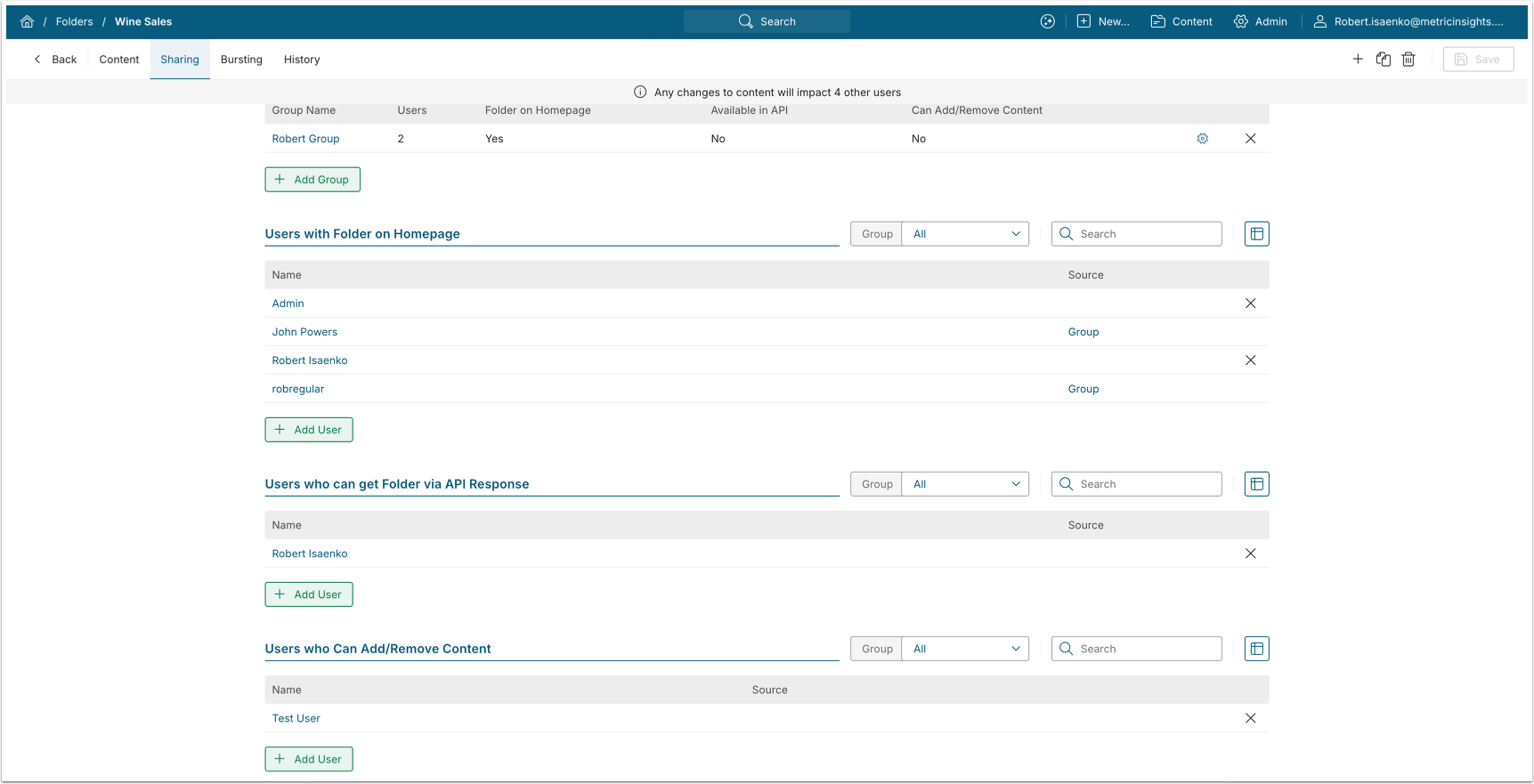
The /api/user_folder endpoint retrieves information on which users have access to which folders, and supports assigning and deleting user-to-folder access. Each data entry has a unique ID and represents a single user-to-folder mapping.
7.1. Get User_Folder Associations
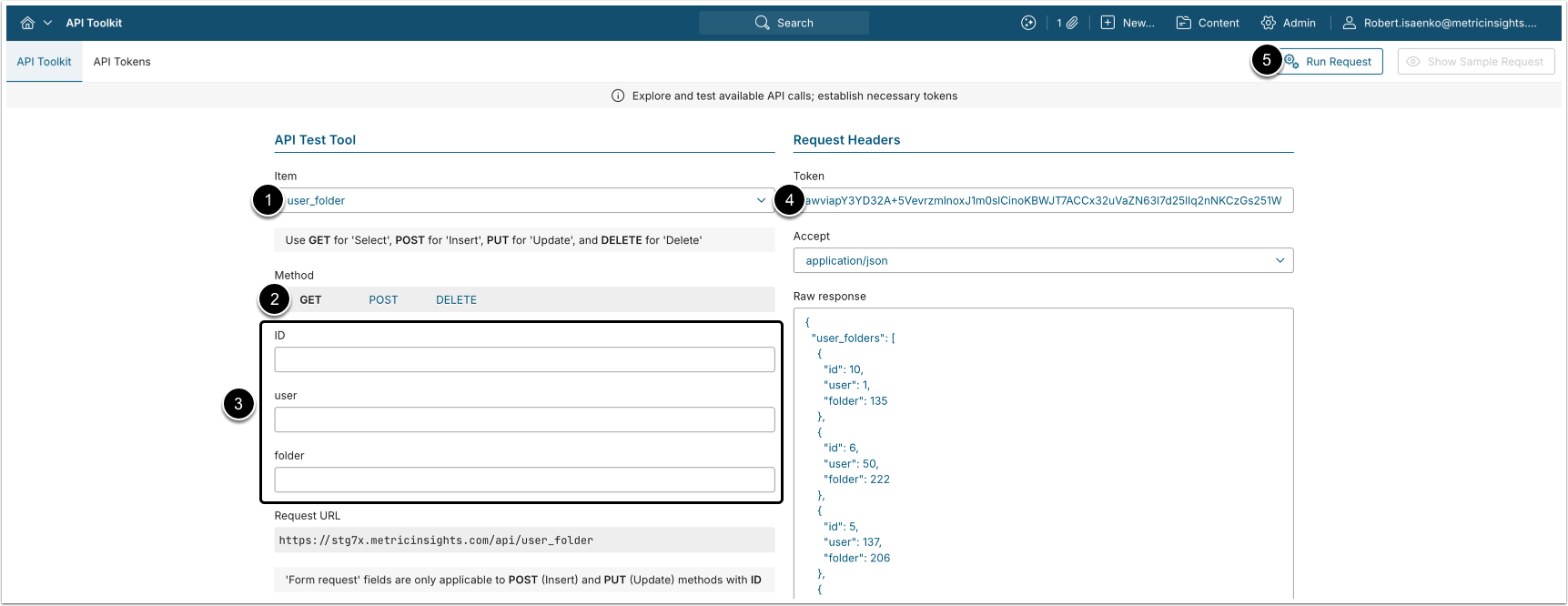
NOTE: The ID of each user_folder data entry is unique and can be used to create or delete data entries.
- GET request to
/api/user_folderreturns all folders available to the group members.
- Item: user_folder.
- Method: GET.
- Filter the results with the following parameters:
- ID: The ID of the
user_folderdata entry. - user: The ID of the User.
- folder: The ID of the Folder.
- ID: The ID of the
- Enter an API Token.
- [Run request]
Example Response
{
  "user_folders": [
    {
      "id": 1,
      "user": 2,
      "folder": 53
    },
    {
      "id": 12,
      "user": 4,
      "folder": 204
    },
    {
      "id": 8,
      "user": 14,
      "folder": 78
    }
  ]
}Fields Description
| Field Name | Value Type | Description |
|---|---|---|
| id | integer | The ID of the user_folder data entry. |
| user | integer | The ID of the Regular/Power User who can add/remove content. |
| folder | integer | The ID of the Folder. |
7.2. Grant Folder Access to Group
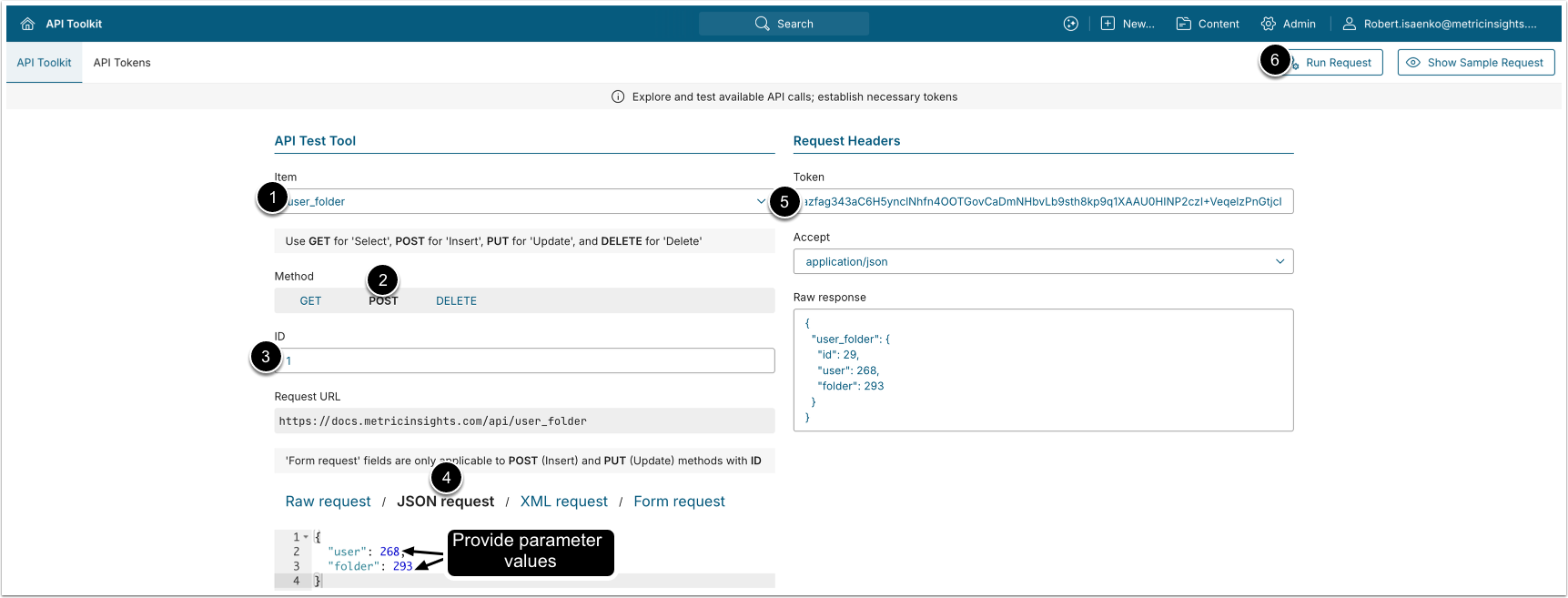
- POST request to
/api/user_foldergrants folder access to group members.
- Item: user_folder.
- Method: POST.
- Enter the ID of an existing
user_folderdata entry.- See Get Group_Folder Associations for details.
- Modify the request by providing values.
- See Fields Description for details.
- Enter an API Token.
- [Run request]
7.3. Remove Folder Access from User
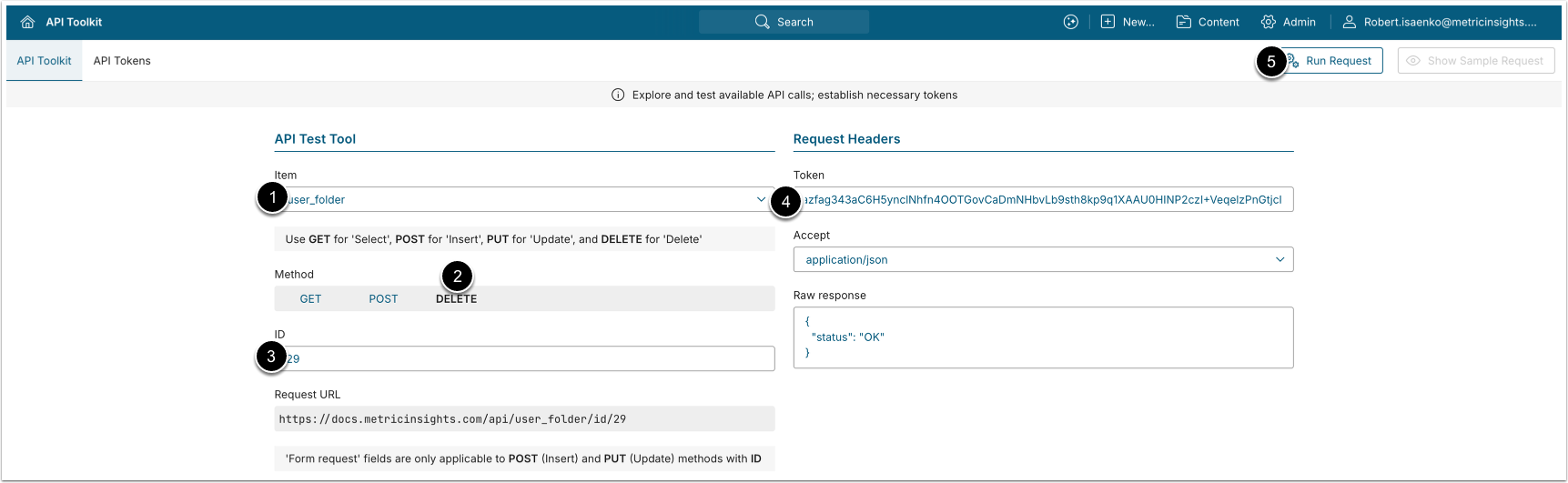
- DELETE request to
/api/user_folder/id/<ID>removes folder access from the selected user.
- Item: user_folder.
- Method: DELETE.
- Enter the ID of the user_folder data entry to be deleted.
- See Get User_Folder Associations for details.
- Enter an API Token.
- [Run request]
8. Configure User_Folder_View Associations
The /api/user_folder_view endpoint provides information on which users have "Display on Homepage" access to which folders, and supports assigning and deleting user-to-folder access. Each data entry has a unique ID and represents a single user-to-folder mapping.
8.1. Get User_Folder_View Associations
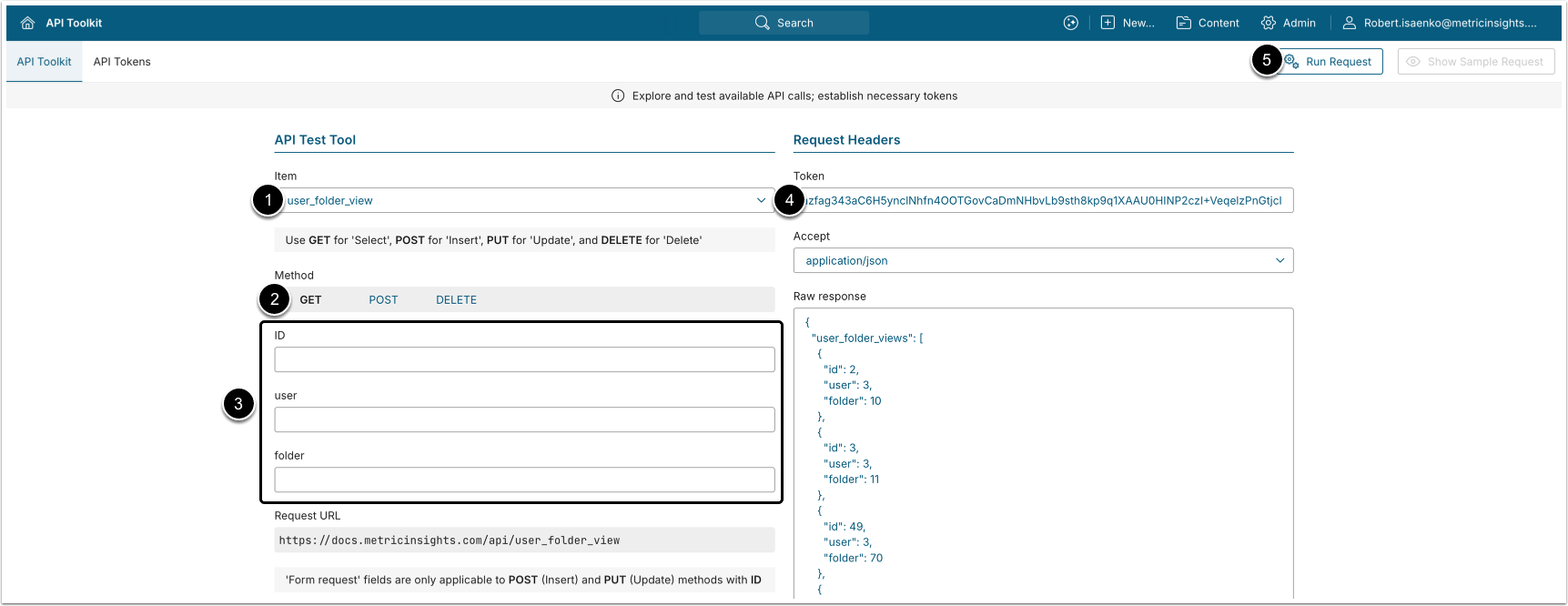
NOTE: The id of each user_folder_view data entry is unique and can be used to create new data entries or delete existing ones.
- GET request to
/api/user_folder_viewreturns all user-to-folder associations where users can see the folder on their homepage.
- Item: user_folder_view.
- Method: GET.
- Filter the results with the following parameters:
- ID: The ID of the
user_folder_viewdata entry. - group: The ID of the Group.
- folder: The ID of the Folder.
- ID: The ID of the
- Enter an API Token.
- [Run request]
Example Response
{
  "user_folder_views": [
    {
      "id": 1,
      "user": 2,
      "folder": 53
    },
    {
      "id": 12,
      "user": 4,
      "folder": 204
    },
    {
      "id": 8,
      "user": 14,
      "folder": 78
    }
  ]
}Fields Description
| Field Name | Value Type | Description |
|---|---|---|
| id | integer | The ID of the user_folder_view data entry. |
| user | integer | The ID of the User who can see the Folder on their homepage. |
| folder | integer | The ID of the Folder. |
8.2. Grant Folder Homepage View Access to User
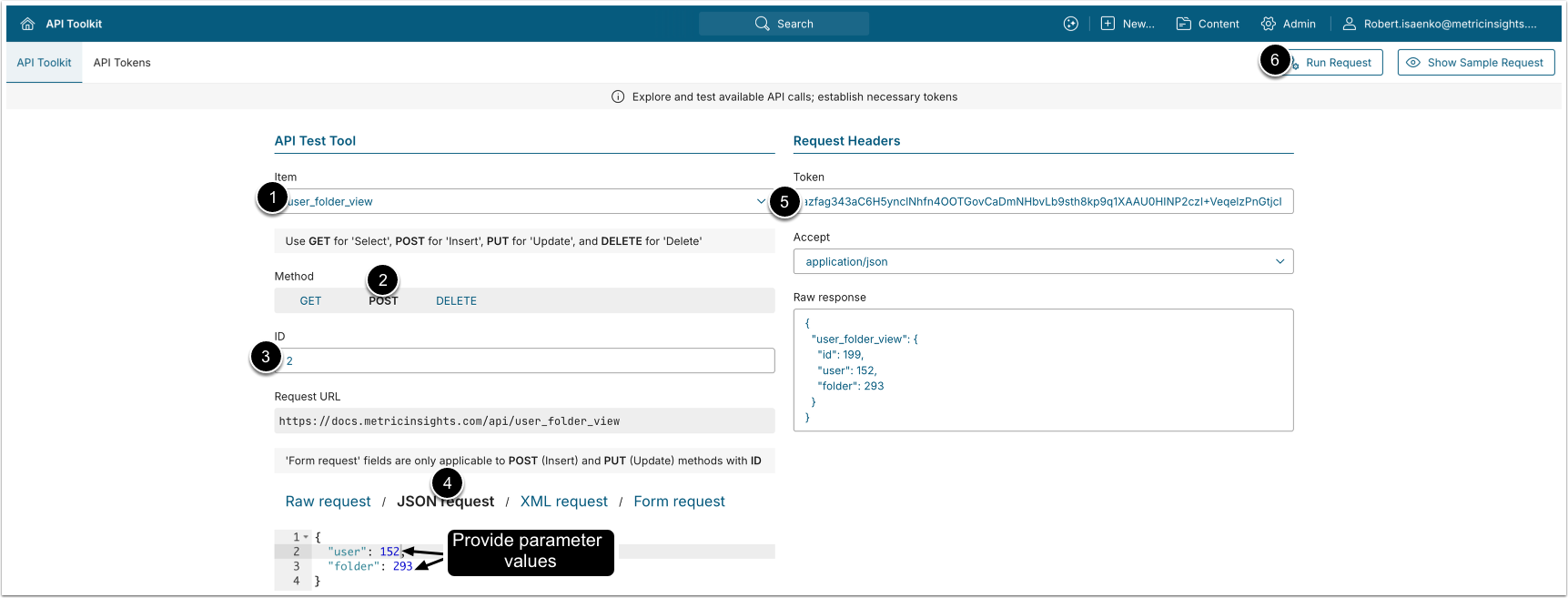
- POST request to
/api/user_folder_viewgrants "Display Folder on homepage" access to the selected user.
- Item: user_folder_view.
- Method: POST.
- Enter ID of an existing
user_folder_viewdata entry.- See Get User_Folder_View Associations for details.
- Modify the request by providing values.
- See Fields Description for details.
- Enter an API Token.
- [Run request]
8.3. Remove Folder Homepage View Access from User
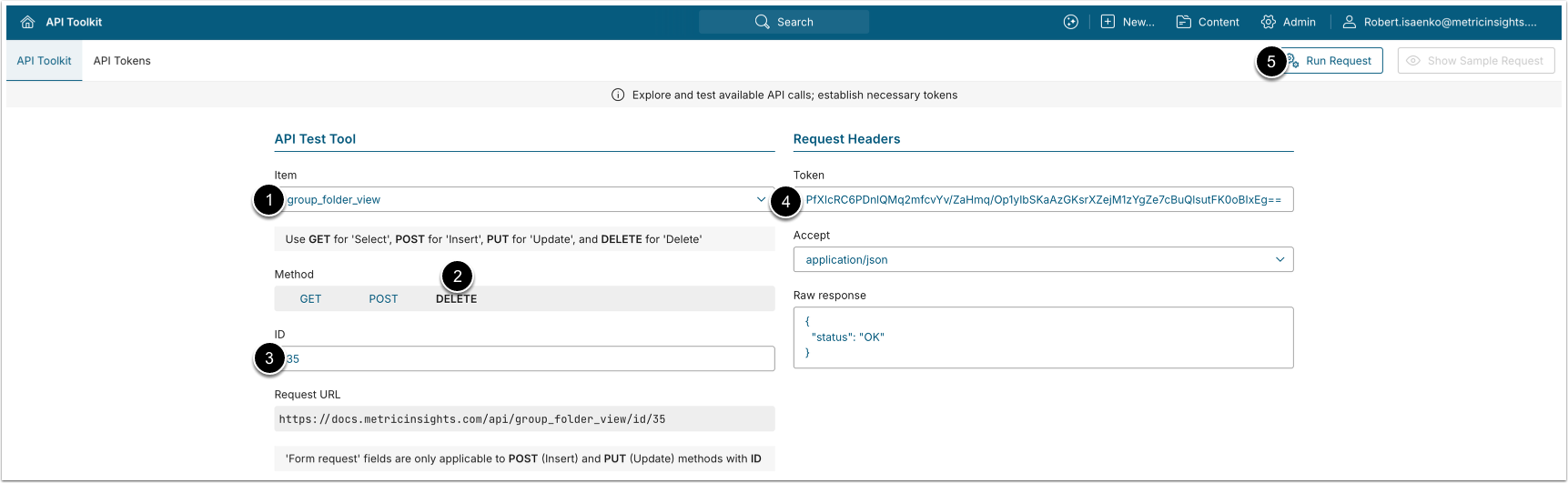
- DELETE request to
/api/user_folder_view/id/<id>removes "Display Folder on homepage" access from the selected user.
- Item: user_folder_view.
- Method: DELETE.
- Enter the ID of the user_folder_view data entry to be deleted.
- See Get User_Folder_View Associations for details.
- Enter an API Token.
- [Run request]
9. Configure User_Folder_API Associations
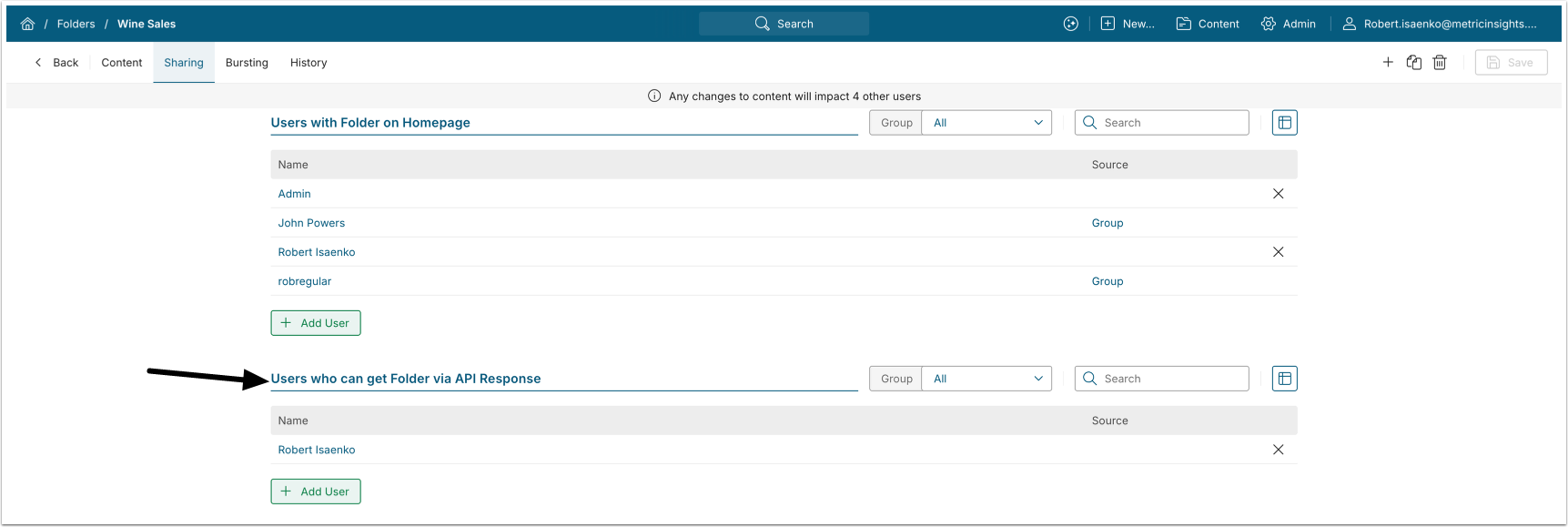
The /api/user_folder_api endpoint retrieves information about user-to-folder access via API response and supports assigning and removing that access. Each data entry has a unique ID and represents a single user-to-folder mapping.
9.1. Get User_Folder_API Associations
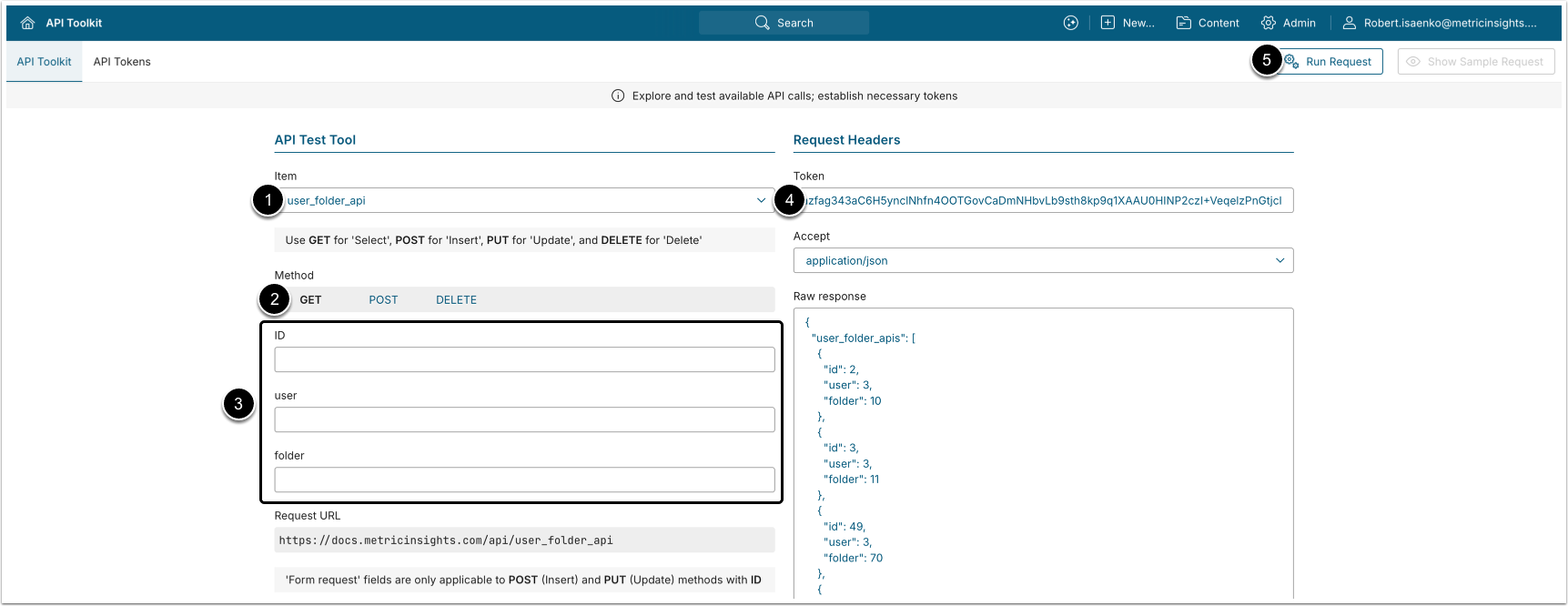
NOTE: The ID of each user_folder_api data entry is unique and can be used to create or delete data entries.
- GET request to
/api/user_folder_apireturns all user-to-folder associations where the folder is available for the users in the API response.
- Item: user_folder_api.
- Method: GET.
- Filter the results with the following parameters:
- ID: The ID of the
user_folder_apidata entry. - user: The ID of the Group.
- folder: The ID of the Folder.
- ID: The ID of the
- Enter an API Token.
- [Run request]
Example Response
{
  "user_folder_api": [
    {
      "id": 1,
      "user": 2,
      "folder": 53
    },
    {
      "id": 12,
      "user": 4,
      "folder": 204
    },
    {
      "id": 8,
      "user": 14,
      "folder": 78
    }
  ]
}Fields Description
| Field Name | Value Type | Description |
|---|---|---|
| id | integer | The ID of the user_folder_api data entry. |
| user | integer | The ID of the User who can see the Folder in API response. |
| folder | integer | The ID of the Folder. |
9.2. Grant Folder API Response Access to User
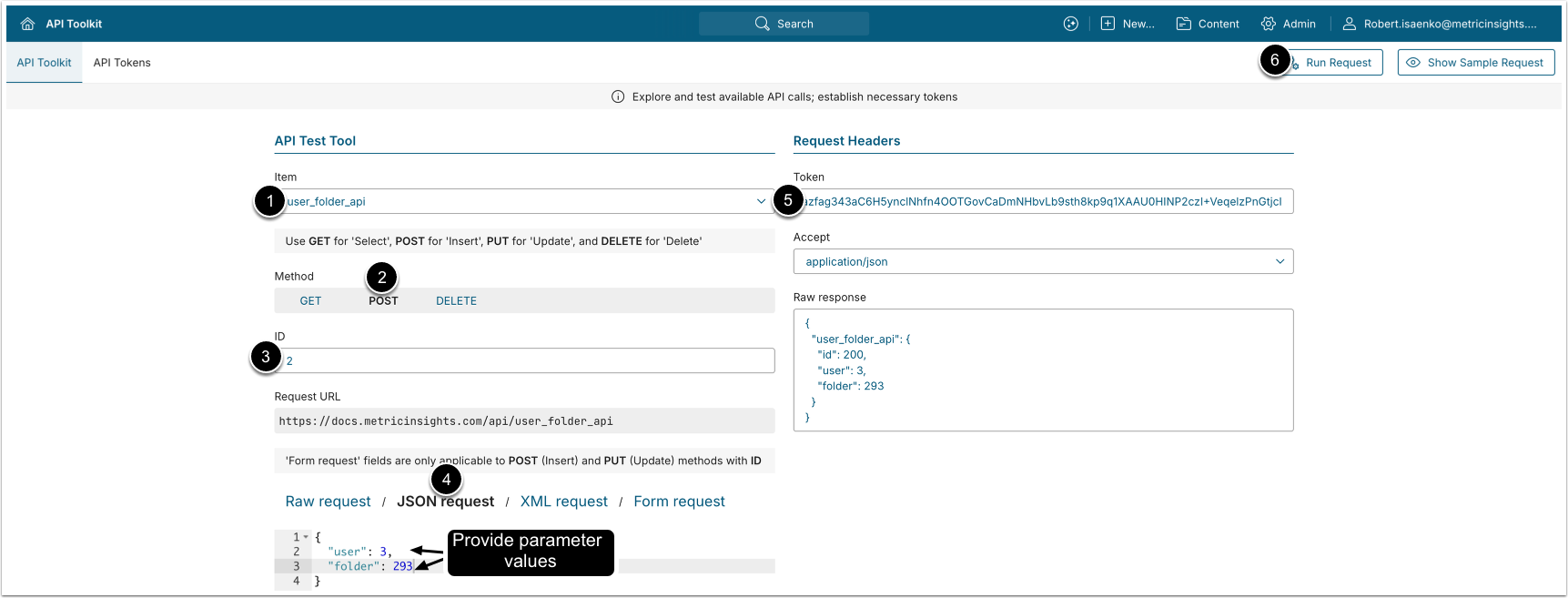
- POST request to
/api/user_folder_apigrants "Available in API Response" access to the selected user.
- Item: user_folder_api.
- Method: POST.
- Enter the ID of an existing
user_folder_apidata entry.- See Get User_Folder_API Associations for details.
- Modify the request by providing values.
- See Fields Description for details.
- Enter an API Token.
- [Run request]
9.3. Remove Folder API Response Access from User
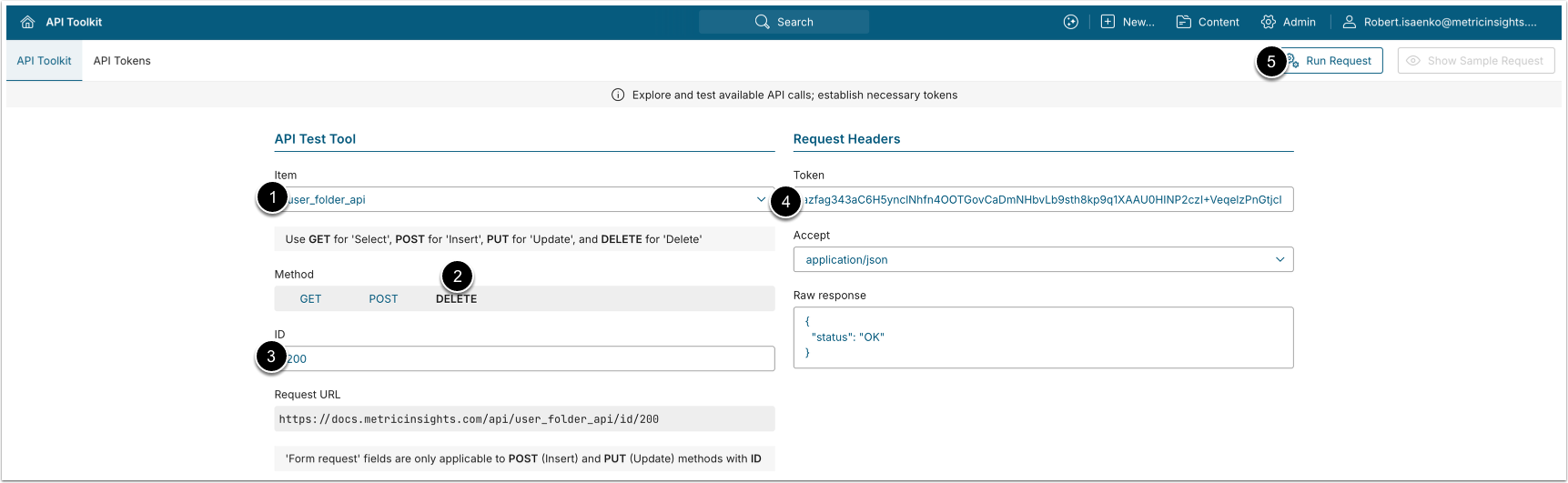
- DELETE request to
/api/group_folder_apiremoves folder API response access from group members.
- Item: group_folder_api.
- Method: DELETE.
- Enter the ID of the
group_folder_apidata entry to remove.- See Get Group_Folder_API Associations for details.
- Enter an API Token.
- [Run request]