This article describes API calls available for configuration of User and Group access to Apps (Portal Pages):
/api/group_page: Retrieve, grant, and remove App edit access from Groups./api/user_page: Retrieve, grant, and remove App edit access from Users./api/page/access: Retrieve Groups and Users with direct App edit access, and Users with both direct and Group-assigned App edit access./api/group_page_view: Retrieve, grant, modify, and remove App view access from Group./api/user_page_view: Retrieve, grant, modify, and remove App view access from User.
Prerequisites:
- Set up API access, verify that you have API access, and obtain a token via the get_token call OR
- Generate Personal API Token
Table of contents:
1. Access Admin > System > API Toolkit
2. Configure Group Edit Access to App
2.1. Retrieve Groups with Edit Access to Apps
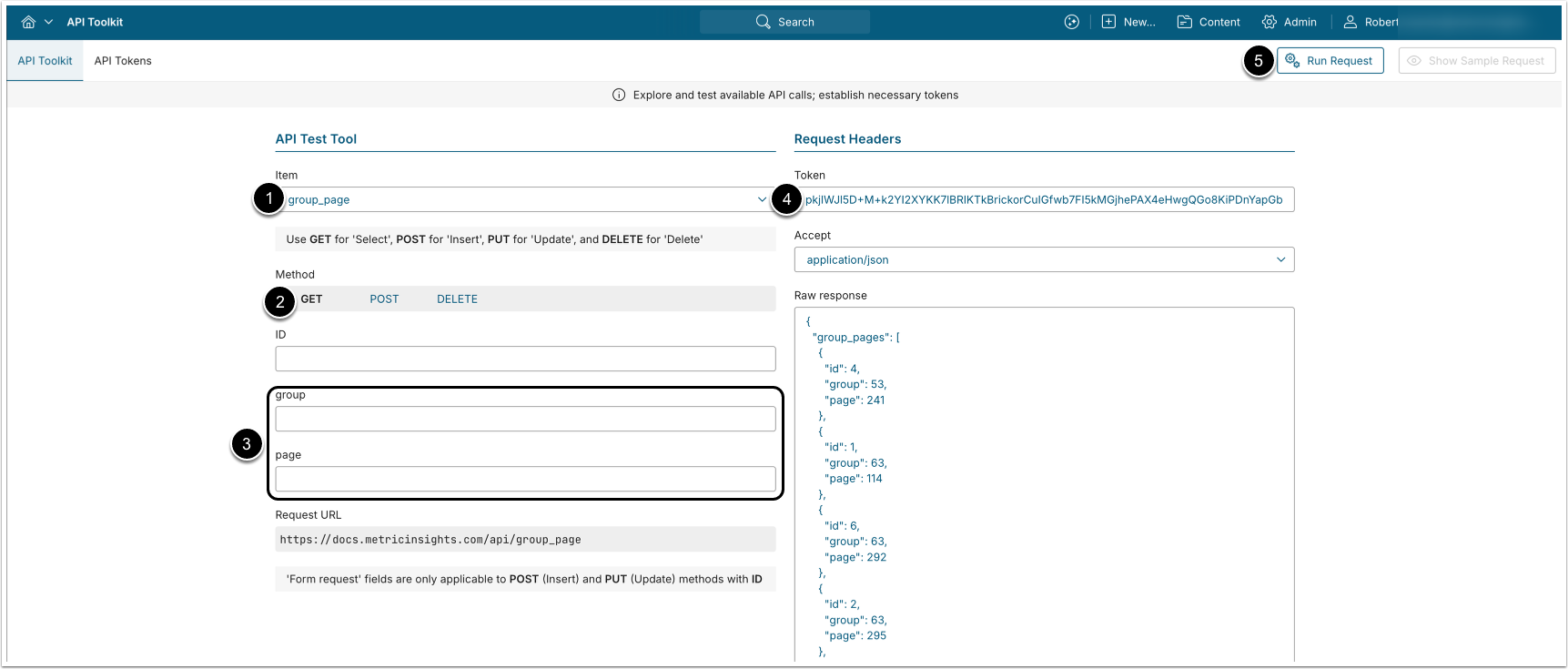
- GET request to
/api/group_pagereturns all Groups that have edit access to Apps. - GET request to
/api/group_page/id/<ID>returns a single Group-to-App edit access mapping by ID.
- Item: group_page
- Method: GET
- Optionally, apply filtering:
- group: Return all Apps to which the specified Group has edit access.
- page: Return all Groups that are assigned edit access to a specified App.
- Enter an API Token.
- [Run request]
Example Response
{
  "group_pages": [
    {
      "id": 4,
      "group": 53,
      "page": 241
    },
    {
      "id": 1,
      "group": 63,
      "page": 114
    },
    {
      "id": 6,
      "group": 63,
      "page": 292
    }
  ]
}Fields Description
| Parameter Name | Value Type | Description |
|---|---|---|
group_pages | array | Array containing all Group-to-App edit access mappings. |
id | integer | ID of a single Group-to-App edit access mapping. |
group | integer | ID of the Group. |
page | integer | ID of the App which the Group has edit access to. |
2.2. Assign App Edit Access to Group
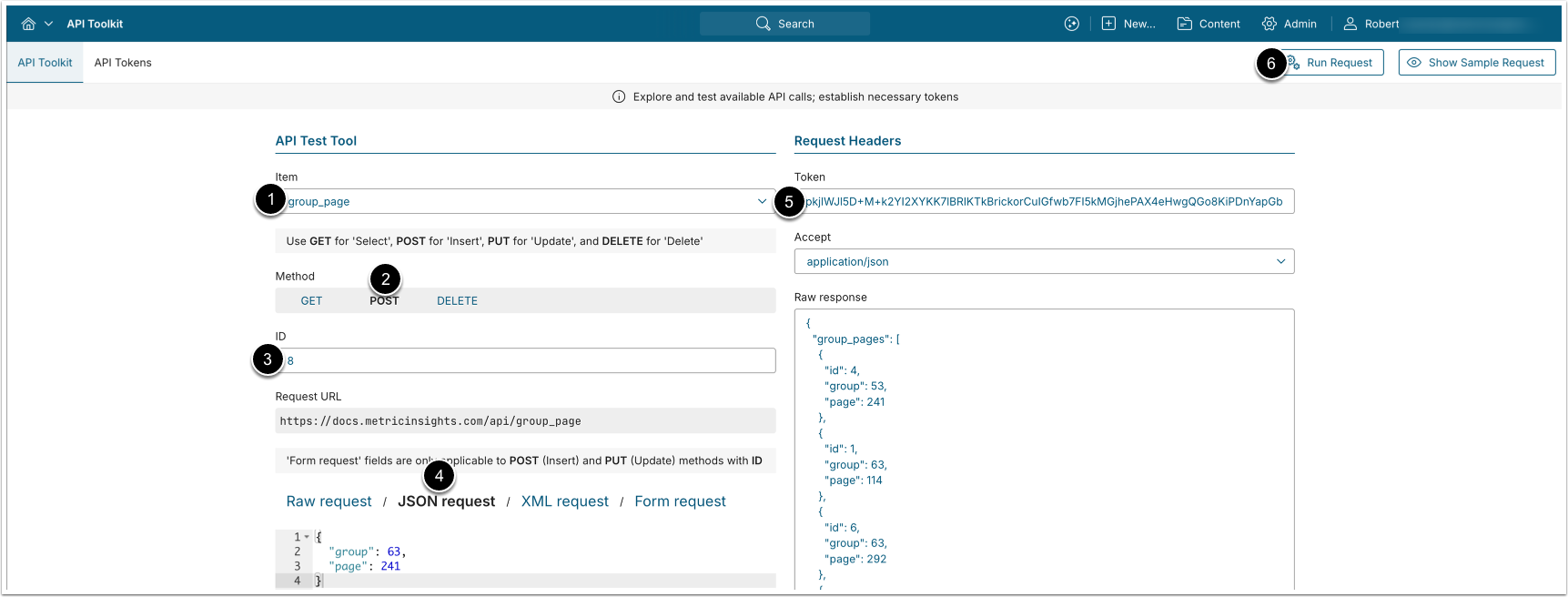
POST request to /api/group_page assigns App edit access to a Group.
- Item: group_page
- Method: POST
- Select JSON request and provide the following values:
- group: The ID of the Group to which you want to assign App edit access.
- page: The ID of the App, edit access to which you want to assign to the Group.
- Enter an API Token.
- [Run request]
2.3. Remove App Edit Access from Group
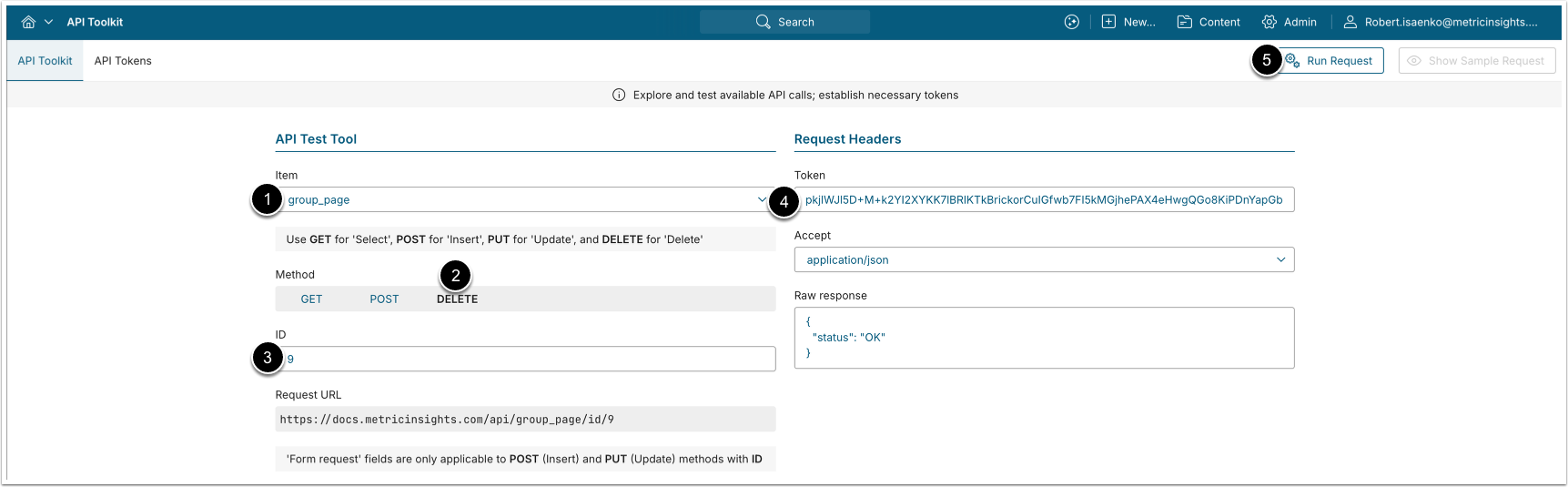
DELETE request to /api/group_page/id/<ID> removes edit access from a Group.
- Item: group_page
- Method: DELETE
- ID: Enter the ID of an existing Group-to-App edit access mapping.
- See Retrieve Groups with Edit Access to Apps for details.
- Enter an API Token.
- [Run request]
3. Configure User Edit Access to App
3.1. Retrieve Users with Edit Access to Apps
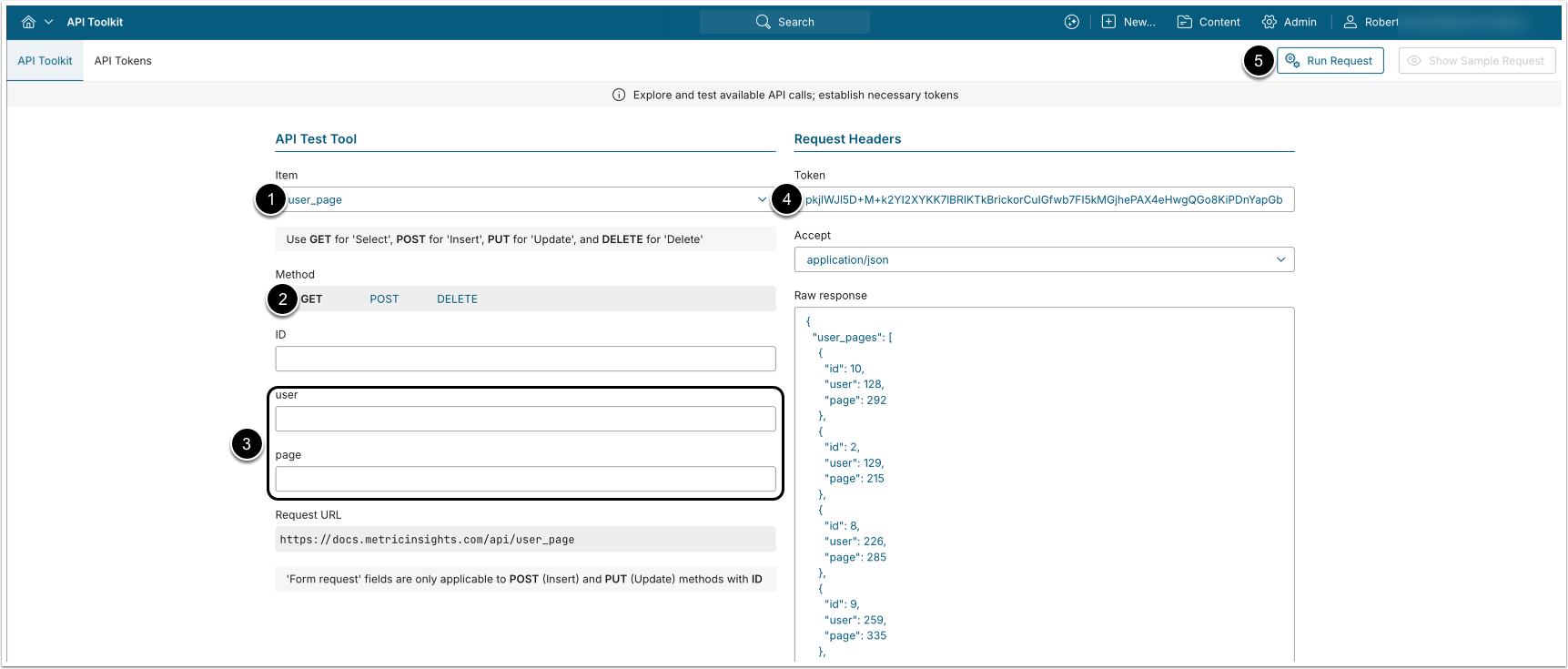
- GET request to
/api/user_pagereturns all Users that have edit access to Apps. - GET request to
/api/user_page/id/<ID>returns a single User-to-App edit access mapping by ID.
- Item: user_page
- Method: GET
- Optionally, apply filtering:
- user: Return all Apps to which the specified User has edit access.
- page: Return all Users that are assigned edit access to a specified App.
- Enter an API Token.
- [Run request]
Example Response
{
  "user_pages": [
    {
      "id": 10,
      "user": 128,
      "page": 292
    },
    {
      "id": 2,
      "user": 129,
      "page": 215
    },
    {
      "id": 8,
      "user": 226,
      "page": 285
    },
    {
      "id": 9,
      "user": 259,
      "page": 335
    },
    {
      "id": 11,
      "user": 259,
      "page": 345
    }
  ]
}Fields Description
| Parameter Name | Value Type | Description |
|---|---|---|
user_pages | array | Array containing all User-to-App edit access mappings. |
id | integer | ID of a single User-to-App edit access mapping. |
user | integer | ID of the User. |
page | integer | ID of the App which the User has edit access to. |
3.2. Assign App Edit Access to User
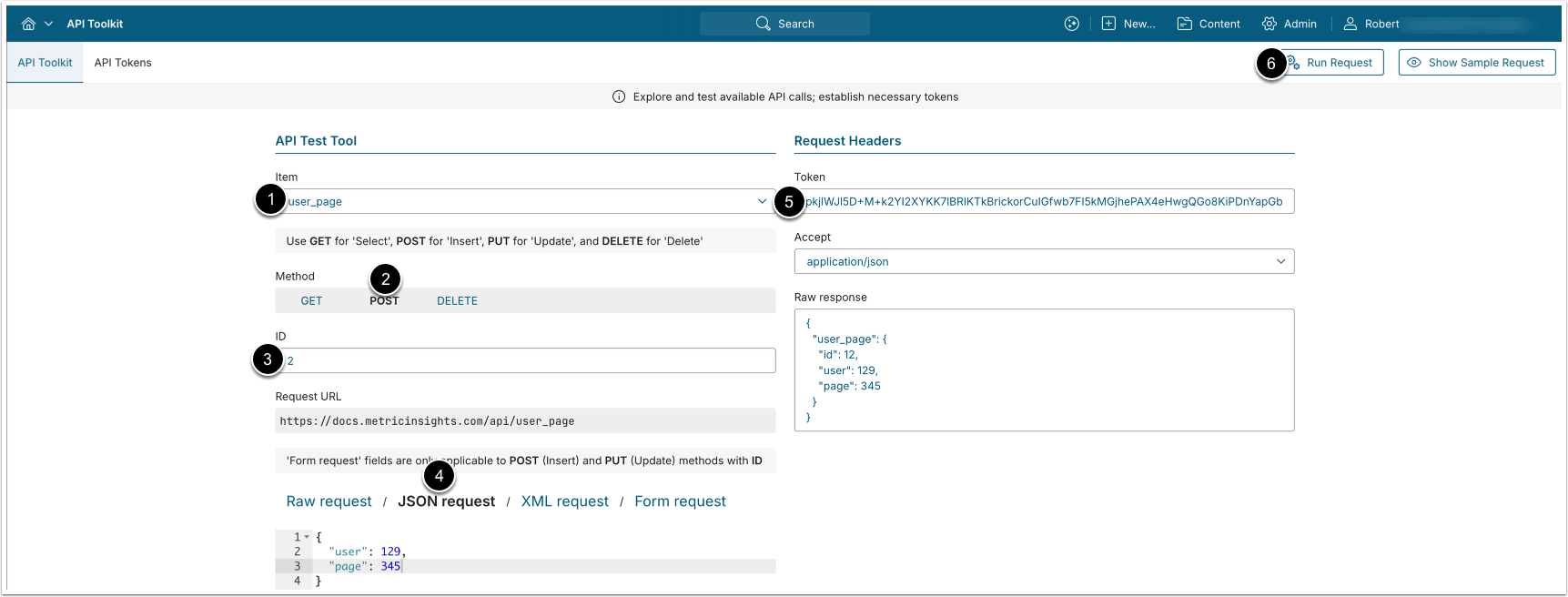
POST request to /api/user_page assigns App edit access to a User.
- Item: user_page
- Method: POST
- Select JSON request and provide the following values:
- user: The ID of the User to which you want to assign App edit access.
- page: The ID of the App, edit access to which you want to assign to the User.
- Enter an API Token.
- [Run request]
3.3. Remove App Edit Access from User
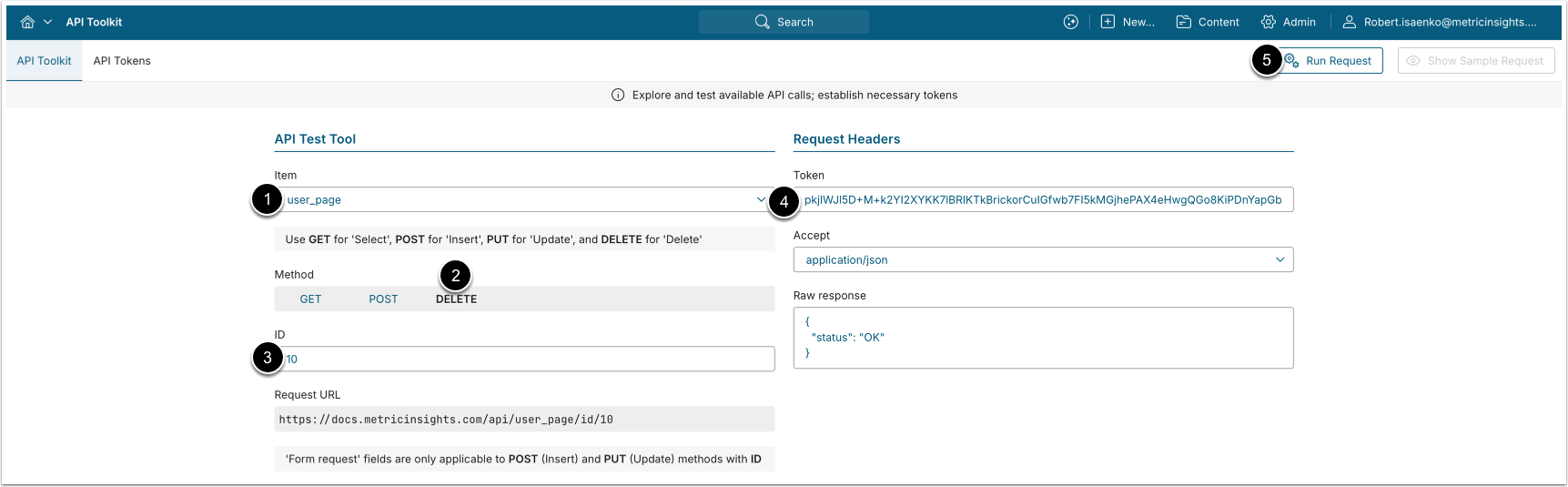
DELETE request to /api/user_page/id/<ID> removes App edit access from a User.
- Item: user_page
- Method: DELETE
- ID: Enter the ID of an existing User-to-App edit access mapping.
- See Retrieve Users with Edit Access to Apps for details.
- Enter an API Token.
- [Run request]
4. Retrieve Groups And Users with App Edit Access
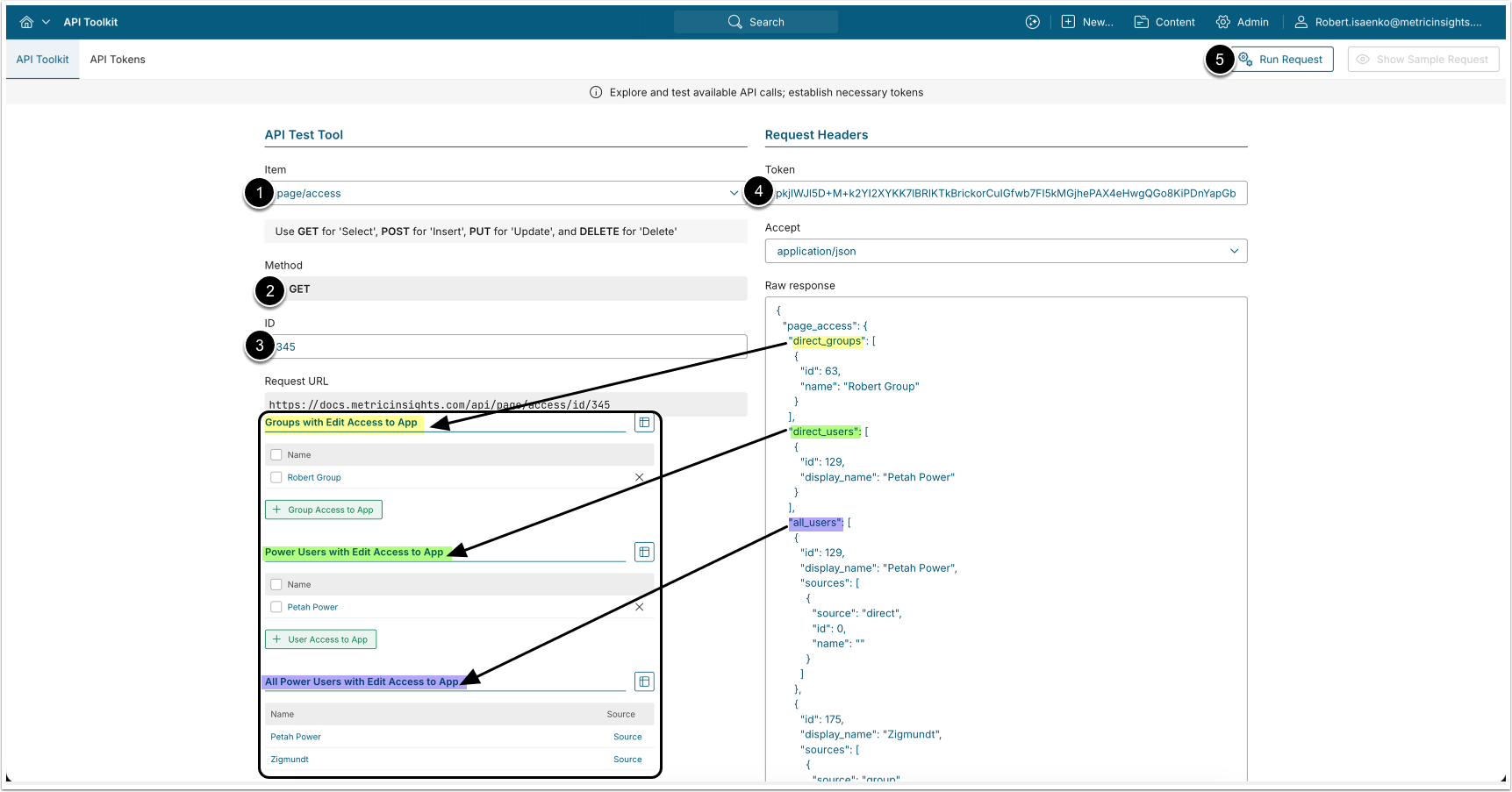
- GET request to
/api/page/access/<id>returns Groups and Users with App edit access.
- Item: page/access.
- Method: GET.
- ID: Enter the ID of an App.
- Enter an API Token.
- [Run request]
Example Response
{
  "page_access": {
    "direct_groups": [
      {
        "id": 63,
        "name": "Robert Group"
      }
    ],
    "direct_users": [
      {
        "id": 129,
        "display_name": "John Powers"
      }
    ],
    "all_users": [
      {
        "id": 129,
        "display_name": "John Powers",
        "sources": [
          {
            "source": "direct",
            "id": 0,
            "name": ""
          }
        ]
      },
      {
        "id": 175,
        "display_name": "Zigmundt",
        "sources": [
          {
            "source": "group",
            "id": 63,
            "name": "Robert Group"
          }
        ]
      }
    ]
  }
}Field Description
| Parameter Name | Value Type | Description |
|---|---|---|
direct_groups | array | Groups with edit access to the App. |
Below are the Group object parameters from the direct_groups array: | ||
id | integer | The ID of the Group. |
name | string | The name of the Group. |
direct_users | array | Users with direct edit access to the App. |
Below are the User object parameters from the direct_users array: | ||
id | integer | User ID. |
display_name | string | User’s first and last name. |
all_users | array | Users with both direct and indirect (via Group) edit access to the App. |
Below are the User object parameters from the all_users array: | ||
id | integer | User ID. |
display_name | string | User’s first and last name. |
sources | array | Source of edit access. |
Below are the User object parameters from the sources array: | ||
source | string | Source of edit access. Supported values:
NOTE: |
id | integer | The ID of the Group through which the user has edit access to the App.
|
name | string | The name of the Group through which the user has edit access to the App.
|
5. Configure Group View Access to App
5.1. Retrieve Groups with View Access to App
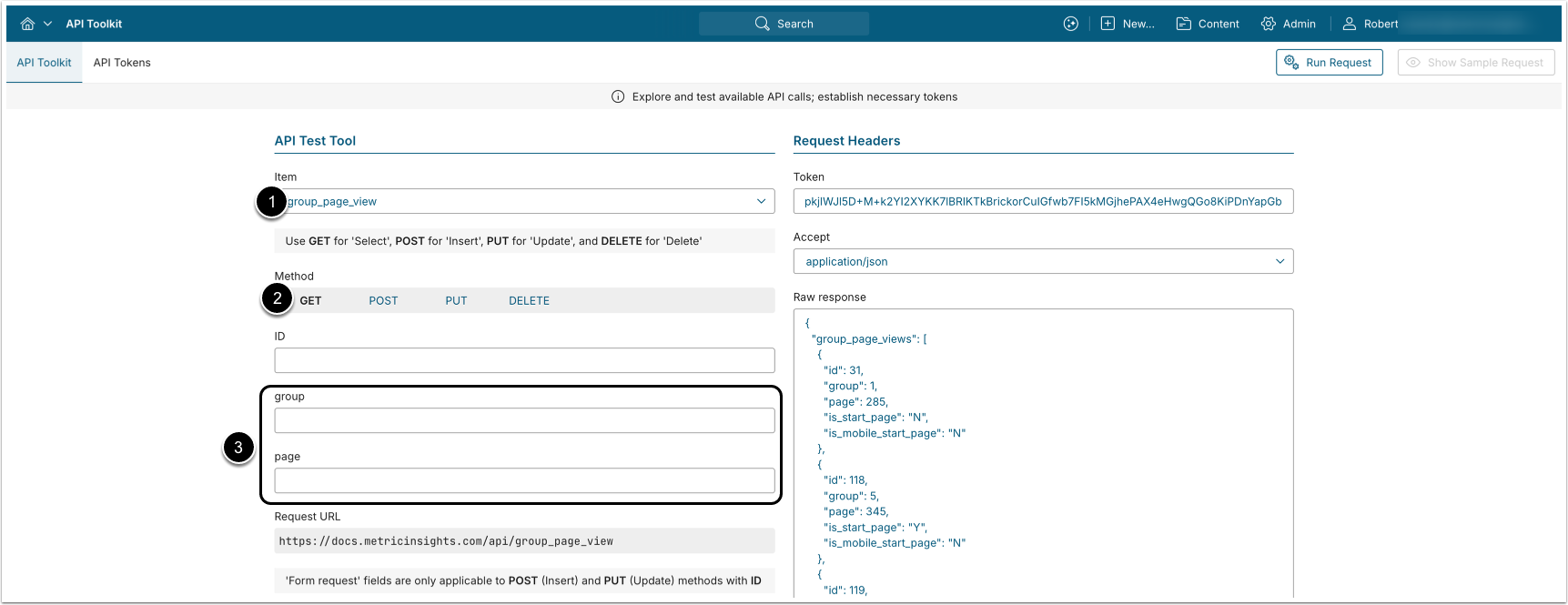
- GET request to
/api/group_page_viewreturns all Group-to-App view access mappings. - GET request to
/api/group_page_view/id/<ID>returns a single Group-to-App view access mapping by ID.
- Item: group_page_view
- Method: GET
- Optionally, apply filtering:
- group: Return all Apps to which the specified Group has view access.
- page: Return all Groups that are assigned view access to a specified App.
- Enter an API Token.
- [Run request]
Example Response
{
  "group_page_views": [
    {
      "id": 31,
      "group": 1,
      "page": 285,
      "is_start_page": "N",
      "is_mobile_start_page": "N"
    },
    {
      "id": 118,
      "group": 5,
      "page": 345,
      "is_start_page": "Y",
      "is_mobile_start_page": "N"
    },
    {
      "id": 119,
      "group": 7,
      "page": 345,
      "is_start_page": "Y",
      "is_mobile_start_page": "N"
    },
    {
      "id": 22,
      "group": 10,
      "page": 39,
      "is_start_page": "Y",
      "is_mobile_start_page": "N"
    }
  ]
}Fields Description
| Parameter Name | Value Type | Description |
|---|---|---|
group_page_views | array | Array containing all Group-to-App view access mappings. |
id | integer | ID of a single Group-to-App view access mapping. |
group | integer | ID of the Group. |
page | integer | ID of the App to which the Group has view access. |
is_start_page | string | Whether the App is displayed on the homepage navigation bar. |
is_mobile_start_page | string | Whether the App is displayed on the homepage navigation bar for mobile devices. |
5.2. Assign App View Access to Group
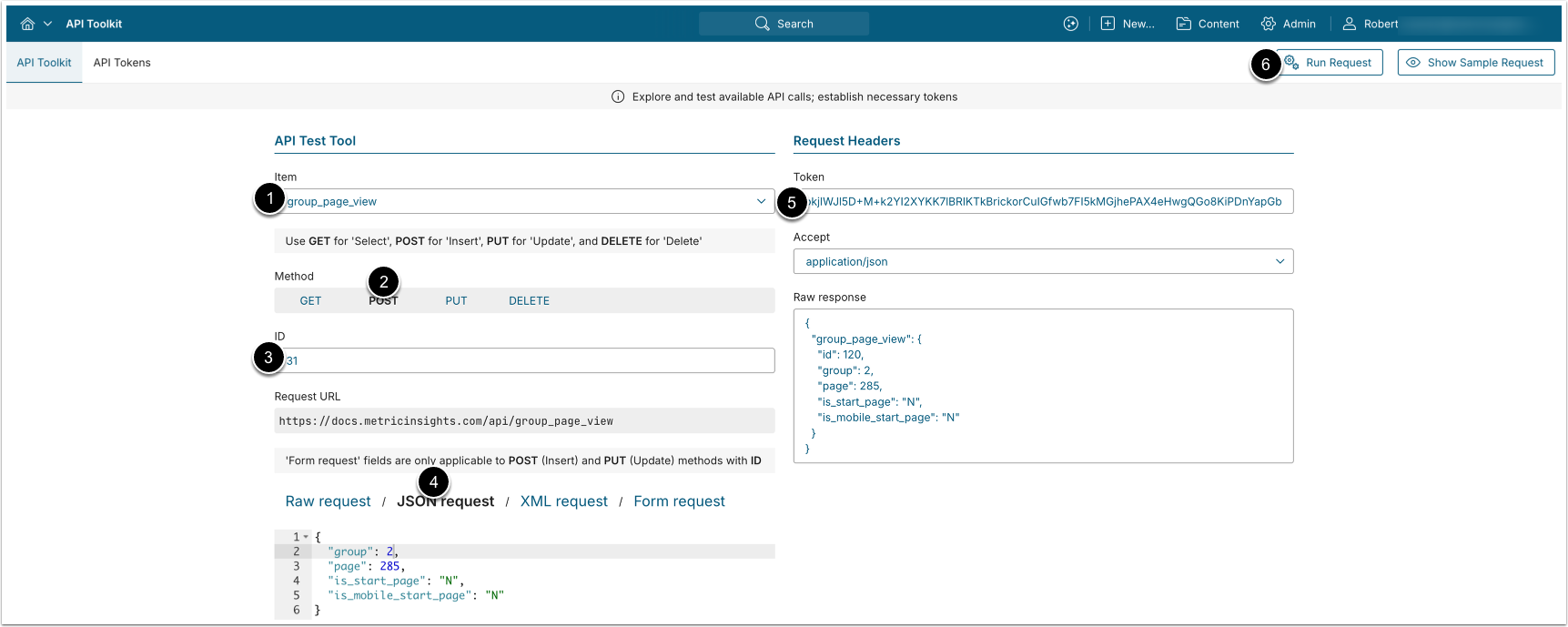
POST request to /api/group_page_view assigns App view access to a Group.
- Item: group_page_view
- Method: POST
- Enter the ID of an existing Group-to-App view access mapping.
- See Retrieve Groups with View Access to App for details.
- Select JSON request and provide the following values:
- group: The ID of the Group to which you want to assign App view access.
- page: The ID of the App, view access to which you want to assign to the Group.
- is_start_page: Whether the App will be displayed on the homepage navigation bar of the Group members.
- is_mobile_start_page: Whether the App will be displayed on the homepage navigation bar for mobile devices of the Group members.
- Enter an API Token.
- [Run request]
5.3. Modify App View Access of Group
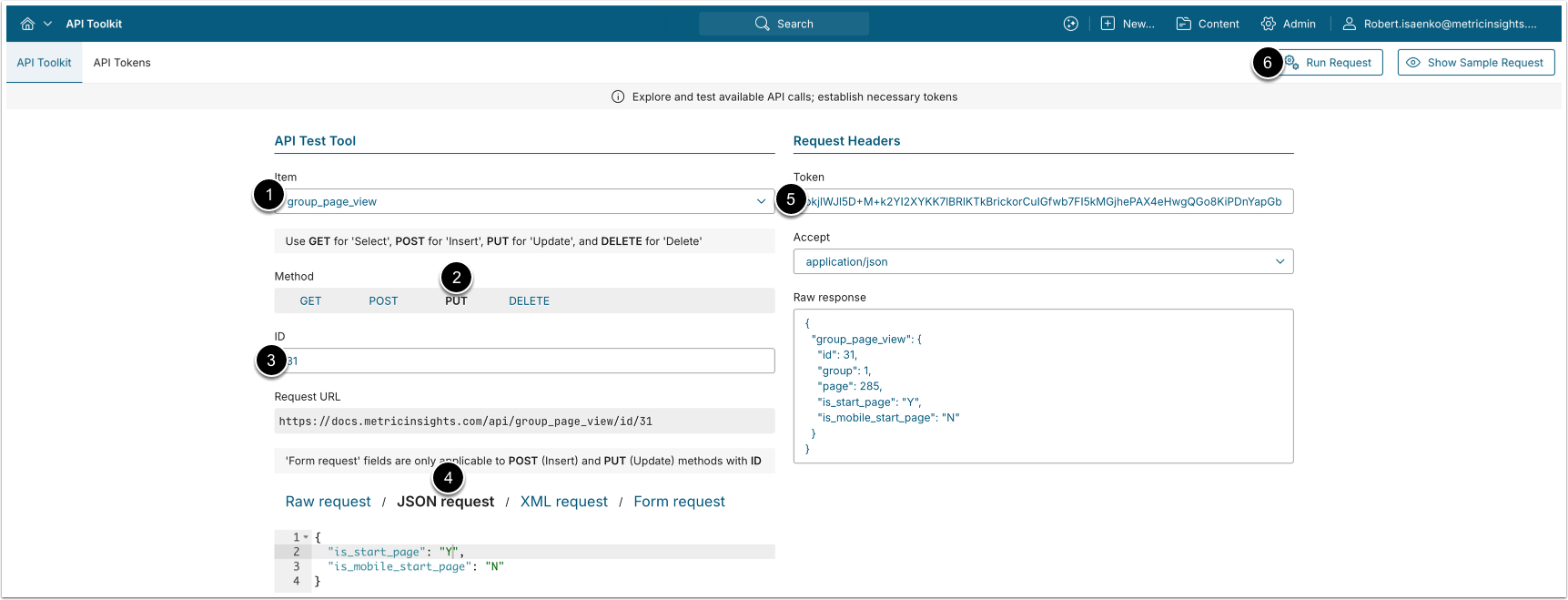
PUT request to /api/group_page_view with body {"is_start_page": "<Y/N>", "is_mobile_start_page": "<Y/N>"} modifies App view access of a Group.
- Item: group_page_view
- Method: PUT
- Enter the ID of an existing Group-to-App view access mapping.
- See Retrieve Groups with View Access to App for details.
- Select JSON request and provide the following values:
- is_start_page: Whether the App will be displayed on the homepage navigation bar of Group members.
- is_mobile_start_page: Whether the App will be displayed on the homepage navigation bar for mobile devices of the Group members.
- Enter an API Token.
- [Run request]
5.4. Remove App View Access from Group
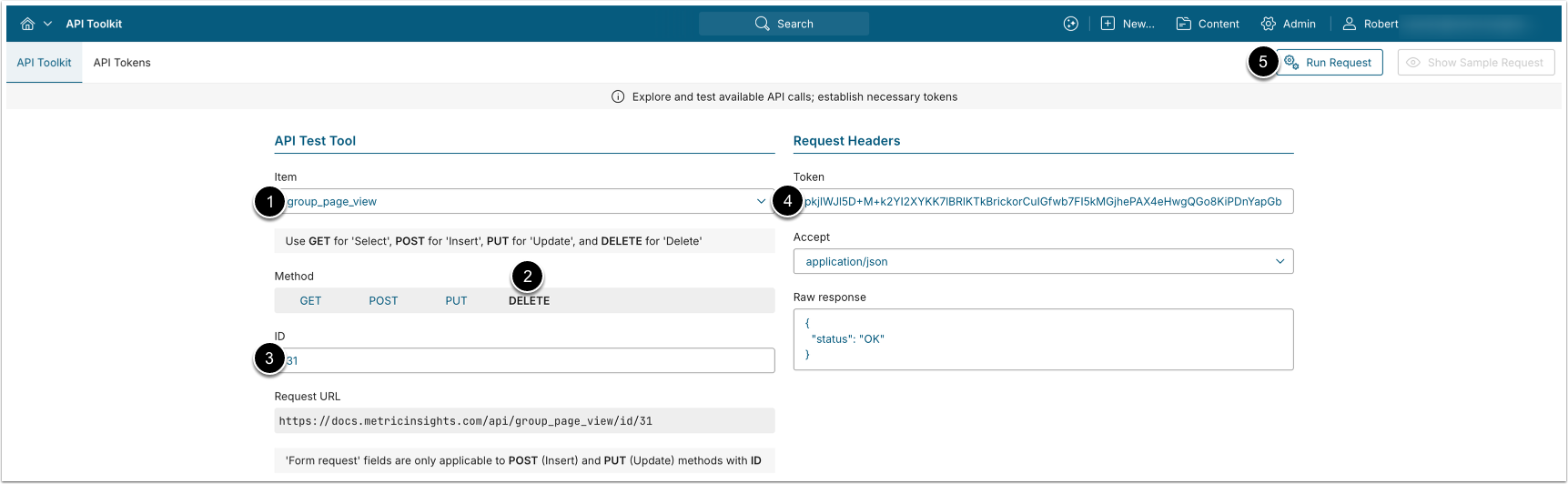
DELETE request to /api/group_page_view/id/<ID> removes App view access from a Group.
- Item: group_page_view
- Method: DELETE
- ID: Enter the ID of an existing Group-to-App view access mapping.
- See Retrieve Groups with View Access to App for details.
- Enter an API Token.
- [Run request]
6. Configure User View Access to App
6.1. Retrieve Users with View Access to App
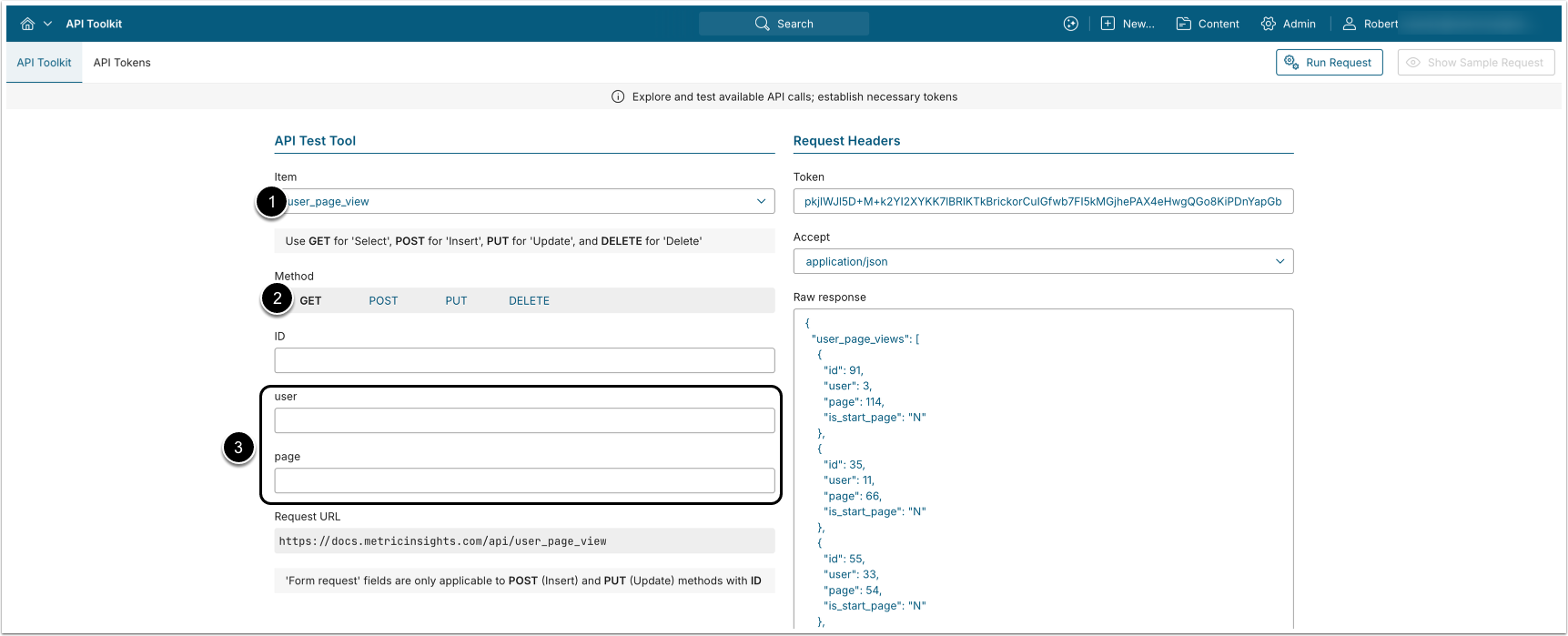
- GET request to
/api/user_page_viewreturns all User-to-App view access mappings. - GET request to
/api/user_page_view/id/<ID>returns a single User-to-App view access mapping by ID.
- Item: user_page_view
- Method: GET
- Optionally, apply filtering:
- user: Return all Apps to which the specified User has view access.
- page: Return all Users that are assigned view access to a specified App.
- Enter an API Token.
- [Run request]
Example Response
{
  "user_page_views": [
    {
      "id": 91,
      "user": 3,
      "page": 114,
      "is_start_page": "Y"
    },
    {
      "id": 35,
      "user": 11,
      "page": 66,
      "is_start_page": "N"
    },
    {
      "id": 55,
      "user": 33,
      "page": 54,
      "is_start_page": "Y"
    },
    {
      "id": 271,
      "user": 118,
      "page": 241,
      "is_start_page": "N"
    }
  ]
}Fields Description
| Parameter Name | Value Type | Description |
|---|---|---|
user_page_views | array | Array containing all User-to-App view access mappings. |
id | integer | ID of a single User-to-App view access mapping. |
user | integer | ID of the User. |
page | integer | ID of the App to which the User has view access. |
is_start_page | string | Whether the App is displayed on the homepage navigation bar. |
6.2. Assign App View Access to User
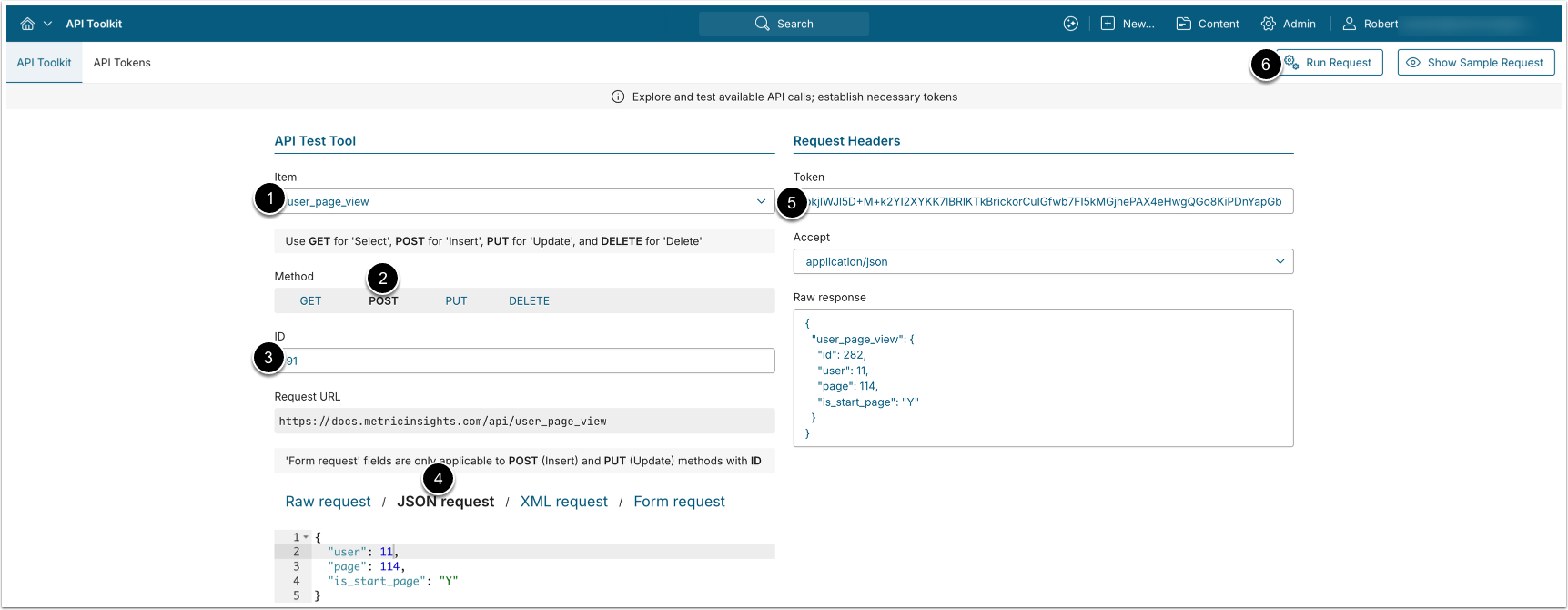
POST request to /api/user_page_view assigns App view access to a User.
- Item: user_page_view
- Method: POST
- Enter the ID of an existing User-to-App view access mapping.
- See Retrieve Users with View Access to App for details.
- Select JSON request and provide the following values:
- user: The ID of the User to which you want to assign App view access.
- page: The ID of the App, view access to which you want to assign to the User.
- is_start_page: Whether the App will be displayed on the User's homepage navigation bar.
- Enter an API Token.
- [Run request]
6.3. Modify App View Access of User
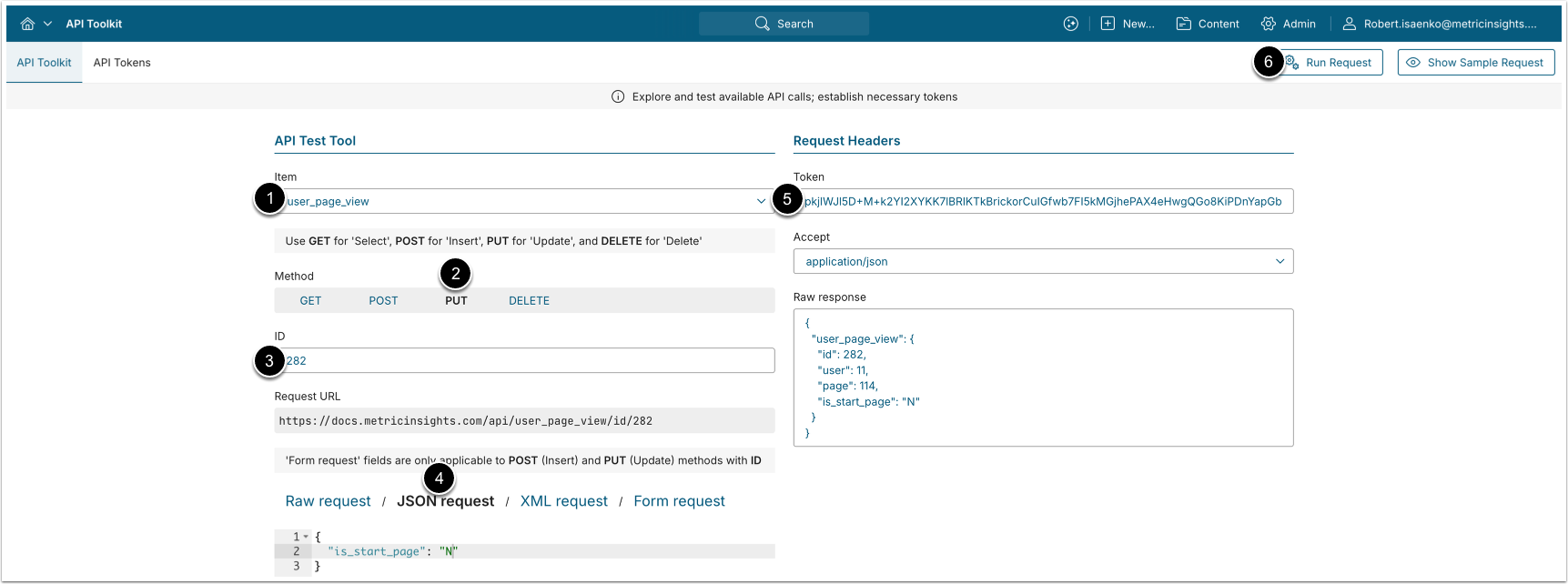
PUT request to /api/user_page_view with body {"is_start_page": "<Y/N>"} modifies App view access of a User.
- Item: user_page_view
- Method: PUT
- Enter the ID of an existing User-to-App view access mapping.
- See Retrieve Users with View Access to App for details.
- Select JSON request and provide the following values:
- is_start_page: Whether the App will be displayed on the User's homepage navigation bar.
- Enter an API Token.
- [Run request]
6.4. Remove App View Access from User
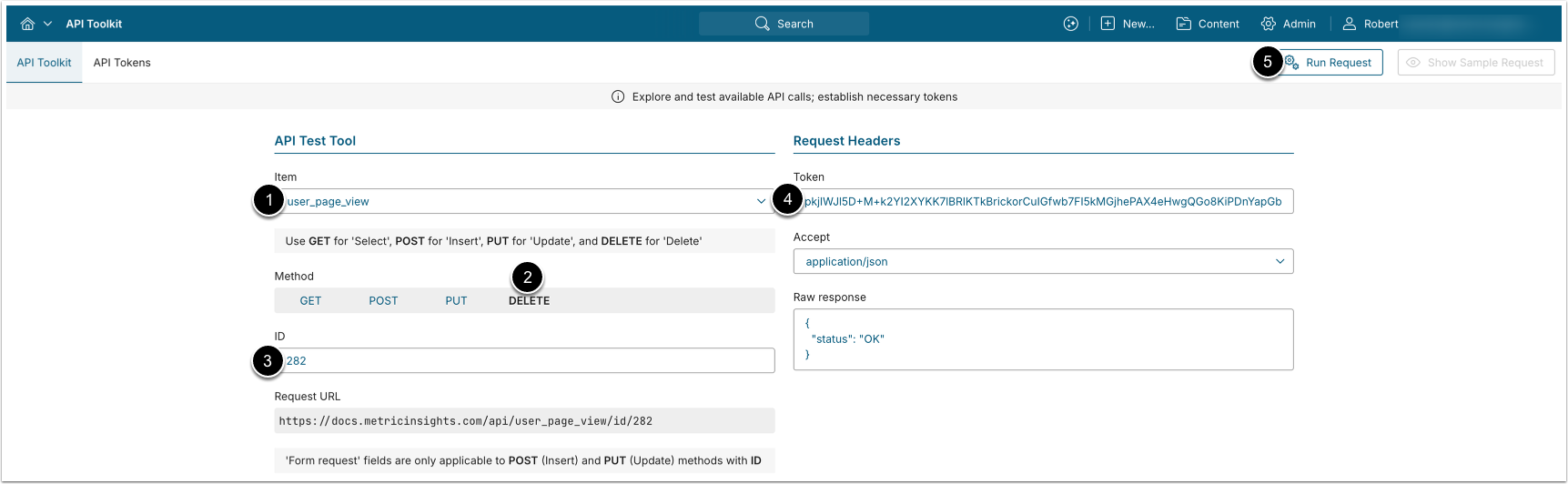
DELETE request to /api/user_page_view/id/<ID> removes App view access from a User.
- Item: user_page_view
- Method: DELETE
- ID: Enter the ID of an existing User-to-App view access mapping.
- See Retrieve Users with View Access to App for details.
- Enter an API Token.
- [Run request]