Metric Insights can integrate with the Databricks Genie AI tool using a Model Context Protocol (MCP) Server to establish a secure, programmatic connection from Concierge service. This integration exposes Databricks Conversational Analytics and related AI services within Concierge, enabling users to submit natural-language queries to Databricks data assets without context switching.
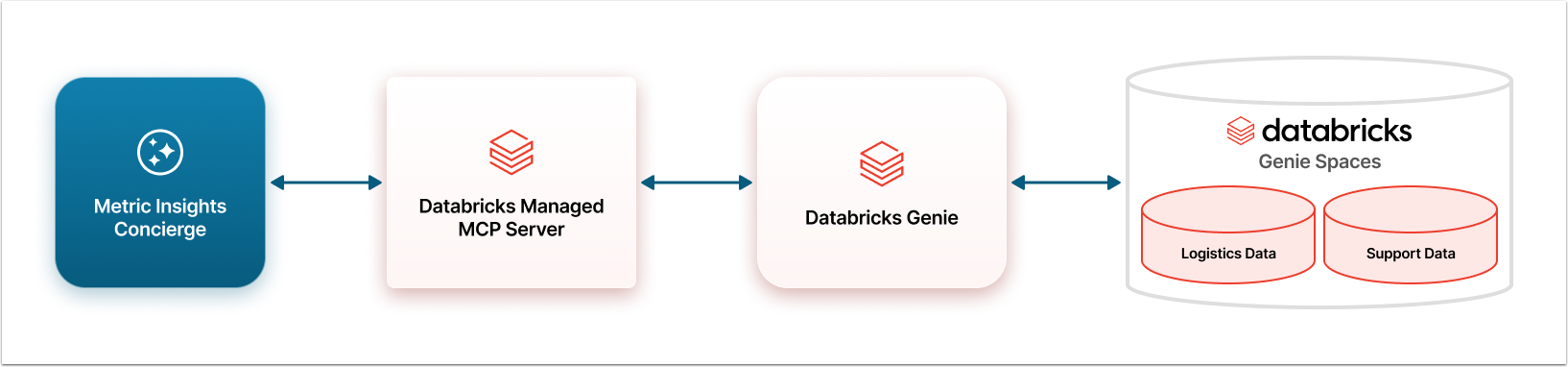
Architectural Diagram for Databricks MCP Server Integration with Concierge
This diagram shows an example, where Databricks Genie was configured to have Logistics Data and Support Data as Agents. Your Databricks Genie can have other Agents set up with different names. These Agents correlate to their respective Domains in Metric Insights Concierge. A User can ask a question about logistics and Concierge will know to route that question through the Databricks Managed MCP Server to the specific Domain.
Prerequisites
- Databricks Admin Account;
- Ability to grant service principal the SELECT and USE SCHEMA privileges;
- Metric Insights Admin User account.
Steps to Connect Concierge and Databricks
- Decide on the Authentication method: Define how Concierge will perform authentication when connecting to Databricks:
- "Service Account Token": The Token is requested form Databricks and inserted into the configuration code automatically. The User only provides credentials to the service account in Databricks. This Auth Type should be used if OAuth authentication method is used in Databricks.
- "Defined in configuration": The authentication Token has to be created in Databricks account and manually inserted into the Concierge configuration code. This Auth Type should be used if Databricks has the security model which doesn't include OAuth or there are other specifics that need a flexible solution. Be aware, that when the Token expires, it has to be re-entered into the configuration code manually.
- Set up Databricks and gather information for authentication: Enable the MCP server, create Agents and gather connection information.
- Configure External Resource in Metric Insights account: Set up Concierge to connect with Databricks.
- Create a Domain: Create a new Domain or use an existing one and associate it with External Resource. External Resources are not directly shown in the All Sources menu of the Concierge panel. Instead, they are associated with a Domain and the Domains are listed in the All Sources menu.
- NOTE: You will need to gather all of the Space ID's copied in Step 2 to use as the Domain ID when associating the External Resource with Domain.