Search Filter API is a set of endpoints designated to re-create the Search page for Custom Apps. It covers retrieving the filter panel values, running searches, and configuring the items that drive Search filtering:
/api/search/build_url: Build fully resolved URLs for an External Report./api/search/certification_level: Retrieve Certification Levels available for filtering./api/search/external_icon: Retrieve icons for External Report types./api/search/filter_select: Retrieve Owners, Tags, Categories, or Custom Fields./api/search/filter_value: Retrieve Search filter panel values./api/search/global_search: Retrieve Global search results./api/search/index_status: Retrieve the status of the search index./api/search/log_click: Log a search-result click./api/search/suggestion: Retrieve search suggestions./api/search/tab: Retrieve Search page tabs.
Prerequisites:
- Under Admin > System > System Variables, ensure
GLOBAL_SEARCH_USE_DATA_ANALYZERisY. Several endpoints in this article return reduced data when the System Variable is off.
Table of contents:
- Access Admin > System > API Toolkit
- Build Search URL
- Get Certification Levels
- Get Icons for External Report Types
- Get Owners, Tags, or Categories
- Get Search Filter Panel Values
- Get Global Search Results
- Get Index Status
- Log Search Result Click
- Get Search Suggestions
- Get Search Tabs
NOTE: All POST requests described in this article are demonstrated as GET requests, with parameters passed in the query string. This is for compatibility with the API Toolkit. Both methods are supported for these endpoints.
1. Access Admin > System > API Toolkit
2. Build Search URL
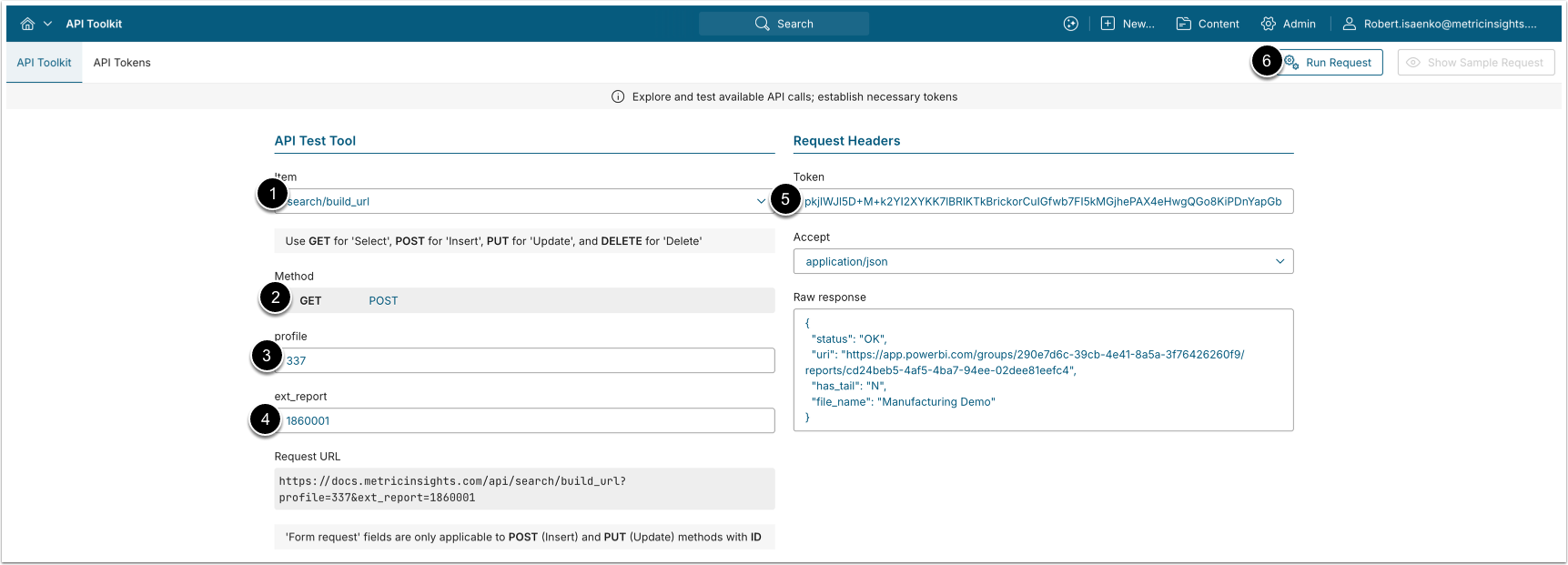
- The POST request to
/api/search/build_urlbuilds a fully resolved external report URL for a given plugin connection profile. Pass the optionalext_reportparameter to resolve the URL down to a specific External Report; omit it to get the profile-level URL. - The endpoint also accepts GET requests, with all parameters encoded as query string values.
- Item: search/build_url.
- Method: GET
- profile: The plugin connection profile ID.
- ext_report: External Report Reference ID.
- To find the value of this parameter for your External Report, run
GET /api/external_report/id/<ID>replacing<ID>with your External Report ID. Copy theexternal_report_reference_idvalue.
- To find the value of this parameter for your External Report, run
- Enter an API Token.
- [Run request]
Example Response
{
  "status": "OK",
  "uri": "https://app.powerbi.com/groups/290e7d6c-39cb-4e41-8a5a-3f76426260f9/reports/cd24beb5-4af5-4ba7-94ee-02dee81eefc4",
  "has_tail": "N",
  "file_name": "Manufacturing Demo"
}Fields Description
| Field Name | Value Type | Description |
|---|---|---|
status | string | Current status of the request. Returns OK on a 2xx response. |
uri | string | The fully resolved External Report URL. |
has_tail | string | Indicates whether the URL has a query-string tail appended. "Y" if a tail is present, "N" otherwise. |
file_name | string | The display name of the External Report Reference. |
3. Get Certification Levels
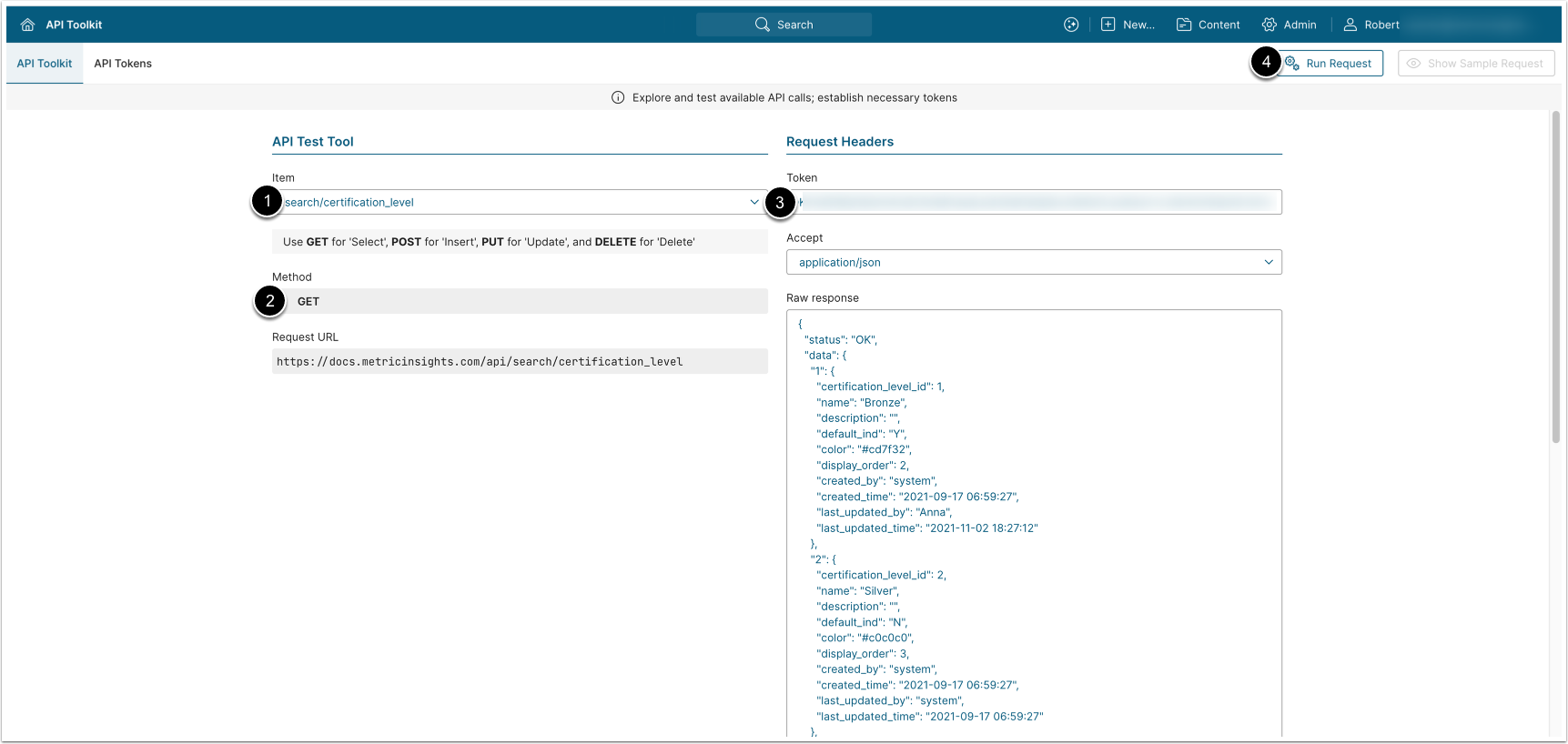
GET request to /api/search/certification_level returns all Certification Levels available for Search filtering.
- Item: search/certification_level.
- Method: GET.
- Enter an API Token.
- [Run request]
Example Response
{
  "status": "OK",
  "data": {
    "1": {
      "certification_level_id": 1,
      "name": "Bronze",
      "description": "",
      "default_ind": "Y",
      "color": "#cd7f32",
      "display_order": 2,
      "created_by": "system",
      "created_time": "2021-09-17 06:59:27",
      "last_updated_by": "Anna",
      "last_updated_time": "2021-11-02 18:27:12"
    },
    "2": {
      "certification_level_id": 2,
      "name": "Silver",
      "description": "",
      "default_ind": "N",
      "color": "#c0c0c0",
      "display_order": 3,
      "created_by": "system",
      "created_time": "2021-09-17 06:59:27",
      "last_updated_by": "system",
      "last_updated_time": "2021-09-17 06:59:27"
    },
    "3": {
      "certification_level_id": 3,
      "name": "Gold",
      "description": " ",
      "default_ind": "N",
      "color": "#d4af37",
      "display_order": 4,
      "created_by": "system",
      "created_time": "2021-09-17 06:59:27",
      "last_updated_by": "Anna",
      "last_updated_time": "2021-10-18 20:26:08"
    },
    "6": {
      "certification_level_id": 6,
      "name": "Development Approved",
      "description": "",
      "default_ind": "N",
      "color": "#00ff00",
      "display_order": 5,
      "created_by": "Yevgeniya",
      "created_time": "2021-12-03 18:52:56",
      "last_updated_by": "Yevgeniya",
      "last_updated_time": "2021-12-03 18:52:56"
    }
  }
}Fields Description
| Field Name | Value Type | Description |
|---|---|---|
status | string | Current status of the request. Returns OK on a 2xx response. |
data | object | The list of Certification Levels. |
Below are the Certification Level fields from the data array: | ||
certification_level_id | integer | The ID of the Certification Level. |
name | string | The name of the Certification Level. |
description | string | The description of the Certification Level. |
default_ind | string (Y/N) | Whether or not the Certification Level is the default one. |
color | string | The hex color of the Certification Level. |
display_order | integer | Display order of the Certification Level. |
created_by | string | The username of the User who created the Certification Level. |
created_time | string | The time when the Certification Level was created. |
last_updated_by | string | The username of the User who last updated the Certification Level. |
last_updated_time | string | The timestamp when the Certification Level was last updated. |
4. Get Icons for External Report Types
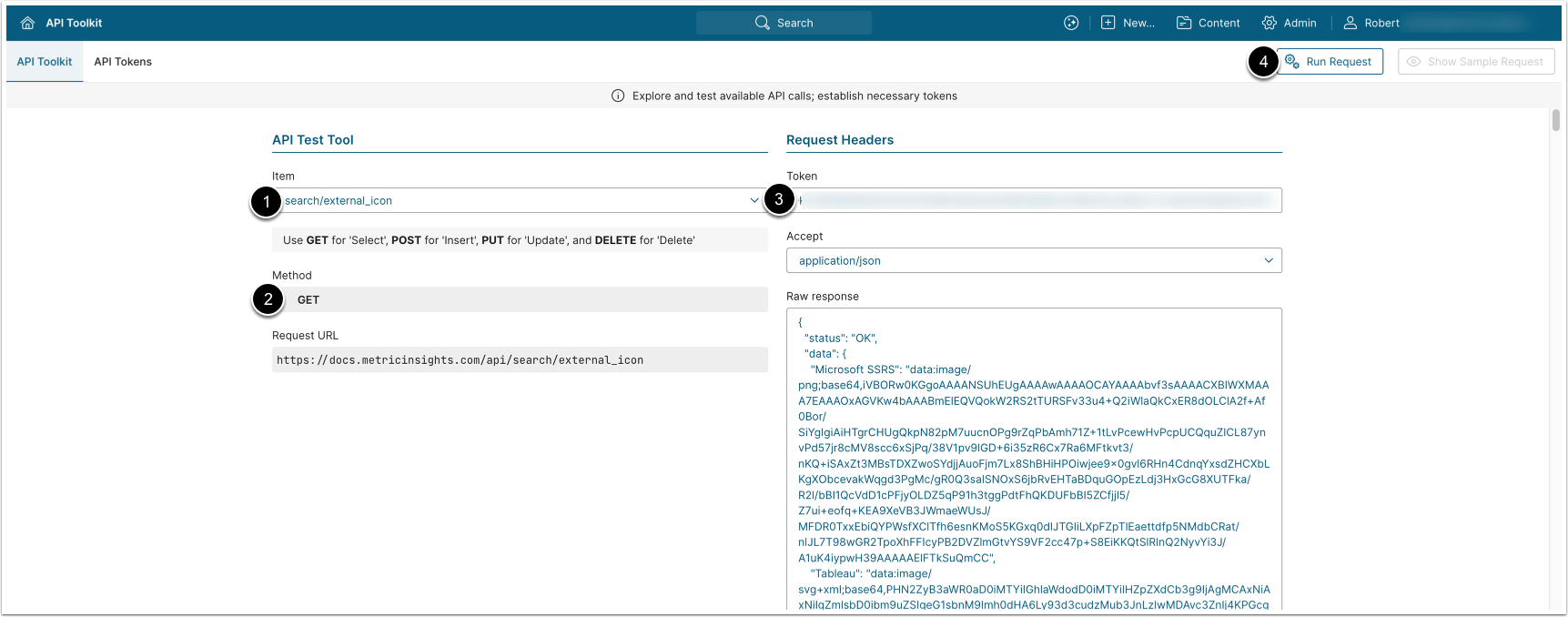
The GET request to /api/search/external_icon returns base64-encoded image data URLs of External Report icons.
- Item: search/external_icon.
- Method: GET.
- Enter an API Token.
- [Run request]
Example Response
{
  "status": "OK",
  "data": {
    "Microsoft SSRS": "data:image/png;base64,iVBORw0KGgoAAAANSUhEUgAAAAwAAAAOCAYAAAAbvf3sAAAACXBIWXMAAA7EAAAOxAGVKw4bAAABmElEQVQokW2RS2tTURSFv33u4+Q2iWlaQkCxER8dOLClA2f+Af0Bor/SiYgIgiAiHTgrCHUgQkpN82pM7uucnOPg9rZqPbAmh71Z+1tLvPcewHvPcpUCQquZICL87ynvPd57jr8cMV8scc6xSjPq/38V1pv9IGD+6i35zR6Cx7Ra6MFtkvt3/nKQ+iSAxZt3MBsTDXZwoSYdjjAuoFjm7Lx8ShBHiHPOiwjee9x0gvl6RHn4CdnqYxsdZHCXbLKgXObcevakWqgd3PgMc/gR0Q3saISNOxS6jbRvEHTaBDquGOpEzLdj3HxGcG8XUTFka/R2l/bBI1QcVdD1cPFjyOLDZ5qP91h3tggPdtFhQKDUFbBI5ZCfjjl5/Z7ui+eofq+KEA9XeVB3JWmaeWUsJ/MFDR0TxxEbiQYPWsfXClTfh6esnKMoS5KGxq0dIJTGIiLXpFZpTlEaettdfp5NMdbCRat/nlJL7T98wGR2TpoXhFFIcyPB2DVZlmGtvYS9VF2cc47p+S8EiKKQtSlRInQ2NyvYi3J/A1uK4iypwH39AAAAAElFTkSuQmCC",
    "Tableau": "data:image/svg+xml;base64,PHN2ZyB3aWR0aD0iMTYiIGhlaWdodD0iMTYiIHZpZXdCb3g9IjAgMCAxNiAxNiIgZmlsbD0ibm9uZSIgeG1sbnM9Imh0dHA6Ly93d3cudzMub3JnLzIwMDAvc3ZnIj4KPGcgY2xpcC1wYXRoPSJ1cmwoI2NsaXAwXzIyODlfMjg3MykiPgo8cGF0aCBkPSJNOC4wODMzNCAwLjMzMzM3NEg3LjU4MzM0VjMuMzMzMzdIOC4wODMzNFYwLjMzMzM3NFoiIGZpbGw9IiM3ODkwOUMiLz4KPHBhdGggZD0iTTkuMzMzMzQgMS41ODMzN0g2LjMzMzM0VjIuMDgzMzdIOS4zMzMzNFYxLjU4MzM3WiIgZmlsbD0iIzc4OTA5QyIvPgo8cGF0aCBkPSJNMTQuMDgzMyA2LjMzMzM3SDEzLjU4MzNWOS4zMzMzN0gxNC4wODMzVjYuMzMzMzdaIiBmaWxsPSIjNUM2QkMwIi8+CjxwYXRoIGQ9Ik0xNS4zMzMzIDcuNTgzMzdIMTIuMzMzM1Y4LjA4MzM3SDE1LjMzMzNWNy41ODMzN1oiIGZpbGw9IiM1QzZCQzAiLz4KPHBhdGggZD0iTTIuMDgzMzQgNi4zMzMzN0gxLjU4MzM0VjkuMzMzMzdIMi4wODMzNFY2LjMzMzM3WiIgZmlsbD0iIzc4OTA5QyIvPgo8cGF0aCBkPSJNMy4zMzMzNCA3LjU4MzM3SDAuMzMzMzM2VjguMDgzMzdIMy4zMzMzNFY3LjU4MzM3WiIgZmlsbD0iIzc4OTA5QyIvPgo8cGF0aCBkPSJNOC4wODMzNCAxMi4zMzM0SDcuNTgzMzRWMTUuMzMzNEg4LjA4MzM0VjEyLjMzMzRaIiBmaWxsPSIjNUM2QkMwIi8+CjxwYXRoIGQ9Ik05LjMzMzM0IDEzLjU4MzRINi4zMzMzNFYxNC4wODM0SDkuMzMzMzRWMTMuNTgzNFoiIGZpbGw9IiM1QzZCQzAiLz4KPHBhdGggZD0iTTEwLjY2NjcgNy4zMzMzN0g1VjguMzMzMzdIMTAuNjY2N1Y3LjMzMzM3WiIgZmlsbD0iI0U4NzYyRCIvPgo8cGF0aCBkPSJNOC4zMzMzNCA1SDcuMzMzMzRWMTAuNjY2N0g4LjMzMzM0VjVaIiBmaWxsPSIjRTg3NjJEIi8+CjxwYXRoIGQ9Ik00LjMzMzMzIDJIMy42NjY2NlY2LjY2NjY3SDQuMzMzMzNWMloiIGZpbGw9IiNGRkEwMDAiLz4KPHBhdGggZD0iTTYuMzMzMzMgNEgxLjY2NjY2VjQuNjY2NjdINi4zMzMzM1Y0WiIgZmlsbD0iI0ZGQTAwMCIvPgo8cGF0aCBkPSJNMTIgMkgxMS4zMzMzVjYuNjY2NjdIMTJWMloiIGZpbGw9IiM2MDdEOEIiLz4KPHBhdGggZD0iTTE0IDRIOS4zMzMzNFY0LjY2NjY3SDE0VjRaIiBmaWxsPSIjNjA3RDhCIi8+CjxwYXRoIGQ9Ik00LjMzMzMzIDlIMy42NjY2NlYxMy42NjY3SDQuMzMzMzNWOVoiIGZpbGw9IiNDNjI4MjgiLz4KPHBhdGggZD0iTTYuMzMzMzMgMTFIMS42NjY2NlYxMS42NjY3SDYuMzMzMzNWMTFaIiBmaWxsPSIjQzYyODI4Ii8+CjxwYXRoIGQ9Ik0xMiA5SDExLjMzMzNWMTMuNjY2N0gxMlY5WiIgZmlsbD0iIzBENDdBMSIvPgo8cGF0aCBkPSJNMTQgMTFIOS4zMzMzNFYxMS42NjY3SDE0VjExWiIgZmlsbD0iIzBENDdBMSIvPgo8L2c+CjxkZWZzPgo8Y2xpcFBhdGggaWQ9ImNsaXAwXzIyODlfMjg3MyI+CjxyZWN0IHdpZHRoPSIxNiIgaGVpZ2h0PSIxNiIgZmlsbD0id2hpdGUiLz4KPC9jbGlwUGF0aD4KPC9kZWZzPgo8L3N2Zz4K",
    "QlikView": "data:image/svg+xml;base64,PHN2ZyB3aWR0aD0iMTYiIGhlaWdodD0iMTYiIHZpZXdCb3g9IjAgMCAxNiAxNiIgZmlsbD0ibm9uZSIgeG1sbnM9Imh0dHA6Ly93d3cudzMub3JnLzIwMDAvc3ZnIj4KPHBhdGggZD0iTTExLjUwMzUgMTIuNDkyMkMxMC40MjE3IDEzLjM1MDEgOS4wODEwNiAxMy44MTU3IDcuNzAwNDYgMTMuODEzMUM0LjMyNTEgMTMuODE4NyAxLjU4Nzg0IDExLjA4MiAxLjU4Nzg0IDcuNzAwNDVDMS41ODc4NCA2LjI0NjA5IDIuMDkyOTkgNC45MTM0IDIuOTM2OTYgMy44NjQwOUwxLjgxNTI2IDIuNzM3MjVDMC42NDAyMTEgNC4xMjM3MiAtMC4wMDMyNDAyOSA1Ljg4MzAyIDEuMjI3MDhlLTA1IDcuNzAwNDVDMS4yMjcwOGUtMDUgMTEuOTUzNyAzLjQ0Nzc2IDE1LjQwMDkgNy43MDA0NiAxNS40MDA5QzkuNTcxNjcgMTUuNDAwOSAxMS4yODY4IDE0LjczNTEgMTIuNjE5NSAxMy42MjQ3TDExLjUwMzUgMTIuNDkyMloiIGZpbGw9IiM1NDU2NUEiLz4KPHBhdGggZD0iTTEzLjg3ODggMTUuMDA2NkgxNkwxMy43MTI1IDEyLjUxMzdDMTQuODA3NSAxMS4xNDg3IDE1LjQwMzMgOS40NTA0NSAxNS40MDA5IDcuNzAwNDVDMTUuNDAwOSAzLjQ0Nzc1IDExLjk1MzIgMS4yMjM4OGUtMDYgNy43MDA0NiAxLjIyMzg4ZS0wNkM2LjU3OTE0IC0wLjAwMDYzMTQ4NCA1LjQ3MTI2IDAuMjQ0MDYgNC40NTQ1MSAwLjcxNjkxNEMzLjQzNzc3IDEuMTg5NzcgMi41MzczIDEuODc5MzQgMS44MTUyNiAyLjczNzI1TDIuOTM2OTYgMy44NjQwOUMzLjUwOTY5IDMuMTUwMiA0LjIzNTI2IDIuNTc0NCA1LjA2MDg1IDIuMTc5MzhDNS44ODY0NCAxLjc4NDM2IDYuNzkwMzcgMS41ODAyNSA3LjcwNTU5IDEuNTgyMTlDMTEuMDg2NiAxLjU4MjE5IDEzLjgyMzMgNC4zMTk0NCAxMy44MjMzIDcuNzAwNDVDMTMuODIzMyA5LjY0MzUzIDEyLjkxODggMTEuMzc2MSAxMS41MDgxIDEyLjQ5MTdMMTIuNTU3OSAxMy41NDY2TDEyLjYwMiAxMy41OTY0TDEyLjYxMzMgMTMuNjA3N0wxMy44Nzg4IDE1LjAwNjZaIiBmaWxsPSIjMDA5ODQ1Ii8+Cjwvc3ZnPgo="
 }
}Fields Description
| Field Name | Value Type | Description |
|---|---|---|
status | string | Current status of the request. Returns OK on a 2xx response. |
data | object | A list of key-value pairs, where each key represents a BI tool data source; e.g., Microsoft Power BI, Tableau, QlikView, and each value contains the corresponding icon encoded as a Base64 data URL. |
5. Get Owners, Tags, or Categories
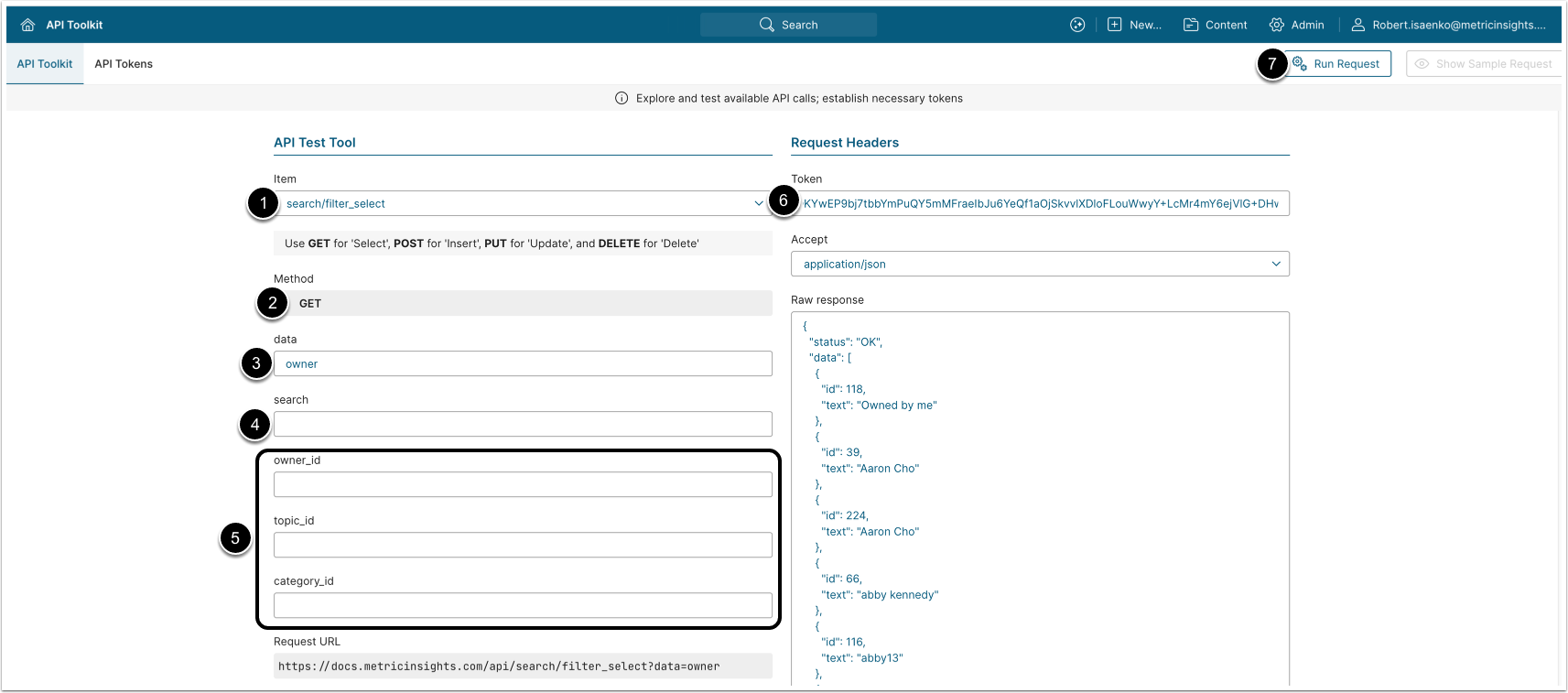
- The GET request to
/api/search/filter_select?data=ownerreturns all Owners available for Search filtering. - The GET request to
/api/search/filter_select?data=tagreturns all Tags available for Search filtering. - The GET request to
/api/search/filter_select?data=category&category_id=<ID>returns a specified Category available for Search filtering. - The GET request to
/api/search/filter_select?data=custom_fieldreturns Custom Fields available for Search filtering.
- Item: search/filter_select.
- Method: GET.
- data (required): Select one of the search filtering objects to retrieve:
owner,tag,category,custom_field.categoryrequires providing one or morecategory_idvalues.
- search: Optionally, enter a search term for filtering.
- Optionally, apply additional filtering by specifying
owner_id,topic_id, orcategory_id(s). - Enter an API Token.
- [Run request]
Example Responses and Fields Descriptions
| Field Name | Value Type | Description |
|---|---|---|
status | string | Current status of the request. Returns OK on a 2xx
response. |
data | array | List of select options for the requested data type. The shape of each item depends on the data value — see below. |
The table above demonstrates fields present in responses to all /api/search/filter_select calls. See the following subsections for information on response structure and field descriptions for specific calls.
{
  "status": "OK",
  "data": [
    {
      "id": 238,
      "text": "Owned by me"
    },
    {
      "id": 39,
      "text": "Andrew Johnson"
    },
    {
      "id": 224,
      "text": "Bill Thomas"
    },
    {
      "id": 66,
      "text": "Chris Edwards"
    }
  ]
}| Field Name | Value Type | Description |
|---|---|---|
id | integer | User ID of the owner. |
text | string | Display name of the owner, or the localized label "Owned by me" for the entry representing the calling user. |
{
  "status": "OK",
  "data": [
    {
      "id": 238,
      "text": "\"Gross Margin\"",
      "icon": []
    },
    {
      "id": 246,
      "text": "Business Glossary: Power BI: Dev 23 article",
      "icon": [],
      "props": {
        "section": "Business Glossary",
        "term": "Power BI: Dev 23 article"
      }
    },
     {
      "id": 175,
      "text": "Corporate Goals: Reduce Customer Churn",
      "icon": {
        "icon_type": "fa",
        "fa_icon": "fas university"
      },
      "props": {
        "section": "Corporate Goals",
        "term": "Reduce Customer Churn"
      }
    },
    {
      "id": 247,
      "text": "Business Glossary: sales",
      "icon": [],
      "props": {
        "section": "Business Glossary",
        "term": "sales"
      }
    }
  ]
}| Field Name | Value Type | Description |
|---|---|---|
id | integer | Tag ID. |
text | string | Tag label. |
icon | array | object | Icon descriptor. Empty array ([]) when the Tag has no icon;
otherwise an object. |
Below are the fields of the icon object: | ||
icon_type | string | Icon source type (e.g., fa for Font Awesome). |
fa_icon | string | Font Awesome class (e.g., fas university). |
props | object | Optional — present only for Glossary Terms that belong to a Section. Contains section and term. |
Below are the fields of the props object: | ||
section | string | Name of the Glossary Term Section. |
term | string | Name of the Glossary Term. |
{
  "status": "OK",
  "data": [
    {
      "id": 123,
      "text": "Documentation Examples"
    }
  ]
}| Field Name | Value Type | Description |
|---|---|---|
id | integer | Category ID. |
text | string | Full hierarchical category path (e.g., Documentation Examples). Requires category_id in the request; returns an empty data array if category_id omitted. |
{
  "status": "OK",
  "data": [
    {
      "cfs_id": 41,
      "label": "Wine Sales",
      "fields": [
        {
          "id": 324,
          "text": "Accessories",
          "type": "single",
          "display_in_filter_pane_ind": "Y"
        },
        {
          "id": 212,
          "text": "Country",
          "type": "multi",
          "display_in_filter_pane_ind": "Y"
        },
        {
          "id": 315,
          "text": "Responsible",
          "type": "users",
          "display_in_filter_pane_ind": "Y"
        }
      ]
    },
    {
      "cfs_id": 39,
      "label": "Alation New Section",
      "fields": [
        {
          "id": 318,
          "text": "Alation Data Classification",
          "type": "single",
          "display_in_filter_pane_ind": "N"
        },
        {
          "id": 319,
          "text": "Alation Status",
          "type": "single",
          "display_in_filter_pane_ind": "N"
        }
      ]
    }
  ]
}| Field Name | Value Type | Description |
|---|---|---|
cfs_id | integer | Custom Field Section ID. |
label | string | Section display name. |
fields | array | List of Custom Fields in this section — see below. |
Below are the fields of the fields object: | ||
id | integer | Custom Field ID. |
text | string | Custom Field name. |
type | string | Custom Field type. |
display_in_filter_pane_ind | string | Whether the field is configured to appear in the Search filter pane («Y»/«N») |
6. Get Search Filter Panel Values
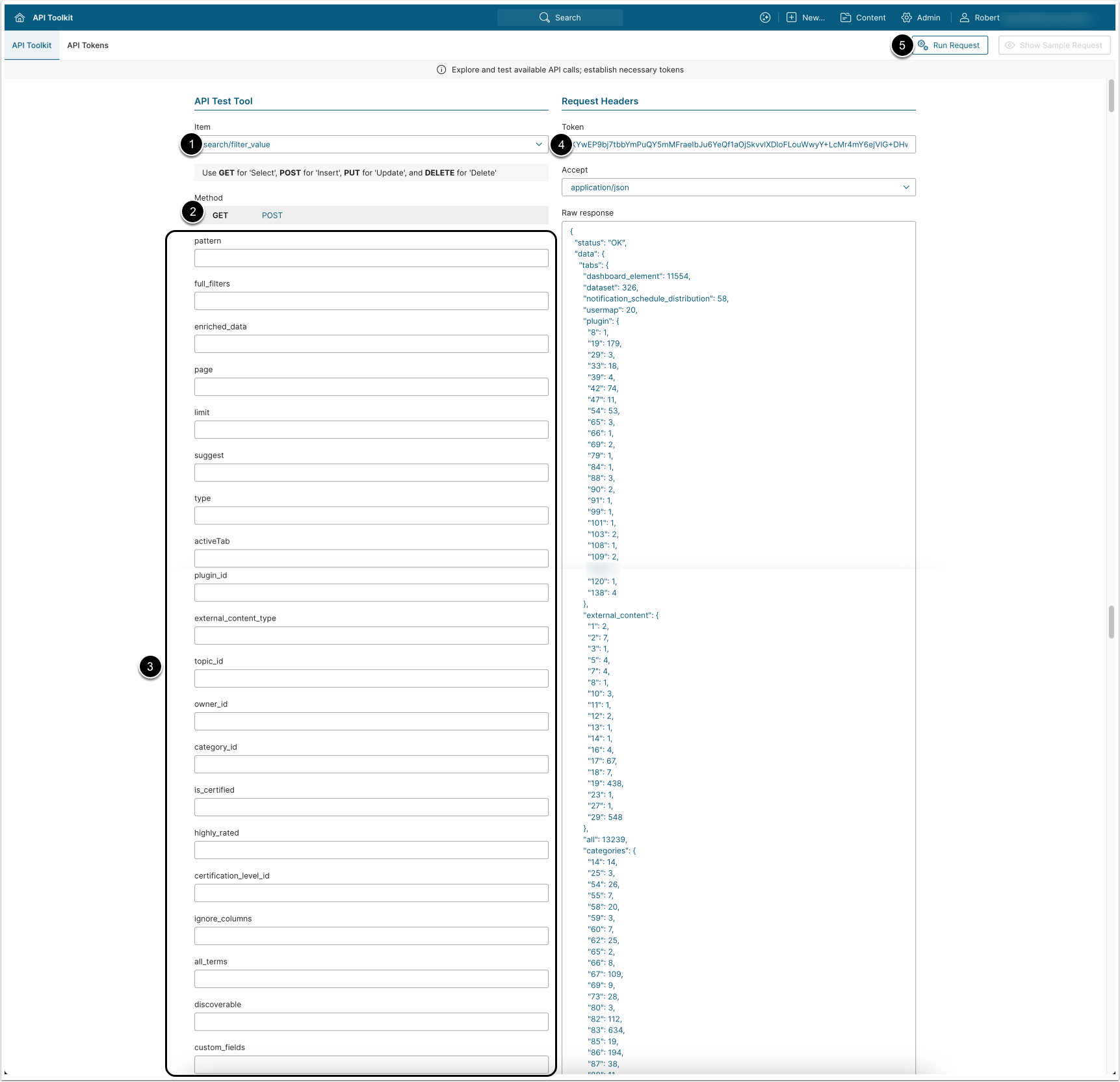
- The POST request to
/api/search/filter_valuereturns all values needed to populate the filter panel on the Search page, including tab counts, available Owners, Tags, Categories, Custom Fields, Engagement range, Certification Levels, and other filtering options. - The endpoint also accepts GET requests, with all parameters encoded as query string values.
- Item: search/filter_value.
- Method: GET.
- Optionally, provide parameters.
- See Optional Parameters for details.
- Enter an API Token.
- [Run request]
Optional Parameters
Search Context Parameters
Pass these to tell the endpoint what the user is searching for and where they are looking. The endpoint returns the same set of fields (tabs, categories, tags, owners, engagement, etc.), but the counts inside each one are scoped to items that match the search; e.g., passing pattern=sales returns the number of sales-matching items in each Owner, Tag, and Category rather than the totals across the whole catalog.
| Field Name | Value Type | Description |
|---|---|---|
pattern | string | The search keyword or phrase currently entered by the user. |
type | string | The search type. Defaults to "all". |
activeTab | string | The currently active content type tab. Defaults to "all". |
suggest | string | Set to "Y" to enable suggestion mode. |
all_terms | string | Set to "Y" to require all search terms to match (AND logic). Defaults to OR logic. |
page | integer | Page number for paginating search results. |
limit | integer | Number of results per page. |
Active Filter Parameters
Pass these to declare the filters the user has already selected in the panel. The endpoint returns the same set of fields, but the counts in every facet are narrowed by the supplied filters so that each remaining facet shows how many items would still match if that value were added next; e.g., supplying owner_id=42 shrinks tags and categories to only those that apply to items owned by User 42. This is what powers faceted drill-down on the Search page.
| Field Name | Value Type | Description |
|---|---|---|
plugin_id | string | Single plugin ID or comma-separated list (e.g., Tableau, PowerBI). |
external_content_type | string | Single external content type ID or comma-separated list. |
topic_id | string | Single tag ID or comma-separated list. |
owner_id | string | Single owner user ID or comma-separated list. |
category_id | string | Single category ID or comma-separated list. |
is_certified | string | Set to "Y" to return only certified content. |
highly_rated | string | Set to "Y" to return only highly rated content. |
certification_level_id | integer | ID of the certification level to filter by. |
discoverable | string | Set to "N" to exclude discoverable-only content. |
custom_fields | string | Custom field filters as a JSON-encoded array of filter objects. |
custom_field_filter | string | When a previous response was requested with full_filters=1, each returned filter entry carries a parameter_name. Pass the selected values back using that parameter name to narrow results. |
glossary_term_filter | string | |
datasource_table_name | string | |
datasource_column_name | string | |
external_filter | string |
Response Control Parameters
Pass these to change the shape of the response rather than which items are counted. full_filters=1 wraps the filter families in a top-level types object and returns each entry as a rich object with a display name, count, and a parameter_name for round-trip filter selection; it also adds the source_tables, source_table_columns, and external_filters families. enriched_data=1 adds glossary terms and tag names to the response. ignore_columns=Y excludes data column matches from the search scope. The total number of items counted is unchanged by these parameters.
| Field Name | Value Type | Description |
|---|---|---|
full_filters | integer | Set to 1 to return full filter values for owners, tags, categories, and custom fields. |
enriched_data | integer | Set to 1 to include enriched data such as glossary terms and tag names. |
ignore_columns | string | Set to "Y" to exclude data column names from the search scope. |
Example Response
{
  "status": "OK",
  "data": {
    "tabs": {
      "internal report": 517,
      "metric": 10563,
      "dashboard_element": 0,
      "dataset": 44,
      "notification_schedule_distribution": 12,
      "usermap": 3,
      "plugin": { "42": 74, "54": 53, "19": 182 },
      "external_content": { "44": 1031, "53": 942, "68": 71 },
      "categories": { "83": 628, "91": 9922, "106": 10170 },
      "all": 14121
    },
    "_main_tabs": { "internal report": 517, "metric": 10563 },
    "categories": { "83": 628, "91": 9922, "106": 10170 },
    "tags": { "0": 104, "226": 154, "229": 146 },
    "owners": { "0": 7, "19": 6247, "23": 10384 },
    "engagement": { "min": 0, "max": 124 },
    "custom_field": {
      "322": ["Bronze", "Gold", "Silver"],
      "329": ["Approved", "In Progress", "Under Review"]
    },
    "content_type_filter": { "44": 1031, "53": 942, "117": 10563, "118": 517 },
    "certification_level": { "1": 4978, "2": 8, "3": 15 },
    "folders": { "25": 4985, "33": 55 },
    "glossary": { "13": ["Customer Lifetime Value (CLV)", "Profit", "Sales"] },
    "tag_names": [],
    "discoverable": false,
    "certificationLevels": [
      { "value": 1, "label": "Bronze" },
      { "value": 2, "label": "Silver" },
      { "value": 3, "label": "Gold" }
    ],
    "enabledCertificationLevels": true,
    "includeAllTerms": false,
    "openLinksInNewTab": "N"
  }
}Fields Description
| Field Name | Child Field Name | Value Type | Description |
|---|---|---|---|
status | string | Current status of the request. | |
data | object | Object containing all filter values for
populating the Search page filter panel. | |
tabs | internal report | integer | Count of Report items. Optional |
metric | integer | Count of Metric items. Optional | |
dashboard_element | integer | Count of Element items. Optional | |
dataset | integer | Count of Dataset items. Optional | |
notification_schedule_distribution | integer | Count of Burst items. Optional | |
usermap | integer | Count of User Map items. Optional | |
plugin | object | Key-value pairs where each key is a plugin
ID and the value is the item count for that plugin type (e.g.,
PowerBI, Tableau, QlikSense). | |
external_content | object | Key-value pairs where each key is an External Content type ID and the value is the item count. | |
all | integer | Total count of all searchable items across all content types. | |
categories | object | Key-value pairs where each key is a category ID and the value is the count of items in that category, scoped to the tab context. Returns the same data as the top-level categories field. | |
categories | object | Key-value pairs where each key is a
category ID and the value is the count of items in that category.
Used directly by the Category filter dropdown. | |
tags | object | Key-value pairs where each key is a Tag ID
and the value is the count of tagged items. Key "0" represents
untagged items. Populates the Tag filter dropdown. | |
owners | object | Key-value pairs where each key is an owner User ID and the value is the count of items owned by that User. Key
"0" represents items with no owner assigned. Populates the Owner
filter dropdown. | |
engagement | min | integer | Minimum engagement value across all items. |
max | integer | Maximum engagement value across all items. | |
custom_field | object | Key-value pairs where each key is a Custom Field ID and the value is an array of available string options for
that field. Populates the Custom Fields filter dropdowns. | |
tag_names | array | Array of Tag name strings associated with the current result set. Empty when no Tag name data is available. | |
discoverable | boolean | Indicates whether the result set contains discoverable-only content. | |
folders | object | Key-value pairs where each key is a Folder ID and the value is the count of items in that Folder. | |
glossary | object | Key-value pairs where each key is the glossary entry ID and the value is an array of associated glossary terms.
Used for glossary-based search enrichment. | |
content_type_filter | object | Key-value pairs where each key is a
content type or plugin ID and the value is the item count.
Populates the Content type dropdown in the Advanced section of the
filter panel. | |
certification_level | object | Key-value pairs where each key is a Certification Level ID and the value is the count of items at that
level. | |
includeAllTerms | boolean | Reflects the current state of the Include all terms setting. When true, all search terms must match (AND logic). Corresponds to the all_terms request parameter. | |
enabledCertificationLevels | boolean | Reflects the ENABLE_CERTIFICATION_LEVELS system variable. When true, the Certification Level filter is enabled platform-wide. | |
certificationLevels | value | integer | The certification level ID. |
label | string | The display name of the Certification Level (e.g., Bronze, Silver, Gold). | |
openLinksInNewTab | string | "Y" if search result links open in a new browser tab. |
7. Get Global Search Results
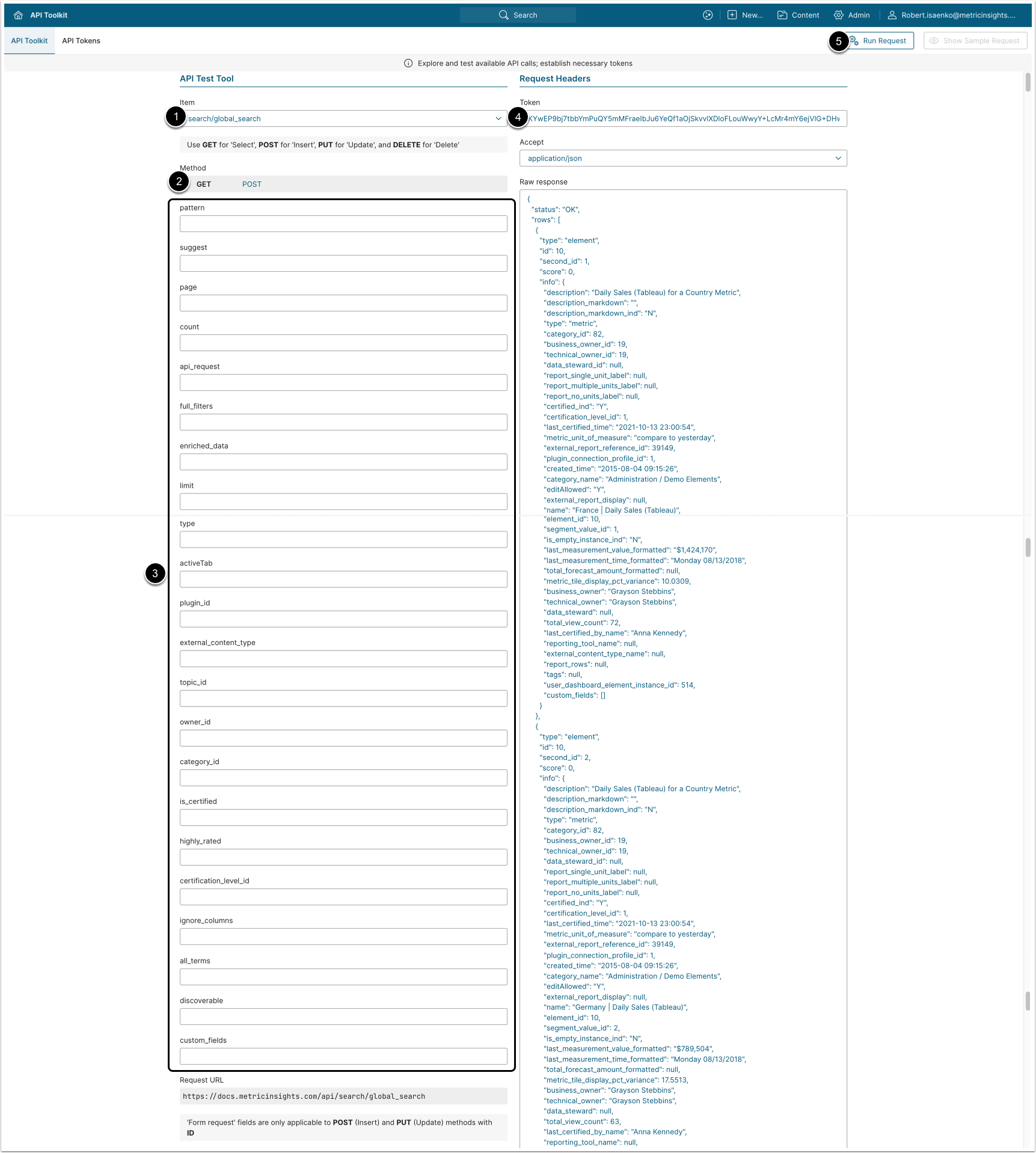
POST and GET requests to /api/search/global_search return the search results displayed on the Search page. A POST request can be executed as GET request with parameters encoded in the URL.
- Item: search/global_search.
- Method: POST (preferred) or GET (alias, no ID in path).
- Optionally, provide parameters.
- See Optional Parameters for details.
- Enter an API Token
- [Run request]
NOTE: When suggest=Y and pattern is 2 characters or fewer, the response returns the user's recent searches instead of running a fresh search. Patterns of 3 or more characters trigger a full search and the request is recorded in the search log (see search_log_id in the response).
Optional Parameters
Search Context Parameters
Pass these to tell the endpoint what the user is searching for and how the results page should be sliced. pattern is the query itself; type, activeTab, and exclude scope which kinds of content are eligible; page and limit paginate results; all_terms and suggest change matching behavior.
| Field Name | Value Type | Description |
|---|---|---|
pattern | string | The search keyword or phrase currently entered by the user. |
suggest | string | Set to Y to return the user's recent searches when pattern is empty or short. |
page | integer | Page number for paginating search results. Defaults to 0. |
limit | integer | Number of results per page. Defaults to 20. |
type | string | Search type filter. Defaults to all. |
activeTab | string | The currently active content type tab. Defaults to all. |
exclude | array | Array of items to exclude from results. |
all_terms | string | Set to Y to require all search terms to match (AND logic). Defaults to OR logic. |
Active Filter Parameters
Pass these to declare the filters the user has already selected in the panel. The endpoint returns the same set of result fields, but the matching items are narrowed by the supplied filters; e.g., supplying owner_id=42 restricts results to items owned by User 42, and any facet counts returned alongside reflect that narrowed set.
| Field Name | Value Type | Description |
|---|---|---|
plugin_id | string | Single plugin ID or comma-separated list (e.g., Tableau, PowerBI). |
external_content_type | string | Single External Content type ID or comma-separated list. |
topic_id | string | Single Tag ID or comma-separated list. |
owner_id | string | Single owner User ID or comma-separated list. |
category_id | string | Single Category ID or comma-separated list. |
is_certified | string | Set to Y to return only certified content. |
highly_rated | string | Set to Y to return only highly rated content. |
certification_level_id | integer | ID of the Certification Level to filter by. |
discoverable | string | Set to N to exclude discoverable-only content. |
custom_fields | string | Custom Field filters as a JSON-encoded array of filter objects. |
Response Control Parameters
Pass these to change the shape of the response rather than which items are returned. full_filters=1 returns the full set of available filter values alongside the results, so the caller can render filter chips with counts. enriched_data=1 adds supplementary information such as glossary terms and tag names to each row. ignore_columns=Y excludes data column names from the search scope. api_request=Y includes glossary-term data in the response. The total number of matching items is unchanged by these parameters.
| Field Name | Value Type | Description |
|---|---|---|
full_filters | integer | Set to 1 to return full filter values alongside results. |
enriched_data | integer | Set to 1 to include enriched data such as glossary terms and Tag names. |
ignore_columns | string | Set to Y to exclude data column names from the search scope. |
api_request | string | Set to Y to include glossary-term data in the response. |
Example Response
  {
    "status": "OK",
    "rows": [
      {
        "type": "element",
        "id": 10421,
        "second_id": 0,
        "score": 0.87,
        "info": {
          "name": "Regional Sales Overview",
          "element_type": "external report",
          "category": "Sales / Q4",
          "owner": "Jane Smith",
          "certification_level_id": 1,
          "url": "https://mi.example.com/dashboard/external/report/10421"
        }
      },
      {
        "type": "dataset",
        "id": 822,
        "second_id": 0,
        "score": 0.71,
        "info": {
          "name": "Customer Demographics",
          "owner": "Data Engineering Team"
        }
      },
      {
        "type": "document",
        "id": 35,
        "second_id": 0,
        "score": 0.42,
        "info": {
          "title": "Sales Methodology Glossary",
          "section": "Glossary"
        }
      }
    ],
    "quantity": 47,
    "search_log_id": 9123,
    "perPageCount": 20,
    "page": 0
} Fields Description
The response object contains the following top-level fields: status, rows, quantity, search_log_id, perPageCount, page. Fields whose Field cell includes a hyperlink contain nested objects or arrays documented in a dedicated sub-table immediately following.
Top-Level Fields
| Field Name | Value Type | Description |
|---|---|---|
status | string | Current status of the request. Returns OK on a 2xx response. |
| rows | array | Array of search result objects. Empty array when no results match. Each entry's structure varies slightly by its type — see below. |
quantity | integer | Total number of results that match the query across all pages. |
search_log_id | integer | ID of the search-log entry created for this request. Returned only when the request was logged — i.e., suggest is not Y and pattern is longer than 2 characters. |
perPageCount | integer | Number of results returned per page. Defaults to 20. |
page | integer | Current page number returned. Defaults to 0. |
rows[]: Top-Level Result Fields
| Field Name | Value Type | Description |
|---|---|---|
type | string | Type of the search result. Common values:
|
id | integer | string | Identifier of the result. Numeric element_id for type=element, or the external URL for type=dataset_data records sourced from an external metadata tool. |
name | string | Display name of the result. |
second_id | integer | string | Secondary identifier. For type=element this is the segment_value_id (0 when unsegmented). For type=dataset_data this is a composite key used internally by the search index. |
score | float | Overall relevance score assigned by the search engine. Higher values indicate stronger matches. |
words | array of strings | Search terms (lemmas and sublemmas) that matched against this result. E.g., ["sales", "sale"]. |
| info | object | Detailed payload about the result. The shape of info differs by type — see the info tables below. |
| reasons | array of objects | Ranked list of evidence explaining why this result matched. Each entry corresponds to one matched field on one related row. See the reasons[] table below. |
external_link_original | string | The original external URL the result is sourced from. Returned only for type=dataset_data results. |
rows[].info — when type=element
| Field Name | Value Type | Description |
|---|---|---|
name | string | Element name. |
element_id | integer | Internal element ID. |
segment_value_id | integer | Segment value ID; 0 for unsegmented elements. |
type | string | Element type — external report, internal report, metric, multi-metric chart, etc. |
description | string | Plain-text element description. |
description_markdown | string | Markdown-rendered description. |
description_markdown_ind | string (Y/N) | Whether the description is stored in Markdown. |
category_id | integer | Category ID. |
category_name | string | Full category path (e.g., Sales and Marketing / Sales). |
business_owner_id | integer | User ID of the Business Owner. |
technical_owner_id | integer | User ID of the Technical Owner. |
data_steward_id | integer | null | User ID of the Data Steward. |
business_owner | string | Display name of the Business Owner. |
technical_owner | string | Display name of the Technical Owner. |
data_steward | string | null | Display name of the Data Steward. |
certified_ind | string (Y/N) | Whether the element is certified. |
certification_level_id | integer | null | ID of the Certification Level. |
last_certified_time | string | Timestamp of the last certification. |
last_certified_by_name | string | null | Username of the user who last certified the element. |
external_report_reference_id | integer | ID of the linked External Report Reference (where applicable). |
plugin_connection_profile_id | integer | ID of the Plugin Connection Profile (where applicable). |
external_report_display | string | null | Display mode for External Reports (e.g., iframe). |
report_single_unit_label / report_multiple_units_label / report_no_units_label | string | null | Localized unit labels for native Reports. |
metric_unit_of_measure | string | null | Unit of measure for Metrics. |
last_measurement_value_formatted | string | null | Most recent formatted Metric value. |
last_measurement_time_formatted | string | null | Most recent measurement timestamp, formatted. |
total_forecast_amount_formatted | string | null | Forecast total, formatted (Metrics). |
metric_tile_display_pct_variance | number | null | Display variance shown on the Metric tile. |
total_view_count | integer | null | Number of times the element has been viewed. |
content_type_alias | string | Alias of the content type (e.g., Tableau, metric, other). |
reporting_tool_name | string | Name of the BI tool that produced the content (e.g., Tableau, Power BI). |
external_content_type_name | string | Display name of the external content type. |
report_rows | integer | null | Row count for internal Reports. |
tags | string | null | Comma-separated list of topic_id values applied to the
element. |
user_dashboard_element_instance_id | integer | The calling user's element-instance ID (used by other dashboard APIs). |
editAllowed | string (Y/N) | Whether the calling user is permitted to edit this element. |
is_empty_instance_ind | string (Y/N) | Whether the element currently has no measurements / instances. |
created_time | string | Creation timestamp. |
| custom_fields | array | Custom Fields configured on the element, grouped by section. See custom_fields[] below. |
| topics | object | Tags and Glossary terms associated with the element, grouped by topic type. See topics below. |
rows[].info — when type=dataset_data
| Field Name | Value Type | Description |
|---|---|---|
| url | string | Internal URL or pass-through to the external dataset. |
| external_link | string | External link to the source asset (e.g., Atlan table URL). |
| external_tool_url | string | Direct URL to the asset in the source metadata tool. |
| external_tool_type | string | Source metadata tool identifier (e.g., atlan, collibra, alation). |
| external_tool_type_label | string | Display label for the source metadata tool (e.g., atlan). |
| external_tool_type_icon_url | string | URL of the icon representing the source metadata tool. |
| object_type | string | Object type in the source tool (e.g., Table, TABLE). |
| description | string | Description of the dataset, sourced from the metadata tool. |
| certified_ind | string (Y/N) | Whether the dataset is certified. |
| certification_level_id | integer | null | Certification Level ID (when applicable). |
| created_time | string | Creation timestamp, sourced from the metadata tool. |
| last_certified_time | string | Last certification timestamp. |
| last_certified_by_name | string | null | Username of the user who last certified the dataset. |
| icon_url | string | URL of the dataset's content-type icon (e.g., MySQL icon). |
| icon_name | string | Name of the icon. |
| dataset_columns | array | Custom metadata blocks (columns, ownership, schema, etc.) shown on the result card. See dataset_columns[] below. |
| topics | object | Tags and Glossary terms associated with the dataset, grouped by topic type. See topics below. |
rows[].info.dataset_columns[]
| Field Name | Value Type | Description |
|---|---|---|
| name | string | Label of the metadata block (e.g., Columns, Owners, Schema, Status, Size). |
| value | array | object | string | Block contents. May be an array of column objects (for Columns), a key-value object (for ownership, status, sizing), or a scalar. |
| isJson | boolean | true when value is a structured object/array; false for scalar strings. |
| iconInd | string | Icon source mode: fa (Font Awesome), upload (custom uploaded icon in iconData), or none. |
| iconName | string | null | Font Awesome class when iconInd = fa. |
| iconData | string | null | Base64-encoded image when iconInd = upload. |
rows[].info.topics — topic type object
| Field Name | Child Field | Value Type | Description |
|---|---|---|---|
| <topic_type_key> | topic_type_name | string | Display name of the topic type. |
use_icon | string | null | Icon mode (fa, etc.) or null when no icon is configured. | |
icon_type | string | null | Type of icon (fa, etc.). | |
icon | string | null | Custom icon data. | |
fa_icon | string | null | Font Awesome class (e.g., fas signal). | |
topics | array | List of topics in this type — see fields below. |
rows[].info.custom_fields[]
| Field Name | Value Type | Description |
|---|---|---|
cfs_id | integer | Custom Field Section ID. |
label | string | Section display name. |
| fields | array | List of Custom Fields in this section. See fields[] below. |
rows[].info.custom_fields[].fields[]
| Field Name | Value Type | Description |
|---|---|---|
id | integer | Custom Field ID. |
name | string | Custom Field name. |
type | string | Custom Field type — textarea, multi, single, users, etc. |
supportRestriction | boolean | Whether the field supports restriction-based filtering. |
values | array of strings | Configured values. For users type, entries are pre-rendered HTML <a> tags wrapping the user's email. |
rows[].reasons
| Field Name | Value Type | Description |
|---|---|---|
table | string | Name of the DB table the matched field belongs to (e.g., dashboard_element, external_report_rollup, dataset_data, folder, glossary_term, etc.). |
name | string | Display name of the matched row. |
record_id | integer | Primary key of the matched row in table. |
second_id | integer | Secondary identifier (segment value, etc.). |
field | string | Name of the field within the row that matched. |
value | string | Actual value of the matched field. |
field_rate | integer | Per-field weighting (0–100) applied during scoring. |
table_rate | integer | Per-table weighting (0–100) applied during scoring. |
rank | integer | Position of this reason within its table/field group. |
reason_score | float | Raw score contributed by this reason before result-level aggregation. |
result_score | float | This reason's contribution to the row's final score. |
relation_paths | array of arrays | How the matched row is connected back to the parent result via foreign-key relationships. Each path is a list of { table, pk } hops. Empty array when the match is directly on the result row. |
match_type | string | Matching mode: lemma (exact lemma match), sublemma (partial/substring match within a larger lemma), or other modes the analyzer supports. |
words | object | Map of word → score contribution, showing which query terms matched and how strongly each contributed. |
matched_symbol | string | The token the analyzer matched. Lemma matches show a single symbol (e.g., sale); sublemma matches show the path parent > child (e.g., sale > salesanalysis). |
explain | string | Human-readable explanation of the match (e.g., "Has a Category of Sales."). Empty string when no explanation is available. |
rows[].reasons[].relation_paths — relation hops
| Field Name | Value Type | Description |
|---|---|---|
table | string | Name of the table at this hop. |
pk | string | Primary key value at this hop. May be composite (e.g., 167047_31095). |
8. Get Index Status
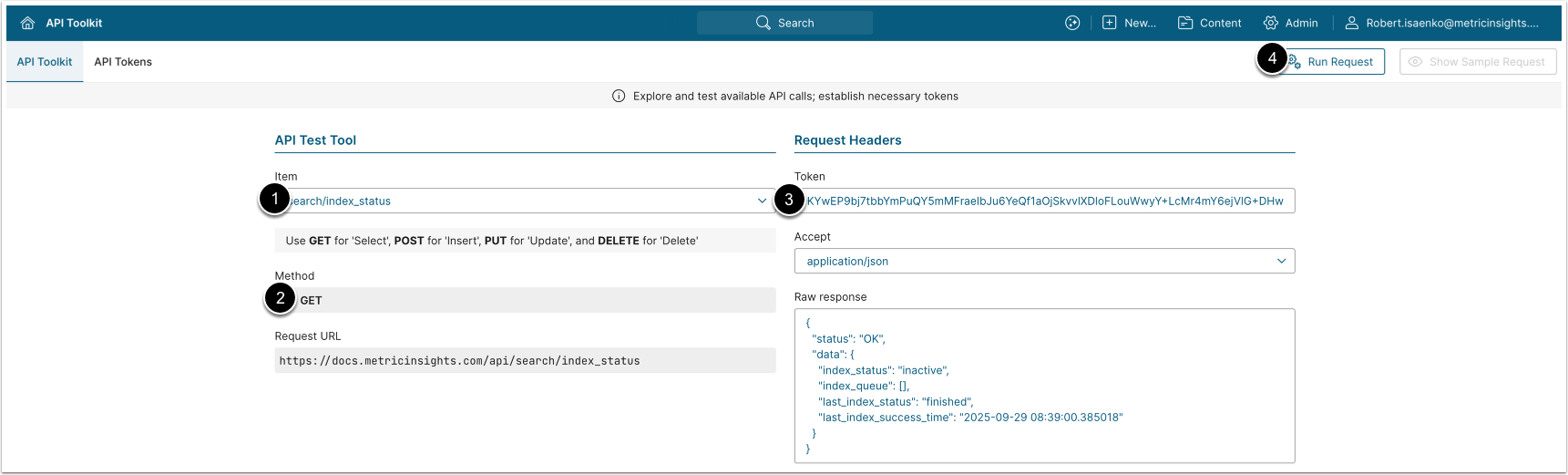
The GET request to /api/search/index_status returns the current state of the global search index, the list of queued indexing operations, and information about the most recent indexing run.
- Item: search/index_status.
- Method: GET.
- Enter an API Token
- [Run request]
Example Response
{
  "status": "OK",
  "data": {
    "index_status": "inactive",
    "index_queue": [],
    "last_index_status": "finished",
    "last_index_success_time": "2026-05-25 01:12:03.704622"
  }
}Fields Description
| Field Name | Child Field Name | Value Type | Description |
|---|---|---|---|
status | string | Current status of the request. Returns OK on a 2xx response. | |
data | object | Object containing index state. | |
index_status | string | Current state of the index:
| |
index_progress | float | Optional, present only when index_status = "running". Progress
of the current indexing run as a percentage (0 to 100). | |
index_queue | array of strings | Up to 10 indexing operations currently queued for execution. Each entry is a raw queue message in the form <command>::<user_id>::<params>::<attrs>:
| |
last_index_status | string | Status of the most recent indexing run, regardless of whether it succeeded. Common values: finished, failed, cancelled, or an
empty string when no indexing run has ever completed. | |
last_index_success_time | string | Timestamp (server local time) of the most recent successful indexing run, in YYYY-MM-DD HH:MM:SS format. Empty string when no successful run has ever completed. |
9. Log Search Result Click
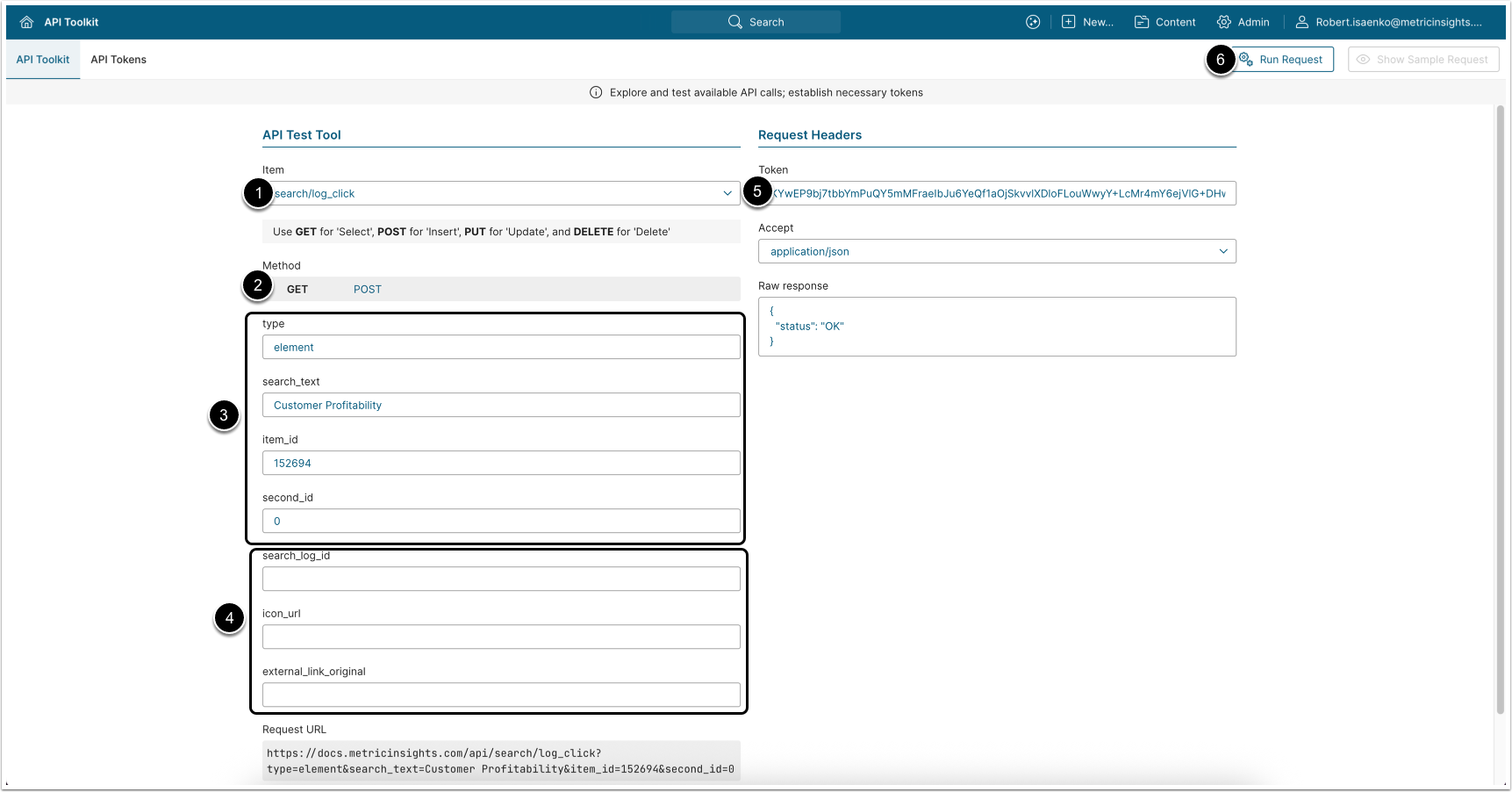
POST and GET requests to /api/search/log_click record that the authenticated user clicked a result on the Search page. A POST request can be executed as a GET request with parameters encoded in the URL.
- Item: search/log_click.
- Method: POST (preferred) or GET (alias, no ID in path).
- Enter required parameters:
- type: The type of object that was clicked. One of:
element,reference,dataset,distribution,document,portal_page,dataset_data. - search_text: The search query the user entered (the
patternfrom the originatingglobal_searchcall). - item_id: ID of the clicked item. For
type = element, this is theelement_id. For other types it is the row ID in the corresponding domain (see the item_id and second_id by type table below). - second_id: Secondary identifier. The exact value depends on
type, see the same table.
- type: The type of object that was clicked. One of:
- Enter optional parameters:
- search_log_id: The
search_log_idreturned by/api/search/global_searchfor the search that produced this result. When present, the click is linked to that specific search log entry so analytics can correlate "search → click" pairs. - icon_url: Only used with
type = dataset_data. URL of the icon shown next to the result in the UI. - external_link_original: Only used with
type = dataset_data. The original external URL of the clicked result (e.g., the Atlan, Collibra, Alation asset URL). If omitted,item_idis used instead.
- search_log_id: The
- Enter an API Token.
- [Run request]
The endpoint does not return a data payload. Logging a click contributes to personalized result ranking; subsequent searches by the same user for the same query give clicked results a higher score.
item_id and second_id by type
type value | item_id | second_id |
|---|---|---|
element | element_id of the Metric, Report, or External Report. | segment_value_id; pass 0 for unsegmented elements. |
reference | External Report Reference ID. | Pass 0. |
dataset | Dataset ID. | Pass 0. |
distribution | Burst (Notification Schedule Distribution) ID. | Pass 0. |
document | document_id. | Pass 0. |
portal_page | App (Portal Page) ID. | Pass 0. |
dataset_data | External URL of the clicked result (Atlan / Collibra / Alation asset URL). | The composite key returned by global_search for this row. Pass it back verbatim. |
Example Response
{
  "status": "OK"
}Fields Description
| Field Name | Value Type | Description |
|---|---|---|
status | string | Current status of the request. Returns |
10. Get Search Suggestions
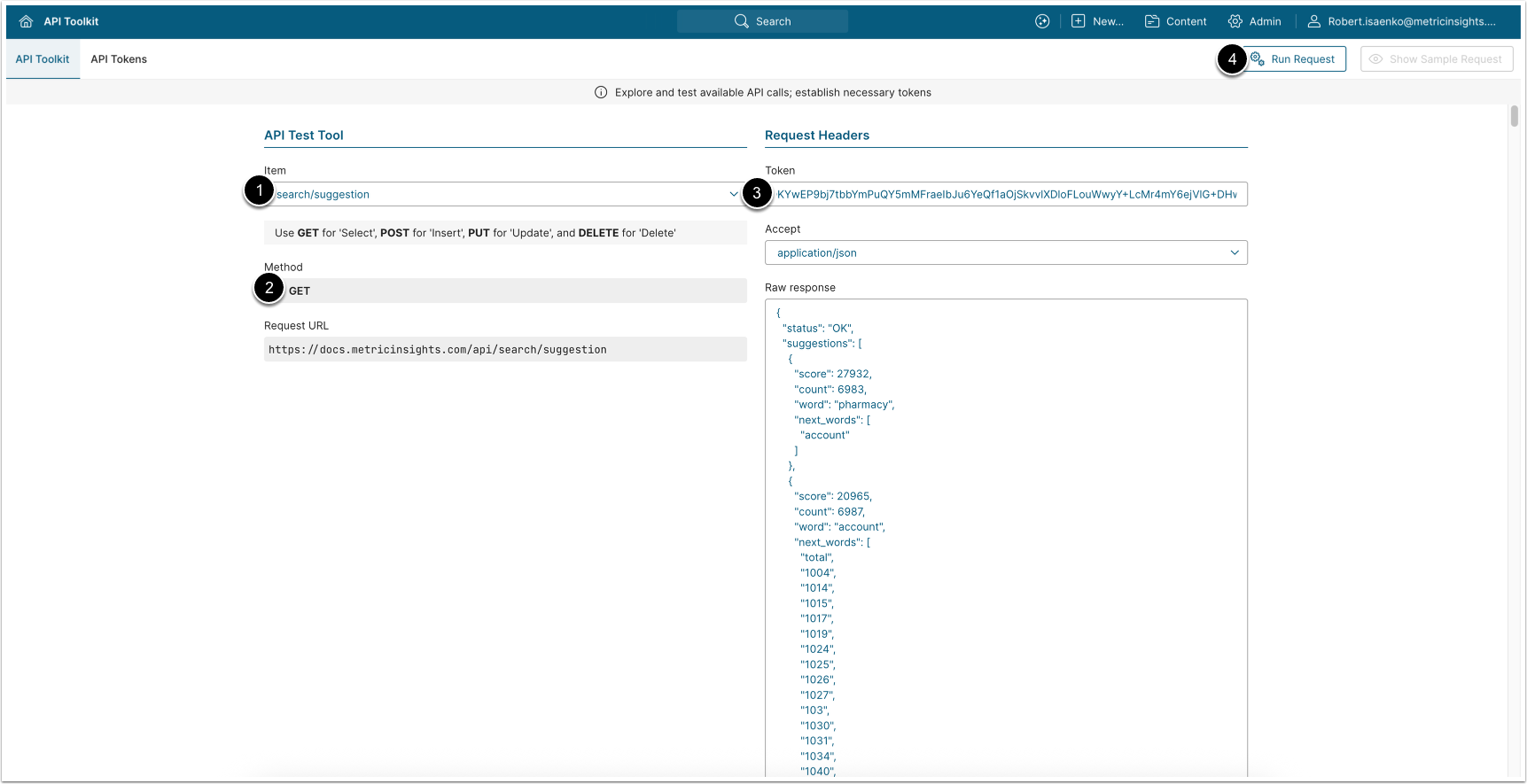
The GET request to /api/search/suggestion returns two lists used to power the Search box's type-ahead and "Recent" panel:
suggestions: Popular search words derived from indexed content the User can access;recent_searches: Search phrases the User and their User Groups have run before.
NOTE: Results are scoped to the calling User's access. Administrators see suggestions derived from all indexed content; non-administrators see only suggestions derived from content they are permitted to access.
- Item: search/suggestion.
- Method: GET.
- Enter an API Token.
- [Run request]
Example Response
{
    "status": "OK",
    "suggestions": [
      {
        "word": "sales",
        "score": 1840,
        "count": 612,
        "next_words": ["analysis", "dashboard", "by"]
      },
      {
        "word": "revenue",
        "score": 920,
        "count": 305,
        "next_words": ["report", "forecast"]
      },
      {
        "word": "country",
        "score": 410,
        "count": 168,
        "next_words": ["performance", "sales"]
      }
    ],
    "recent_searches": [
      "sales analysis",
      "revenue forecast",
      "country performance",
      "retail sales"
    ]
}Fields Description
| Field Name | Value Type | Description |
|---|---|---|
status | string | Current status of the request. Returns OK on a 2xx response. |
suggestions | array of objects | Popular search words derived from indexed content the user can access, ranked by relevance (highest first), up to 2000 entries. See fields from the suggestions[] below. |
recent_searches | array of strings | Distinct search phrases the user has previously run that returned results, plus popular searches from the user's User Groups. Ordered most-recent / most-popular first, up to 1000 entries. |
Below are the fields from the suggestions array: | ||
word | string | The suggested search word. Lowercased, contains only alphanumeric characters, hyphens, and underscores. Always at least 3 characters. |
score | integer | Relevance score; higher means more relevant. The array is sorted by score descending. |
count | integer | Number of indexed content items in which this word appears prominently. |
next_words | array of strings | Words that most commonly follow this word in indexed content ordered by co-occurrence frequency. Used to power multi-word type-ahead (e.g., sales → analysis, dashboard). Empty array when no following word is common enough. |
11. Get Search Tabs
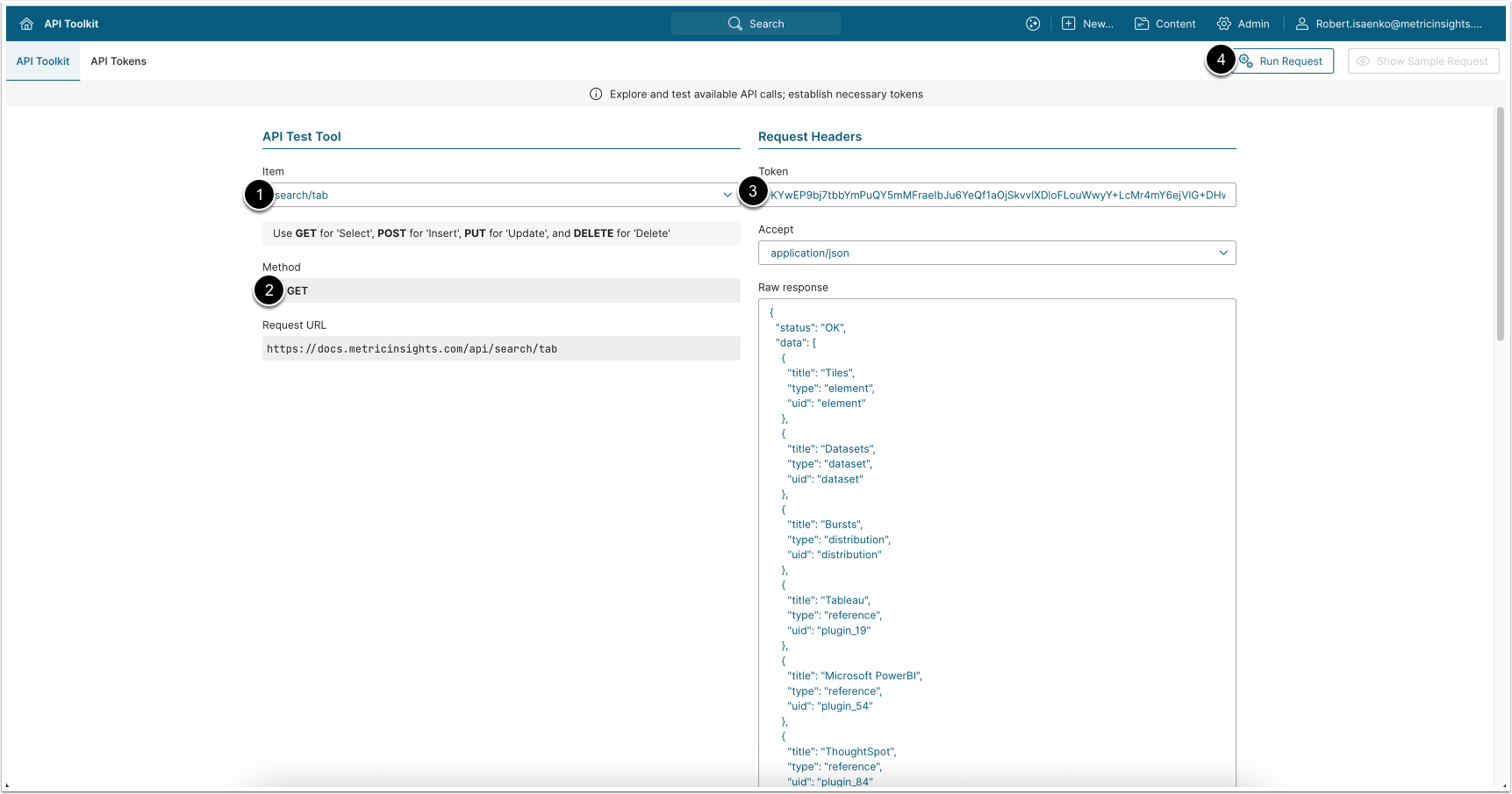
The GET request to /api/search/tab returns the set of tabs displayed on the Search page. The tabs let Users narrow results by content type, BI tool, or category. The structure of the returned tabs depends on how the instance is configured to group search results (the Group results by setting under Admin > Search configuration).
NOTE: Tabs are scoped to the calling User's access: Users see only the tabs for content types, BI tools, or categories they are permitted to access. Administrators see all configured tabs.
- Item: search/tab.
- Method: GET.
- Enter an API Token
- [Run request]
Example Response
{
  "status": "OK",
  "data": [
    {
      "title": "Metric",
      "type": "content_type",
      "uid": "metric"
    },
    {
      "title": "Report",
      "type": "content_type",
      "uid": "internal report"
    },
    {
      "title": "Tableau",
      "type": "content_type",
      "uid": "plugin_19"
    },

    {
      "title": "Salesforce",
      "type": "content_type",
      "uid": "external_content_type_3"
    },

    {
      "title": "Daily sales (Demo)",
      "type": "dataset_data",
      "uid": "dataset_170_0"
    }

  ]
}Fields Description
| Field Name | Value Type | Description |
|---|---|---|
status | string | Current status of the request. Returns OK on a 2xx response. |
data | array | List of tabs to display, in the order they should be rendered. Empty array ( See the fields of the |
Below are the fields of the data object: | ||
title | string | Display label of the tab; e.g., Tiles, Datasets, Bursts, Tableau, Power BI, a Category name, Metric, Report. |
type | string | Tab type, which tells the client how to filter results when the tab is selected. Supported types:
|
uid | string | Unique identifier of the tab. Passed to /api/search/global_search as activeTab to scope results to this tab. |