This article describes API calls available for Privilege and Privilege Set configuration:
/api/privilege: Retrieve Privileges./api/privilege_set: Retrieve, create, update, and delete Privilege Sets./api/privilege_set_privilege: Retrieve, assign, and remove Privileges from Privilege Sets.
Prerequisites:
- Set up API access, verify that you have API access, and obtain a token via the get_token call OR
- Generate Personal API Token
Table of contents :
1. Access Admin > System > API Toolkit
2. Retrieve Privileges
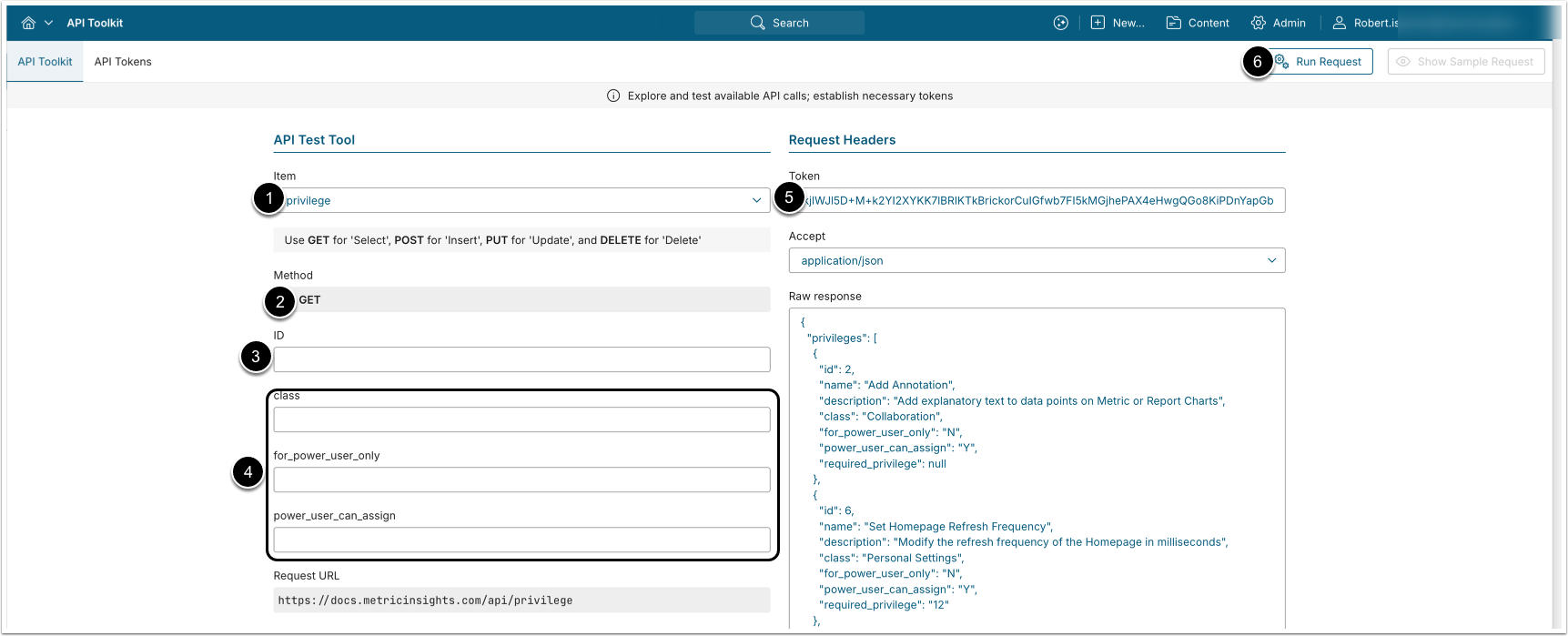
- GET request to
/api/privilegereturns all Privileges. - GET request to
/api/privilege/id/<ID>returns a single Privilege by its ID.
- Item: privilege
- Method: GET
- Optionally, apply filtering:
- ID: Retrieve a single Privilege by ID.
- class: Retrieve Privileges from a class.
- for_power_users_only: Retrieve Privileges that can be assigned only to Power Users.
- power_user_can_assign: Retrieve Privileges that can be assigned by Power Users.
- Enter an API Token.
- [Run request]
Example Response
{
  "privileges": [
    {
      "id": 2,
      "name": "Add Annotation",
      "description": "Add explanatory text to data points on Metric or Report Charts",
      "class": "Collaboration",
      "for_power_user_only": "N",
      "power_user_can_assign": "Y",
      "required_privilege": null
    },
    {
      "id": 6,
      "name": "Set Homepage Refresh Frequency",
      "description": "Modify the refresh frequency of the Homepage in milliseconds",
      "class": "Personal Settings",
      "for_power_user_only": "N",
      "power_user_can_assign": "Y",
      "required_privilege": "12"
    }
  ]
}Fields Description
| Parameter Name | Value Type | Description |
|---|---|---|
privilege | array | An array with Privilege data. |
id | integer | Privilege ID. |
name | string | Privilege name. |
description | string | What this Privilege allows the Users to do. |
class | string | Name of the Privilege class this Privilege belongs to. |
for_power_user_only | string | Whether the Privilege can only be held by Power Users.
|
power_user_can_assign | string | Whether Power-User
admins may grant this Privilege.
|
required_privilege | string | Comma-separated IDs of prerequisite Privileges that the recipient must already hold before this Privilege can be assigned.
|
3. Configure Privilege Sets
3.1. Retrieve Privilege Sets
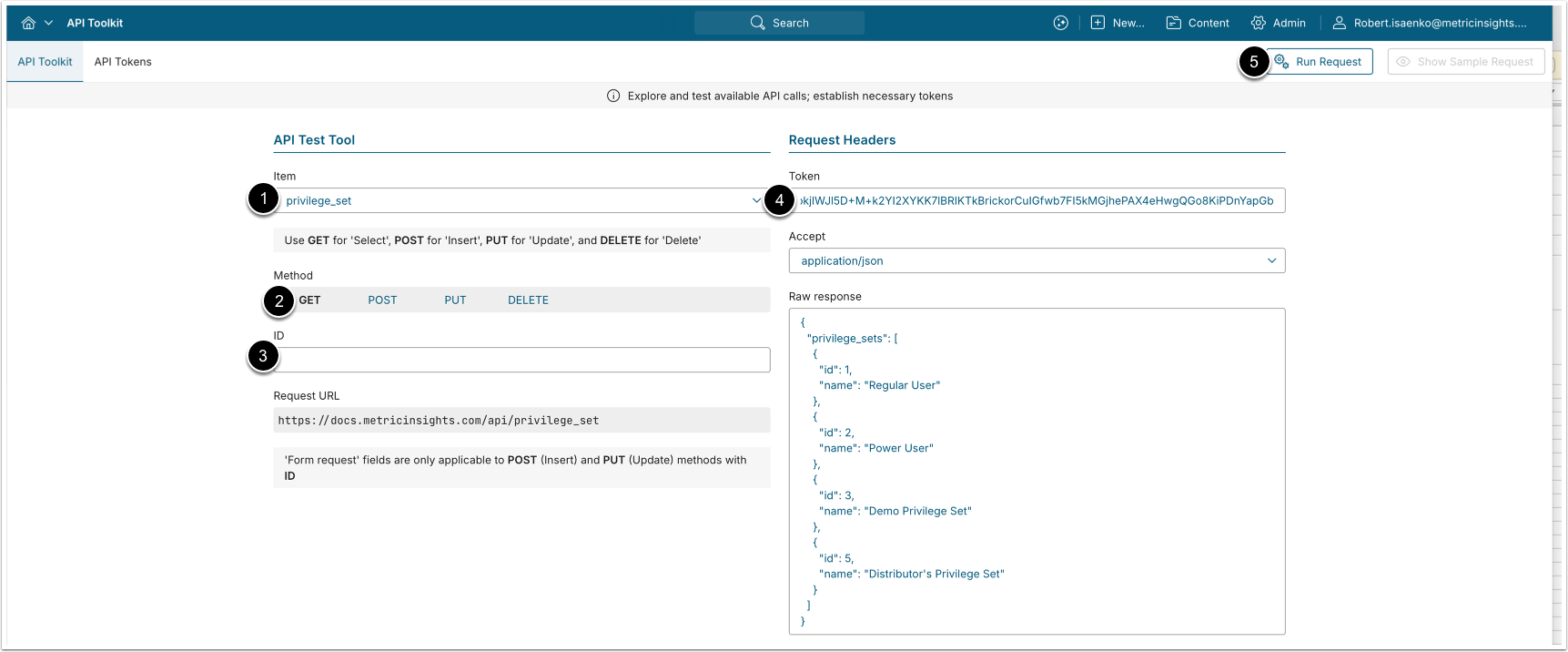
- GET request to
/api/privilege_setreturns all Privilege Sets. - GET request to
/api/privilege_set/id/<ID>returns a single Privilege Set by its ID.
- Item: privilege_set
- Method: GET
- Optionally, apply filtering:
- ID: Retrieve a single Privilege Set by ID.
- Enter an API Token.
- [Run request]
Example Response
{
  "privilege_sets": [
    {
      "id": 1,
      "name": "Regular User"
    },
    {
      "id": 2,
      "name": "Power User"
    },
    {
      "id": 3,
      "name": "Demo Privilege Set"
    },
    {
      "id": 5,
      "name": "Distributor's Privilege Set"
    }
  ]
}Fields Description
| Parameter Name | Value Type | Description |
|---|---|---|
privilege_sets | array | An array with Privilege Set data. |
id | integer | Privilege Set ID. |
name | string | Privilege Set name. |
3.2. Create Privilege Set
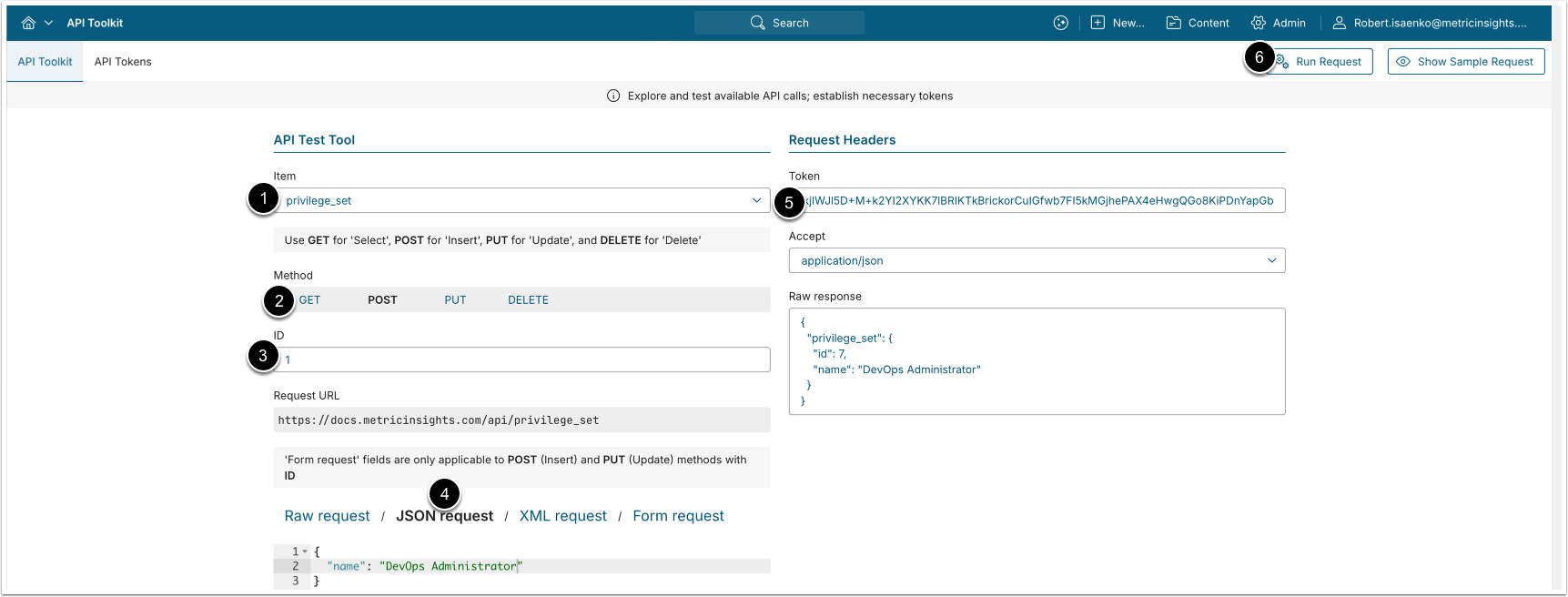
- POST request to
/api/privilege_setwith body{"name": "<Privilege_Set_name>"}creates a new Privilege Set.
- Item: privilege_set
- Method: POST
- Enter the ID of an existing Privilege Set.
- See Retrieve Privilege Sets for details.
- Select JSON request and provide a
namefor the new Privilege Set. - Enter an API Token.
- [Run request]
3.3. Update Privilege Set
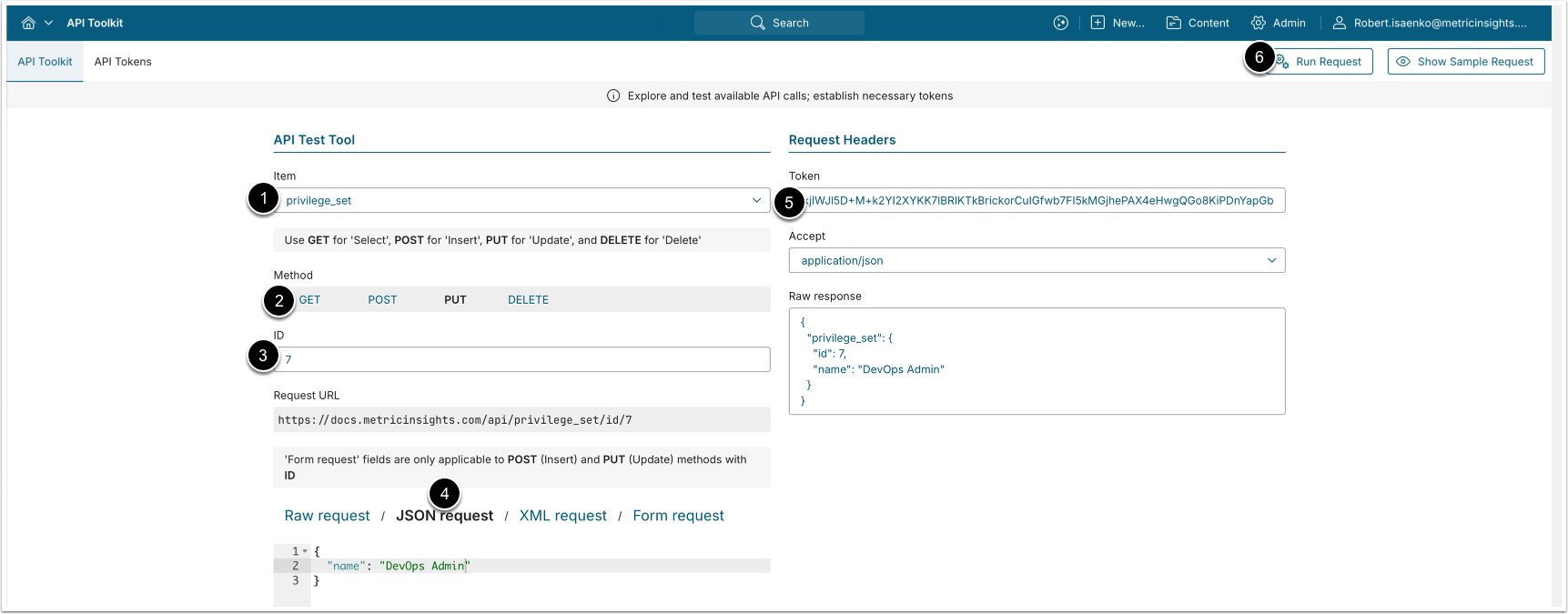
- PUT request to
/api/privilege_set/id/<ID>with body{"name": "<Privilege_Set_New_Name>"}updates the Privilege Set name.
- Item: privilege_set
- Method: PUT
- Enter the ID of the Privilege Set you want to modify.
- See Retrieve Privilege Sets for details.
- Select JSON request and provide a new
namefor the Privilege Set. - Enter an API Token.
- [Run request]
3.4. Delete Privilege Set
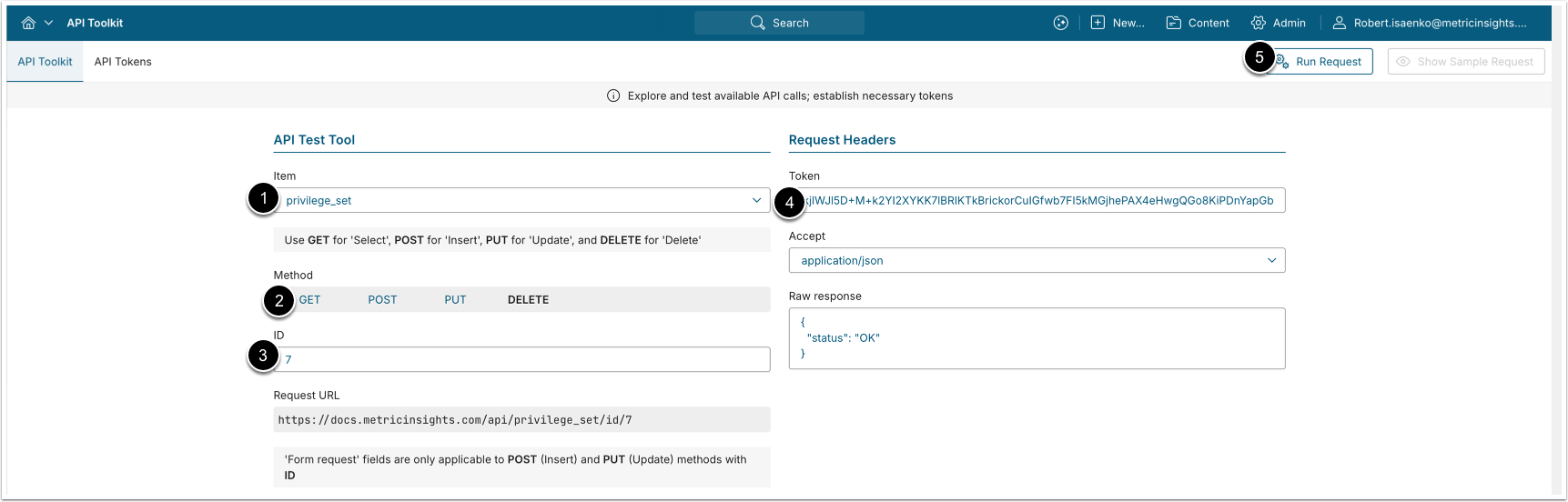
- DELETE request to
/api/privilege_set/id/<ID>deletes the specified Privilege Set.
- Item: privilege_set
- Method: DELETE
- Enter the ID of the Privilege Set you want to delete.
- See Retrieve Privilege Sets for details.
- Enter an API Token.
- [Run request]
4. Configure Privilege Set Privileges
4.1. Retrieve Privileges Assigned to Privilege Sets
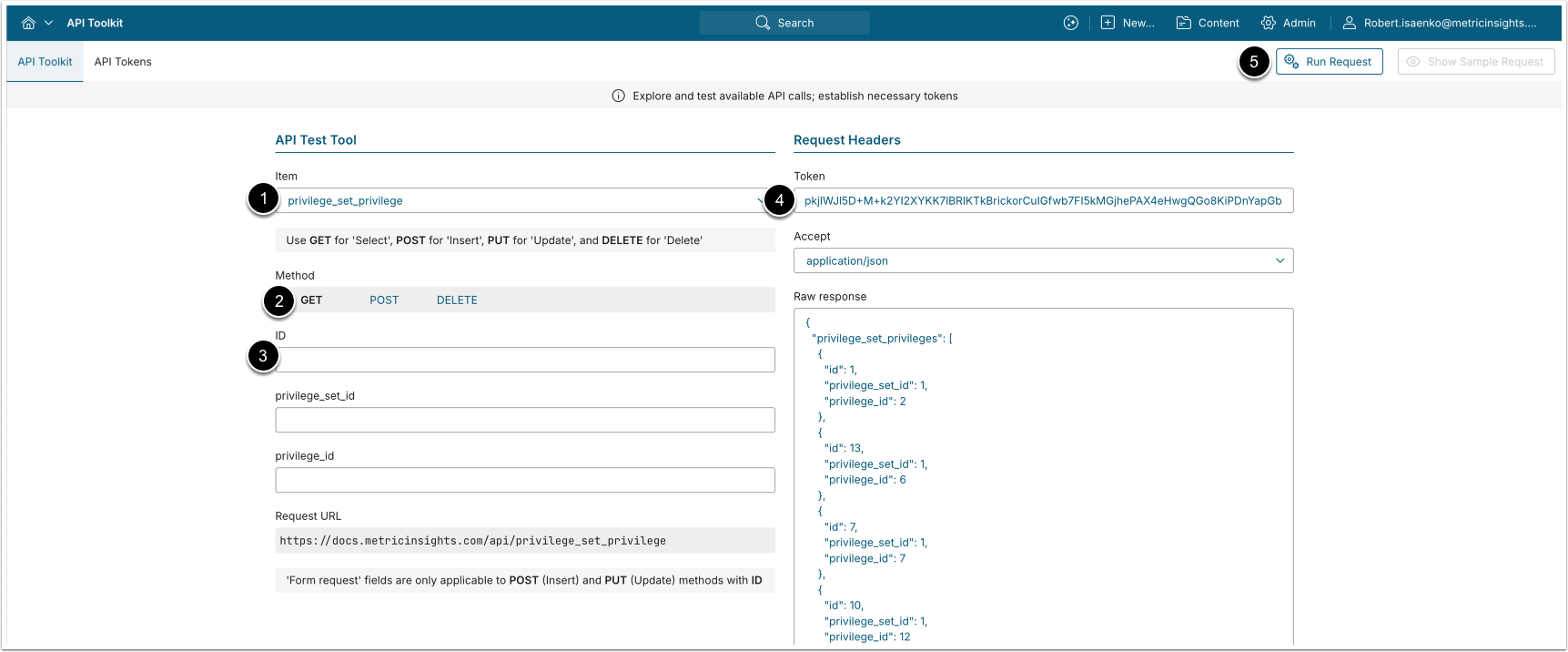
- GET request to
/api/privilege_set_privilegereturns all Privilege-to-Privilege Set mappings. - GET request to
/api/privilege_set_privilege/id/<ID>returns a single Privilege-to-Privilege Set mapping by its ID.
- Item: privilege_set_privilege
- Method: GET
- Optionally, apply filtering:
- ID: Retrieve a single Privilege-to-Privilege Set mapping by ID.
- Enter an API Token.
- [Run request]
Example Response
Example for GET /api/privilege_set_privilege:
{
  "privilege_set_privileges": [
    {
      "id": 1,
      "privilege_set_id": 1,
      "privilege_id": 2
    },
    {
      "id": 13,
      "privilege_set_id": 1,
      "privilege_id": 6
    }
  ]
}
Example for GET /api/privilege_set_privilege/id/<ID>:
{
  "privilege_set_privilege": {
    "id": 1,
    "privilege_set_id": 1,
    "privilege_id": 2
  }
}Fields Description
| Parameter Name | Value Type | Description |
|---|---|---|
privilege_set_privileges | array | An array with all Privilege-to-Privilege Set mappings. |
id | integer | Privilege-to-Privilege Set mapping ID. |
privilege_set_id | integer | ID of the Privilege Set to which the Privilege is assigned |
privilege_id | integer | ID of the Privilege assigned to the Privilege Set. |
4.2. Assign Privilege to Privilege Set
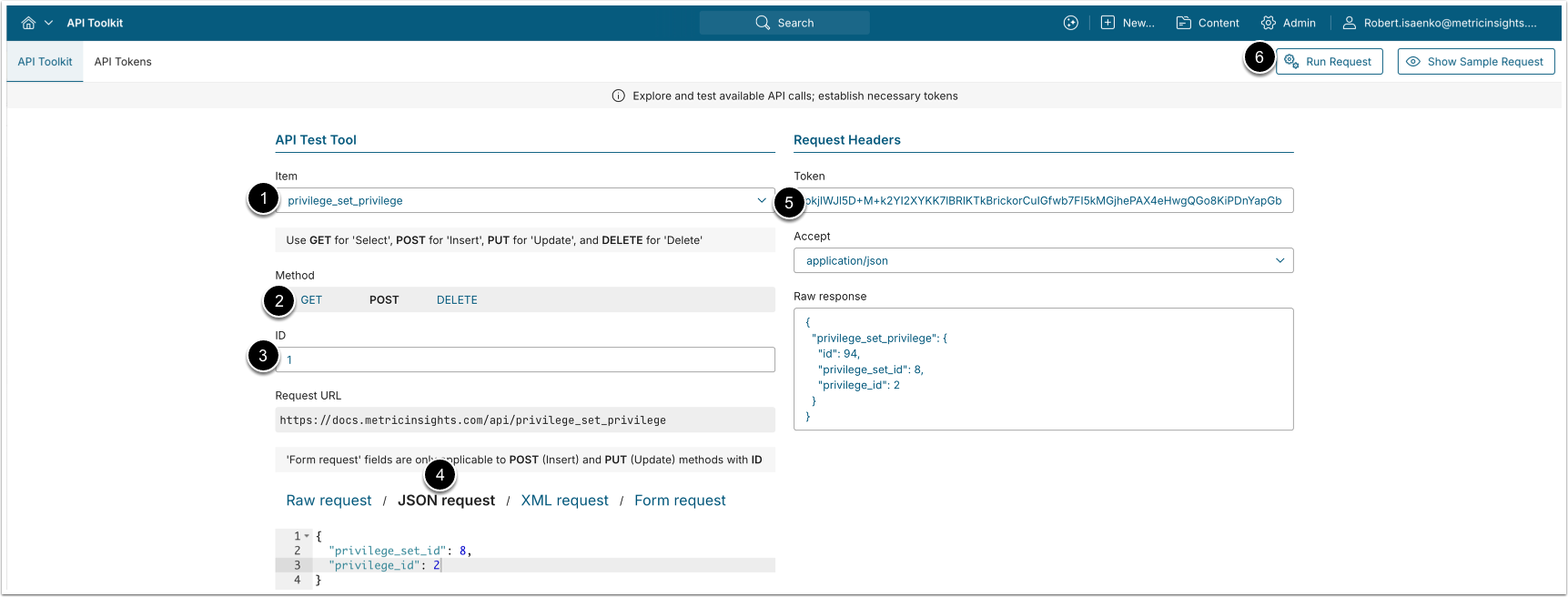
- POST request to
/api/privilege_set_privilegewith body{"privilege_set_id": "<ID>", "privilege_id": "<ID>"}assigns a Privilege to a Privilege Set.
- Item: privilege_set_privilege
- Method: POST
- Enter the ID of an existing Privilege-to-Privilege Set mapping.
- See Retrieve Privileges Assigned to Privilege Sets for details.
- Select JSON request and enter the following values:
- privilege_set_id: ID of the Privilege Set to which you want to assign a Privilege.
- privilege_id: ID of the Privilege that you want to assign to the Privilege Set.
- Enter an API Token.
- [Run request]
4.3. Remove Privilege from Privilege Set
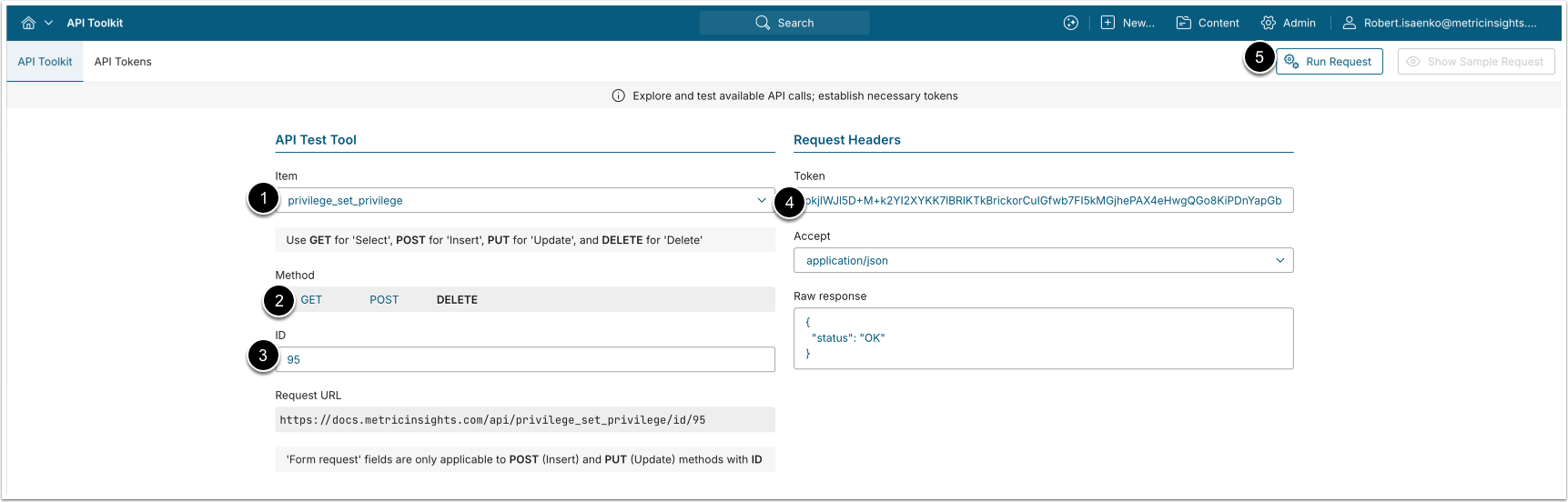
- DELETE request to
/api/privilege_set_privilege/id/<ID>removes a Privilege from a Privilege Set.
- Item: privilege_set_privilege
- Method: DELETE
- Enter the ID of the Privilege-to-Privilege Set mapping you want to remove.
- See Retrieve Privileges Assigned to Privilege Sets for details.
- Enter an API Token.
- [Run request]