This article describes the API endpoint used to retrieve the execution status and success/error counts of Data Collection Trigger runs in Metric Insights.
The endpoint is read-only and returns run metadata such as overall status, success and error counts, and a per-object-type breakdown. It can be used by an external orchestration system to check whether a Trigger run finished successfully before allowing dependent processing to continue.
The following endpoints are covered:
/api/data_collection_trigger_run: Retrieve a single run by ID, or the most recent runs for a Trigger withtrigger_idandlast_runs./api/data_collection_trigger_run/id/{id}: Retrieve a single run by its ID using the path form.
Prerequisites:
- Set up API access, verify that you have API access, and obtain a token via the get_token call OR
- Generate a Personal API Token.
NOTES:
- Access requirements for this endpoint differ by role:
- Admin: Has full access.
- Power User: Requires the Create Data Collection Triggers privilege and edit access to the Trigger. View-only access is not sufficient.
- Regular User: Cannot access the endpoint and receives a 403 response, even with edit access to the Trigger.
Table of Contents
1. Access Admin > System > API Toolkit
2. Retrieve Data Collection Trigger Run Status and Counts
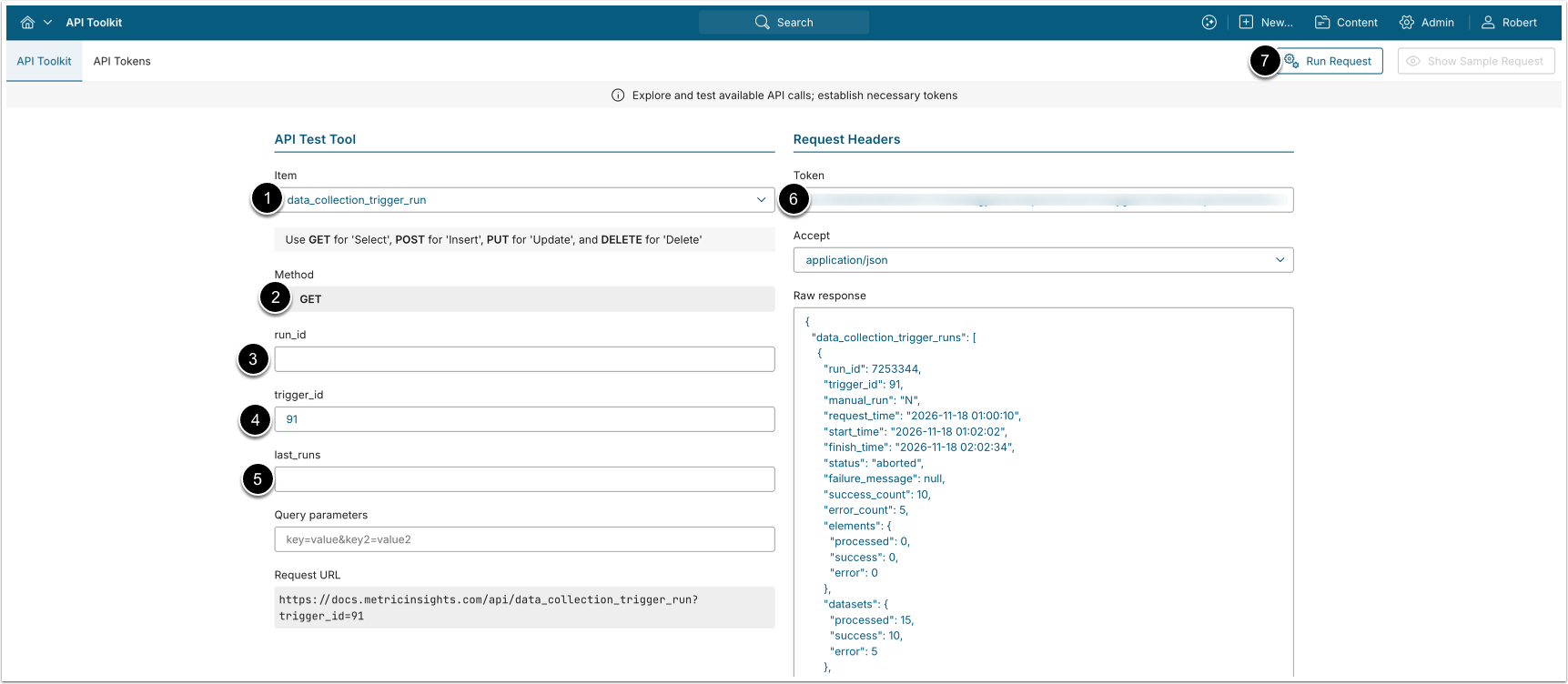
- GET request to
/api/data_collection_trigger_run?trigger_id=<ID>returns the most recent run of the specified Trigger.- NOTE: Using
trigger_idalone defaults tolast_runs=1.
- NOTE: Using
- GET request to
/api/data_collection_trigger_run?run_id=<ID>or/api/data_collection_trigger_run/id/{id}returns a specific Trigger run, identified by its run ID. - GET request to
/api/data_collection_trigger_run?trigger_id=<ID>&last_runs=<number_of_runs>returns the given number of most recent runs for the specified Trigger.
NOTE: When run_id is supplied, the other filter parameters are ignored and only that single run is returned.
- Item: data_collection_trigger_run.
- Method: GET.
- run_id: Enter run ID to retrieve its details.
- trigger_id: Enter Trigger ID to return its run(s).
- last_runs: Optionally, enter the number of most recent runs to return when
trigger_idis specified. Accepts a value from1to100. Default value:1. - Enter an API Token.
- [Run request]
Example Response
{
  "data_collection_trigger_run": {
    "run_id": 12345,
    "trigger_id": 42,
    "manual_run": "N",
    "request_time": "2026-11-18 10:30:00",
    "start_time": "2026-11-18 10:30:05",
    "finish_time": "2026-11-18 10:35:42",
    "status": "success",
    "failure_message": null,
    "success_count": 150,
    "error_count": 0,
    "elements": {
      "processed": 150,
      "success": 150,
      "error": 0
    },
    "datasets": {
      "processed": 10,
      "success": 10,
      "error": 0
    },
    "profiles": {
      "processed": 5,
      "success": 5,
      "error": 0
    },
    "event_calendars": {
      "processed": 2,
      "success": 2,
      "error": 0
    }
  }
}
Fields Description
| Field Name | Value Type | Description |
|---|---|---|
run_id | integer | Trigger run ID. |
trigger_id | integer | ID of the Trigger that produced this run. |
manual_run | string | Indicates whether the run was started manually ("Y") or automatically ("N"). |
request_time | datetime | Time the run was requested. |
start_time | datetime | Time execution started. |
finish_time | datetime | Time execution finished. |
status | string | Overall run state: queued, running, success, failed, timed_out, or aborted. |
failure_message | string | Message describing the failure, or null when the run did not fail. |
success_count | integer | Total number of objects processed successfully across all types. |
error_count | integer | Total number of objects that errored across all types. |
Below are the fields of the elements, datasets, profiles, and event_calendars breakdown objects: | ||
processed | integer | Number of objects of this type processed in the run. |
success | integer | Number of objects of this type processed successfully. |
error | integer | Number of objects of this type that errored. |