This article describes the endpoint for Report Component configuration, supported beginning in v7.2.1:
/api/report_component_data: Retrieve Report Components, supports filtering.
PREREQUISITES:
- Set up API access, verify that you have API access, and obtain a token via the get_token call OR
- Generate Personal API Token
TABLE OF CONTENTS:
1. Access Admin > System > API Toolkit
2. Retrieve Report Component Data
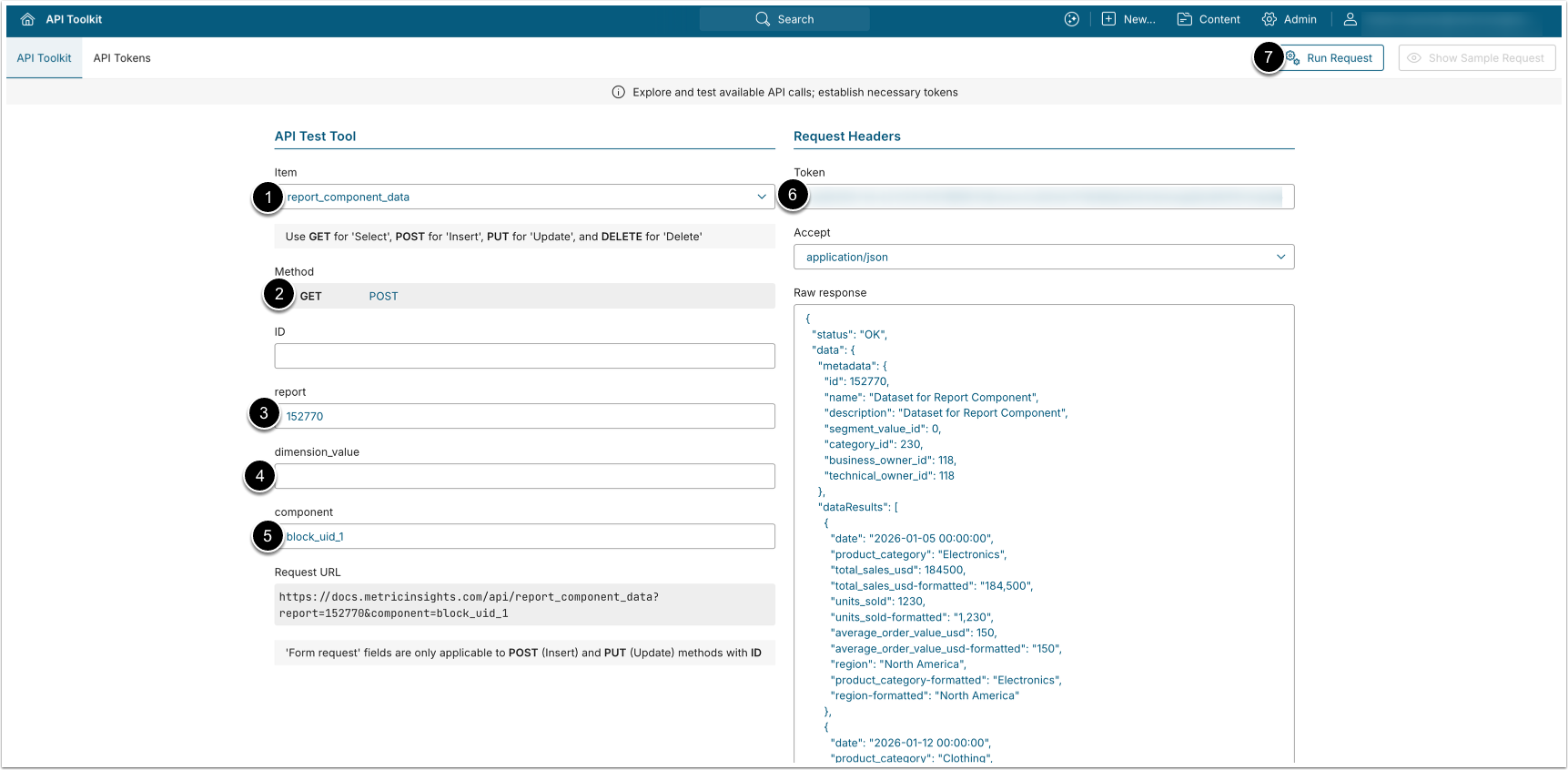
- GET request to
/api/report_component_data?report=<Report_ID>returns the selected Report Component's data.
- Item: report_component_data.
- Method: GET.
- report: Enter the ID of the Report.
- dimension_value: Optionally, filter the returned results by the Dimension Value.
- component: Optionally, filter the Component by UUID to retrieve its data.
- If this parameter is not provided, the data of the Component that is shown on tile is returned.
- Component UUID can be fetched from the
dashboard.dataset_renderer_block_componenttable.
- Enter an API Token.
- [Run request]
Example Response
{
    "metadata": {
        "id": 152770,
        "name": "Dataset for Report Component",
        "description": "Dataset for Report Component",
        "segment_value_id": 12014,
        "category_id": 230,
        "business_owner_id": 118,
        "technical_owner_id": 118
    },
    "metadataComponent": {
        "type": "kpi_chart",
        "title": "Sales for All Regions",
        "stoplight_more_is_better": "Y",
        "stoplight_color_for_high_values": "#077E45",
        "stoplight_color_for_low_values": "#AC2B2B"
    },
    "dataResults": {
        "table": [
            { "date": "2026-01-26 00:00:00", "value": 76200, "value-formatted": "76,200" },
            { "date": "2026-02-16 00:00:00", "value": 29700, "value-formatted": "29,700" },
            { "date": "2026-02-27 00:00:00", "value": 38400, "value-formatted": "38,400" }
        ]
    }
}
Fields Description
| Parameter Name | Value Type | Description |
|---|---|---|
metadata | object | Top-level object containing report identification details. |
metadata object’s fields: | ||
id | integer | The ID of the Report. |
name | string | The name of the Report. |
description | string | The description of the Report. |
segment_value_id | integer | The ID of the Dimension Value used to filter the report data. |
category_id | integer | The ID of the Category the Report belongs to. |
business_owner_id | integer | The ID of the Business Owner of the Report. |
technical_owner_id | integer | The ID of the Technical Owner of the Report. |
metadataComponent | object | Configuration details of the specific Report Component being
returned. NOTE: Currently, it is only supported for the KPI Chart component. |
metadataComponent object’s fields | ||
type | string | The component type. (e.g. "kpi_chart") |
title | string | The display title of the component. |
stoplight_more_is_better | string | Whether higher values are considered positive.
("Y"/"N") |
stoplight_color_for_high_values | string | Hex color code applied to high/good stoplight values. |
stoplight_color_for_low_values | string | Hex color code applied to low/bad stoplight values. |
dataResults | object | Contains the query result data for the component. |
table | array | Array of data row objects returned by the component query. |
dataResults | object | Contains the query result data for the component. |
dataResults object’s fields: | ||
table | array | Array of data row objects returned by the component query. |
3. Retrieve Report Component Data With Additional Filtering
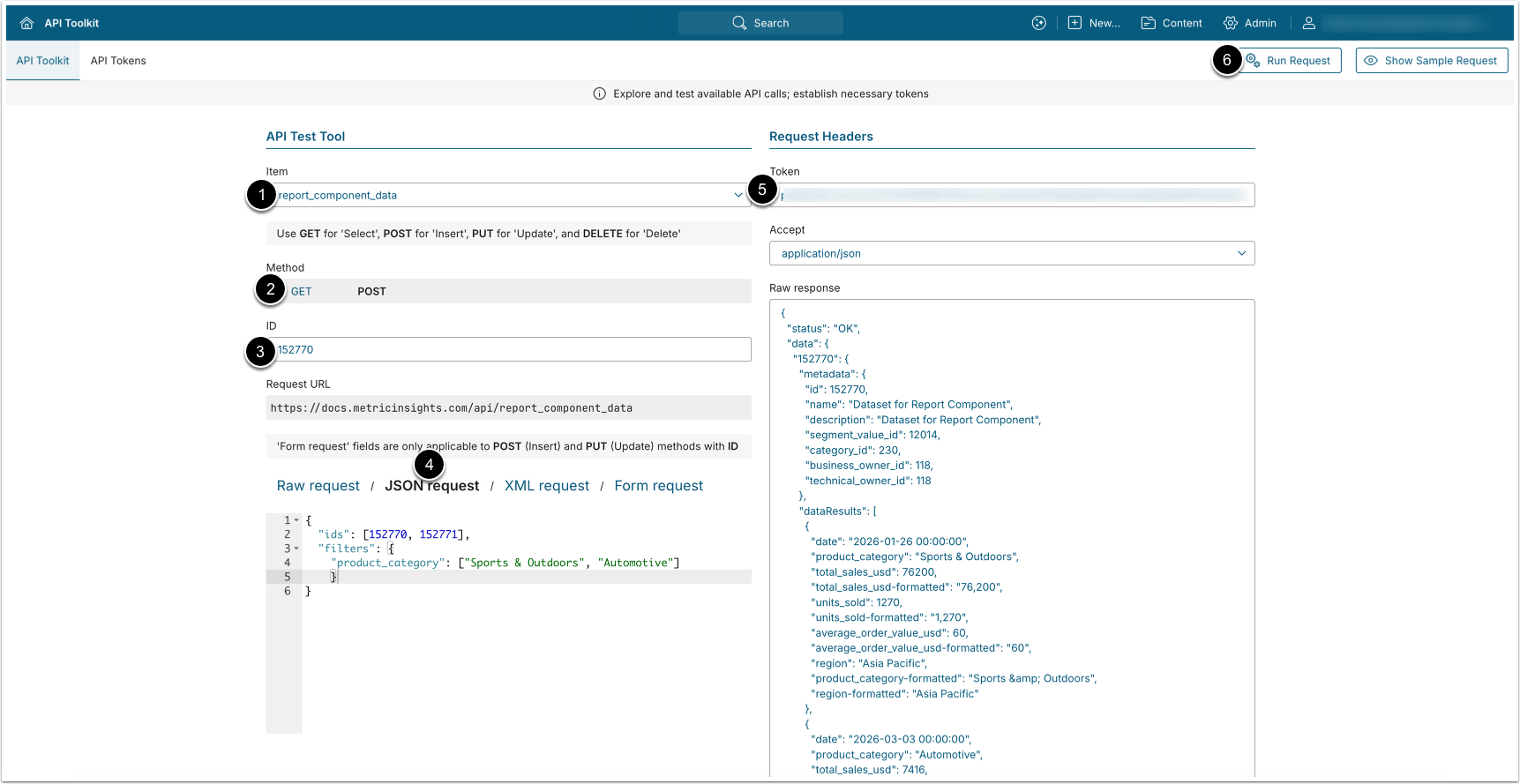
- POST request to
/api/report_component_datasupports retrieving Report Component data with additional filtering.
- Item: report_component_data.
- Method: POST.
- report: Enter the ID of the Report.
- Select JSON request and provide the following parameters:
- ids (Required, unless
all_kpi_chartis set to'Y'): An array of Report IDs (integer), or"{reportId}_{segmentValueId}"strings. - filters (Optional): An object of Report's field names and filter values.
- See Filtering Examples for details on available filters.
- all_kpi_chart (Optional): Set to
'Y'to return all Reports that have KPI chart components with "Show on Tile" option enabled.- NOTE: When enabled, this parameter ignores the ids parameter value.
- last_values (Optional): Set to 'Y' to to return only two records with last/previous values for KPI charts.
- ids (Required, unless
- Enter an API Token.
- [Run request]
Filtering Examples
Filtering for a single Report:
{
  "ids": [152770],
  "filters": {
    "product_category": ["Books & Media"]
  }
}
Filtering across multiple Reports:
{
  "ids": [152770, 152771, 152772],
  "filters": {
    "region": ["Asia Pacific"]
  }
}
Filering for multi-select filter:
{
  "ids": [152770],
  "filters": {
    "product_category": ["Sports & Outdoors","Automotive"]
  }
}
Filtering for a range of values:
{
  "ids": [152770, 152771],
  "filters": {
    "product_category": ["Sports & Outdoors", "Automotive"],
    "units_sold": {
      "from": 0,
      "to": 75000
    }
  }
}
Return all Reports where KPI charts are set to be displayed on tile, limit the returned data to 2 last values:
{
  "all_kpi_chart": "Y",
  "last_values": "Y"
}