Beginning in v7.2.1, the Data Processor supports dynamic JVM configuration. Administrators can tune JVM settings at runtime through the Metric Insights UI without manually editing configuration files. All changes are detected automatically and applied through an automatic service restart.
Four System Variables control the Data Processor heap size, garbage collector, and additional startup options, plus how often changes are applied. Most deployments run well on the built-in defaults; adjust these variables only when the workload calls for it, such as a Data Processor that runs low on memory or needs different garbage collection behavior.
Table of contents :
NOTE: Modify these variables at your own risk. Invalid JVM options can prevent the Data Processor from starting. Always validate JVM flags before applying them in production.
1. Configure Data Processor System Variables
Access Admin > System > System Variables
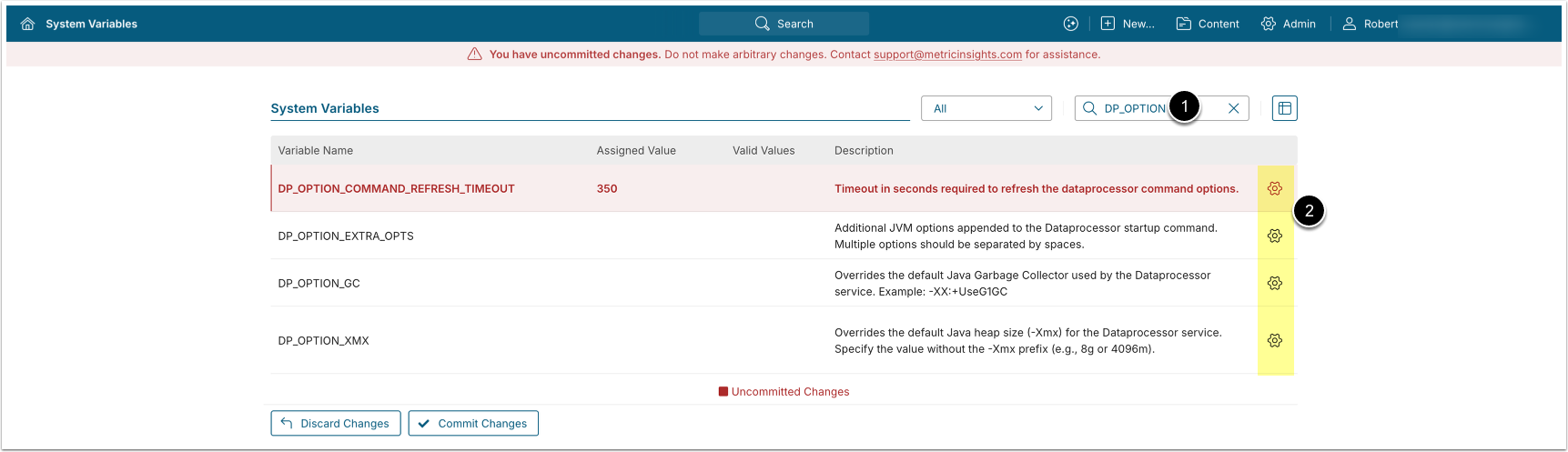
NOTE: Values for these System Variables are automatically picked up by the Data Processor on each refresh cycle. Clicking [Commit Changes] is not required.
- Enter
DP_OPTIONin the search field. - Use the following System Variables for JVM configuration. To edit a variable value, click the gear icon, enter a new value, then [Save]:
- DP_OPTION_XMX: Override the default Java heap size (
-Xmx).- Specify without the
-Xmxprefix; e.g.,8gor4096m.
- Specify without the
- DP_OPTION_GC: Override the default Garbage Collector.
- Example:
-XX:+UseG1GC
- Example:
- DP_OPTION_EXTRA_OPTS: Enter any additional JVM options to append to the startup command. Separate multiple options with spaces.
- DP_OPTION_COMMAND_REFRESH_TIMEOUT: Interval in seconds at which the service checks for configuration changes.
- Default:
300
- Default:
- DP_OPTION_XMX: Override the default Java heap size (
2. When and Why to Adjust These Variables
Most deployments run well on the built-in defaults. Adjust a variable only when the Data Processor workload requires it. The following table summarizes the typical use case and recommended value for each variable.
| Variable | When and Why to Adjust | Recommended Value |
|---|---|---|
DP_OPTION_XMX | Increase the maximum Java heap when the Data Processor handles large data volumes or many concurrent collections and runs low on memory. Symptoms include out-of-memory errors or slow, garbage-collection-heavy processing in the Data Processor log. | Keep the heap at or below 80% of the memory available to the Data Processor host or container, which matches the default. Reserve the remaining memory for off-heap and operating system use. The Data Processor requires more than 1 GB of RAM to start, so use a value well above 1g in production; e.g., 8g or 12g. |
DP_OPTION_GC | Change the garbage collector when the default does not suit the workload. G1 GC (-XX:+UseG1GC) suits large heaps or workloads that benefit from shorter, more predictable pause times. | Leave empty to use the default -XX:+UseParallelGC, which favors throughput and suits most deployments. Use -XX:+UseG1GC for large-heap or latency-sensitive deployments. |
DP_OPTION_EXTRA_OPTS | Append extra JVM flags for diagnostics or tuning that the other variables do not cover; e.g., write a heap dump when the Data Processor runs out of memory, or set a system property requested by support@metricinsights.com. | Leave empty unless a specific flag is required, then enter only those flags, separated by spaces; e.g., -XX:+HeapDumpOnOutOfMemoryError. A value entered here replaces the default GC logging options, so include any logging flags that must be retained. |
DP_OPTION_COMMAND_REFRESH_TIMEOUT | Lower the interval to apply changes faster while testing JVM settings. Raise it to reduce how often the Data Processor checks for changes. Changing this variable does not restart the Data Processor. | Keep the default 300 (5 minutes) in production. Use a shorter interval, such as 60, only temporarily while tuning. |
3. Behavior & Defaults
- If DP_OPTION_XMX, DP_OPTION_GC, or DP_OPTION_EXTRA_OPTS are left empty, the built-in Data Processor defaults are used:
- Heap: 80% of the memory available to the Data Processor host or container.
- GC:
-XX:+UseParallelGC - Extra opts: a preconfigured set of GC logging flags writing to
logs/gc.log
- DP_OPTION_COMMAND_REFRESH_TIMEOUT defaults to
300seconds (5 minutes) and controls how often the service polls for changes to the three System Variables above. Changing it does not restart the Data Processor.
4. Examples
Increase heap memory to 12 GB:
DP_OPTION_XMX = 12gSwitch to G1 Garbage Collector:
DP_OPTION_GC = -XX:+UseG1GCAdd extra JVM flags:
DP_OPTION_EXTRA_OPTS = -Dtest.flag=extra_opts_test -XX:+HeapDumpOnOutOfMemoryErrorCheck for configuration changes every 60 seconds:
DP_OPTION_COMMAND_REFRESH_TIMEOUT = 60