This article describes the API endpoints used to view and manage the access that Users and Groups are granted to Dimensions and Dimension Values. Access to a Dimension can be granted directly to a User or indirectly via Group membership, and is governed by a Scope of Access that determines which Dimension Values are accessible. The following endpoints are covered:
/api/dimension/access: Returns the Groups and Users that have access to a Dimension (and to specific Dimension Values), identifying their edit access and scope of access granted directly or via Group membership./api/group_dimension: View, grant, modify, and revoke a Group's access to a Dimension./api/group_dimension_value: View, grant, and revoke a Group's access to a specific Dimension Value./api/user_dimension: View, grant, modify, and revoke a User's access to a Dimension./api/user_dimension_value: View, grant, and revoke a User's access to a specific Dimension Value.
Scope of Access determines which values of a Dimension a Group or User can see:
- All Dimension Values: Access to every value of the Dimension.
- Specific Dimension Values: Access only to the values explicitly granted (via the
group_dimension_valueanduser_dimension_valueendpoints). - Inherited from Parent: Value access is inherited from the parent Dimension. Available only for Dimensions that have a parent Dimension and do not use "user map" security.
Prerequisites:
- Set up API access, verify that you have API access, and obtain a token via the get_token call OR
- Generate Personal API Token
NOTES:
- Only Admin Users and Power Users with edit access to the Dimension can execute these API calls.
Table of Contents
1. Access Admin > System > API Toolkit
2. Retrieve Users and Groups with Access to Dimension
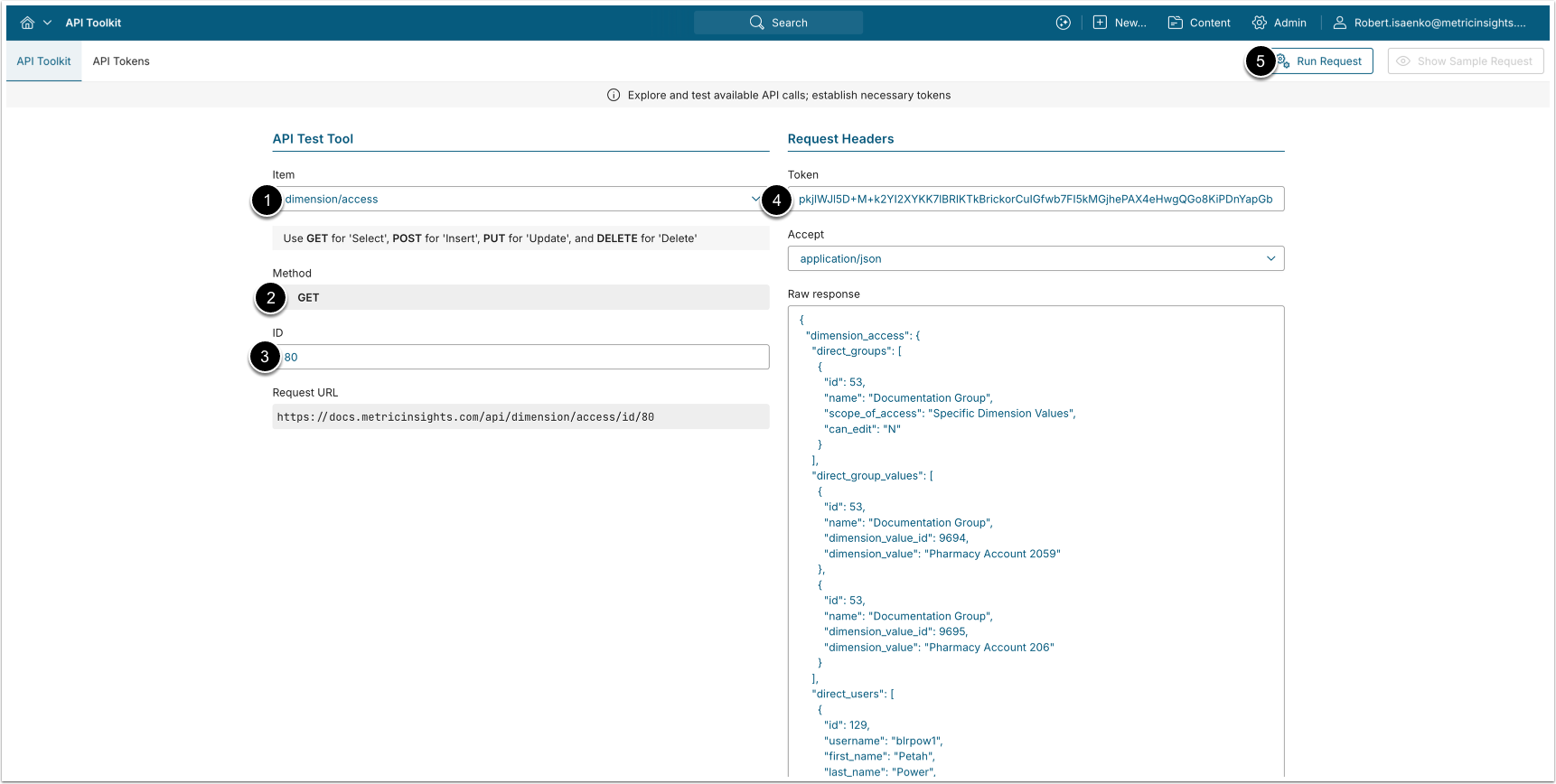
A GET request to /api/dimension/access/id/<id> returns the Groups and Users with access to the specified Dimension. The response identifies Groups and Users with access to the Dimension (with their scope of access and edit access), Groups and Users assigned to specific Dimension Values, and all Users with access (directly or via Group), excluding Admins and members of an "All Access" Group.
- Item: dimension/access
- Method: GET
- ID: Enter the ID of the Dimension.
- Enter an API Token.
- [Run request]
Example Response
{
  "dimension_access": {
    "direct_groups": [
      {
        "id": 53,
        "name": "Sales Group",
        "scope_of_access": "All Dimension Values",
        "can_edit": "Y"
      }
    ],
    "direct_group_values": [
      {
        "id": 60,
        "name": "Regional Managers",
        "dimension_value_id": 1204,
        "dimension_value": "EMEA"
      }
    ],
    "direct_users": [
      {
        "id": 168,
        "username": "test.user",
        "first_name": "Test",
        "last_name": "User",
        "scope_of_access": "Specific Dimension Values",
        "can_edit": "N"
      }
    ],
    "direct_user_values": [
      {
        "id": 168,
        "username": "test.user",
        "first_name": "Test",
        "last_name": "User",
        "dimension_value_id": 1205,
        "dimension_value": "APAC"
      }
    ],
    "all_users": [
      {
        "id": 193,
        "username": "john.powers",
        "first_name": "John",
        "last_name": "Powers",
        "can_edit": "Y",
        "scope_of_access": "All Dimension Values",
        "sources": [
          {
            "source": "group",
            "id": 53,
            "name": "Sales Group"
          }
        ]
      }
    ]
  }
}Fields Description
| Field Name | Value Type | Description |
|---|---|---|
dimension_access | object | Contains the Groups and Users with access to the Dimension. |
direct_groups | array | Groups with access to the Dimension. |
direct_group_values | array | Groups directly assigned access to specific Dimension Values. |
direct_users | array | Users with direct access to the Dimension. |
direct_user_values | array | Users directly assigned access to specific Dimension Values. |
all_users | array | All Users with access to the Dimension (directly or via Group), excluding Admins and members of an "All Access" Group. |
Below are the Group object fields from the direct_groups and direct_group_values arrays: | ||
id | integer | The ID of the Group. |
name | string | The name of the Group. |
scope_of_access | string | The Group's scope of access. ("Inherited from Parent", "All Dimension Values", or "Specific Dimension Values") (direct_groups only) |
can_edit | string | Whether the Group's members can edit the Dimension. ("Y"/"N")
(direct_groups only) |
dimension_value_id | integer | The ID of the specific Dimension Value. (direct_group_values only) |
dimension_value | string | The display name of the Dimension Value. (direct_group_values only) |
Below are the User object fields from the direct_users, direct_user_values, and all_users arrays: | ||
id | integer | User ID. |
username | string | Username. |
first_name | string | User's first name. |
last_name | string | User's last name. |
scope_of_access | string | The User's scope of access. ("Inherited from Parent", "All Dimension Values", or "Specific Dimension Values") (direct_users,
all_users) |
can_edit | string | Whether the User can edit the Dimension. ("Y", "N", or "N/A")
(direct_users, all_users) |
dimension_value_id | integer | The ID of the specific Dimension Value. (direct_user_values only) |
dimension_value | string | The display name of the Dimension Value. (direct_user_values only) |
sources | array | Source(s) of the User's access. (all_users only) |
Below are the source object fields from the sources array: | ||
source | string | Source of access. ("direct" or "group") |
id | integer | The ID of the Group through which the User has access. For directly assigned Users, the value is 0. |
name | string | The name of the Group through which the User has access. For directly assigned Users, the value is an empty string. |
3. Configure Group_Dimension Associations
The /api/group_dimension endpoint retrieves which Groups have access to which Dimensions, and allows granting, modifying, and removing that access. Each data entry has a unique ID and represents a single Group-to-Dimension mapping.
3.1. Retrieve Groups With Access to Dimension
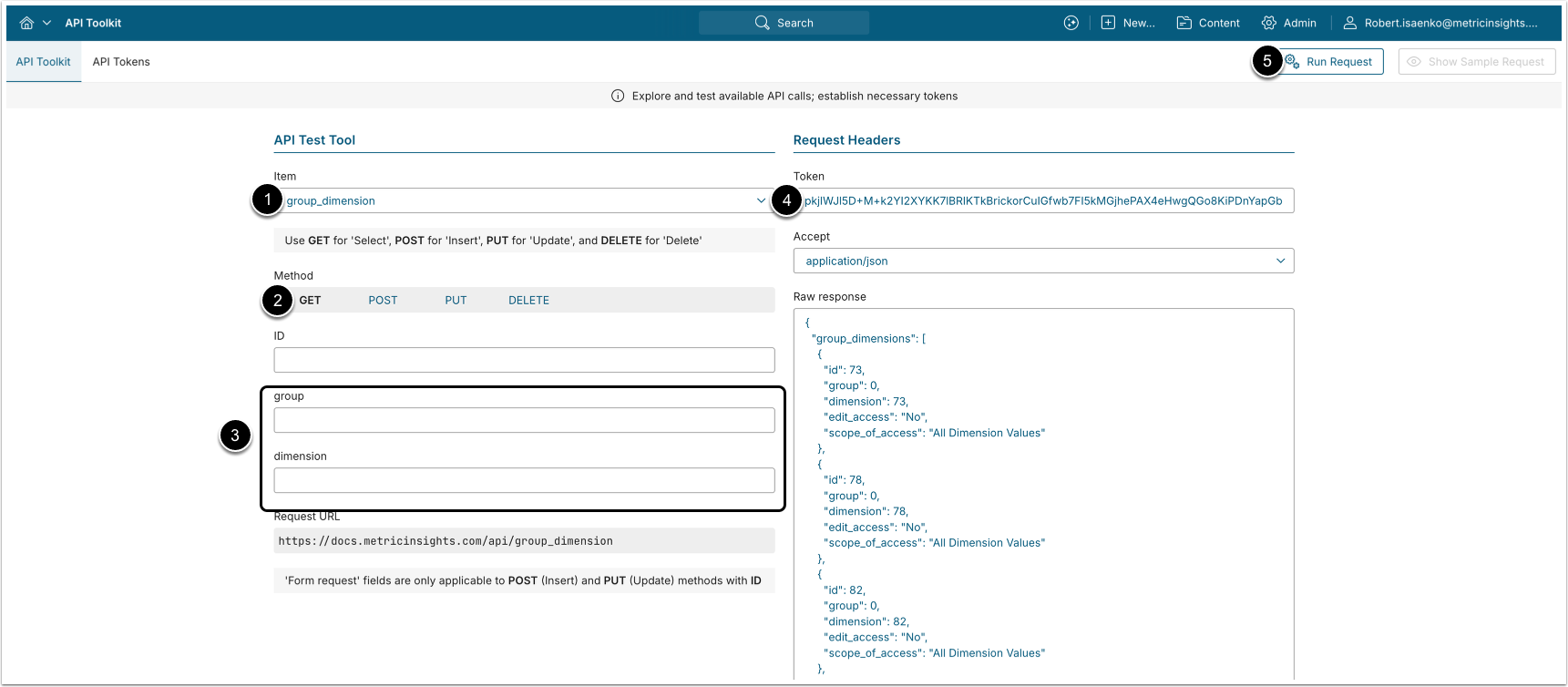
- A GET request to
/api/group_dimensionreturns all Group-to-Dimension access mappings. - A GET request to
/api/group_dimension/id/<id>returns a single Group-to-Dimension mapping by ID.
- Item: group_dimension
- Method: GET
- Filter the results with the following parameters:
- group: The ID of the Group.
- dimension: The ID of the Dimension.
- Enter an API Token.
- [Run request]
Example Response
{
  "group_dimensions": [
    {
      "id": 1,
      "group": 2,
      "dimension": 53,
      "edit_access": "Yes",
      "scope_of_access": "All Dimension Values"
    },
    {
      "id": 12,
      "group": 4,
      "dimension": 204,
      "edit_access": "No",
      "scope_of_access": "Specific Dimension Values"
    },
    {
      "id": 8,
      "group": 14,
      "dimension": 78,
      "edit_access": "No",
      "scope_of_access": "Inherited from Parent"
    }
  ]
}Fields Description
| Field Name | Value Type | Description |
|---|---|---|
id | integer | The ID of the group_dimension data entry. |
group | integer | The ID of the Group. |
dimension | integer | The ID of the Dimension. |
edit_access | string | Whether the Group's members can edit the Dimension.
("Yes"/"No") |
scope_of_access | string | The Group's scope of access. ("Inherited from Parent", "All Dimension Values", or "Specific Dimension Values") |
3.2. Grant Group Access to Dimension
NOTES:
- A Group cannot be granted access to a Dimension it already has access to. To change a Group's access, use a PUT request (see the Modify Group Access to Dimension section).
- The scope "Inherited from Parent" can be used only for Dimensions that have a parent Dimension and do not use "user map" security
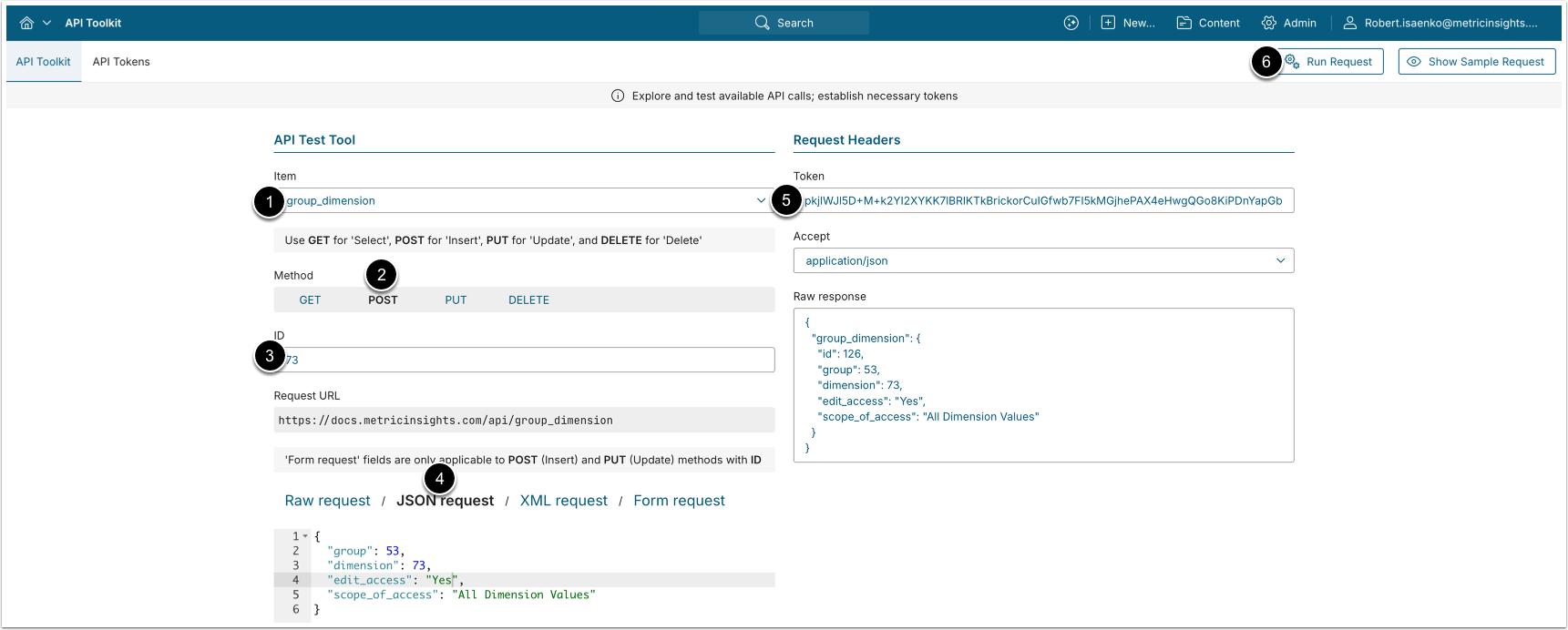
A POST request to /api/group_dimension grants a Group access to the Dimension.
- Item: group_dimension
- Method: POST
- Enter the ID of an existing Group-to-Dimension mapping.
- See the Retrieve Groups With Access to Dimension section for details
- Choose JSON request and provide the following values:
- group: The ID of the Group to grant access to.
- dimension: The ID of the Dimension.
- edit_access: Whether the Group's members can edit the Dimension. ("
Y"/"N", optional, default "N".) - scope_of_access: The scope of access. ("
Inherited from Parent", "All Dimension Values", or "Specific Dimension Values"; optional, default "Specific Dimension Values".)
- Enter an API Token.
- [Run request]
3.3. Modify Group Access to Dimension
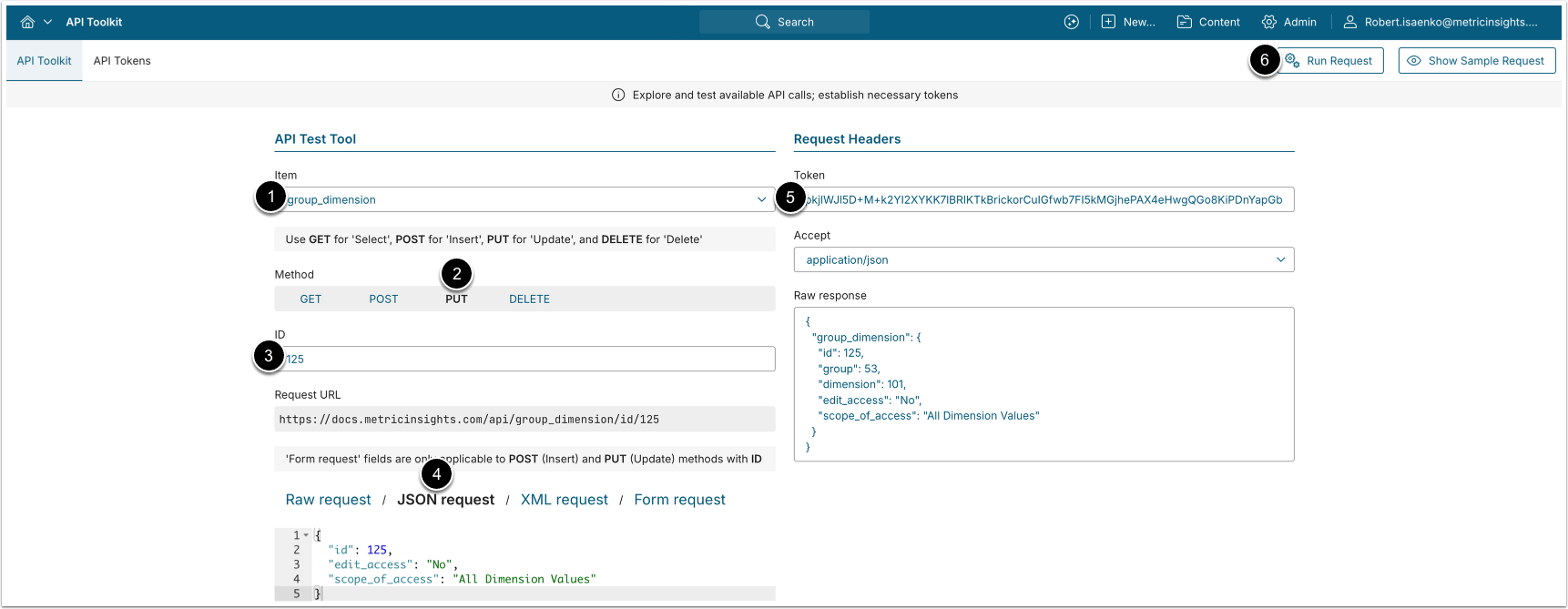
A PUT request to /api/group_dimension/id/<id> with body {"edit_access": "<Y/N>", "scope_of_access": "<scope>"} modifies a Group's access to the Dimension. The group and dimension of an existing mapping cannot be changed.
- Item: group_dimension
- Method: PUT
- Enter the ID of the Group-to-Dimension mapping to modify.
- See the Retrieve Groups With Access to Dimension section for details.
- Choose JSON request and provide the following values:
- edit_access: Whether the Group's members can edit the Dimension. ("
Y"/"N", optional, default "N".) - scope_of_access: The scope of access. ("
Inherited from Parent", "All Dimension Values", or "Specific Dimension Values"; optional, default "Specific Dimension Values".)
- edit_access: Whether the Group's members can edit the Dimension. ("
- Enter an API Token.
- [Run request]
3.4. Remove Group Access from Dimension
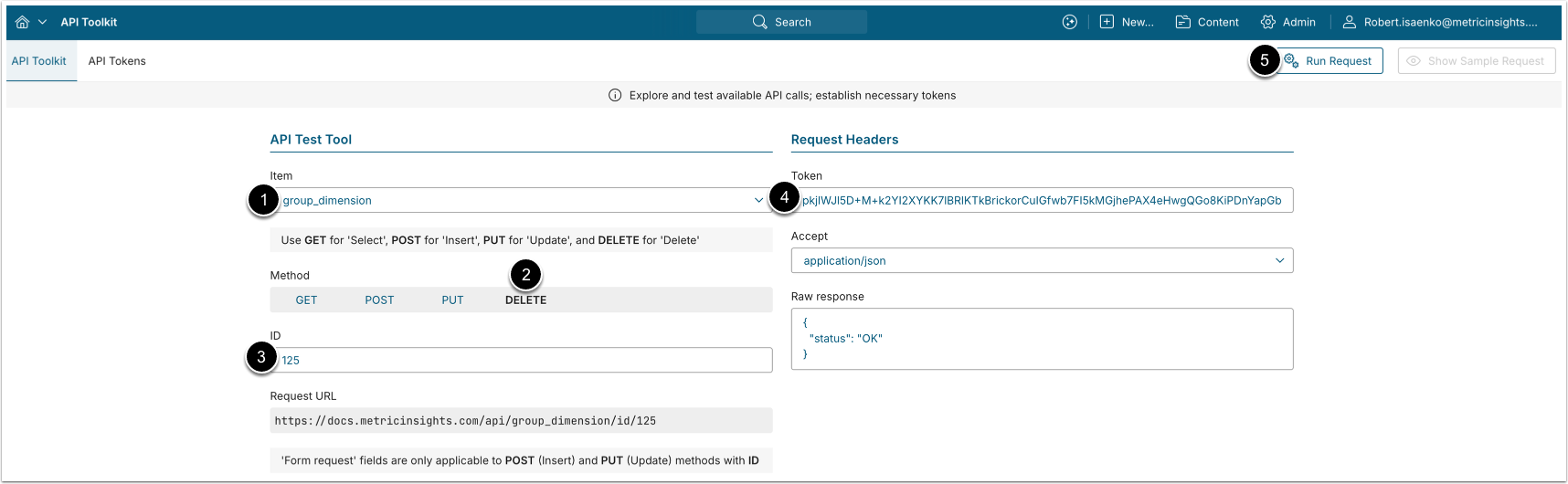
A DELETE request to /api/group_dimension/id/<id> removes a Group's access to the Dimension.
- Item: group_dimension
- Method: DELETE
- Enter the ID of the
group_dimensiondata entry to be deleted.- See the Retrieve Groups With Access to Dimension section for details.
- Enter an API Token.
- [Run request]
4. Configure Group_Dimension_Value Associations
The /api/group_dimension_value endpoint retrieves which specific Dimension Values a Group can access, and allows granting and removing that access. Each data entry has a unique ID and represents a single Group-to-Dimension-Value mapping. These mappings apply when the Group's scope of access to the Dimension is "Specific Dimension Values".
4.1. Retrieve Groups With Access to Dimension Value
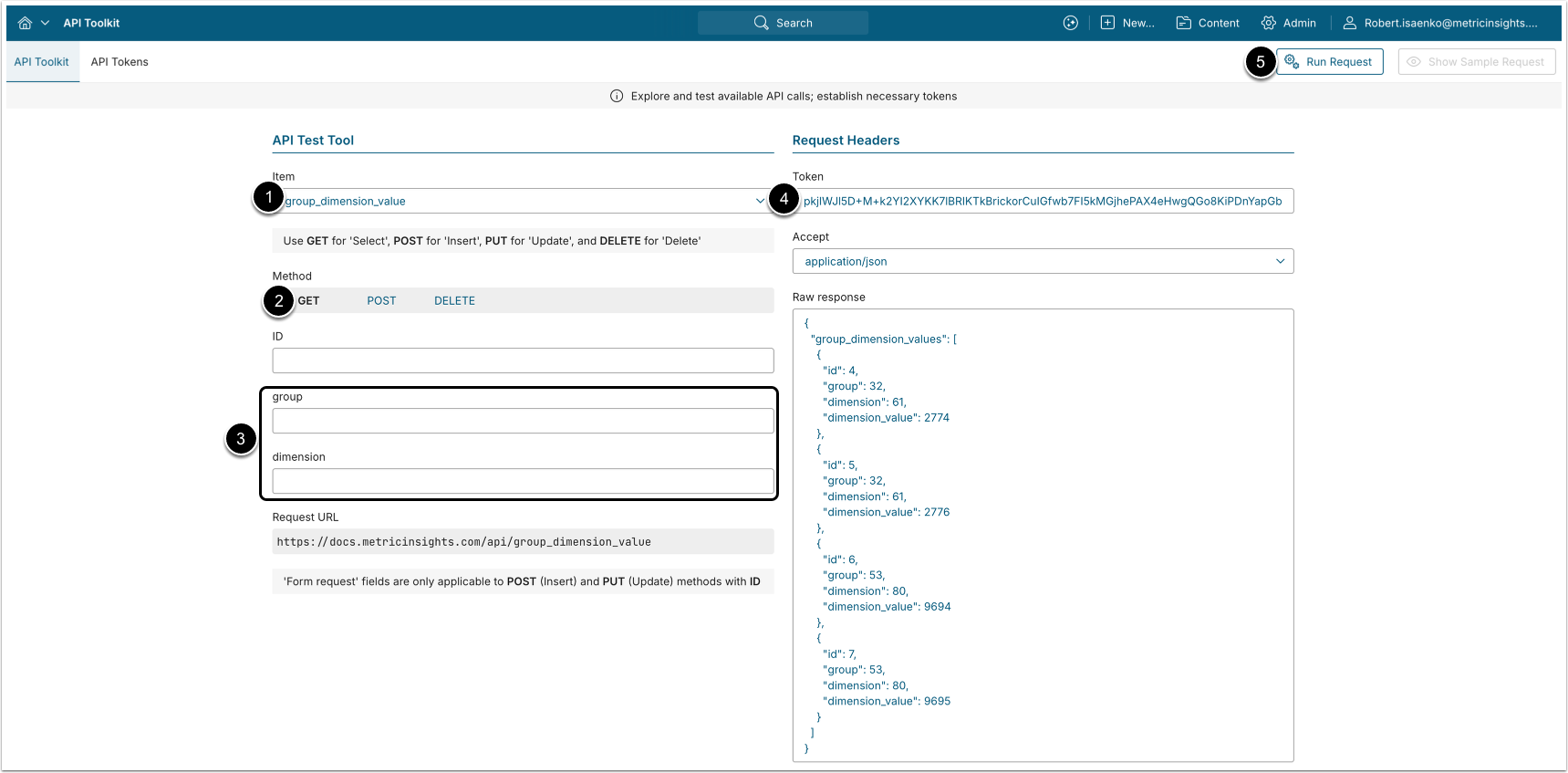
- A GET request to
/api/group_dimension_valuereturns all Group-to-Dimension-Value access mappings. - A GET request to
/api/group_dimension_value/id/<id>returns a single mapping by ID.
- Item: group_dimension_value
- Method: GET
- Filter the results with the following parameters:
- group: The ID of the Group.
- dimension: The ID of the Dimension.
- Enter an API Token.
- [Run request]
Example Response
{
  "group_dimension_values": [
    {
      "id": 1,
      "group": 2,
      "dimension": 53,
      "dimension_value": 1204
    },
    {
      "id": 5,
      "group": 4,
      "dimension": 204,
      "dimension_value": 980
    }
  ]
}Fields Description
| Field Name | Value Type | Description |
|---|---|---|
id | integer | The ID of the group_dimension_value data entry. |
group | integer | The ID of the Group. |
dimension | integer | The ID of the Dimension. |
dimension_value | integer | The ID of the Dimension Value. |
4.2. Grant Group Access to Dimension Value
NOTES:
- A Group cannot be granted access to a Dimension Value it already has.
- A specific Dimension Value cannot be added when the Group's scope of access to the Dimension is "All Dimension Values" or "Inherited from Parent". If the Group has no mapping to the Dimension yet, one is created automatically with the "Specific Dimension Values" scope.
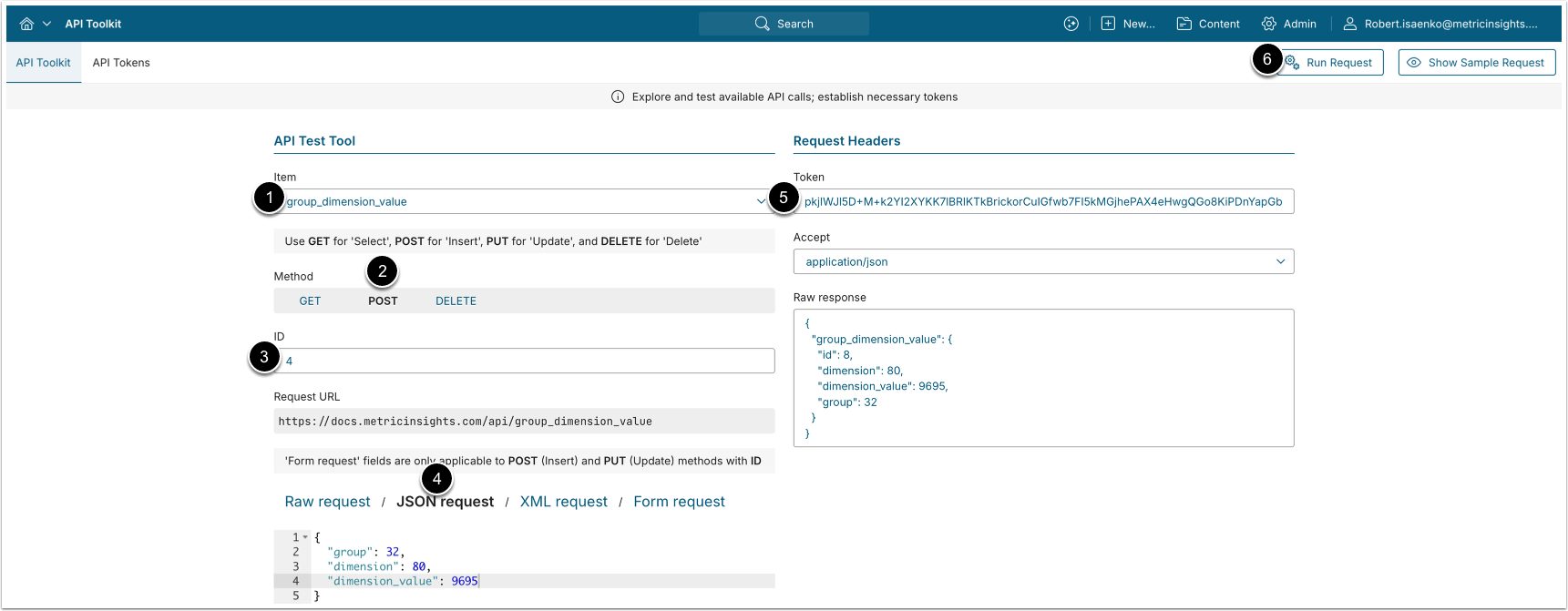
A POST request to /api/group_dimension_value grants a Group access to a specific Dimension Value.
- Item: group_dimension_value
- Method: POST
- Enter the ID of an existing
group_dimension_valuedata entry.- See the Retrieve Groups With Access to Dimension Value section for details.
- Choose JSON request and provide the following values:
- group: The ID of the Group.
- dimension: The ID of the Dimension.
- dimension_value: The ID of the Dimension Value to grant access to.
- Enter an API Token.
- [Run request]
4.3. Remove Group Access from Dimension Value
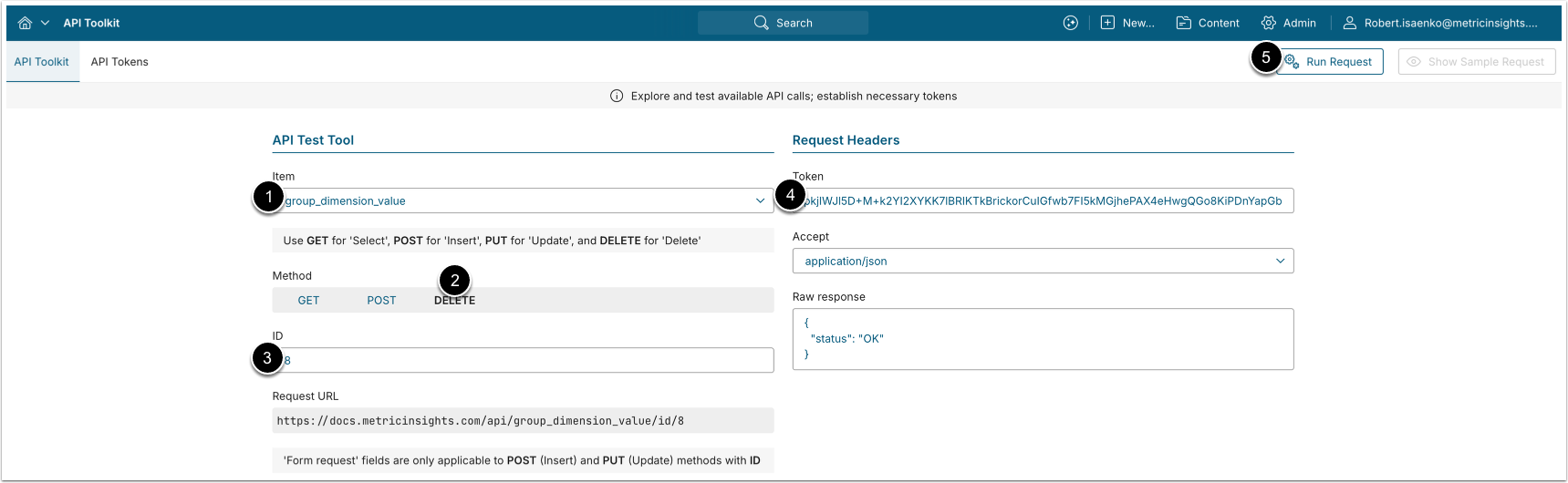
A DELETE request to /api/group_dimension_value/id/<id> removes a Group's access to the Dimension Value.
- Item: group_dimension_value
- Method: DELETE
- Enter the ID of the
group_dimension_valuedata entry to be deleted.- See the Retrieve Groups With Access to Dimension Value section for details.
- Enter an API Token.
- [Run request]
5. Configure User_Dimension Associations
The /api/user_dimension endpoint retrieves which Users have access to which Dimensions, and allows granting, modifying, and removing that access. Each data entry has a unique ID and represents a single User-to-Dimension mapping.
5.1. Retrieve Users With Access to Dimension
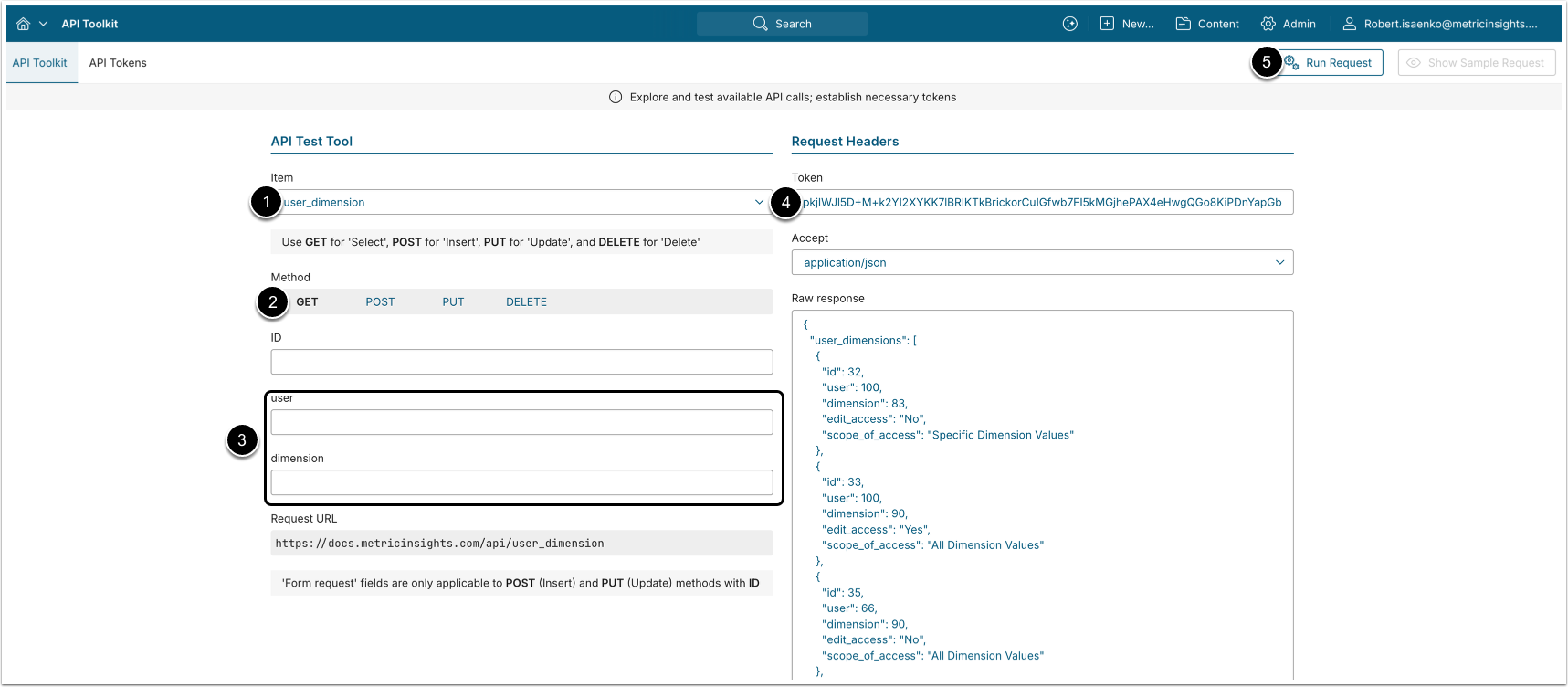
- A GET request to
/api/user_dimensionreturns all User-to-Dimension access mappings. - A GET request to
/api/user_dimension/id/<id>returns a single User-to-Dimension mapping by ID.
- Item: user_dimension
- Method: GET
- Filter the results with the following parameters:
- user: The ID of the User.
- dimension: The ID of the Dimension.
- Enter an API Token.
- [Run request]
Example Response
{
  "user_dimensions": [
    {
      "id": 3,
      "user": 11,
      "dimension": 53,
      "edit_access": "No",
      "scope_of_access": "Specific Dimension Values"
    },
    {
      "id": 9,
      "user": 27,
      "dimension": 78,
      "edit_access": "Yes",
      "scope_of_access": "All Dimension Values"
    }
  ]
}Fields Description
| Field Name | Value Type | Description |
|---|---|---|
id | integer | The ID of the user_dimension data entry. |
user | integer | The ID of the User. |
dimension | integer | The ID of the Dimension. |
edit_access | string | Whether the User can edit the Dimension. ("Yes"/"No") |
scope_of_access | string | The User's scope of access. ("Inherited from Parent", "All Dimension Values", or "Specific Dimension Values") |
5.2. Grant User Access to Dimension
NOTES:
- A User cannot be granted access to a Dimension they already have access to. To change a User's access, use a PUT request (see the Modify User Access to Dimension section).
- The scope "Inherited from Parent" can be used only for Dimensions that have a parent Dimension and do not use "user map" security.
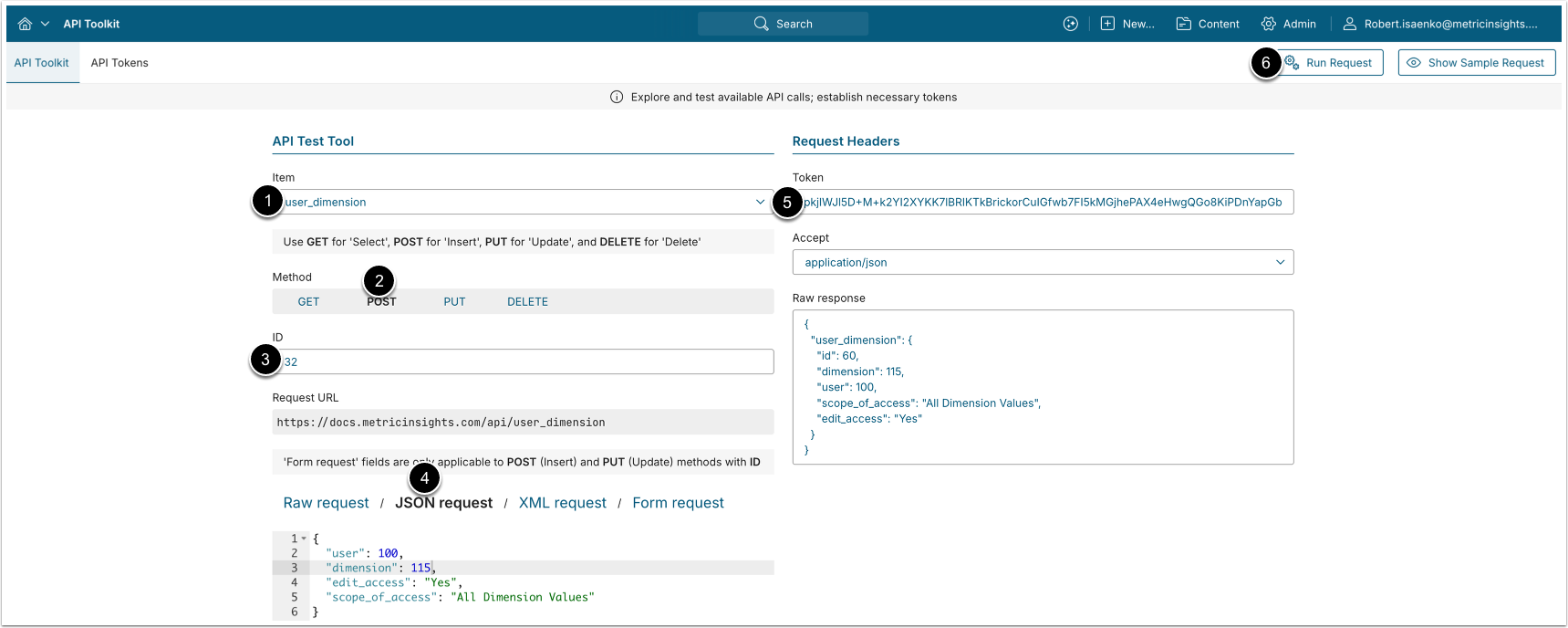
A POST request to /api/user_dimension grants a User access to the Dimension.
- Item: user_dimension
- Method: POST
- Enter the ID of an existing User-to-Dimension mapping.
- See the Retrieve Users With Access to Dimension section for details.
- Choose JSON request and provide the following values:
- user: The ID of the User to grant access to.
- dimension: The ID of the Dimension.
- edit_access: Whether the User can edit the Dimension. ("
Y"/"N", optional, default "N".) - scope_of_access: The scope of access. ("
Inherited from Parent", "All Dimension Values", or "Specific Dimension Values"; optional, default "Specific Dimension Values".)
- Enter an API Token.
- [Run request]
5.3. Modify User Access to Dimension
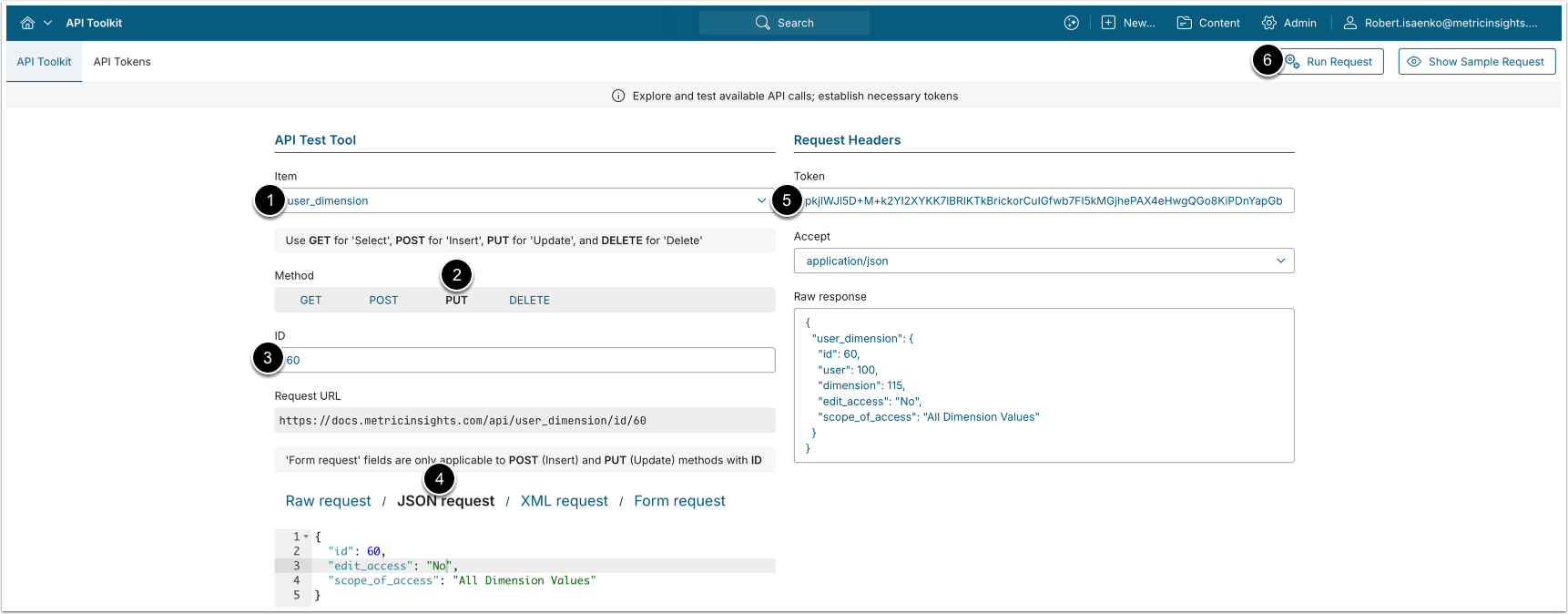
A PUT request to /api/user_dimension/id/<id> with body {"edit_access": "<Y/N>", "scope_of_access": "<scope>"} modifies a User's access to the Dimension. The user and dimension of an existing mapping cannot be changed.
- Item: user_dimension
- Method: PUT
- Enter the ID of the User-to-Dimension mapping to modify.
- See the Retrieve Users With Access to Dimension section for details.
- Choose JSON request and provide the following values:
- edit_access: Whether the User can edit the Dimension. ("
Y"/"N", optional, default "N".) - scope_of_access: The scope of access. ("
Inherited from Parent", "All Dimension Values", or "Specific Dimension Values"; optional, default "Specific Dimension Values".)
- edit_access: Whether the User can edit the Dimension. ("
- Enter an API Token.
- [Run request]
5.4. Remove User Access from Dimension
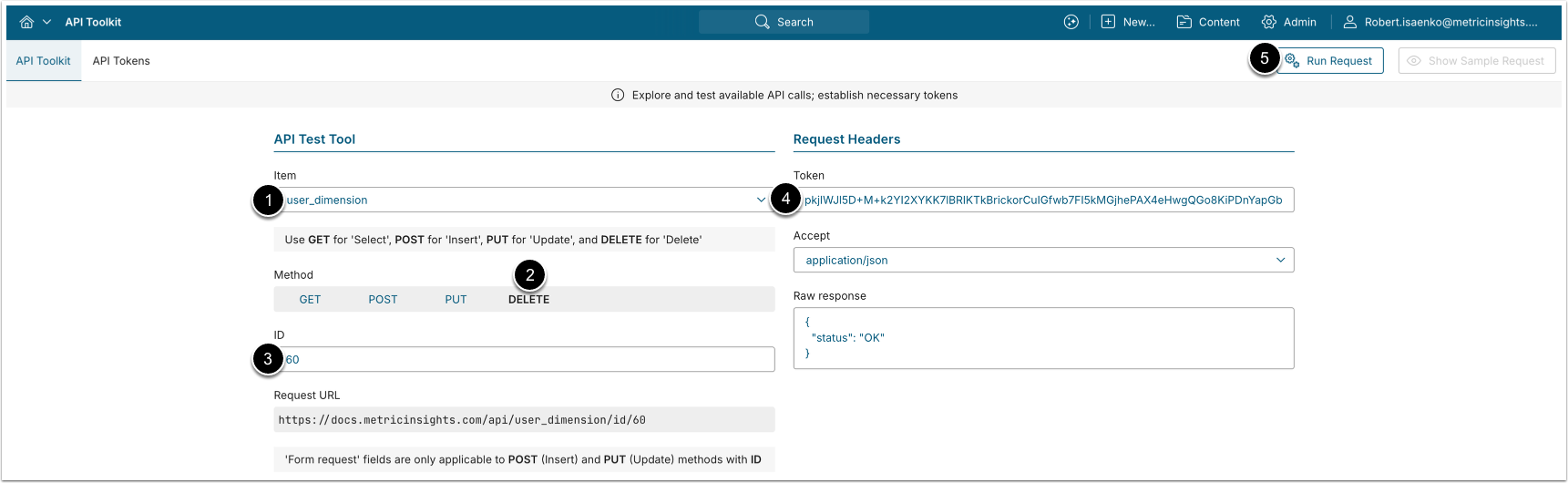
A DELETE request to /api/user_dimension/id/<id> removes a User's access to the Dimension.
- Item: user_dimension
- Method: DELETE
- Enter the ID of the
user_dimensiondata entry to be deleted.- See the Retrieve Users With Access to Dimension section for details.
- Enter an API Token.
- [Run request]
6. Configure User_Dimension_Value Associations
The /api/user_dimension_value endpoint retrieves which specific Dimension Values a User can access, and allows granting and removing that access. Each data entry has a unique ID and represents a single User-to-Dimension-Value mapping. These mappings apply when the User's scope of access to the Dimension is "Specific Dimension Values".
6.1. Retrieve Users With Access to Dimension Value
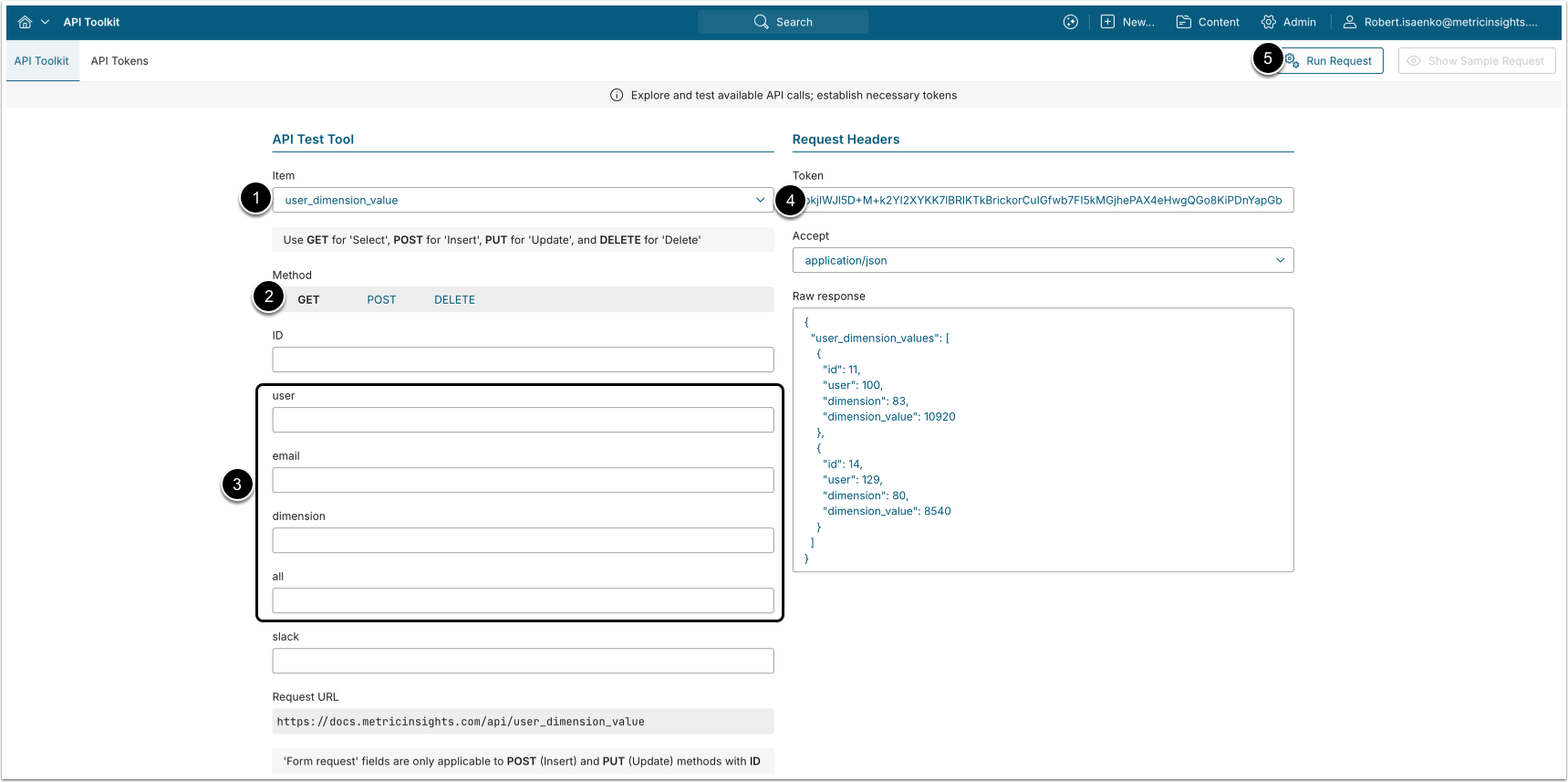
- A GET request to
/api/user_dimension_valuereturns all User-to-Dimension-Value access mappings. - A GET request to
/api/user_dimension_value/id/<id>returns a single mapping by ID.
- Item: user_dimension_value
- Method: GET
- Filter the results with the following parameters:
- user: The ID of the User.
- email: The email of the User (an alternative to
user). - dimension: The ID of the Dimension.
- all: Return every Dimension Value the User can reach, including values granted via "All Dimension Values" and "Inherited from Parent" scopes, not only explicitly assigned values. ("
Y"/"N", default "N".)- Only Admins can use this parameter; for non-Admins it is always treated as "
N". - See the NOTES below for details on this parameter configuration.
- Only Admins can use this parameter; for non-Admins it is always treated as "
- Enter an API Token.
- [Run request]
NOTES:
all="Y"changes the response. Records returned withall="Y"represent computed access rather than stored mappings, so theidfield is omitted each record contains onlyuser,dimension, anddimension_value.all="Y"requiresuseroremail. Without one of them, the response is an empty array.- The
dimensionfilter is ignored whenall="Y": all accessible Dimension Values across all Dimensions are returned regardless ofdimension. - For an Admin User,
all="Y"returns every Dimension Value in the system.
Example Response
{
  "user_dimension_values": [
    {
      "id": 7,
      "user": 11,
      "dimension": 53,
      "dimension_value": 1205
    }
  ]
}Fields Description
| Field Name | Value Type | Description |
|---|---|---|
id | integer | The ID of the user_dimension_value data entry. |
user | integer | The ID of the User. |
dimension | integer | The ID of the Dimension. |
dimension_value | integer | The ID of the Dimension Value. |
6.2. Grant User Access to Dimension Value
NOTES:
- A User cannot be granted access to a Dimension Value they already have.
- A specific Dimension Value cannot be added when the User's scope of access to the Dimension is "All Dimension Values" or "Inherited from Parent". If the User has no mapping to the Dimension yet, one is created automatically with the "Specific Dimension Values" scope.
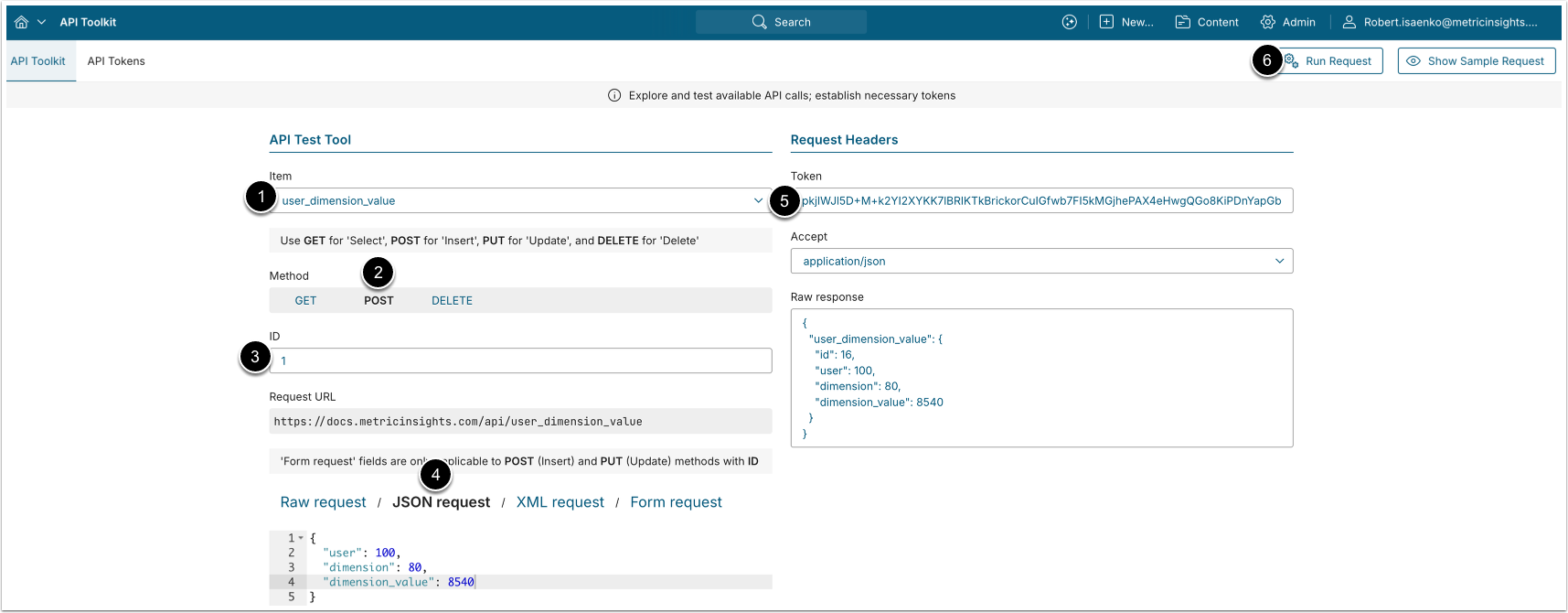
A POST request to /api/user_dimension_value grants a User access to a specific Dimension Value.
- Item: user_dimension_value
- Method: POST
- Enter the ID of an existing
user_dimension_valuedata entry.- See the Retrieve Users With Access to Dimension Value section for details.
- Choose JSON request and provide the following values:
- user: The ID of the User.
- dimension: The ID of the Dimension.
- dimension_value: The ID of the Dimension Value to grant access to.
- Enter an API Token.
- [Run request]
6.3. Remove User Access from Dimension Value
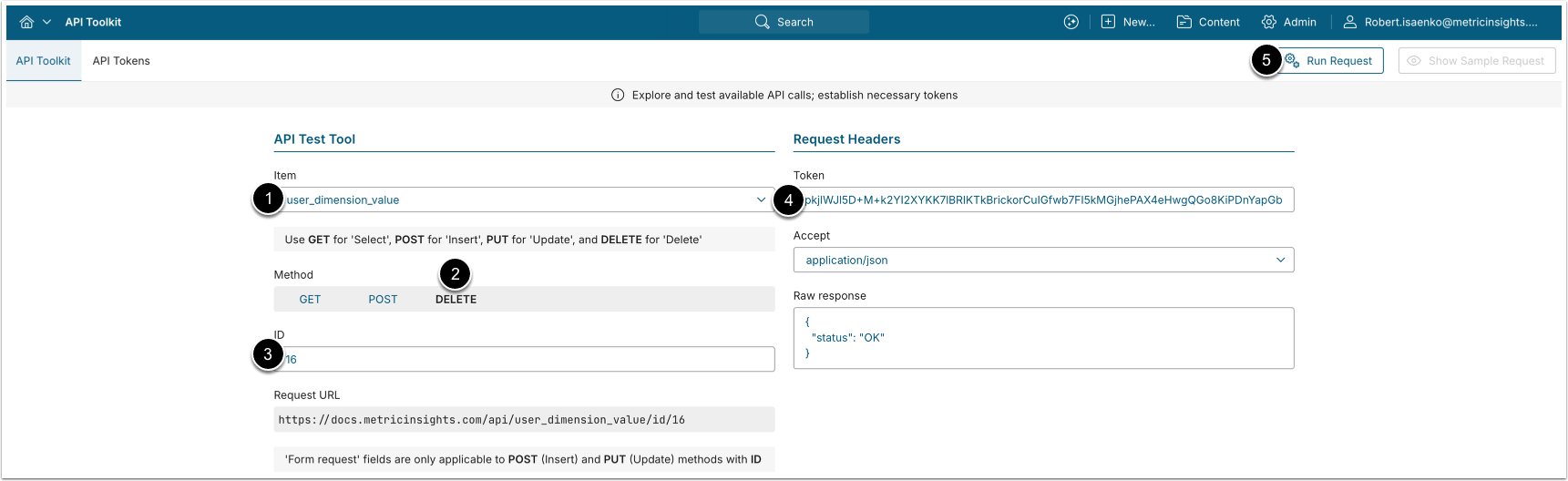
A DELETE request to /api/user_dimension_value/id/<id> removes a User's access to the Dimension Value.
- Item: user_dimension_value
- Method: DELETE
- Enter the ID of the
user_dimension_valuedata entry to be deleted.- See the Retrieve Users With Access to Dimension Value section for details.
- Enter an API Token.
- [Run request]