This article provides a general overview of what Custom Apps are, how they are built, which specialists are typically involved, and which choices must be made before creating a new App.
After reading this document, follow the Custom Apps Workflow Playbook to execute the implementation phase-by-phase.
What Are Custom Apps?
Custom Apps (“Apps”, previously “Portal Pages”) allow customers to build single pages or multi-page sites hosted in Metric Insights, using standard web building blocks (HTML/CSS/JavaScript) and supported Metric Insights configuration options and development patterns.
Custom Apps are typically used to:
- Create curated portal-style experiences for business users
- Present MI content in a tailored layout
- Integrate MI content with external content or workflows (when required)
Mental Model (How the System Fits Together)
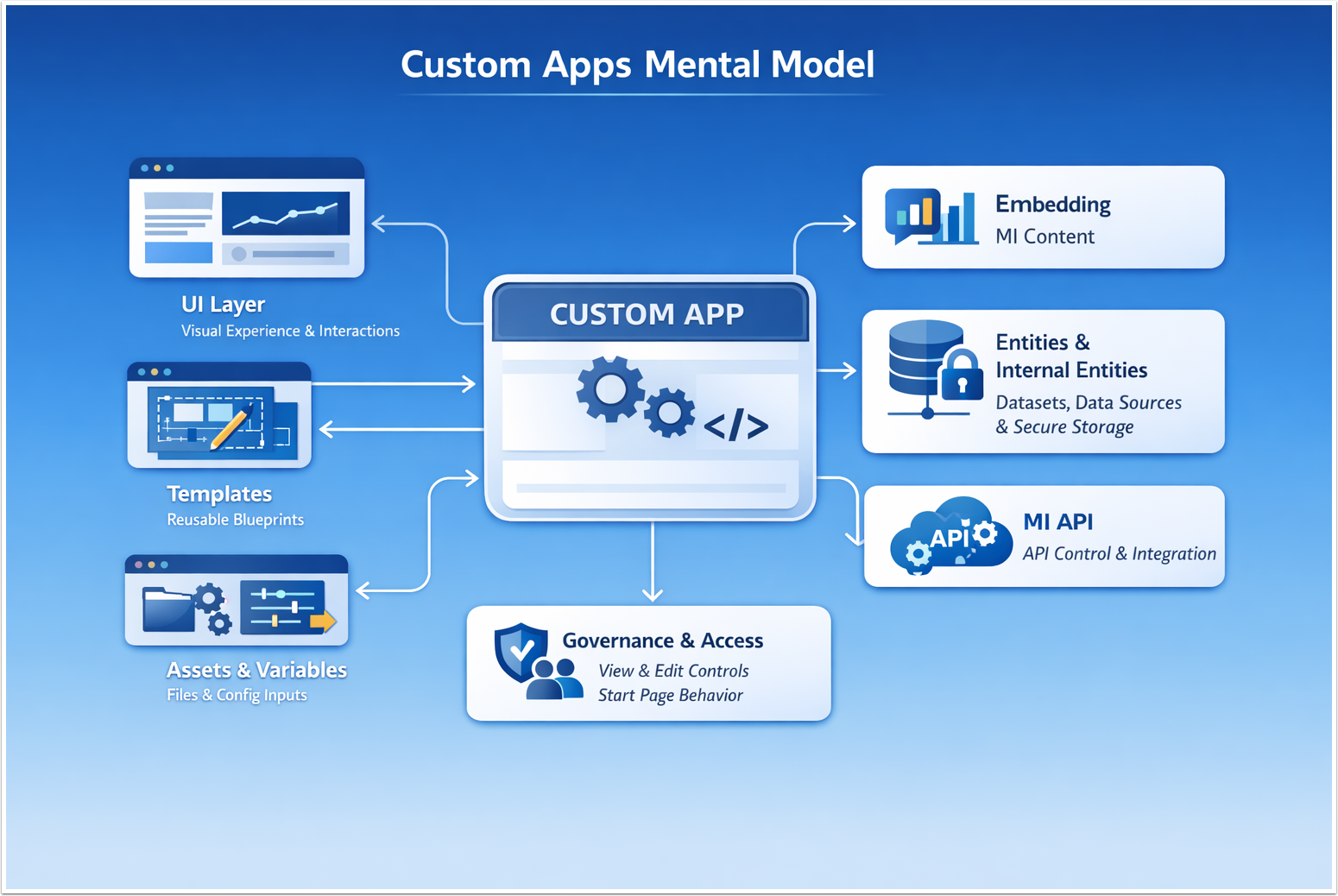
Think of an App as a container that combines the following layers:
- UI Layer: The visual experience and interactions (from simple layout + embedded MI content to a fully custom UI).
- Templates: Reusable blueprints used to create one or many Apps with consistent structure and starter logic.
- Assets (Global / Local): External files (for example, JavaScript, CSS, images, and other static files) used to construct Apps and App Templates; shared globally or scoped to a single App/Template.
- Variables: Template-defined inputs that control how Apps are populated and customized (for example: text/HTML blocks, embedded elements, colors, images/files, and lists/menus), based on the variable type and settings.
- Data + Integration Paths: The ways an App interacts with MI content and data:
- Embedding MI content into the App UI;
- Entities (managed integration points into MI objects such as Datasets/Data Sources/Custom Scripts plus Internal Entities for App-specific storage; Internal Entities can optionally encrypt stored attribute values);
- MI API (broad programmatic control with explicit authentication and error handling).
- Governance & Access (Sharing): Controls who can view an App (shared/view access), which Power Users can edit it, and how start page behavior is applied when an App is assigned to Users or Groups.
NOTES:
- Portal Pages were renamed to Apps in v7.1.0; terminology and UI entry points may differ by version.
- Some environments may support additional tooling such as App Builder; treat optional tooling as an accelerator, not the foundation of your architecture.
The First Decision: Who Builds and Owns the App?
Choose the delivery/ownership model early.
- Customer-built (Customer Dev Ownership)
- Customer developers build and maintain the App (assets, UI behavior, iteration cadence). Customer MI Admins handle platform enablement, governance, and access controls.
- Metric Insights-built (MI Team Ownership)
- Metric Insights team builds the App with customer input. The customer provides requirements, acceptance criteria, design constraints, and data/security requirements.
Why this decision matters:
- It defines who owns ongoing maintenance, releases, and support.
- It sets the level of standardization needed for assets, libraries, and versioning.
- It determines how you assign roles, approvals, and change control.
Safe default:
- If your organization has no web development resources, use MI-built delivery.
- If your organization plans multiple Apps or frequent iteration, establish customer-owned dev processes early.
Decision Gates (Stop Here Until You Decide)
These decisions must be made before implementation to avoid rework:
Gate A: Build model (Template-first vs standalone App)
- Template-first (recommended): Use a Template as the blueprint for one or more Apps.
- Standalone App: Use when you are confident you won't reuse structure/logic.
Gate B: Layout experience (MI navigation bar vs custom layout)
- MI navigation bar: App behaves like a page embedded in the MI experience.
- Custom layout: App behaves more like a portal surface with its own framing.
Gate C: Data interaction approach (can be combined)
- Embedding: Primarily display MI content in a custom layout.
- Entities: Managed, App-scoped integration points into MI objects (Datasets/Data Sources/Custom Scripts).
- MI API: Broad programmatic control with explicit authentication and error handling.
Gate D: Asset delivery and update mechanism
- ZIP upload: Manual packaging and upload for Template/App Assets.
- Version control sync: GitHub / GitLab / Bitbucket for more structured iteration.
Gate E: API token type (if using MI API)
- External application tokens (legacy approach).
- Personal Access Tokens (PATs) (UI-generated, granular permissions, configurable lifetime).
First Principles
These principles prevent fragile, insecure, or unmaintainable implementations.
1. Treat Apps as a Governed Product Surface (Not a One-Off Page)
Define ownership, a release process, and a rollback before building.
2. Handle Secrets and Sensitive Values Using Secure Mechanisms (Never in Front-End Code)
Keep sensitive values out of JavaScript and static assets. Use secure mechanisms; e.g., server-side logic and/or Entities with Encrypted Values designed for secure handling.
4. Standardize on a Primary Construction Pattern
Choose one primary approach per team:
- Template/Layout-first for consistency and scale
- Custom code-first for deep UX control
App Builder is a strong option for quickly assembling common layouts with built-in components. Use it where it fits your use case, and use Templates + code for advanced or highly customized experiences.
5. Sharing and Permissions Are Part of the Design
Define personas and test users early. Validate view (shared) access vs edit access, and confirm start page behavior and underlying object permissions align with the intended audience.
Roles & Responsibilities
NOTE: A single individual can fulfill multiple roles, but the key is ensuring that all responsibilities are clearly assigned and understood.
| Role | Responsibilities |
|---|---|
| Customer MI Admin | Enables and controls App-related settings; defines who can create/edit; manages sharing and permission alignment with underlying MI objects; participates in layout decisions and go-live access configuration. |
| App Developer | Builds the App UI/logic (templates/code); defines variable usage and configuration; implements embedding/Entities/API integrations, and error handling; manages Assets (Global/Local) and the update mechanism (ZIP or VCS sync). |
| App Owner (business/portal owner) | Defines goals, audience, and acceptance criteria; approves UX/layout direction; signs off on release readiness and go-live. |
| Security/IAM (as needed) | Reviews handling of sensitive values; validates the authentication model and permission boundaries (especially for the MI API or external integrations); approves secure patterns for external APIs before go-live. |
| Validator (often App Owner) | Runs persona-based validation (admin vs intended vs restricted users); confirms rollback readiness; verifies the App works for intended users (not only admins) and remains stable after updates. |
Readiness Checklist
- Ownership model chosen (customer-built vs MI-built)
- Decision Gates A–E decided and documented
- Target experience defined (embedded vs portal surface)
- Asset strategy agreed (global vs local + versioning)
- Variable strategy agreed (what is configurable; who manages values)
- Integration approach confirmed (embedding vs entities vs MI API; external systems if any)
- Sharing model defined (view/shared access vs edit access) + test personas identified
- Start page behavior confirmed (if using Apps as start pages)
- Rollback approach agreed (what "revert" means and who can do it)