NOTE: See Setting System Variables for details on System Variables configuration.
Access Admin > System > System Variables
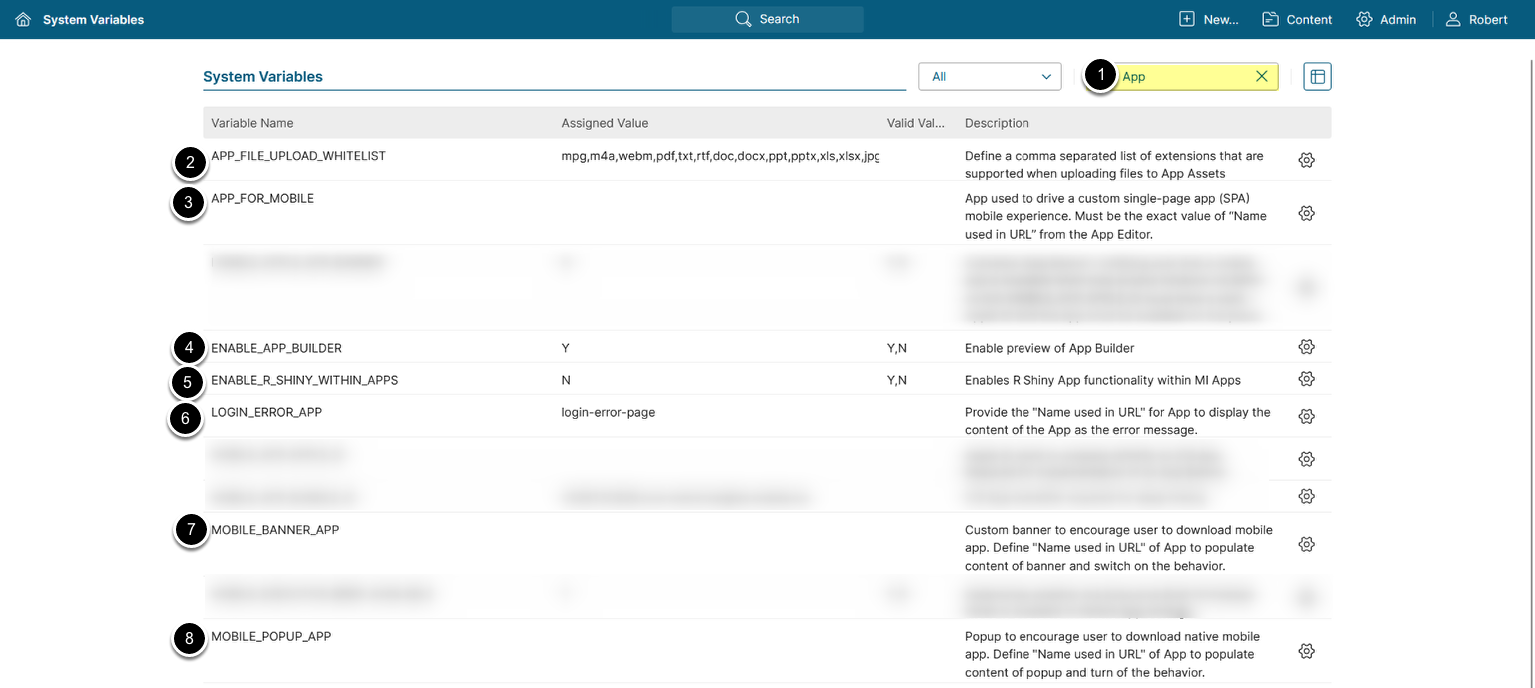
The use of Apps can be controlled by the System Variables shown above:
- Enter
Appin the search field - Set
APP_FILE_UPLOAD_LISTto a comma-separated list of allowed file extensions for App Assets uploading. - Set
APP_FOR_MOBILEto the value of Name used in URL of the App which should be displayed to mobile users when accessing Metric Insights via the mobile app. - Set
ENABLE_APP_BUILDERto 'Y' to enable the App Builder. - Set
ENABLE_R_SHINY_WITHIN_APPSto 'Y' to enable R Shiny functionality within the Apps. - Set
LOGIN_ERROR_APPto the value of Name used in URL of the App which should be displayed to users upon unauthorized login. - Set
MOBILE_BANNER_APPto the value of Name used in URL of an App that will display a banner when accessing MI from a mobile device, encouraging the user to download the mobile app. - Set
MOBILE_APP_POPUPto the value of Name used in URL of an App that will display a popup when accessing MI from a mobile device, encouraging the user to download the mobile app.